1. Введение
The Polycom RealPresence Trio 8500 is a versatile conference phone designed to facilitate clear and efficient communication in meeting environments. It offers robust audio capabilities and a user-friendly interface, making it suitable for various collaboration needs.
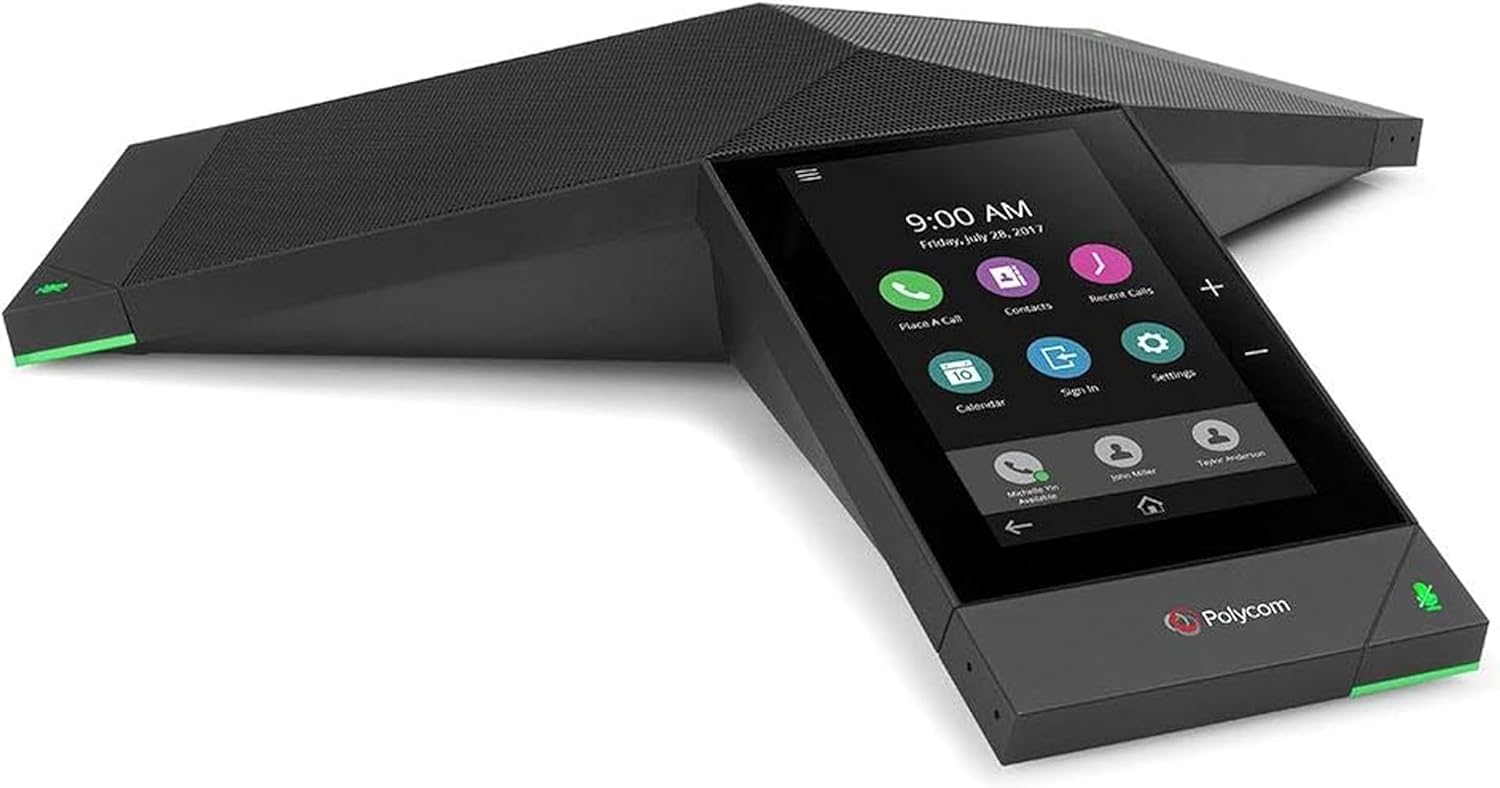
Figure 1.1: Polycom RealPresence Trio 8500 Conference Phone, showcasing its sleek design and integrated touch display.
Ключевые особенности включают в себя:
- Гибкость конференц-связи: Supports video conferencing and content sharing additions, with built-in USB and Bluetooth for device connectivity.
- Превосходное качество звука: Delivers room-filling audio up to 14kHz with full duplex, echo cancellation, and noise reduction for superior voice clarity.
- Сенсорный дисплей: Features a 5-inch color touch display for intuitive navigation and control.
- Интеграция платформы: Compatible with various communication platforms, supporting hybrid registration.
- Conference Meeting Options: Enables collaboration through audio, video, and content sharing.
2. Что в коробке
Upon unboxing your Polycom RealPresence Trio 8500, verify that all components are present:
- Polycom RealPresence Trio 8500 Conference Phone
- Ethernet Cable (for network connectivity and Power over Ethernet, if applicable)

Figure 2.1: The Polycom RealPresence Trio 8500 unit alongside its included Ethernet cable.

Figure 2.2: The Polycom RealPresence Trio 8500 as packaged, showing the protective inserts.
3. Настройка
Follow these steps to set up your Polycom RealPresence Trio 8500:
- Размещение: Position the conference phone centrally in your meeting room for optimal audio pickup. Ensure it is on a stable, flat surface.
- Электропитание и подключение к сети:
Connect the Ethernet cable to the network port on the underside of the Trio 8500. This connection provides both network access and power (if using Power over Ethernet - PoE). If PoE is not available, an external power adapter (sold separately) will be required.

Figure 3.1: The underside of the Polycom Trio 8500, highlighting the network port and other connections.
- Первоначальная загрузка: Once connected, the device will power on automatically. The 5-inch color touch display will illuminate and guide you through the initial setup process, which may include language selection, network configuration, and platform registration.
- Обновление программного обеспечения: It is recommended to check for and install any available software updates via the device's web interface or touch display menu to ensure optimal performance and access to the latest features.
4. Инструкция по эксплуатации
The Polycom RealPresence Trio 8500 is designed for intuitive operation via its touch display.
4.1 Основные функции вызова
- Звонок: Tap the "Place a Call" icon on the home screen, enter the number using the on-screen keypad, and tap the call button.
- Ответ на звонок: When an incoming call rings, tap the "Answer" button on the display.
- Завершение вызова: Tap the "End Call" button during an active call.
- Отключить/включить звук: Tap the microphone icon on the display or press the physical mute button on the device to mute or unmute your audio. The LED indicators on the device will change color to indicate mute status.
- Регулятор громкости: Use the physical volume buttons (+/-) on the device or the on-screen controls to adjust the speaker volume.

Рисунок 4.1: Крупный план view of the Polycom Trio 8500's 5-inch color touch display, showing typical call and menu icons.
4.2 Conference Features
- Adding Participants: During an active call, tap the "Add Participant" or "Conference" icon and dial the number of the new participant.
- Обмен контентом: If configured, use the content sharing options on the display to share presentations or documents from a connected device.
- Bluetooth-подключение: Pair your mobile device via Bluetooth to use the Trio 8500 as a high-quality speakerphone for calls on your personal device.

Figure 4.2: A typical meeting room setup demonstrating the Polycom Trio 8500 facilitating a video conference, with participants viewing content on a large screen.
5. Техническое обслуживание
Правильное техническое обслуживание обеспечивает долговечность и оптимальную производительность вашего Polycom RealPresence Trio 8500.
- Уборка: Use a soft, dry, lint-free cloth to clean the device's exterior and touch display. Avoid abrasive cleaners, solvents, or aerosol sprays.
- Вентиляция: Во избежание перегрева убедитесь, что вентиляционные отверстия устройства не заблокированы.
- Хранилище: If storing the device for an extended period, disconnect it from power and network, and store it in a cool, dry place.
6. Поиск Неисправностей
В этом разделе рассматриваются распространенные проблемы, с которыми вы можете столкнуться при использовании Polycom RealPresence Trio 8500.
| Проблема | Возможная причина | Решение |
|---|---|---|
| Устройство не включается. | Отсутствует электропитание и подключение к сети. | Ensure the Ethernet cable is securely connected and that the network port provides Power over Ethernet (PoE). If not using PoE, ensure the external power adapter is connected and functional. |
| Нет гудка или невозможно совершать звонки. | Network connectivity issue or incorrect SIP/platform registration. | Verify network cable connection. Check network settings on the device's display. Confirm successful registration with your communication platform (e.g., SIP server, Zoom, Microsoft Teams). Consult your IT administrator if necessary. |
| Poor audio quality (echo, noise). | Improper placement, environmental noise, or network latency. | Ensure the device is centrally located and not too close to walls or reflective surfaces. Minimize background noise. Check network stability. |
| Touch display unresponsive. | Временный сбой программного обеспечения. | Restart the device by disconnecting and reconnecting the power/network cable. If the issue persists, consider a factory reset (consult your IT administrator first as this will erase configurations). |
7. Технические характеристики
Detailed technical specifications for the Polycom RealPresence Trio 8500:
| Особенность | Деталь |
|---|---|
| Размеры продукта (Д x Ш x В) | 14.02 x 12.17 x 2.76 дюйма |
| Вес товара | 2.17 фунта (985 грамм) |
| Номер модели | 2200-66700-025 |
| Бренд | ПОЛИ |
| Цвет | Red (Note: Product images show black/dark grey, but specification lists 'Red'. User should refer to actual product color.) |
| Тип телефона | Конференция |
| Источник питания | Проводной электрический (совместимый с PoE) |
| Тип дозвона | Single Keypad (on-screen) |
| Тип автоответчика | Цифровой |
| Возможность конференц-связи | 3-х ходовой |
| Идентификация вызывающего абонента | Нет |
| Видимая диагональ экрана | 5 дюйма / 13 см |
| Первая доступная дата | 11 ноября 2017 г. |

Figure 7.1: Product label on the underside of the Polycom Trio 8500, displaying model number, FCC compliance, and other regulatory information.
8. Гарантия и поддержка
For information regarding the product warranty, please refer to the documentation provided with your purchase or visit the official POLY website. Technical support and additional resources can also be found on the manufacturer's support pages.
It is recommended to register your product with POLY to receive updates and support notifications.
For further assistance, contact POLY customer support directly.


