1. Введение
This manual provides instructions for the installation, operation, and maintenance of the Nexxt Solutions Naxos800 8-Port Fast Ethernet Network Switch. The Naxos800 is an unmanaged compact desktop switch designed for small office/home office (SOHO) environments, student dormitories, and small enterprises, offering reliable network connectivity.
2.Основные характеристики
- 8 портов Fast Ethernet: Provides 8 UTP/STP 10/100Mbps ports with auto MDI/MDIX.
- Подключи и работай: Simple setup requiring no software configuration.
- Неуправляемый коммутатор: Operates without requiring complex management interfaces.
- Store-and-Forward Technology: Ensures efficient packet transmission.
- Изучение MAC-адреса: Supports auto-learning and aging with a built-in 1000 MAC address table.
- Компактный дизайн: Suitable for desktop or wall mounting.
- Экономия энергии: Дизайн с низким энергопотреблением.
- Управление потоком: Full duplex and half duplex back pressure flow control.
- Прочность: Integrated lightning protection and a sturdy metal case.
- Тихая работа: Fanless design for silent performance.
3. Содержимое упаковки
Убедитесь, что ваш пакет содержит следующие предметы:
- One (1) Nexxt Solutions Naxos800 8-Port Fast Ethernet Switch
- Один (1) адаптер питания

Image: The Nexxt Solutions Naxos800 switch, its power adapter, and product packaging.
4. Продукт закончилсяview

Изображение: Спереди view of the Naxos800 switch, showing the Nexxt logo and eight green LED indicators for port activity.
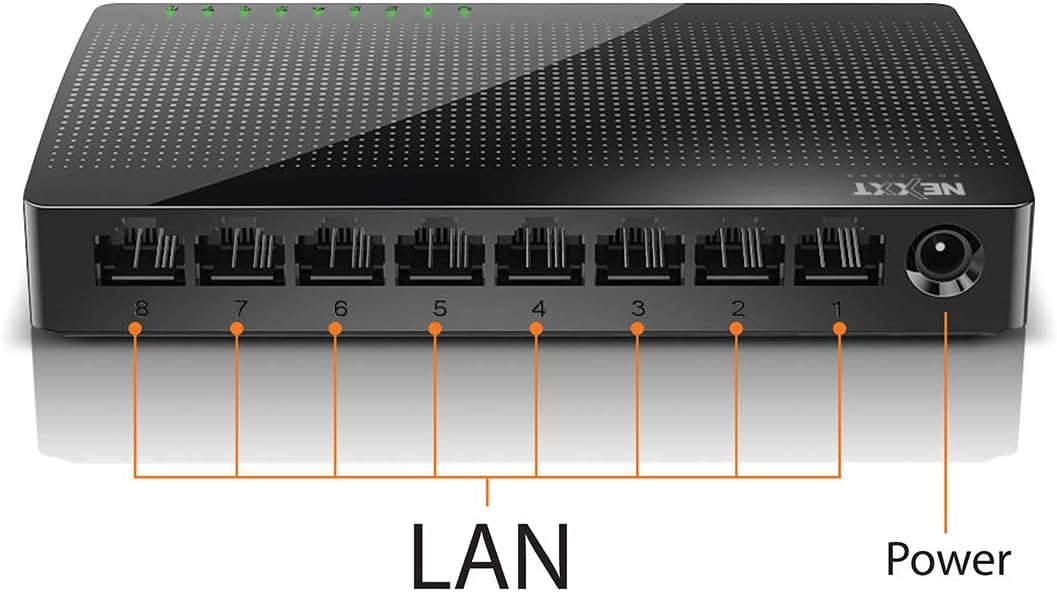
Изображение: сзади view of the Naxos800 switch, highlighting the eight LAN ports (numbered 1-8) and the power input port.
Светодиодные индикаторы
The front panel features LED indicators for each port, providing visual status:
- Зеленый светодиод (постоянно горит): Indicates a stable link connection.
- Зеленый светодиод (мигает): Indicates data activity on the corresponding port.
- Светодиод выключен: No link or connection detected.
5. Настройка и установка
The Naxos800 switch is designed for simple plug-and-play installation. No software or complex configuration is required.
- Размещение: Place the switch on a stable, flat surface or mount it on a wall using appropriate hardware (not included). Ensure adequate ventilation around the device.
- Подключение к электросети: Connect the provided power adapter to the power input port on the switch and then plug the adapter into a standard electrical outlet. The power LED (if present, or the port LEDs will light up) should illuminate.
- Подключиться к сети:
- Connect your router or modem to any of the 8 LAN ports on the Naxos800 switch using an Ethernet cable.
- Connect your network devices (e.g., computers, gaming consoles, IP cameras, Smart TVs, printers) to the remaining LAN ports on the Naxos800 switch using an Ethernet cable.
- Проверить соединение: Once devices are connected, the corresponding LED indicators on the switch's front panel should light up green (solid for link, flashing for activity).

Image: Diagram illustrating a typical network setup. An ADSL or Cable Modem connects to a Router, which then connects to the Naxos800 switch. Various devices like laptops, media players, game consoles, IP cameras, Smart TVs, and IP phones are connected to the Naxos800 switch.
6. Эксплуатация переключателя
The Naxos800 is an unmanaged switch, meaning it operates automatically without user intervention once connected. It functions as an internet splitter, expanding the number of wired network connections available from your router or modem.
- Automatic Speed Detection: Each port automatically detects the speed of the connected device (10Mbps or 100Mbps) and adjusts accordingly.
- Автоматический MDI/MDIX: Eliminates the need for crossover cables; the switch automatically detects and corrects for straight-through or crossover cable types.
- Передача данных: Data packets are forwarded between connected devices at Fast Ethernet speeds. The store-and-forward architecture ensures data integrity.
7. Техническое обслуживание
The Naxos800 switch requires minimal maintenance.
- Уборка: Для чистки внешней поверхности переключателя используйте мягкую сухую ткань. Не используйте жидкие или аэрозольные чистящие средства.
- Вентиляция: Во избежание перегрева убедитесь, что вентиляционные отверстия не заблокированы.
- Цикл питания: If the device experiences issues, a simple power cycle (unplugging and replugging the power adapter) can often resolve minor problems.
8. Поиск Неисправностей
If you encounter issues with your Naxos800 switch, refer to the following common problems and solutions:
| Проблема | Возможная причина | Решение |
|---|---|---|
| Нет питания / Устройство не включается. | Адаптер питания не подключен или неисправен; розетка не работает. | Убедитесь, что адаптер питания надёжно подключён к выключателю и исправной розетке. Попробуйте использовать другую розетку. |
| Индикатор подключения не горит. | Ethernet cable faulty or improperly connected; device not powered on or faulty; incorrect port. |
|
| Низкая скорость сети. | Network congestion; faulty cable; device limitations. |
|
9. Технические характеристики
| Атрибут | Ценить |
|---|---|
| Номер модели | ASIDT084U3 |
| Порты | 8 x 10/100Mbps Fast Ethernet (UTP/STP) |
| Пропускная способность объединительной платы | 1.6 Гбит/с |
| Таблица MAC-адресов | 1000 записей |
| Контроль доступа | CDMA |
| Управление потоком | Full duplex and half duplex back pressure |
| Размеры (Д x Ш x В) | 12.4 х 5.9 х 2.3 см |
| Масса | 140 г |
| Входная мощность | Внешний адаптер питания (входит в комплект) |
Примечание. Технические характеристики могут быть изменены без предварительного уведомления.
10. Гарантия и поддержка
The Nexxt Solutions Naxos800 8-Port Fast Ethernet Network Switch comes with a Ограниченная гарантия сроком на 5 год. For warranty claims or technical support, please contact Nexxt Solutions customer service. Refer to the official Nexxt Solutions webСайт содержит самую актуальную информацию о поддержке и контактные данные.
Nexxt Solutions is a US company committed to quality and customer service.


