1. Введение
This manual provides detailed instructions for the installation, operation, and maintenance of your Pyle PLRVST400 Double DIN In-Dash Car Stereo Head Unit. This versatile audio and video receiver system is designed for universal standard console or wall panel installation, making it suitable for RVs, travel trailers, motor homes, and campers. It features Bluetooth connectivity, a CD/DVD player, MP3/USB playback, AM/FM radio, and a 3-zone audio control system.
2. Информация по технике безопасности
- Ensure proper wiring connections to prevent electrical shorts or damage.
- Не управляйте устройством таким образом, чтобы это отвлекало вас от вождения.
- Избегайте воздействия на устройство экстремальных температур, влаги или прямых солнечных лучей.
- По всем вопросам обслуживания обращайтесь к квалифицированному персоналу.
- Always disconnect the vehicle's battery before performing any installation or wiring.
3. Содержимое упаковки
Проверьте наличие всех предметов в упаковке:
- Pyle PLRVST400 A/V Receiver System
- Питание и жгут проводов
- Дистанционное управление
- Монтажное оборудование (винты)

Image 3.1: Pyle PLRVST400 unit, remote control, and wiring harness.
4. Настройка и установка
The PLRVST400 is designed for universal Double DIN installation in a console or wall panel. Proper installation requires careful attention to wiring connections.
4.1 Подключение проводки
Use the included power and wiring harness to connect the unit to your vehicle's electrical system and speakers. Refer to the wiring diagram provided with the harness for specific connections. Ensure all connections are secure to prevent intermittent operation or damage.
- Power (Yellow B+): Подключите к постоянному источнику питания 12 В.
- Accessory (Red ACC): Подключите к коммутируемому источнику питания 12 В (зажигание).
- Земля (черная): Подключите к массе шасси автомобиля.
- Выходы на динамики: Connect to your vehicle's speakers, observing polarity.
- RCA Audio/Video: Use for external audio/video input or output connections.

Изображение 4.1: Сзади view of the Pyle PLRVST400, illustrating the various input and output ports for wiring.
4.2 Монтаж
Secure the unit into the Double DIN opening using the provided mounting hardware. Ensure the unit is firmly seated and does not obstruct any vehicle controls.
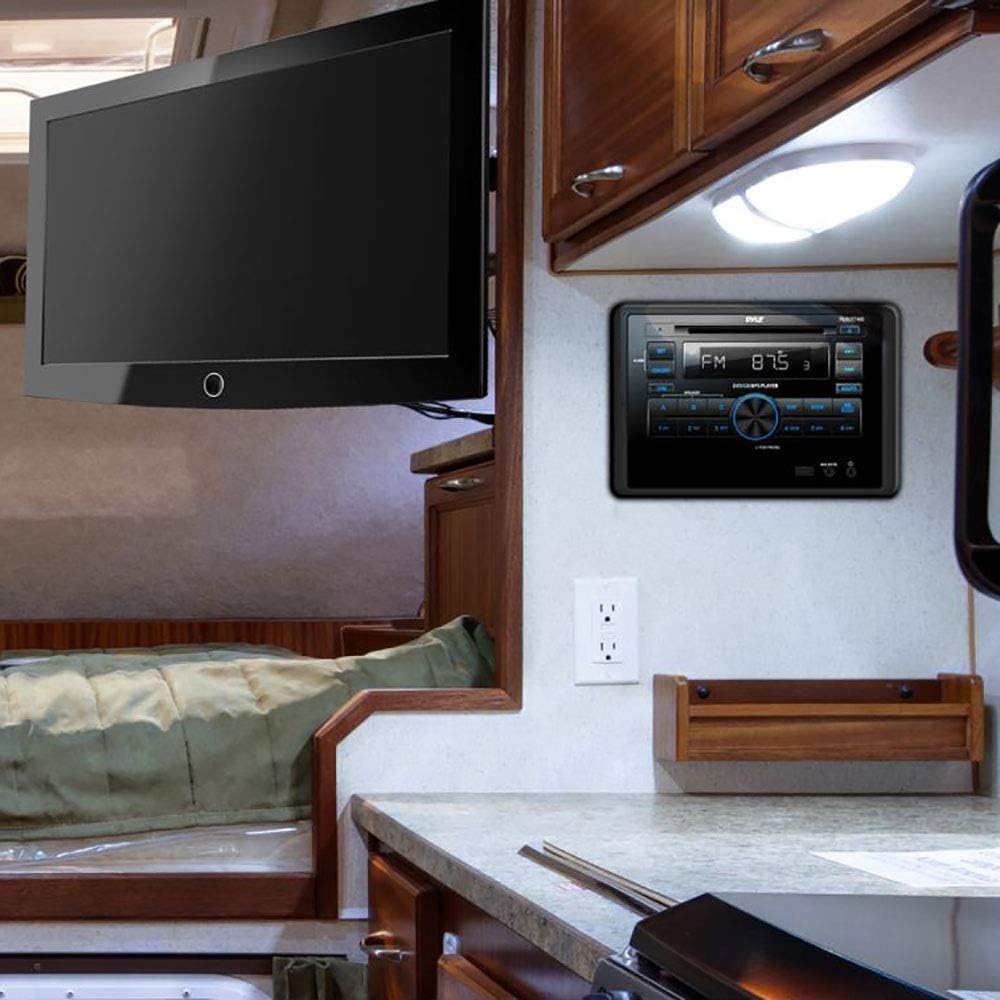
Image 4.2: The Pyle PLRVST400 unit installed in an RV wall panel, demonstrating a typical mounting scenario.
5. Инструкция по эксплуатации
The PLRVST400 features a user-friendly interface with front panel controls and a remote control for convenient operation.

Image 5.1: Front panel of the Pyle PLRVST400 with its accompanying remote control, highlighting key buttons and the LCD display.
5.1 Основные элементы управления
- ВКЛ/ВЫКЛ: Нажмите, чтобы включить или выключить устройство.
- РАЗМЕР: Регулирует яркость ЖК-дисплея.
- PUSH PWR/SEL Knob: Press to select functions or confirm settings. Rotate to adjust volume or navigate menus.
- РЕЖИМ: Cycles through available audio sources (Radio, CD/DVD, USB, AUX, Bluetooth).
- ЗАДАВАТЬ: Предоставляет доступ к системным настройкам и параметрам конфигурации.
5.2. Bluetooth-подключение
The unit features built-in Bluetooth for wireless audio streaming.
- Ensure Bluetooth is enabled on your mobile device (smartphone, tablet, etc.).
- Select 'Bluetooth' as the source on the PLRVST400 using the MODE button.
- Искать available Bluetooth devices on your mobile device. The unit will appear as 'Pyle Audio' or similar.
- Select the unit to pair. The default Bluetooth network password is '0000' (four zeroes).
- Once paired, you can stream audio wirelessly from your device to the PLRVST400.
5.3 CD/DVD Player
Insert a compatible CD or DVD into the disc slot. The unit will automatically detect the disc and begin playback. Supported disc types include CD-R, CD-RW, VCD, DVD, and MP3-CD.
5.4 Работа с радио
Press the MODE button to select 'Radio'.
- AM / FM: Use the band button (often labeled 'WB BAND' or similar) to switch between AM, FM, and Weatherband frequencies.
- Настройка: Use the seek buttons (◀◀ / ▶▶) to automatically search for stations. Manual tuning may be available through the SET menu or by holding seek buttons.
- Предварительные настройки: Store up to 30 radio stations using the numbered preset buttons (1-6). To save a station, tune to it, then press and hold a preset button until you hear a confirmation beep.
- Weatherband (WB): Access weather alerts and information on the Weatherband frequency.
5.5 Воспроизведение через USB
Insert a USB flash drive (up to 32GB) into the USB port. The unit supports MP3 and WMA audio files. Playback will begin automatically or can be selected via the MODE button.
5.6 Дополнительный вход
Connect external audio devices using the RCA (L/R) audio input connectors or a 3.5mm jack. Select 'AUX' as the source via the MODE button.
5.7 Трехзонное управление звуком
The unit features a multi-speaker '3-zone' audio source feature, allowing you to control three separate speaker zones. Use the A, B, and C buttons on the front panel to select and manage audio output for each zone independently.
5.8 Sound Configuration
Access sound settings through the SET menu. Adjust Bass/Treble levels (+/-10dB) and other equalizer settings to customize your audio experience.
6. Техническое обслуживание
- Уборка: Для очистки передней панели устройства используйте мягкую сухую ткань. Не используйте абразивные чистящие средства или растворители.
- Уход за дисками: Handle CDs and DVDs by their edges. Keep discs clean and free of scratches to ensure optimal playback.
- USB-порт: Следите за тем, чтобы USB-порт был чистым от пыли и мусора.
7. Поиск Неисправностей
If you encounter issues with your PLRVST400, refer to the following common problems and solutions:
| Проблема | Возможная причина/решение |
|---|---|
| Блок не включается. | Check power connections (Yellow B+ and Red ACC). Ensure both are connected to a 12V source. Some installations may require twisting the Yellow B+ and Red ACC wires together and connecting both to constant 12V power. Check the ground connection. Verify vehicle's fuse. |
| Нет звука из динамиков. | Check speaker wiring connections and polarity. Ensure the correct audio source is selected. Verify volume level is not at minimum or muted. Check 3-zone audio settings (A, B, C buttons) to ensure desired zones are active. |
| Проблемы с подключением Bluetooth. | Ensure the unit is in Bluetooth mode. Verify Bluetooth is enabled on your mobile device and within range (30+ ft). Try unpairing and re-pairing the device. Confirm the correct password ('0000') is used. |
| Ошибки воспроизведения диска. | Ensure the disc is clean and free of scratches or damage. Verify the disc type is compatible (CD-R, CD-RW, VCD, DVD, MP3-CD). |
| Пульт дистанционного управления не работает. | Check the battery in the remote control. Ensure there are no obstructions between the remote and the unit's IR sensor. |
| Volume control issues (e.g., too loud at lowest setting). | This can sometimes occur due to specific audio source or zone settings. Adjust individual zone levels if available, then control overall volume. |
8. Технические характеристики
| Особенность | Спецификация |
|---|---|
| Номер модели | ПЛРВСТ400 |
| Выходная мощность MAX | 4 х 50 Вт |
| Universal Size Standard | Двойной DIN |
| Звуковой режим | Стерео / Моно |
| Частотная характеристика | 40 Гц-18 кГц (+/- 3 дБ) |
| Сопротивление | 4 Ом |
| Соотношение сигнал/шум | 60дБ |
| Разделение стерео | >50 дБ, @ 1 кГц |
| Регулировка тона | Bass/Treble +/-10dB |
| Радио | PLL Synthesizer Stereo Radio, Weatherband |
| Electronic Shockproof (ESP) | Function included |
| Максимальная поддержка USB-флеш-памяти | 32 ГБ |
| Radio Station Memory | Up to 30 Presets |
| Цифровое аудио File Поддерживать | МР3, WMA |
| Цифровое Видео File Поддерживать | MP4, AVI, MOV, MPG, FLV, XVID |
| CD/DVD Disc Compatibility | CD-R, CD-RW, VCD, DVD, MP3-CD |
| Власть | 12 В постоянного тока |
| Current Drain/Power Consumption | 10 Amp (Максимум.) |
| Размеры шасси | 7.0'' x 6.3'' x 3.9'' |
| Размеры продукта | 7.13 x 6.3 x 10.52 дюйма |
| Вес товара | 4 фунта |
| Технология связи | Bluetooth |
| Тип контроллера | Hand Control (Remote) |
| Совместимые устройства | Smartphone, Speaker, Tablet |
| Тип разъема | 3.5mm Jack, HDMI, RCA, USB Type A |
| Режим аудиовыхода | Стерео, Моно |
| Конфигурация каналов объемного звука | 3.0 |
9. Гарантия и поддержка
Warranty information for the Pyle PLRVST400 is typically provided with your purchase documentation. For specific warranty details, claims, or technical support, please refer to the official Pyle website or contact Pyle customer service directly. Keep your proof of purchase for warranty purposes.


