Введение
This manual provides essential instructions for the safe and effective use of your TecMATE OptiMate1 DUO+ automatic battery charger. Please read this manual thoroughly before operating the device. The OptiMate1 DUO+ is designed to charge and maintain 6V and 12V lead-acid batteries (STD, AGM, GEL) and 12V lithium (LiFePO4) batteries, ensuring optimal battery performance and longevity.
The charger features automatic voltage detection and charging mode selection, simplifying the charging process. Its low power consumption makes it suitable for long-term connection, providing continuous battery diagnosis and maintenance.

Image 1: TecMATE OptiMate1 DUO+ charger with included battery connection accessories.
Инструкции по установке
- Безопасность прежде всего: Ensure the charger is disconnected from the AC power outlet before making any battery connections.
- Определите тип батареи: Confirm your battery is either a 6V/12V lead-acid (STD, AGM, GEL) or a 12V lithium (LiFePO4) battery. The OptiMate1 DUO+ is compatible with capacities from 2Ah to 20Ah for motorcycles.
- Выберите способ подключения:
- SAE#1 Vehicle-Side Cable (Ring Terminals): For permanent connection to the battery terminals. Connect the red ring terminal to the positive (+) battery post and the black ring terminal to the negative (-) battery post. Ensure a secure connection.
- SAE#4 Alligator Clip Cable: For temporary connection. Connect the red alligator clip to the positive (+) battery post and the black alligator clip to the negative (-) battery post. Ensure clips are firmly attached and do not touch each other or any other metal parts.
- Подключение к зарядному устройству: Plug the chosen battery connection cable into the output port of the OptiMate1 DUO+ charger.
- Подключение к сети переменного тока: Plug the charger's AC power cord into a suitable wall outlet. The charger will automatically begin the charging process.
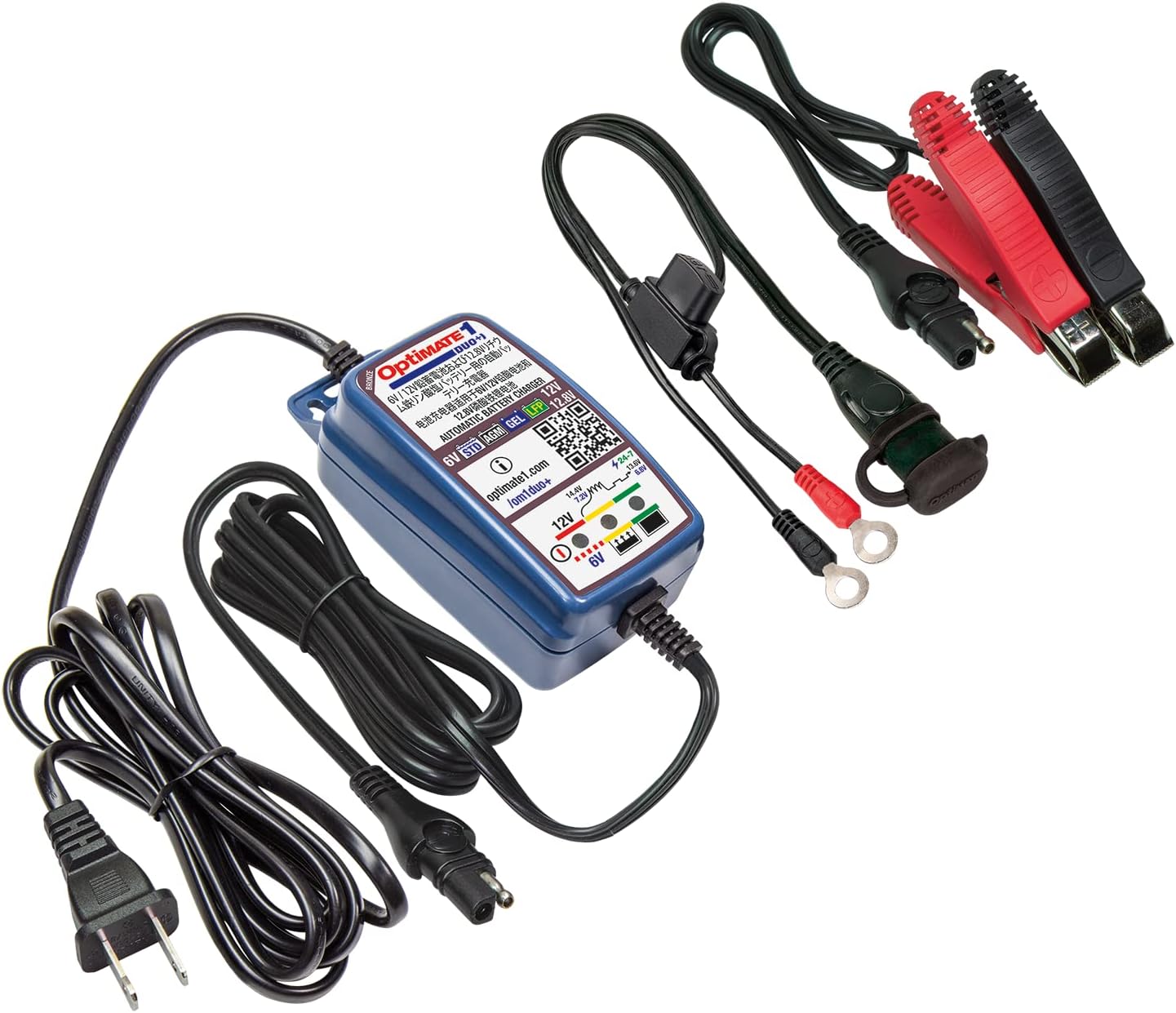
Image 2: The OptiMate1 DUO+ charger showing the two types of battery connection cables included: ring terminals and alligator clips.
Инструкция по эксплуатации
The OptiMate1 DUO+ is an automatic charger. Once connected to the battery and AC power, it will automatically detect the battery voltage (6V or 12V) and type (lead-acid or lithium) and initiate the appropriate charging program.
Индикаторы процесса зарядки:
- Светодиод питания: Indicates the charger is connected to AC power.
- Тип батареи/объемtagе светодиоды: Will illuminate to indicate the detected battery type (6V, 12V STD/AGM/GEL, or 12V LiFePO4).
- Charge Status LEDs: Progress through various stages (e.g., charging, fully charged, maintenance). Refer to the charger's label for specific LED indications.
The charger will automatically switch to a maintenance (float charge) mode once the battery is fully charged, preventing overcharging and ensuring the battery remains in optimal condition. This allows for safe long-term connection.
Обслуживание
The OptiMate1 DUO+ is designed to provide long-term battery maintenance.
- Постоянное соединение: For vehicles stored for extended periods, leave the charger connected to the battery and AC power. The charger's float charge mode will monitor the battery and deliver small charges as needed to maintain full capacity.
- Чистота: Keep the charger and its cables clean and free from dirt or debris.
- Проверка кабеля: Periodically inspect the cables and connectors for any signs of damage, wear, or corrosion. Replace damaged cables immediately.
- Хранилище: Когда зарядное устройство не используется, храните его в сухом, прохладном месте, вдали от прямых солнечных лучей и экстремальных температур.
Поиск неисправностей
If the charger does not appear to be functioning correctly, refer to the following common issues:
| Проблема | Возможная причина | Решение |
|---|---|---|
| No LEDs illuminate when connected to AC power. | No AC power, faulty outlet, or damaged power cord. | Check AC power connection and outlet. Try a different outlet. Inspect power cord for damage. |
| Зарядное устройство не начинает зарядку. | Неправильное подключение батареи, уровень заряда батареи.tage too low, or incompatible battery type. | Ensure correct polarity (+ to +, - to -) and secure connection. Verify battery voltage is within the charger's operating range. Confirm battery type is supported. |
| Charger remains in a low charge state for an extended period. | Battery is deeply discharged or damaged. | Allow more time for charging. If the issue persists, the battery may need professional inspection or replacement. |
| Charger indicates an error. | Внутренняя неисправность или серьезная проблема с батареей. | Disconnect the charger from both AC and battery, wait a few minutes, then reconnect. If the error persists, contact customer support. |
Note: The OptiMate1 DUO+ is not compatible with ROTAX lithium batteries. Charging such batteries will void the warranty.
Технические характеристики продукта
- Модель: TM-407av2
- Бренд: TecMATE
- Выходной ток: Постоянный ток 0.6 А
- Совместимые типы батарей: 6V/12V Lead-Acid (STD, AGM, GEL), 12V Lithium (LiFePO4)
- Compatible Battery Capacity: 2Ah to 20Ah (Motorcycle applications)
- Выход Voltage: 12 Volts (automatic detection for 6V/12V)
- Размеры (Ш x В x Г): 60 мм х 98 мм х 55 мм (2.36 х 3.86 х 2.17 дюйма)
- Масса: 230 г (0.51 фунта)
- Защита от проникновения: IP50 (Dust protected)
- Цвет: Синий
- Входящие в комплект аксессуары:
- SAE#1 Vehicle-Side Cable (Ring Terminals)
- SAE#4 Alligator Clip Cable
Информация о гарантии
The TecMATE OptiMate1 DUO+ comes with a Ограниченная гарантия сроком на 3 года. This warranty covers defects in materials and workmanship under normal use. Please retain your proof of purchase for warranty claims. The warranty does not cover damage caused by misuse, unauthorized modifications, or charging incompatible battery types (e.g., ROTAX lithium batteries).
Поддержка и контакты
For further information, detailed product guides, or technical assistance, please visit the official OptiMate website or contact TecMATE customer support.
Официальная страница продукта: http://www.optimate1.com/om1duo+
Please have your model number (TM-407av2) and purchase details ready when contacting support.


