1. Введение
This manual provides detailed instructions for the RGBZONE WS2812B RF LED Controller. This controller is designed for use with WS2811 and WS2812B dream color LED strip lights, offering a wide range of dynamic lighting effects and easy wireless control.
2. Содержимое упаковки
- 1 x RF LED Controller
- 1 х радиочастотный пульт дистанционного управления
- 1 х Руководство пользователя
3. Продукт закончилсяview
The RGBZONE RF LED Controller system consists of a compact receiver unit and a 14-key RF wireless remote control. The receiver connects directly to your compatible LED strip lights and power supply, while the remote allows for convenient control of lighting modes, speed, and brightness from a distance.
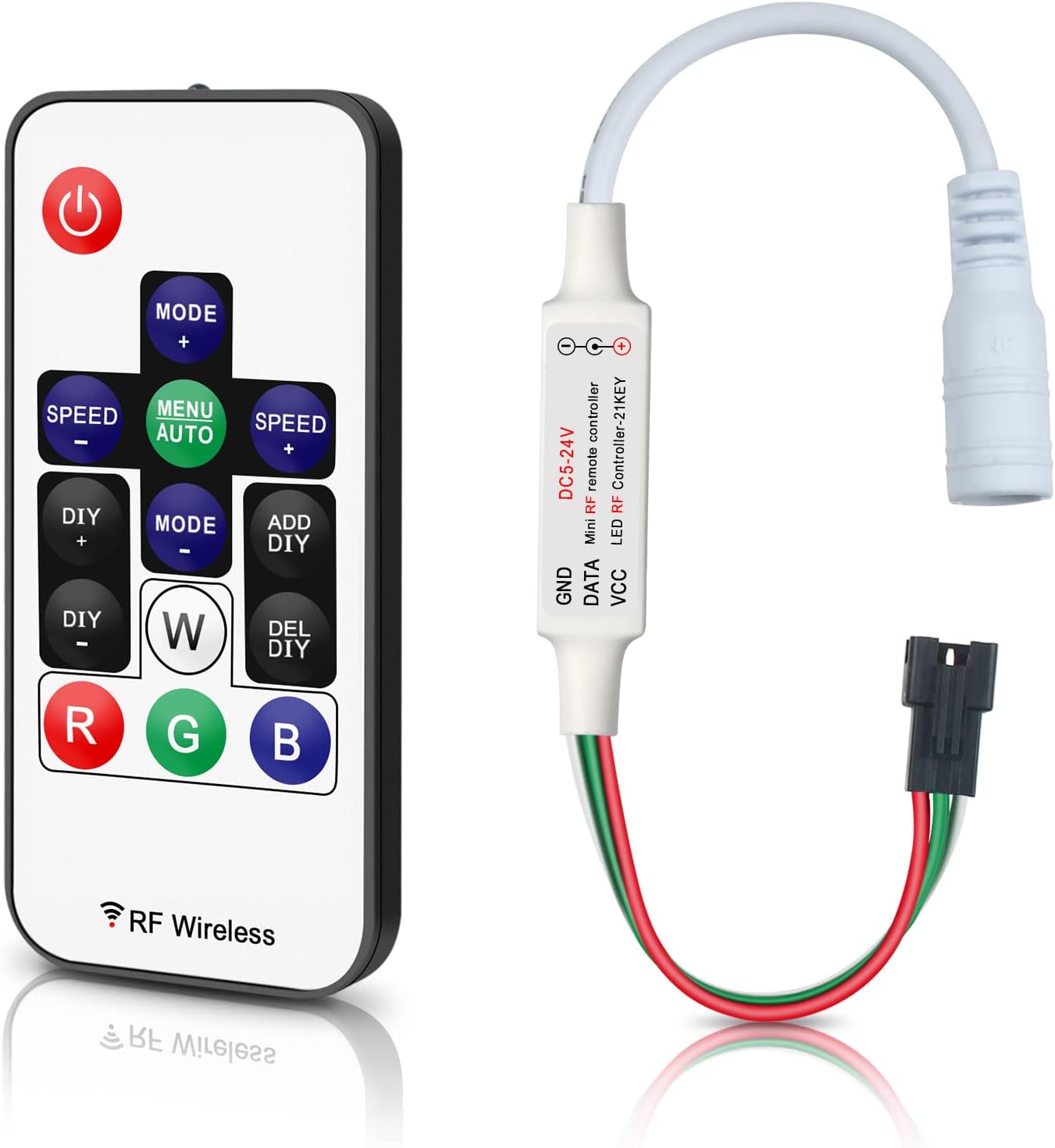
Figure 3.1: RGBZONE RF LED Controller and Remote Control.
This image displays the compact RF LED controller unit alongside its 14-key wireless remote control, which is used to manage the LED strip light functions.

Figure 3.2: Dimensions of Controller and Remote.
This image illustrates the physical dimensions of both the RF LED controller and its remote, showing measurements in millimeters and inches for reference.
3.1. Соединители
The controller features a 3-PIN JST connector for connecting to the LED strip and a DC female connector for power input.

Figure 3.3: Controller Connectors.
крупный план view of the controller's 3-PIN JST connector for LED strips and the DC female connector for power input.
3.2. Установка батареи пульта дистанционного управления.
The remote control uses a CR2025 coin cell battery. Ensure to remove the protective film from the battery before first use.

Рисунок 3.4: Батарейный отсек.
This image shows the battery compartment of the remote control, indicating the CR2025 battery type and the need to remove the protective film before use.
4. Технические характеристики
| Особенность | Деталь |
|---|---|
| Номер модели | FB5010AUSWHO |
| Vol входtage | Постоянный ток 5В-24В |
| Compatible LED Types | WS2811, WS2812B (Dream Color LED Strip Lights) |
| Max Control Pixels | Total 2048 pixels (Factory default: 300 pixels) |
| Тип пульта дистанционного управления | RF Wireless (14-Key) |
| Дальность беспроводной связи | 10-30 meters (through walls, doors, cabinets) |
| Размеры контроллера | прибл. 3.39 х 1.57 х 0.01 дюймов (8.6 х 4 х 0.025 см) |
| Вес товара | 1.06 унции (30 грамма) |
| Источник питания | Battery Powered (Remote), DC Power (Controller) |
| Максимальная мощность нагрузки | 5V<30W, 12V<72W, 24V<144W |
Note: The controller's output voltage соответствует входной громкостиtage. Ensure your power supply voltage соответствует напряжению вашей светодиодной лентыtage (e.g., 5V LED strip requires a 5V power supply).
5. Настройка и установка
Follow these steps to properly connect your RGBZONE RF LED Controller:
- Подготовьте компоненты: Ensure you have the RF LED controller, RF remote control, compatible WS2811/WS2812B LED strip lights, and a suitable DC power adapter (not included).
- Подключите светодиодную ленту: Connect the 3-PIN JST connector from the LED strip to the corresponding 3-PIN JST connector on the RF LED controller. Ensure the pins are aligned correctly (VCC, DATA, GND).
- Подключить источник питания: Connect the DC female connector of the RF LED controller to your DC power adapter. Важный: Входной объемtage of the power supply must match the operating voltage of your LED strip (e.g., for a 5V LED strip, use a 5V power supply). The controller does not regulate voltage.
- Включение питания: Plug in the power adapter to an electrical outlet. The LED strip should light up according to the controller's default settings.

Рисунок 5.1: Схема подключения.
This diagram illustrates the correct connection sequence: Power Adapter to RF Receiver (Controller), and RF Receiver to LED Strip Lights. The remote controller is shown separately, indicating its wireless function.

Figure 5.2: Detailed Connection with Voltage Note.
A more detailed connection diagram emphasizing the importance of matching the power supply voltage (DC5-24V POWER) to the LED strip's voltage (DC5-24V LED Strip).
6. Операция
The 14-key RF remote control allows for comprehensive management of your LED strip lights. The RF signal provides a working distance of 10-30 meters, even through walls and obstacles.
6.1. Функции дистанционного управления

Рисунок 6.1: Схема и функции пульта дистанционного управления.
This image labels the functions of each button on the 14-key RF remote control, including Mode, Speed, DIY, and RGB color buttons.

Figure 6.2: Advanced Remote Functions.
A detailed diagram of the remote control, explaining functions like Mode+ (358 modes), Speed/Brightness adjustment, Custom Mode, and the process for adjusting LED pixel points and RGB order.
- Включение/выключение питания: Нажмите Власть кнопка для включения и выключения света.
- Mode + / -: Cycle through 300+ (up to 358) dynamic color modes.
- Speed + / -: Adjust the speed of the current dynamic mode.
- MENU AUTO: Activates auto-play mode, cycling through 358 modes.
- DIY + / -: Navigate through custom play lists or effect programs.
- ADD DIY: Adds the current effect to the custom mode list.
- DEL DIY: Removes the current effect from the custom mode list.
- W (White): Activates static white color.
- R (Red), G (Green), B (Blue): Activates static Red, Green, or Blue colors respectively.
6.2. Adjusting Pixel Count and RGB Order
The controller supports up to 2048 pixels, with a factory default of 300 pixels. To adjust the number of LED pixel points or the RGB order:
- Ensure the LED strip is powered off.
- Нажмите и удерживайте МЕНЮ АВТО button for 5 seconds to enter the setup menu.
- Использовать РЕЖИМ + и РЕЖИМ - to adjust the number of LED pixel points.
- Нажмите R, G, или B keys to adjust the RGB order. For exampле, нажмите R until the LED strip shows red, G until it shows green, and B until it shows blue.
- Нажмите Власть кнопку для выхода и сохранения настроек.

Figure 6.3: Pixel Adjustment Guidance.
This image visually prompts the user on how to adjust the controller to manage up to 2048 pixels, referencing the remote control for the necessary button presses.
6.3. Remote Control ID Matching
- Match Remote ID: Долгое нажатие G key for 5 seconds. The LED strip will flash green 3 times, indicating successful matching.
- Cancel Remote ID: Нажмите и удерживайте W key for 5 seconds. The LED strip will flash white 3 times, indicating the ID has been canceled.
7. Поддерживаемые продукты
This controller is specifically designed for and compatible with the following LED types:
- WS2811 LED Strip Lights
- WS2812B LED Strip Lights
Note: This controller cannot control SK6812 RGBW LED lights or regular RGB LED strips without a driver IC.

Рисунок 7.1: Examples of Supported LED Products.
This image displays various forms of compatible LED products, including WS2812B strips, WS2811 strings, and WS2812B panels, illustrating the types of lights this controller can manage.

Figure 7.2: Supported Products Overview.
Болееview showing the controller alongside examples of supported LED products like WS2812B and WS2811 strips and strings, reinforcing compatibility.
8. Поиск Неисправностей
| Проблема | Возможная причина | Решение |
|---|---|---|
| Светодиодная лента не горит. | Неверный источник питанияtage. Слабые связи. Remote battery depleted or protective film not removed. | Убедитесь, что напряжение питанияtage matches LED strip voltage. Убедитесь, что все соединения безопасны. Replace remote battery or remove protective film. |
| LED colors are incorrect (e.g., pressing Green shows Red). | Incorrect RGB order setting. | Adjust the RGB order using the setup menu (refer to Section 6.2). |
| Controller becomes very hot during use. | Overload due to too many pixels or high power consumption. | Ensure total pixel count does not exceed 2048. For high power consumption, consider using a separate power supply for the LED strips or adding ampспасатели. |
| Пульт ДУ не отвечает. | Remote not paired with controller. Проблема с батареей. | Perform remote control ID matching (refer to Section 6.3). Check or replace the CR2025 battery. |
| Ограниченный диапазон управления. | Interference or excessive obstacles. | Ensure no major metallic obstructions. While RF penetrates walls, extreme interference can reduce range. |
9. Техническое обслуживание
The RGBZONE RF LED Controller requires minimal maintenance. Keep the controller and remote clean and dry. Avoid exposing them to extreme temperatures, humidity, or direct sunlight. Do not attempt to disassemble the units, as this will void any potential warranty.
10. Гарантия и поддержка
For warranty information or technical support, please refer to the product packaging or contact RGBZONE customer service through the retailer where the product was purchased. Keep your purchase receipt as proof of purchase.