Введение
This manual provides detailed instructions for the installation, operation, and maintenance of your EinCar Android 10 Car Stereo. Please read this manual thoroughly before using the product to ensure proper functionality and safety. Keep this manual for future reference.
Информация по безопасности
- Не используйте устройство таким образом, чтобы это отвлекало вас от вождения. Всегда ставьте безопасность дорожного движения на первое место.
- Убедитесь в правильности подключения всей проводки, чтобы предотвратить короткие замыкания или повреждения. Если вы не уверены в правильности установки, обратитесь к специалисту.
- Не подвергайте устройство воздействию экстремальных температур, прямых солнечных лучей в течение длительного времени или чрезмерной влажности.
- Не пытайтесь разбирать или модифицировать устройство. Это может привести к аннулированию гарантии и повреждению устройства.
- Поддерживайте громкость на уровне, позволяющем слышать внешние звуки дорожного движения.
Содержимое упаковки
Проверьте наличие всех предметов в упаковке:
- EinCar Android 10 Car Stereo Head Unit (10.1-inch display)
- GPS-антенна
- Жгут питания
- Кабели USB
- Кабели RCA
- Внешний микрофон (если входит в комплект)
- Задний View Camera (with necessary cables)
- Монтажные кронштейны и винты
- Руководство пользователя
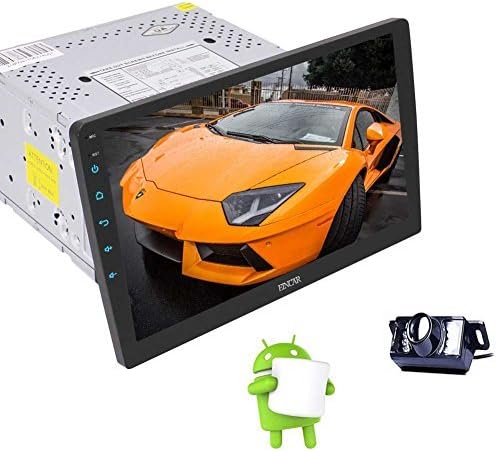
Image: The EinCar Android 10 Car Stereo head unit, featuring a 10.1-inch display, shown alongside a backup camera and the Android operating system logo, representing the main components of the product.
Руководство по установке
1. Проверки перед установкой
- Перед началом установки отсоедините отрицательную клемму аккумуляторной батареи автомобиля.
- Ensure the mounting space in your dashboard is compatible with a double DIN unit.
- Test all functions of the unit before final installation.
2. Проводные соединения
Connect the power harness, speaker wires, and other accessory wires according to your vehicle's wiring diagram and the stereo's labels. Common connections include:
- Желтый: 12V Constant Power
- Красный: 12V Accessory Power (Ignition Switched)
- Черный: Земля
- Апельсин: Illumination/Dimmer
- Синий: Мощность антенны/Ampдистанционное включение lifier
- Коричневый: Управление на рулевом колесе (SWC)
- Провод заднего хода: Connect to vehicle's reverse light signal for automatic camera display.
3. Установка GPS-антенны
Установите антенну GPS в месте с хорошим обзором. view из-под неба, например, на приборной панели или под лобовым стеклом, подальше от металлических препятствий.
4. Задняя часть View Установка камеры
Установите заднюю view camera at the back of your vehicle, ensuring it has a clear view. Connect its power to the reverse light circuit and the video signal to the dedicated camera input on the head unit.
5. Установка головного устройства
Secure the head unit into the dashboard using the provided mounting brackets and screws. Ensure the display is positioned correctly and can be adjusted if it features a rotating mechanism.
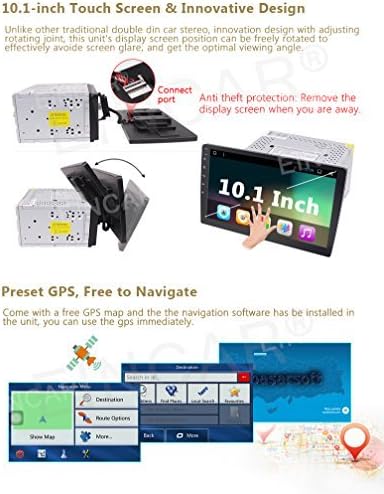
Image: The 10.1-inch display of the EinCar car stereo, demonstrating its rotating screen capability and the anti-theft feature where the display can be detached from the main unit.
Первоначальная установка и конфигурация
1. Первое включение
After installation, reconnect the vehicle's battery. The unit should power on automatically or by pressing the power button. Follow any on-screen prompts for initial language and time zone settings.
2. Сетевое подключение (Wi-Fi)
To access online features and download apps, connect the unit to a Wi-Fi hotspot (e.g., from your smartphone). Go to Настройки > Сеть и Интернет > Wi-Fi, выберите свою сеть и введите пароль.
3. GPS Configuration
Ensure the GPS antenna is properly connected. Open the pre-installed navigation application. The system will acquire satellite signals. You may need to download map data for offline use if not already pre-loaded.

Image: A visual representation of the EinCar car stereo's Android operating system interface, highlighting the quick settings menu accessible by swiping down from the top of the screen.
Инструкция по эксплуатации
1. Базовая навигация по интерфейсу
The 10.1-inch touchscreen allows for intuitive control. Swipe, tap, and drag just like a smartphone. The home screen provides access to frequently used applications. Swipe down from the top of the screen to access quick settings and notifications.
2. GPS-навигация
Tap the "Navigation" icon on the home screen to launch the GPS application. Enter your destination, and the system will provide turn-by-turn voice guidance and visual map directions. Ensure map data is up-to-date for optimal performance.
3. Bluetooth-подключение
Сопряжение устройства:
- Перейти к Настройки > Подключенные устройства > Подключить новое устройство.
- Включите Bluetooth на своем мобильном устройстве и выполните поиск доступных устройств.
- Select "EinCar" or a similar name from the list on your phone.
- Подтвердите код сопряжения на обоих устройствах.
4. FM / AM радио
Tap the "Radio" icon. Use the on-screen controls to scan for stations, save presets, and switch between FM and AM bands. Ensure the radio antenna is properly connected for clear reception.
5. Media Playback (USB/SD/Mirrorlink)
- USB/SD-накопитель: Insert a USB drive or SD card into the designated port/slot. The system will automatically detect media files. Use the "Music" or "Video" app to browse and play content.
- Зеркальная ссылка: Connect your smartphone via USB and follow the on-screen instructions to enable screen mirroring. This allows your phone's display to be shown on the car stereo screen.
6. Задняя часть View Камера
При включении задней передачи дисплей автоматически переключится на заднюю ось. view Видеопоток с камеры, обеспечивающий четкое изображение. view пространства позади вашего автомобиля.
7. Установка Wi-Fi и приложения
Once connected to Wi-Fi, you can access the Google Play Store to download and install various applications, including navigation apps, music streaming services, and more.
8. Управление рулевым колесом (SWC)
If your vehicle supports it and the SWC wires are connected, you can configure the steering wheel buttons to control functions like volume, track skipping, and mode switching. Access the SWC settings in the system menu to program the buttons.
Обслуживание
- Очистка экрана: Аккуратно протрите сенсорный экран мягкой безворсовой тканью. Для удаления стойких загрязнений слегка потрите.ampСмочите ткань водой или средством для чистки экранов, предназначенным для электроники. Избегайте использования агрессивных химикатов.
- Обновления программного обеспечения: Периодически проверяйте наличие обновлений системного ПО через меню настроек, чтобы обеспечить оптимальную производительность и доступ к новым функциям. Для обновлений требуется стабильное подключение по Wi-Fi.
- Общий уход: Следите за тем, чтобы устройство было чистым от пыли и мусора. Избегайте размещения на устройстве тяжелых предметов и прямых ударов.
Поиск неисправностей
| Проблема | Возможная причина | Решение |
|---|---|---|
| Блок не включается. | Incorrect wiring (power/ground), blown fuse, vehicle battery disconnected. | Проверьте силовые и заземляющие соединения. Осмотрите предохранители автомобиля. Убедитесь, что аккумулятор подключен. |
| Нет звука из динамиков. | Speaker wires incorrectly connected, volume too low, mute activated, ampпроблема с лифером. | Verify speaker wiring. Increase volume. Check if mute is active. Ensure external ampУсилитель (если используется) подключен к источнику питания. |
| Сигнал GPS не найден. | GPS antenna not connected, antenna obstructed, unit in an area with poor satellite reception. | Убедитесь, что GPS-антенна надежно подключена и размещена на безопасном расстоянии. view неба. Выйдите на открытое пространство. |
| Не удается выполнить сопряжение Bluetooth-устройства. | Bluetooth not enabled on unit or phone, device already paired, incorrect pairing code. | Ensure Bluetooth is active on both devices. Delete previous pairings and try again. Verify pairing code. |
| Задний view камера не отображается. | Камера не включена, видеокабель ослаблен, провод срабатывания заднего хода не подключен. | Check camera power and video connections. Ensure the reverse trigger wire is correctly connected to the vehicle's reverse light signal. |
Технические характеристики
| Особенность | Деталь |
|---|---|
| Операционная система | Андроид 10.0 |
| Процессор | Четырехъядерный |
| БАРАН | 2 ГБ |
| Внутренняя память (ПЗУ) | 16 ГБ |
| Размер экрана | 10.1 дюйма |
| Тип дисплея | LCD, Touchscreen |
| Размер шасси | Double DIN (Note: Product title and description indicate Double DIN, while one spec entry states Single DIN. Double DIN is assumed based on primary product description.) |
| GPS-навигация | Built-in, Satellite Map Type |
| Bluetooth | Yes (Hands-free calling, music streaming, OBD2, SWC support) |
| Wi-Fi | Built-in module for hotspot connection |
| Радио тюнер | FM/AM-приемник |
| Воспроизведение медиа | USB, SD, Mirrorlink, AAC, FLAC, MP3, WMA |
| Видеовыход | Support for headrest monitors |
| Задний View Камера | Included, IP67 waterproof, night vision |
| Вес товара | 6.46 фунта |
| Размеры упаковки | 12.95 x 9.76 x 9.29 дюйма |


