Введение
This manual provides comprehensive instructions for the setup, operation, and maintenance of your Thomson WHP5327 Wireless TV Headphones. Designed for comfortable, high-quality audio listening from various sources like TVs, Hi-Fi systems, smartphones, tablets, and laptops, these over-ear headphones offer a wireless range of up to 20 meters and come with a convenient charging station.
Информация по безопасности
Перед использованием изделия внимательно прочтите все инструкции по технике безопасности. Сохраните это руководство для дальнейшего использования.
- Do not expose the headphones or charging station to extreme temperatures, humidity, or direct sunlight.
- Не роняйте устройство и не подвергайте его сильным ударам.
- Не пытайтесь разбирать или модифицировать изделие. Это приведет к аннулированию гарантии.
- Используйте только прилагаемый адаптер питания и кабели.
- Длительное прослушивание музыки на высокой громкости может привести к повреждению слуха. Отрегулируйте громкость до комфортного уровня.
- Хранить в недоступном для детей месте.
Содержимое упаковки
Проверьте наличие всех предметов в упаковке:
- 1x Thomson WHP5327 Wireless TV Headphones
- 1x Charging Station / Transmitter
- 1x Адаптер питания
- 2x Rechargeable Batteries (AA)
- 3x Audio Cables (e.g., 3.5mm Jack, RCA)
- 2x Audio Adapters (e.g., 6.3mm adapter)
- 1x Руководство пользователя
Продукт болееview
Ознакомьтесь с компонентами вашей беспроводной системы наушников.
Наушники

Изображение: сбоку view of the Thomson WHP5327 headphones, highlighting the integrated volume control and power button on the earcup.
- Регулируемая повязка на голову: Для комфортной посадки.
- Мягкие амбушюры: Provide comfort during extended listening sessions.
- Регулятор громкости: Integrated on the earcup for easy adjustment.
- Кнопка/индикатор питания: Для включения/выключения наушников и отображения их состояния.
- Зарядные контакты: Located on the bottom of the headband for charging on the station.
- Аудиоразъем 3.5 мм: For optional wired connection to devices (cable may be required).
Зарядная станция/передатчик
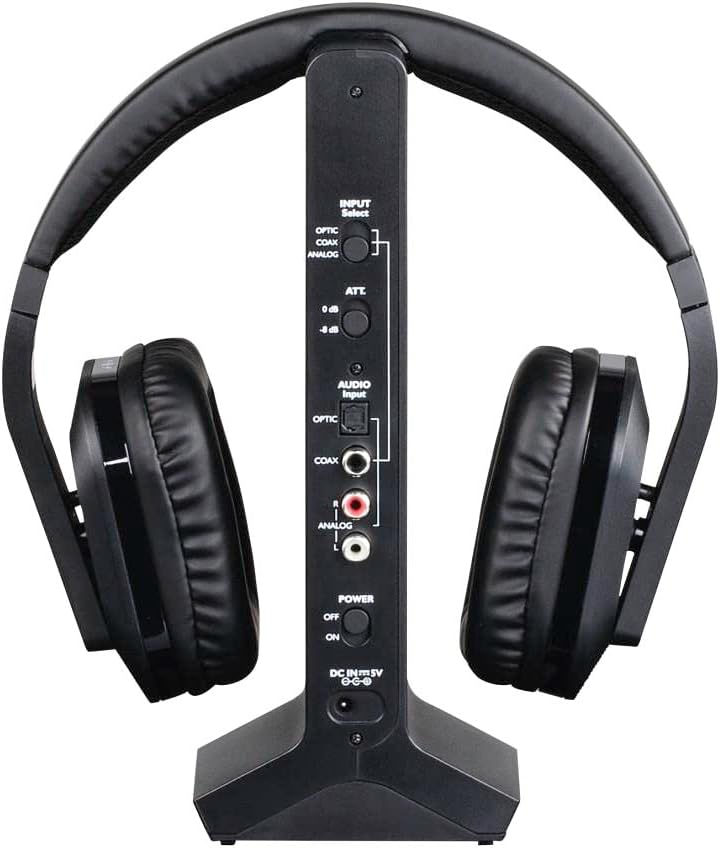
Изображение: сзади view of the Thomson WHP5327 charging station, displaying the various audio input ports (Optical, Coaxial, Analog) and power connection.
- Headphone Cradle: For storing and charging the headphones.
- Индикатор заряда: Индикатор, показывающий состояние зарядки.
- Индикатор питания: Light indicating the station is powered on.
- Переключатель выбора входа: To choose between Optical, Coaxial, or Analog audio inputs.
- Порты аудиовхода: Optical, Coaxial, and Analog (RCA) inputs for connecting to audio sources.
- Power Input (DC IN 5V): Для подключения адаптера питания.
- Выключатель: To turn the charging station on/off.
Настраивать
1. Зарядка наушников
- Insert the provided rechargeable AA batteries into the headphone earcups, ensuring correct polarity.
- Connect the power adapter to the "DC IN 5V" port on the charging station and plug it into a wall outlet. The Power indicator on the station will light up.
- Place the headphones onto the charging station. Ensure the charging contacts align. The "CHARGE" indicator on the station will light up, indicating charging is in progress.
- Allow approximately 8 hours for the initial full charge. Subsequent charges may take less time.

Image: The Thomson WHP5327 headphones resting on their charging station, ready for use or charging.
2. Connecting the Charging Station to an Audio Source
The charging station acts as the transmitter. Choose the appropriate connection method for your audio source (TV, Hi-Fi, etc.).
- Optical Digital Audio (Recommended for TVs):
Connect an optical audio cable (not always included, check package contents) from your TV's "Optical Out" or "Digital Audio Out (Optical)" port to the "OPTIC" input on the charging station. Set the "INPUT Select" switch on the station to "OPTIC".
- Коаксиальный цифровой звук:
Connect a coaxial audio cable from your audio source's "Coaxial Out" port to the "COAX" input on the charging station. Set the "INPUT Select" switch on the station to "COAX".
- Analog Audio (RCA or 3.5mm Jack):
Use the provided RCA audio cable to connect your audio source's "Audio Out" (red and white RCA jacks) to the "ANALOG" RCA inputs on the charging station. If your source has a 3.5mm headphone jack, use the provided 3.5mm to RCA adapter cable. Set the "INPUT Select" switch on the station to "ANALOG".
Ensure the power switch on the charging station is set to "ON" after connecting the audio source.
Инструкция по эксплуатации
Включение/выключение
- To turn on the headphones, press and hold the Power button on the earcup until the indicator light illuminates.
- To turn off the headphones, press and hold the Power button again until the indicator light turns off.
Регулятор громкости
Adjust the listening volume using the integrated volume control dial/buttons located on the earcup of the headphones.

Image: A person comfortably wearing the Thomson WHP5327 headphones while watching television, demonstrating typical usage.
Автоматическое отключение
The transmitter and headphones feature an automatic shut-off function. If no audio signal is detected for approximately 5 minutes, both the transmitter and headphones will automatically power down to conserve battery life.
Дальность беспроводной связи
The Thomson WHP5327 headphones offer a wireless range of up to 20 meters (approximately 65 feet) from the charging station/transmitter. Optimal range may vary depending on environmental factors such as walls, obstacles, and interference from other wireless devices.

Image: A diagram illustrating the wireless range between the headphones and the base unit, indicating a typical operational distance of 10-15 meters.
Проводное подключение (опционально)
While primarily designed for wireless use, the WHP5327 headphones can also be used with a wired connection. Connect a 3.5mm audio cable (not always included) from your audio source (e.g., smartphone, tablet, laptop) to the 3.5mm audio jack on the headphone earcup. This allows for direct audio playback without the need for the charging station/transmitter.

Image: A person using the Thomson WHP5327 headphones connected via a cable to a smartphone, demonstrating the optional wired listening mode.
Обслуживание
- Уборка: Use a soft, dry cloth to clean the headphones and charging station. Do not use liquid cleaners or abrasive materials.
- Замена батареи: The headphones use rechargeable AA batteries. If the battery life significantly decreases, replace them with new rechargeable AA batteries of the same type and capacity. Ensure correct polarity when inserting.
- Хранилище: When not in use, store the headphones on the charging station to keep them charged and ready. If storing for an extended period, ensure batteries are fully charged and store in a cool, dry place.
Поиск неисправностей
| Проблема | Возможная причина | Решение |
|---|---|---|
| Нет звука в наушниках. | Headphones not turned on or not charged. Transmitter not powered or not connected to audio source. Incorrect input selected on transmitter. Громкость источника звука слишком низкая или звук отключен. | Ensure headphones are charged and turned on. Check power connection to transmitter and ensure it's ON. Verify audio cable connection from source to transmitter. Select correct input (Optical, Coaxial, Analog) on transmitter. Increase volume on audio source and headphones. |
| Звук искажен или прерывист. | Вне зоны доступа. Помехи от других беспроводных устройств. Низкий заряд батареи наушников. | Подойдите ближе к передатчику. Move transmitter away from other electronic devices (Wi-Fi routers, cordless phones). Зарядите наушники. |
| Наушники не заряжаются. | Headphones not properly seated on charging station. Charging station not powered. Неисправные аккумуляторы. | Ensure headphones are correctly placed on the station, making good contact. Проверьте подключение адаптера питания и розетки. Замените батареи, если они больше не держат заряд. |
| Automatic shut-off occurs too quickly. | No audio signal or very low audio signal from source. | Increase the volume output from your audio source (e.g., TV). |
Технические характеристики
| Особенность | Деталь |
|---|---|
| Модель | ВХП5327 |
| Тип | Over-Ear, Circum-Aural, Wireless |
| Цвет | Черный |
| Материал | Пластик |
| Передача инфекции | Радиочастота (RF) |
| Несущая частота | 2400 МГц |
| Частотная характеристика | 20 Гц - 22 кГц |
| Сопротивление | 24 Ом |
| Чувствительность | 120 дБ |
| Отношение сигнал / шум | 80 дБ |
| Distortion Rate (max.) | 1 % |
| Дальность беспроводной связи | До 20 м (65 футов) |
| Battery Life (average volume) | До 8 часов |
| Источник питания | 2x AA Rechargeable Batteries (included) |
| Аудиовходы (передатчик) | Optical, Coaxial, Analog (RCA) |
| Масса | 1.44 фунта (приблизительно 0.65 кг) |
Гарантия и поддержка
Thomson products are designed and manufactured to the highest quality standards. This product is covered by a limited warranty against defects in materials and workmanship. For detailed warranty terms and conditions, please refer to the warranty card included in your package or visit the official Thomson webсайт.
For technical support, troubleshooting assistance, or spare parts inquiries, please contact Thomson customer service. Contact information can typically be found on the product packaging or the official Thomson support webсайт.
Пожалуйста, сохраните документ, подтверждающий покупку, для претензий по гарантии.


