Введение
The Pioneer Elite VSX-LX302 is an advanced audio/video component receiver designed to deliver immersive sound and high-quality video experiences. It supports DTS:X and Dolby Atmos for multi-dimensional audio, enhanced by Reflex Optimizer for Atmos-enabled speakers. The receiver is compatible with Ultra HD video, HDR10, and Dolby Vision, supporting 4K/60p/4:4:4/24-bit content. Connectivity features include FireConnect, Chromecast built-in, and DTS Play-Fi for multi-room audio streaming. It offers a phono input and six HDMI inputs, providing versatile options for various home entertainment setups.
Основные характеристики
- Выходная мощность: 200 W/Ch. (6 ohms, 1 kHz, THD 10 %, 1Ch Driven) / 100 W/Ch. (8 ohms, 20 Hz-20 kHz, THD 0.08 %, 2Ch Driven, FTC)
- Аудио форматы: Multi-dimensional sound processing with Dolby Atmos & DTS:X.
- Совместимость с видео: Ultra HD pass-through with HDCP 2.2, Dolby Vision compatible with HDR10 and BT.2020 support (4K/60p/4:4:4/24-bit).
- Калибровка: MCACC Auto Room Tuning and synchronized sound with Phase Control.
- Speaker Support: Supports 4 Ohm speakers.
- Wireless & Multi-room Audio: Features FireConnect, Chromecast built-in, and DTS Play-Fi Technologies.
Настраивать
Распаковка и содержимое
Осторожно извлеките все компоненты из упаковки. Убедитесь, что в наличии следующие предметы:
- Ресивер Pioneer Elite VSX-LX302
- Дистанционное управление
- Батарейки ААА (2)
- Микрофон для калибровки помещения
- Руководство по эксплуатации (данный документ)
- FM-антенна
- AM Антенна
Connecting Your Receiver
Перед выполнением любых подключений убедитесь, что приемник выключен и отсоединен от розетки.
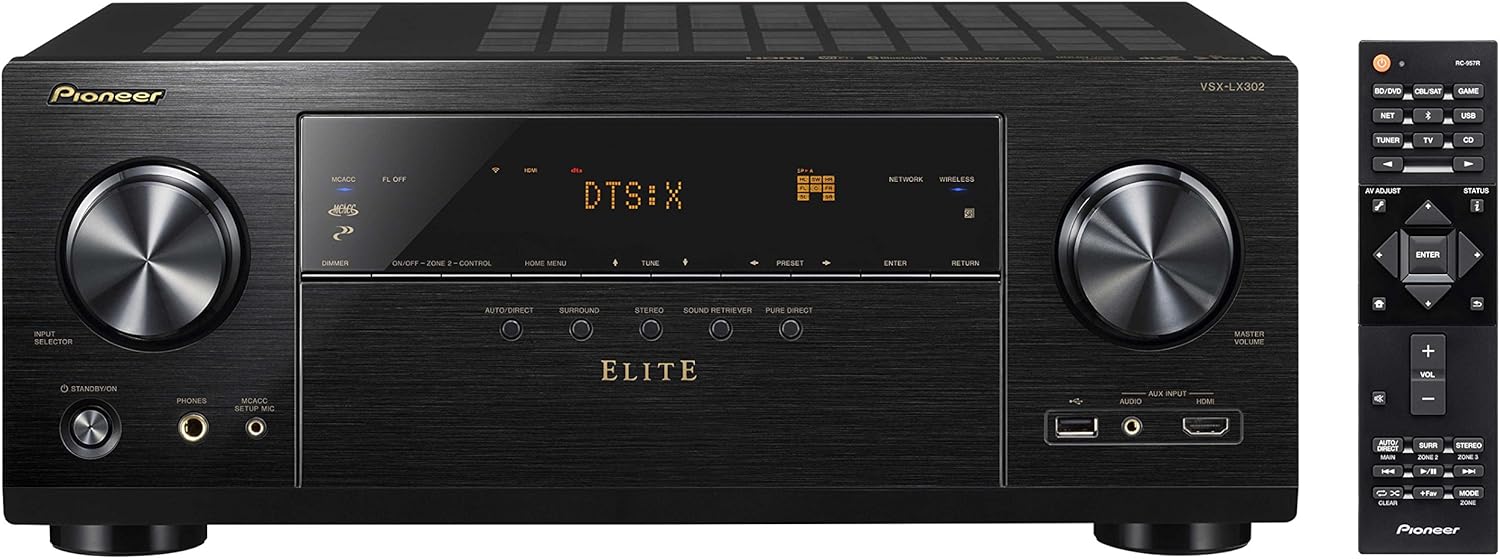
Рисунок 1: Передняя часть view of the Pioneer Elite VSX-LX302 receiver, showing input selector, display, and volume controls.

Рисунок 2: Сзади view of the Pioneer Elite VSX-LX302 receiver, detailing various audio and video input/output ports.
Подключения динамиков
Connect your speakers to the corresponding terminals on the rear panel (Figure 2). The VSX-LX302 supports a 7.2 channel configuration. Ensure correct polarity (+ to + and - to -) for optimal sound quality. This receiver supports 4 Ohm speakers.
Подключения HDMI
Connect your video sources (e.g., Blu-ray player, gaming console, streaming device) to the HDMI IN ports on the rear panel. Connect your TV or projector to the HDMI OUT (ARC) port. The receiver features 6 HDMI inputs and 2 HDMI outputs, all supporting HDCP 2.2, Dolby Vision, HDR10, and BT.2020.
Аудиоподключения
Utilize the various audio inputs for other devices. A dedicated PHONO input is available for turntables. Digital audio inputs (optical and coaxial) are also provided.
Сетевое подключение
Connect the receiver to your home network via an Ethernet cable to the NETWORK port or use the built-in Wi-Fi for wireless connectivity. This enables features like Chromecast built-in, DTS Play-Fi, and internet radio.
Automatic Room Calibration (MCACC)
Use the included Room Calibration Microphone and the MCACC (Multi-Channel Acoustic Calibration System) feature to automatically optimize the sound settings for your specific listening environment. Follow the on-screen instructions displayed on your TV.
Инструкция по эксплуатации
Включение/выключение питания
Для включения или выключения ресивера нажмите кнопку POWER на передней панели или на пульте дистанционного управления.
Выбор входного сигнала
Use the INPUT SELECTOR knob on the front panel or the corresponding buttons on the remote control to switch between connected audio/video sources (e.g., BD/DVD, GAME, SAT/CATV, CD).
Регулятор громкости
Adjust the volume using the MASTER VOLUME knob on the front panel or the VOLUME +/- buttons on the remote control.
Звуковые режимы
Select various sound modes (e.g., Auto Direct, Surround, Stereo, Pure Direct) to optimize audio playback for different content types. The receiver supports Dolby Atmos and DTS:X for immersive surround sound.
Сетевые возможности
Access streaming services, internet radio, and multi-room audio functionalities (FireConnect, Chromecast built-in, DTS Play-Fi) through the receiver's network connection. Control these features using the Pioneer Remote App on your smartphone or tablet.
Обслуживание
To ensure optimal performance and longevity of your Pioneer Elite VSX-LX302 receiver, follow these maintenance guidelines:
- Уборка: Regularly wipe the exterior with a soft, dry cloth. Avoid using abrasive cleaners or solvents.
- Вентиляция: Ensure adequate ventilation around the receiver. Do not block ventilation openings. Allow sufficient space (at least 6 inches) above and around the unit for proper airflow.
- Удаление пыли: Periodically use a soft brush or a vacuum cleaner with a brush attachment to remove dust from the ventilation grilles.
- Шнур питания: Inspect the power cord for any damage. If damaged, discontinue use and contact qualified service personnel.
- Условия окружающей среды: Избегайте воздействия на приемник экстремальных температур, влажности, прямых солнечных лучей или чрезмерного количества пыли.
Поиск неисправностей
If you encounter issues with your receiver, refer to the following common troubleshooting steps:
- Нет питания: Ensure the power cord is securely plugged into the receiver and a working wall outlet. Check if the power outlet is active.
- Нет звука: Verify that the correct input source is selected. Check all speaker connections for proper polarity and secure fit. Ensure the volume is not muted or set too low. Confirm that the speakers are enabled in the receiver's settings.
- Нет видео: Confirm that the correct HDMI input is selected. Check HDMI cable connections between the source, receiver, and TV/projector. Ensure the TV/projector is set to the correct HDMI input.
- Проблемы с сетевым подключением: Check your router and internet connection. Ensure the receiver is within range of your Wi-Fi network or the Ethernet cable is securely connected. Try restarting the receiver and your network equipment.
- Пульт дистанционного управления не работает: Check and replace the batteries in the remote control. Ensure there are no obstructions between the remote and the receiver's IR sensor.
- Искаженный звук: Check speaker impedance compatibility. Ensure speaker wires are not frayed or shorting. Reduce the volume if distortion occurs at high levels.
For more detailed troubleshooting, consult the full instruction manual or visit the Pioneer support webсайт.
Технические характеристики
| Размеры продукта | 14.6 x 17.1 x 6.8 дюйма |
| Вес товара | 22 фунта |
| Номер модели товара | VSX-LX302 |
| Бренд | PIONEER |
| Технология связи | HDMI |
| Тип контроллера | андроид |
| Специальная характеристика | Мультирум |
| Совместимые устройства | Спикер |
| Всего портов HDMI | 9 (6 входа, 2 выход) |
| Тип разъема | HDMI |
| Кодирование аудио | ДТС |
| Режим аудиовыхода | Объемный |
| Конфигурация каналов объемного звука | 7.2 |
| Дата первой доступности | 12 мая 2017 г. |
Гарантия и поддержка
Подробную информацию о гарантии см. в гарантийном талоне, прилагаемом к вашему изделию, или на официальном сайте Pioneer. website. For technical support, product registration, or service inquiries, please visit the Pioneer support section on their official webсайт или свяжитесь напрямую со службой поддержки клиентов.


