Введение
Thank you for choosing the Divoom Onbeat 500 Portable Wireless Bluetooth Speaker. This device is designed to deliver powerful sound with convenient wireless connectivity. This manual will guide you through the setup, operation, and maintenance of your speaker to ensure optimal performance and longevity.
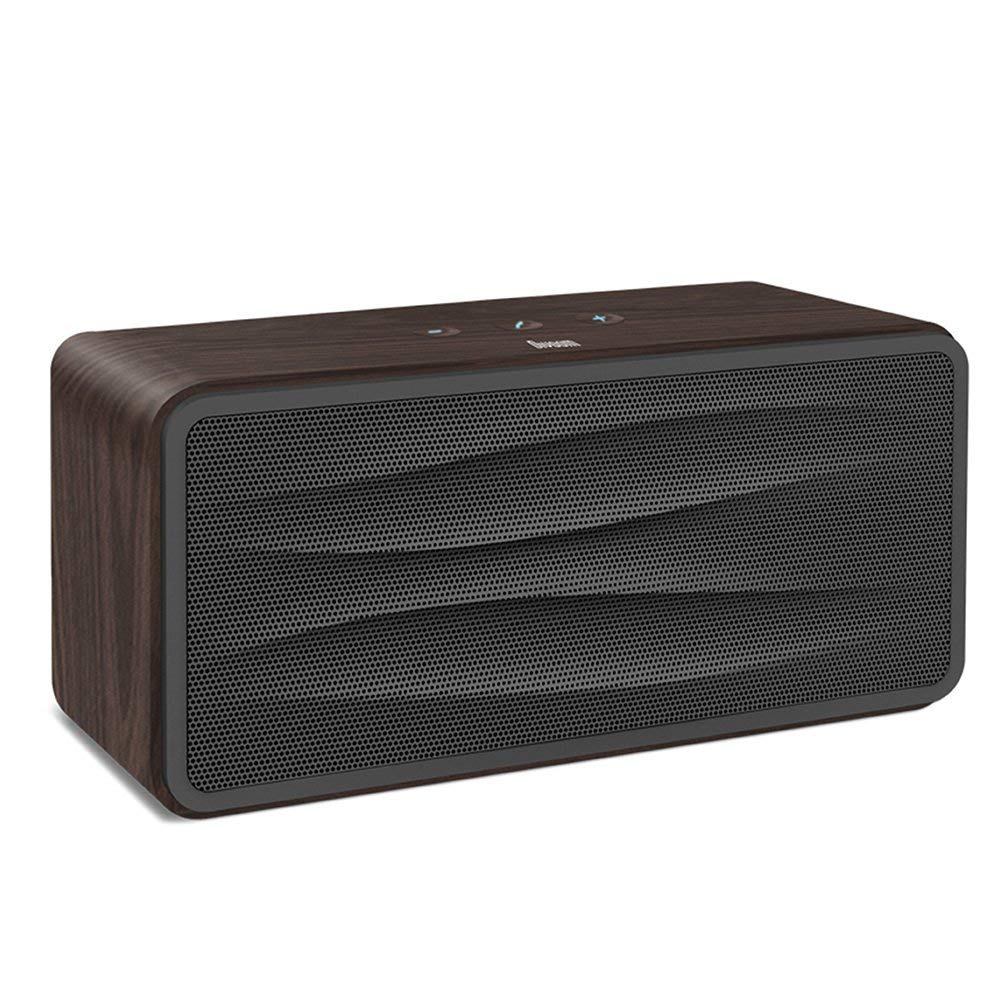
Рисунок 1: Передний view of the Divoom Onbeat 500 speaker. This image displays the speaker's main grille and overall design.
Содержимое упаковки
Проверьте комплектацию на наличие следующих предметов:
- Divoom Onbeat 500 Speaker
- Кабель для зарядки Micro USB
- Вспомогательный кабель
- Руководство пользователя (этот документ)
- Гарантийный талон
Характеристики продукта
The Divoom Onbeat 500 speaker offers a range of features for an enhanced audio experience:
- Мощный звук: 2.1 channel design with a proprietary passive bass radiator for rich audio.
- Технология NFC: Tap-to-pair functionality for quick and easy Bluetooth connection.
- Bluetooth-подключение: Wirelessly play and control music from up to 33 feet (10 meters) away.
- Встроенный динамик: Allows you to make and take calls directly from the speaker.
- Долговечный аккумулятор: Integrated 5000mAh battery provides extended playback time.
- Вспомогательный вход: Для проводного подключения к устройствам, не поддерживающим Bluetooth.
Настраивать
1. Зарядка динамика
Before initial use, fully charge your Divoom Onbeat 500 speaker. Use the provided Micro USB charging cable to connect the speaker to a USB power source (e.g., computer USB port, USB wall adapter). The charging indicator light will illuminate during charging and turn off or change color when fully charged. A full charge typically provides 8-10 hours of playback.
2. Включение и выключение
- Для включения: Нажмите и удерживайте кнопку питания в течение нескольких секунд, пока не услышите звуковой сигнал или не загорится индикатор.
- Чтобы выключить: Нажмите и удерживайте кнопку питания еще несколько секунд, пока динамик не выключится.
3. Сопряжение по Bluetooth
The Onbeat 500 offers two methods for wireless connection:
NFC (Near Field Communication) Pairing:
If your device supports NFC, you can pair quickly:
- Убедитесь, что функция NFC включена на вашем смартфоне или планшете.
- With the Onbeat 500 powered on, gently tap your NFC-enabled device against the NFC area on the speaker.
- Confirm the pairing request on your device. The speaker will indicate a successful connection.
Стандартное сопряжение Bluetooth:
For devices without NFC or for manual pairing:
- Power on the Divoom Onbeat 500 speaker. It will automatically enter Bluetooth pairing mode if no device is connected, or you may need to press a dedicated Bluetooth button (refer to speaker controls).
- On your audio device (smartphone, tablet, computer), go to the Bluetooth settings and enable Bluetooth.
- Искать available devices. You should see "Divoom Onbeat 500" in the list.
- Select "Divoom Onbeat 500" to connect. The speaker will confirm the connection with an audible prompt.
4. Вспомогательное подключение
To connect a device using the auxiliary cable:
- Connect one end of the provided auxiliary cable to the AUX-in port on the Divoom Onbeat 500.
- Connect the other end of the auxiliary cable to the headphone jack or audio output of your device.
- The speaker will automatically switch to AUX mode, or you may need to select it manually (refer to speaker controls).

Рисунок 2: Сторона view of the Divoom Onbeat 500, illustrating the location of the charging port, AUX input, and control buttons.
Управление динамиком
1. Воспроизведение музыки
Once connected via Bluetooth or AUX, you can control music playback from your connected device. The speaker may also have integrated controls for volume adjustment, play/pause, and track skipping. Refer to the speaker's physical buttons for these functions.
2. Функция громкой связи
When connected to a smartphone via Bluetooth, the Divoom Onbeat 500 can be used as a speakerphone:
- Ответ на звонок: Press the Call button (often indicated by a phone icon) on the speaker.
- Завершение вызова: Нажмите кнопку вызова еще раз.
- Отклонение вызова: Нажмите и удерживайте кнопку вызова.

Рисунок 3: Задний view of the Divoom Onbeat 500, highlighting the passive bass radiator for enhanced low-frequency sound.
Обслуживание
1. Уборка
Чтобы сохранить внешний вид и функциональность вашего динамика:
- Протрите внешнюю поверхность мягкой, сухой, безворсовой тканью.
- Не используйте абразивные чистящие средства, спирт, бензол или другие химические растворители, так как они могут повредить покрытие.
- Избегайте попадания влаги в отверстия.
2. Уход за аккумулятором
Для продления срока службы встроенного литий-ионного аккумулятора:
- Избегайте частой полной разрядки аккумулятора.
- Если динамик не используется в течение длительного времени, храните его в прохладном, сухом месте.
- Charge the speaker at least once every three months if stored for a long time to prevent deep discharge.
Поиск неисправностей
If you encounter issues with your Divoom Onbeat 500, please refer to the following common solutions:
| Проблема | Возможное решение |
|---|---|
| Динамик не включается | Ensure the battery is charged. Connect the speaker to a power source using the Micro USB cable and try again. |
| Нет звука из динамика | Check the volume level on both the speaker and your connected device. Ensure the speaker is correctly paired via Bluetooth or connected via AUX. Try re-pairing the Bluetooth device. |
| Сбой сопряжения Bluetooth | Ensure the speaker is in pairing mode. Turn off and on Bluetooth on your device. Move your device closer to the speaker. Clear previous Bluetooth connections on your device and try again. |
| Плохое качество звука | Ensure the speaker and connected device are within range (for Bluetooth). Check for interference from other wireless devices. Try a different audio source or cable. |
Технические характеристики
Detailed technical specifications for the Divoom Onbeat 500 speaker:
- Название модели: Divoom Onbeat 500
- Тип динамика: Компьютер спикер
- Технологии подключения: Bluetooth
- Технология беспроводной связи: Bluetooth
- Метод контроля: Трогать
- Источник питания: Питание от батареи
- Аккумулятор: 1 литий-ионный аккумулятор (5000 мАч)
- Аудио Ватtage: 20 Вт
- Максимальная выходная мощность динамика: 100 Вт
- Конфигурация канала объемного звука: 2.1
- Совместимые устройства: Android, Windows, iPhone (iOS)
- Тип разъема: USB (для зарядки)
- Размеры продукта: 22.5 x 7.49 x 10.49 см (ДхШхВ)
- Вес товара: 1.55 кг
- Цвет: Древесный уголь
- Особые характеристики: NFC, Built-in Speakerphone, Passive Bass Radiator
Гарантия и поддержка
Your Divoom Onbeat 500 speaker comes with a limited warranty. Please refer to the included Warranty Card for detailed terms and conditions, including warranty period and coverage.
For technical support, service inquiries, or further assistance, please visit the official Divoom website or contact their customer service department using the information provided on your Warranty Card or product packaging. Please have your model number (Onbeat 500) and purchase details ready when contacting support.


