1. Введение
This manual provides detailed instructions for the setup, operation, and maintenance of your Enover TS18 7-Day Programmable Digital Timer. This device is designed to automate the control of electrical appliances by setting specific ON/OFF times throughout the week, offering convenience and energy management.
2. Особенности продукта
- Гибкий график: Program up to 10 distinct ON/OFF cycles within a 7-day period. Each program repeats weekly.
- Управление энергопотреблением: Automatically controls lamps, holiday lights, humidifiers, and other electrical devices. Includes a feature to protect devices from overcharge.
- Security Function: Features a random ON/OFF option to vary lighting times, simulating occupancy when away from home.
- Удобный интерфейс: Equipped with a large LCD display for clear visibility and a manual override switch for immediate control adjustments.
- Запасная батарея: An integrated battery retains programmed settings during power outagда, это устраняет необходимость в перепрограммировании.

Image: Enover TS18 Digital Timer highlighting key features for easy home automation.
3. Содержимое упаковки
В комплект входят следующие предметы:
- 1 x Enover Digital Timer Switch (Model TS18)
- 1 х Руководство пользователя

Image: Contents of the Enover TS18 Digital Timer package, including the timer and manual.
4. Продукт закончилсяview
The Enover TS18 Digital Timer features a clear LCD display and intuitive buttons for easy programming. It plugs directly into a standard electrical outlet.

Изображение: Спереди view of the Enover TS18 Digital Timer, displaying the time and control buttons.
Функции кнопок:
- НЕДЕЛЯ: Sets the day(s) for programs.
- ЧАС: Adjusts the hour for time and program settings.
- МИНУТА: Adjusts the minute for time and program settings.
- РЕЗ/РКЛ: Resets or recalls settings.
- ЧАСЫ: Enters or exits clock setting mode.
- ТАЙМЕР: Cycles through program settings (P1 ON, P1 OFF, P2 ON, etc.).
- ВКЛ/АВТО/ВЫКЛ: Selects operating mode (Always ON, Automatic, Always OFF).
- СЛУЧАЙНЫЙ: Activates or deactivates the random ON/OFF function.
- СБРОС: Small button (requires a pointed object) to clear all settings and reset the device.
Video: A brief demonstration of the Enover Digital Timer's basic functions and display.
5. Настройка
5.1 Первоначальная зарядка
Before first use, plug the timer into an electrical outlet for approximately 5-10 minutes to charge the internal battery. This ensures the display is active and settings can be retained.
5.2 Установка текущего времени и дня
- Нажмите и удерживайте ЧАСЫ кнопка.
- Удерживая ЧАСЫ, нажмите кнопку НЕДЕЛЯ Нажимайте кнопку несколько раз, чтобы установить текущий день недели.
- Удерживая ЧАСЫ, нажмите кнопку ЧАС button repeatedly to set the current hour (AM/PM will display).
- Удерживая ЧАСЫ, нажмите кнопку МИНУТА Нажимайте кнопку несколько раз, чтобы установить текущую минуту.
- Выпустите ЧАСЫ чтобы сохранить настройки.
6. Инструкция по эксплуатации
6.1 Программирование циклов включения/выключения
Таймер позволяет установить до 10 программ включения/выключения. Для настройки программы выполните следующие действия:
- Нажмите ТАЙМЕР Нажмите кнопку один раз. На дисплее отобразится «1 ВКЛ».
- Нажимать НЕДЕЛЯ to select the day(s) for this program (e.g., MO, TU, WE, TH, FR, SA, SU, MO TU WE TH FR, SA SU, MO TU WE TH FR SA SU, etc.).
- Нажимать ЧАС для установки желаемого часа включения.
- Нажимать МИНУТА для установки желаемой минуты включения.
- Нажмите ТАЙМЕР Нажмите кнопку еще раз. На дисплее отобразится «1 ВЫКЛ».
- Repeat steps 2-4 to set the desired OFF time for Program 1. Ensure the correct day(s) are selected for the OFF time.
- Продолжайте нажимать ТАЙМЕР to cycle through and set additional programs (2 ON, 2 OFF, up to 10 ON, 10 OFF).
- После установки всех желаемых программ нажмите кнопку ЧАСЫ кнопку, чтобы вернуться к отображению текущего времени.
- Убедитесь, что таймер включен. АВТО mode for programs to execute. Press ВКЛ/АВТО/ВЫКЛ ездить на велосипеде АВТО.
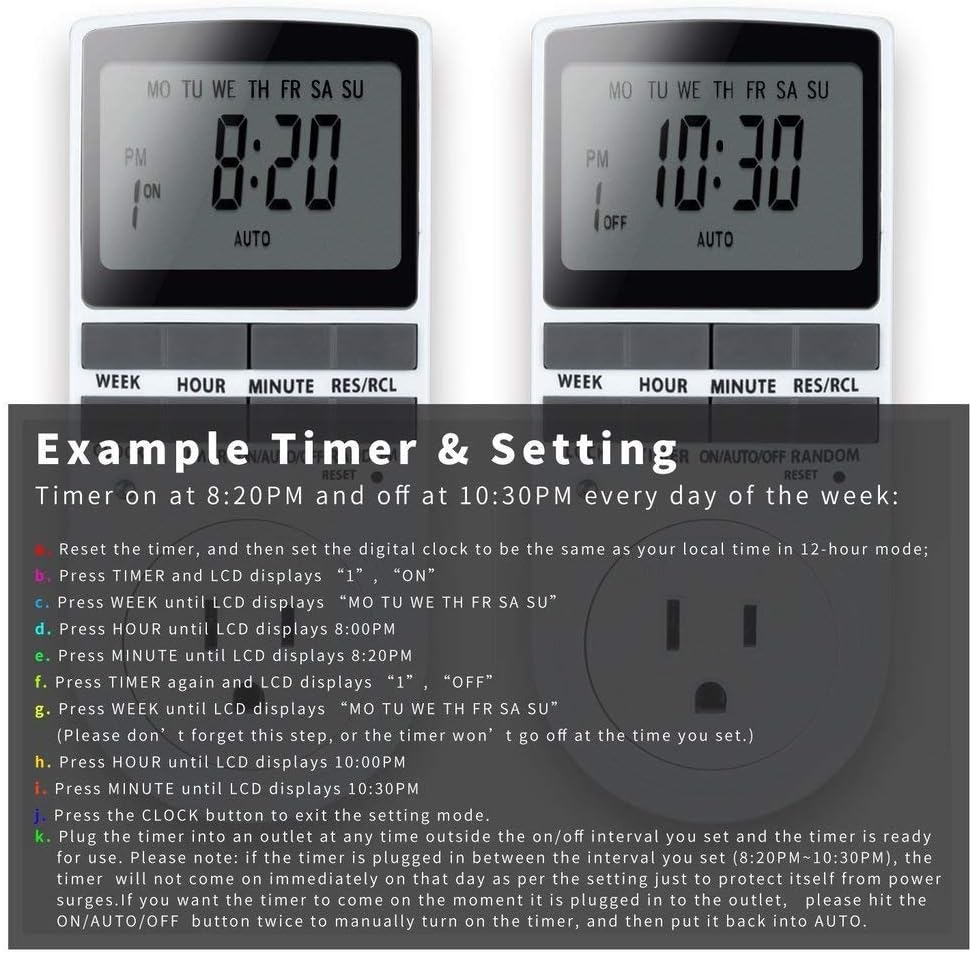
Image: Visual guide for setting an example timer program (ON at 8:20 PM, OFF at 10:30 PM daily).
6.2 Random Function (Anti-theft)
To activate the random ON/OFF feature:
- Нажмите СЛУЧАЙНЫЙ button. The word "RANDOM" will appear on the display.
- In random mode, the timer will turn ON and OFF at varying times within a set period, typically around the programmed ON/OFF times, to simulate occupancy.
- Для деактивации нажмите кнопку СЛУЧАЙНЫЙ кнопку еще раз.

Image: The anti-theft random feature of the Enover TS18 Digital Timer, designed to deter intruders.
6.3 Ручное управление
To manually switch the timer's output without affecting programmed settings:
- Нажмите ВКЛ/АВТО/ВЫКЛ кнопка для циклического переключения режимов: ON (всегда включено), АВТО (follows programs), ВЫКЛЮЧЕННЫЙ (всегда выключено).
- Select the desired temporary mode. The timer will revert to АВТО mode at the next programmed ON/OFF event.
Video: A detailed demonstration of setting programs and using the manual override function on the Enover Digital Timer.
7. Приложения
The Enover TS18 Digital Timer can be used to automate various household devices, enhancing convenience and energy efficiency.
- Coffee Makers: Program your coffee maker to start brewing before you wake up.
- Aquarium Lights/Pumps: Automate the lighting and filtration cycles for your aquarium.
- Indoor Grow Lights: Maintain consistent light schedules for plants.
- Праздничные украшения: Set festive lights to turn on and off automatically.
- Fans/Humidifiers: Control environmental devices to operate only when needed.
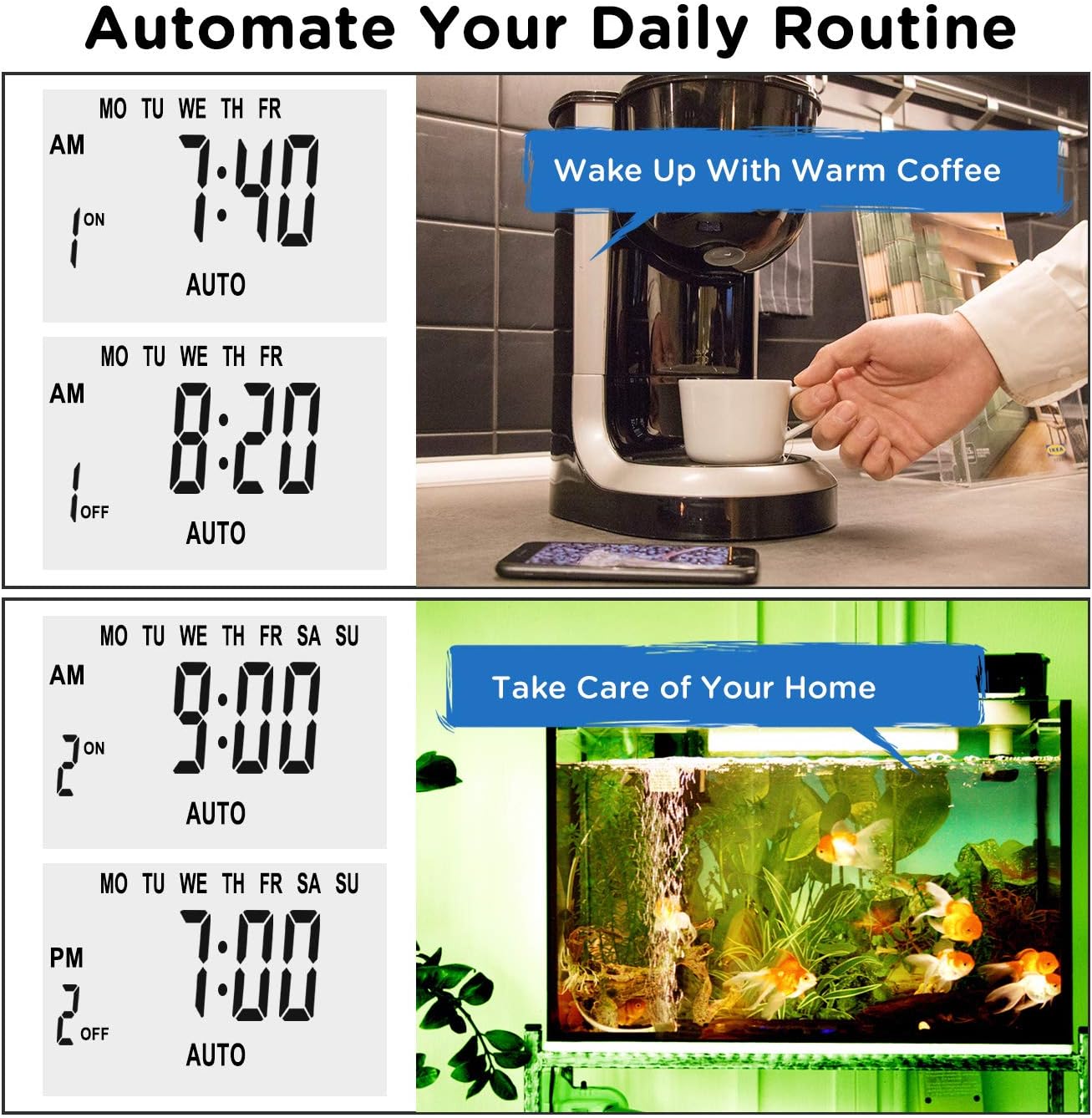
Изображение: Бывшийamples of automating daily routines with the Enover TS18 Digital Timer, such as a coffee maker and aquarium.
8. Технические характеристики
| Номер модели | ТС18 |
| Бренд | Эновер |
| Цвет | Белый |
| Материал | Пластик |
| Количество настроек | 10 (программы включения/выключения) |
| Томtage | 120 Вольт |
| Ватtage | 1800 Вт |
| Ampсредняя емкость | 15 Amps |
| Метод установки | Плагин |
| Тип крепления | Вставное крепление |
| Формат плагинов | B - US style with ground plug |
| Особые возможности | 3-wire grounded plug and 3-prong grounded outlet |
| Использование | Только для использования в помещении. |
| Вес товара | 6.4 унции |
| Размеры упаковки | 5.67 x 3.31 x 2.6 дюйма |
| Тип элемента батареи | NiMH |
| Срок службы батареи | 100 days (backup) |
9. Поиск Неисправностей
- Таймер не включается/выключается в соответствии с программой:
- Убедитесь, что таймер включен. АВТО режим.
- Убедитесь, что текущее время и день установлены правильно.
- Check that the ON and OFF times for the specific program are correctly entered and assigned to the desired days.
- Confirm the appliance connected to the timer is switched ON.
- Дисплей пустой или тусклый:
- Plug the timer into an active electrical outlet for 5-10 minutes to charge the internal battery.
- Все настройки сбрасываются после отключения питания.tage:
- The internal battery may not be sufficiently charged. Ensure the timer is regularly plugged in to maintain battery charge.
- To clear all settings:
- Используйте заостренный предмет (например, кончик ручки), чтобы надавить. ПЕРЕЗАГРУЗИТЬ button. This will clear all programs and reset the clock. You will need to re-enter all settings.
10. Гарантия и поддержка
For warranty information or technical support, please refer to the contact details provided on the product packaging or the official Enover webсайт. Сохраните чек о покупке на случай гарантийных претензий.


