Введение
This manual provides detailed instructions for the setup, operation, and maintenance of your Acer R271 bid 27-inch IPS Full HD (1920 x 1080) Display. Please read this manual thoroughly before using your monitor to ensure proper functionality and to maximize your viewопыт.

Передний view of the Acer R271 bid 27-inch IPS Full HD Display.
Настраивать
Содержимое упаковки
Убедитесь, что в упаковке присутствуют все компоненты:
- Acer R271 bid 27-inch Display
- Подставка для монитора
- Шнур питания
- Кабель HDMI (может различаться в зависимости от региона)
- Кабель VGA (может различаться в зависимости от региона)
Монитор в сборе
To assemble the monitor, carefully attach the stand to the back of the display panel. Ensure it clicks securely into place. Place the monitor on a stable, flat surface.
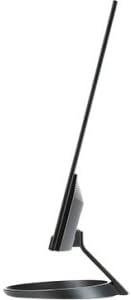
Сторона view illustrating the slim design of the Acer R271 bid monitor.
Подключение монитора
The Acer R271 bid monitor supports multiple input options. Connect the appropriate cable from your computer or device to the corresponding port on the monitor.
- HDMI: Для цифрового видео и аудио высокой четкости.
- DVI (w/HDCP): Для цифрового видеоподключения.
- VGA: For analog video connection.
После подключения видеокабеля подключите шнур питания к монитору, а затем к розетке.
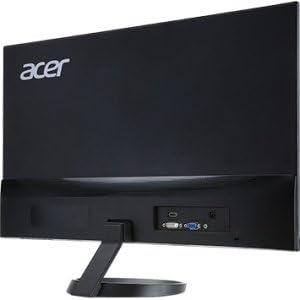
Задний view of the Acer R271 bid monitor, highlighting the HDMI, DVI, and VGA input ports.
Включение питания
Press the power button, usually located on the bottom right side of the monitor, to turn on the display. The monitor will automatically detect the active input source.
Инструкция по эксплуатации
Основные функции
Use the buttons located on the bottom bezel of the monitor to navigate the On-Screen Display (OSD) menu. These buttons typically allow you to:
- Power On/Off the monitor.
- Select input source (HDMI, DVI, VGA).
- Adjust volume (if applicable).
- Access the OSD menu for advanced settings.
Настройки дисплея
The OSD menu provides options to customize your display. Common adjustments include:
- Яркость: Отрегулируйте общую яркость экрана.
- Контраст: Измените разницу между светлыми и темными областями.
- Настройки цвета: Тонкая настройка цветовой температуры, гаммы и отдельных уровней RGB.
- Режим изображения: Select preset modes for different content types (e.g., Standard, Movie, Game).
Основные характеристики
The Acer R271 bid monitor incorporates several features designed to enhance your viewопыт работы:
- Технология IPS: Provides clear and bright colors from wide viewing angles (up to 178 degrees).
- Дизайн ZeroFrame: An edge-to-edge display that minimizes bezels, ideal for multi-monitor setups.
- Технология защиты глаз: Includes features like Blue Light Filter, Flicker-less, and ComfyView для снижения нагрузки на глаза при длительном использовании.
Официальная видеопрезентация продуктаasing the Acer R1 Series monitor's features, including ZeroFrame design, Full HD resolution, IPS technology for wide viewing angles, and Eye Protect technology for user comfort.
Техническое обслуживание и уход
Очистка монитора
Чтобы очистить экран, аккуратно протрите его мягкой тканью без ворса. Для удаления стойких загрязнений используйтеampen the cloth with a mild, non-abrasive screen cleaner. Avoid using alcohol-based cleaners or spraying liquid directly onto the screen.
Общий уход
Keep the monitor away from direct sunlight, excessive heat, and moisture. Do not block the ventilation openings. Avoid placing heavy objects on the monitor or its cables.
Поиск неисправностей
No Display or "No Signal" Message
- Убедитесь, что кабель питания надежно подключен к монитору и розетке.
- Verify that the video cable (HDMI, DVI, or VGA) is firmly connected to both the monitor and your computer.
- Проверьте, выбран ли на мониторе правильный источник входного сигнала, используя экранное меню (OSD).
- Убедитесь, что ваш компьютер включен и не находится в спящем режиме.
Плохое качество изображения
- Настройте яркость, контрастность и цветопередачу через экранное меню (OSD).
- Убедитесь, что разрешение экрана вашего компьютера установлено на собственное разрешение монитора (1920 x 1080).
- Проверьте видеокабель или разъемы на наличие физических повреждений.
Технические характеристики
| Особенность | Спецификация |
|---|---|
| Размер экрана | 27 дюйма |
| Разрешение экрана | 1920 x 1080 (Full HD) |
| Тип панели | ИПС |
| Время отклика | 4мс |
| Шаг пикселя | 0.311 мм |
| Яркость | 250 нит |
| Входы сигнала | 1 x HDMI, 1 x DVI (w/HDCP), 1 x VGA |
| Соотношение сторон | 16:9 |
| Вес товара | 8.05 фунта |
| Размеры продукта (ДxШxВ) | 24.8 x 18.1 x 9.4 дюйма |
| Цвет | Черный |

Detailed dimensions of the Acer R271 bid monitor.
Информация о гарантии
The Acer R271 bid monitor typically comes with a 3-year limited warranty. Please refer to the warranty card included with your product or visit the official Acer website for specific terms and conditions, as warranty details may vary by region and retailer.
Поддержка клиентов
For further assistance, technical support, or to download the latest drivers and software, please visit the official Acer support webсайт:
You may also contact Acer customer service directly for personalized support.


