1. Введение
This manual provides detailed instructions for the installation, operation, and maintenance of your Alpine CDE-163BT Advanced Bluetooth CD Receiver. Please read this manual thoroughly before using the unit to ensure proper operation and to prevent damage. Keep this manual for future reference.
The Alpine CDE-163BT is a versatile car stereo receiver featuring advanced Bluetooth connectivity for hands-free calling and audio streaming, CD playback, USB input, and FM/AM tuner capabilities. It is designed to deliver high-quality audio performance and user-friendly control.
2. Настройка и установка
2.1 Содержимое упаковки
Перед началом установки убедитесь в наличии всех компонентов:
- Alpine CDE-163BT Head Unit
- Жгут проводов
- Mounting Sleeve and Trim Ring
- Микрофон для громкой связи по Bluetooth
- Руководство пользователя (этот документ)
- Монтажное оборудование (винты, кронштейны)
2.2 Схема электропроводки
Refer to the wiring diagram provided with the unit's installation guide for specific connections. Key connections include:
- Власть: Yellow (constant 12V), Red (switched 12V), Black (ground).
- Спикеры: White/White-Black (Front Left), Gray/Gray-Black (Front Right), Green/Green-Black (Rear Left), Purple/Purple-Black (Rear Right).
- Антенна: Blue (power antenna/amplifier remote turn-on).
- Микрофон: Connect the supplied microphone to the dedicated input for hands-free calling.
Осторожность: Incorrect wiring can cause damage to the unit or vehicle's electrical system. If you are unsure about any wiring connections, consult a qualified professional installer.
2.3 Первоначальное включение питания
After installation, turn on your vehicle's ignition. The unit should power on. Follow any on-screen prompts for initial setup, such as language selection or clock setting.
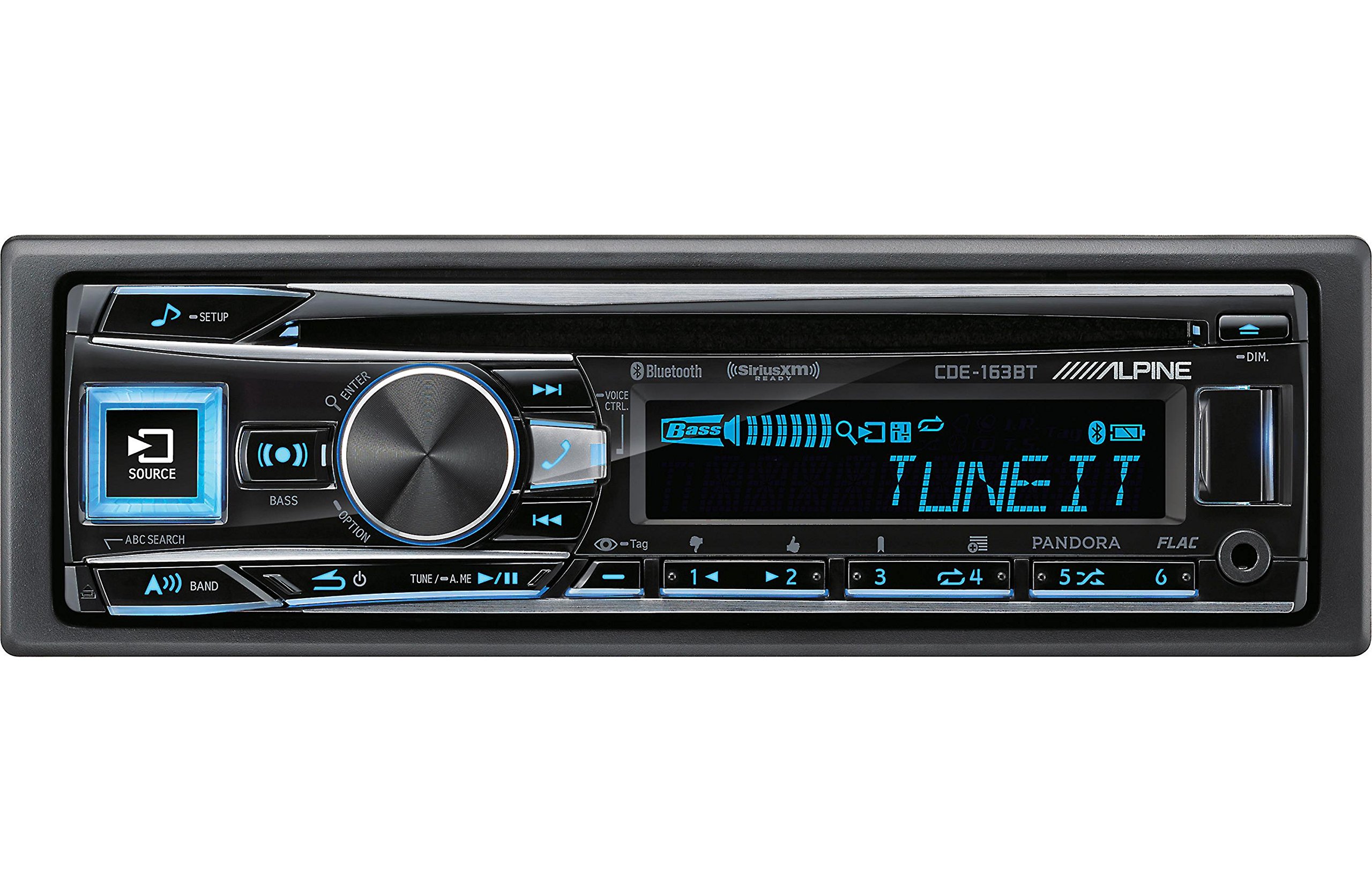
Figure 2.3.1: Front panel of the Alpine CDE-163BT receiver. This image displays the main controls, including the large rotary knob, source button, setup button, and display screen showing "TUNEIT" and "Bass" indicators.
3. Операция
3.1 Органы управления на передней панелиview
Ознакомьтесь с основными элементами управления на передней панели:
Рисунок 3.1.1: Подробная информация view of the Alpine CDE-163BT front panel. Key controls include the SOURCE button (left, illuminated), SETUP button (top left), large central rotary knob for volume and selection, BASS/OPTION button, VOICE CTRL button, and various preset/track skip buttons along the bottom.
- Кнопка ИСТОЧНИК: Selects the audio source (CD, Tuner, USB, Bluetooth Audio, AUX).
- Кнопка НАСТРОЙКА: Accesses the main setup menu for system adjustments.
- Поворотная ручка (громкость/ввод): Turns to adjust volume. Press to confirm selections in menus.
- BASS/OPTION Button: Provides quick access to bass settings or other options depending on the current mode.
- Кнопка VOICE CTRL: Activates voice control features on connected smartphones.
- Кнопка BAND: Switches between FM1, FM2, FM3, and AM bands in tuner mode.
- TUNE/A.ME/II Buttons: Used for manual tuning, auto memory, and play/pause functions.
- Track Skip/Preset Buttons (1-6): Used for skipping tracks or selecting radio presets.
- Кнопка DIM: Регулирует яркость дисплея.
3.2 Включение/выключение питания и выбор источника
- Чтобы повернуть устройство ON, press any button (e.g., SOURCE or the Rotary Knob).
- Чтобы повернуть устройство ВЫКЛЮЧЕННЫЙ, press and hold the power button (often integrated with the TUNE/A.ME button).
- Нажмите ИСТОЧНИК button repeatedly to cycle through available audio sources: CD, Tuner, USB, Bluetooth Audio, AUX.
3.3 Регулятор громкости
Поверните большой центральный элемент. Вращающаяся ручка По часовой стрелке для увеличения объема и против часовой стрелки для уменьшения объема.
3.4 Настройки звука
Нажмите BASS/OPTION button or navigate through the SETUP menu to adjust audio settings such as Bass, Treble, Balance (left/right), and Fader (front/rear). Use the Rotary Knob to adjust values and press it to confirm.
3.5 Работа радиоприемника (FM/AM тюнер)
- Select "Tuner" as the source using the ИСТОЧНИК кнопка.
- Нажмите ГРУППА Кнопка для переключения между диапазонами FM1, FM2, FM3 и AM.
- Ручная настройка: Нажмите НАСТРОЙКА buttons (◀ / ▶) to manually tune frequencies.
- Искать тюнинг: Нажмите и удерживайте НАСТРОЙКА кнопки для автоматического поиска следующей мощной станции.
- Предустановленные станции: To store a station, tune to the desired frequency, then press and hold one of the numbered preset buttons (1-6) until you hear a beep. To recall a preset, simply press the corresponding numbered button.
3.6 Воспроизведение компакт-дисков
- Вставьте компакт-диск в слот для диска. Устройство автоматически переключится на воспроизведение с CD и начнется воспроизведение.
- Use the ◀ / ▶ buttons to skip tracks.
- Нажмите TUNE/A.ME/II button for Play/Pause.
- Нажмите ABC SEARCH button to search for tracks by name.
3.7. Bluetooth-подключение
The CDE-163BT features built-in Bluetooth for hands-free calling and audio streaming.
3.7.1 Сопряжение Bluetooth-устройства
- Убедитесь, что Bluetooth включен на вашем мобильном устройстве.
- On the CDE-163BT, go to the SETUP menu and select "Bluetooth Setup".
- Choose "Pairing" or "Device Search".
- On your mobile device, search for available Bluetooth devices and select "Alpine CDE-163BT".
- Confirm the pairing code if prompted. Once paired, the Bluetooth icon on the receiver's display will illuminate.
3.7.2 Звонки по громкой связи
- При входящем звонке устройство отобразит идентификатор вызывающего абонента. Нажмите кнопку. ВХОДИТЬ button (Rotary Knob) to answer.
- Чтобы завершить вызов, нажмите кнопку ВХОДИТЬ кнопку еще раз.
- Use the supplied microphone for clear communication.
- Нажмите ГОЛОСОВОЕ УПРАВЛЕНИЕ кнопка для активации голосового помощника на вашем смартфоне.
3.7.3 Потоковая передача звука по Bluetooth
- Select "Bluetooth Audio" as the source.
- Start playback on your paired mobile device. Audio will stream through the receiver.
- Use the ◀ / ▶ buttons on the receiver to skip tracks.
3.8 Воспроизведение через USB
- Connect a USB storage device (e.g., USB flash drive) to the USB port.
- Выберите «USB» в качестве источника. Устройство автоматически обнаружит совместимый аудиоконтент и начнёт его воспроизведение. files (including FLAC format).
- Use the ◀ / ▶ buttons to skip tracks.
- The unit supports various audio formats.
3.9 Pandora and SiriusXM Ready
- Пандора: Connect your iPhone or Android smartphone via USB or Bluetooth and launch the Pandora app. Select Pandora as the source on the receiver to control the app.
- SiriusXM: This unit is SiriusXM Ready. An optional SiriusXM Connect Vehicle Tuner and subscription are required for satellite radio reception. Connect the tuner and select SiriusXM as the source.
3.10 Настройки дисплея
- Нажмите ТУСКЛЫЙ кнопка для регулировки яркости дисплея.
- Access the SETUP menu to customize display colors for buttons and the screen.
4. Техническое обслуживание
4.1 Чистка устройства
Wipe the front panel with a soft, dry cloth. For stubborn stains, dampen the cloth lightly with water. Avoid using harsh chemicals, abrasive cleaners, or solvents as they can damage the finish.
4.2 Уход за дисками
Handle CDs by their edges. Keep discs clean and free of scratches. If a disc is dirty, wipe it gently from the center outwards with a soft, lint-free cloth. Do not use solvents or abrasive cleaners on discs.
5. Поиск Неисправностей
If you experience issues with your CDE-163BT, refer to the table below for common problems and solutions.
| Проблема | Возможная причина | Решение |
|---|---|---|
| Нет электричества | Неправильная проводка; Перегоревший предохранитель; Выключенное зажигание автомобиля. | Check power connections; Replace fuse; Turn vehicle ignition on. |
| Нет звука | Слишком низкая громкость; Включен режим отключения звука; Неправильное подключение динамиков; Ampпожизненно. | Increase volume; Deactivate mute; Check speaker connections; Check ampсила жизни. |
| Bluetooth не подключается | Устройство не находится в режиме сопряжения; Bluetooth на телефоне выключен; Помехи. | Ensure phone Bluetooth is on and discoverable; Re-attempt pairing; Move closer to unit. |
| CD skips or won't play | Dirty or scratched disc; Disc inserted incorrectly. | Clean disc; Insert disc correctly; Try a different disc. |
| USB-устройство не распознано | Incompatible format; Damaged USB device; Loose connection. | Гарантировать files are compatible; Try a different USB device; Reconnect USB device. |
If the problem persists after attempting these solutions, please contact Alpine customer support.
6. Технические характеристики
Below are the technical specifications for the Alpine CDE-163BT Advanced Bluetooth CD Receiver:
- Номер модели: 79380
- Размеры продукта: 5 x 11 x 10 дюйма
- Вес товара: 4.05 фунта (4.1 фунта)
- Технологии беспроводной связи: Bluetooth
- Технологии подключения: Bluetooth
- Особые характеристики: Built-In Bluetooth, FM Tuner
- Другие особенности дисплея: Беспроводной
- Цвет: ЧЕРНЫЙ
- Производитель: альпийский
- Технологии подключения: Bluetooth
- Совместимые устройства: Смартфон
- Тип разъема: Разъем 3.5 мм, USB
- Режим аудиовыхода: Моно, стерео
- Конфигурация канала объемного звука: 4 канала
- Ватtage: 200 Вт
- Дата первой доступности: 19 января 2016 г.
7. Гарантия и поддержка клиентов
7.1 Информация о гарантии
Alpine products are manufactured to the highest quality standards. This product is covered by a limited warranty. Please refer to the separate warranty card included with your purchase for specific terms, conditions, and duration of coverage. Retain your proof of purchase for warranty claims.
7.2 Поддержка клиентов
For technical assistance, troubleshooting beyond this manual, or warranty service, please contact Alpine customer support:
- Webсайт: Visit the official Alpine webсайт с ресурсами поддержки, ответами на часто задаваемые вопросы и контактными формами.
- Телефон: Refer to the Alpine website or your warranty card for regional customer service phone numbers.
- Авторизованные сервисные центры: For repairs, locate an authorized Alpine service center through the official webсайт.
When contacting support, please have your product model number (CDE-163BT) and serial number ready.


