1. Введение
This manual provides essential information for the safe and effective operation of your OWON SDS6062 Digital Storage Oscilloscope. Please read this manual thoroughly before using the device to ensure proper setup, operation, and maintenance. The SDS6062 is a 2-channel oscilloscope featuring a 60 MHz bandwidth, 500 MS/s sample rate, and a 10M record length, designed for precise electrical signal analysis.
2. Информация по технике безопасности
Always observe the following safety precautions to prevent injury and avoid damage to the instrument or any connected products. Read these instructions carefully before operation.
- Источник питания: Use only the power adapter supplied with the instrument. Ensure the voltage соответствует вашему местному источнику питания.
- Заземление: The oscilloscope must be properly grounded to prevent electric shock.
- Безопасность зонда: Do not connect the probe ground lead to a point where a voltage greater than 30V RMS or 42.4V peak is present.
- Среда: Operate the device in a well-ventilated area, away from moisture, dust, and direct sunlight. Avoid operating in explosive atmospheres.
- Обслуживание: Все работы по техническому обслуживанию должны выполняться квалифицированным сервисным персоналом. Не пытайтесь ремонтировать устройство самостоятельно.
3. Содержимое упаковки
Убедитесь, что все перечисленные ниже товары присутствуют в вашей посылке. Если какие-либо товары отсутствуют или повреждены, свяжитесь с поставщиком.
- Цифровой запоминающий осциллограф OWON SDS6062
- 2 осциллографических щупа
- 1 х Шнур питания
- 1 x Probe Adjust Pen
- 1 х USB кабель для передачи данных
- 1 x CD с программным обеспечением
- 1 x Руководство пользователя (этот документ)
4. Продукт закончилсяview
The OWON SDS6062 is a compact and powerful digital storage oscilloscope. It features an 8-inch (800x600) color TFT-LCD screen for clear waveform display and an intuitive control panel for easy operation. Key features include its 60 MHz bandwidth, 500 MS/s real-time sample rate, and 10M record length, making it suitable for a wide range of applications.
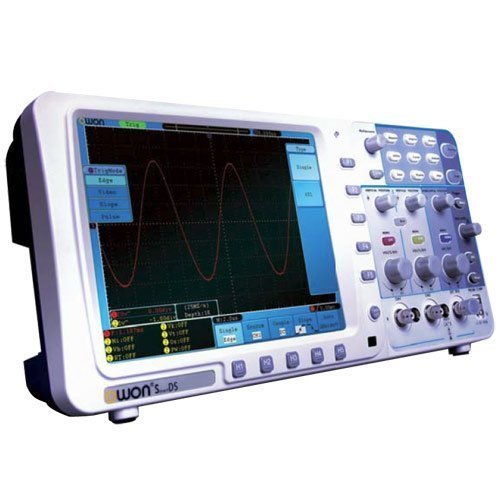
Рисунок 4.1: Передняя часть view of the OWON SDS6062 Digital Storage Oscilloscope, showing the display, control knobs, and function buttons.
4.1 Органы управления на передней панели
The front panel includes the main display, vertical controls (VOLTS/DIV, position), horizontal controls (SEC/DIV, position), trigger controls, and various function buttons for menu navigation, measurement, and utility settings.
4.2 Соединения на задней панели
The rear panel provides connectivity options including the power input, USB host and device ports, LAN port for network connectivity, and a VGA port for external display output.
5. Настройка
Follow these steps to set up your OWON SDS6062 oscilloscope for initial use.
5.1 Подключение питания
- Убедитесь, что осциллограф выключен.
- Connect the supplied power cord to the power input on the rear panel of the oscilloscope.
- Другой конец шнура питания подключите к заземленной розетке переменного тока.
5.2 Подключение зондов
- Align the BNC connector of the probe with the CH1 or CH2 input on the front panel.
- Push and twist the connector clockwise until it locks into place.
- Attach the probe ground clip to the ground terminal of the circuit under test.
- Set the probe attenuation switch (e.g., 1X or 10X) to match the setting on the oscilloscope's input channel menu.
5.3 Первоначальное включение питания
- Нажмите кнопку питания, расположенную на передней панели.
- The oscilloscope will perform a self-test and display the startup screen.
- After startup, it is recommended to perform a probe compensation adjustment (refer to Section 7.3).
6. Работа с осциллографом
This section covers basic operation and common functions of the SDS6062.
6.1 Основные измерения
To display a signal:
- Connect a signal source to CH1 or CH2 using a probe.
- Нажмите АВТОНАСТРОЙКА button. The oscilloscope will automatically adjust vertical, horizontal, and trigger settings to display a stable waveform.
- Отрегулируйте ВОЛЬТ / ДИВ ручка для изменения вертикальной шкалы (громкость)tagе на дивизию).
- Отрегулируйте СЕК/ДЕЛ ручка для изменения горизонтального масштаба (время на одно деление).
- Use the vertical and horizontal ПОЗИЦИЯ knobs to move the waveform on the screen.
6.2 Система запуска
Система запуска стабилизирует повторяющиеся волновые формы и регистрирует отдельные события.
- Триггерный уровень: Используйте УРОВЕНЬ ТРИГГЕРА ручка для регулировки громкостиtagуровень, при котором срабатывает триггер.
- Режим триггера: Access the trigger menu to select modes like Edge, Pulse, Video, or Slope.
- Источник триггера: Select the input channel (CH1, CH2, EXT, AC Line) that will be used for triggering.
6.3 Функции измерения
The SDS6062 offers various automatic measurement functions.
- Нажмите МЕРА button to display the measurement menu.
- Select desired measurements such as Vpp, Vmax, Vmin, Freq, Period, Rise Time, etc.
6.4 Connectivity (LAN and VGA)
- LAN: Connect an Ethernet cable to the LAN port on the rear panel to connect the oscilloscope to a network. This allows for remote control and data transfer using compatible software.
- VGA: Use the VGA port to connect an external monitor or projector for larger display of waveforms, useful for presentations or collaborative work.
7. Техническое обслуживание
Правильное техническое обслуживание обеспечивает долговечность и точность вашего осциллографа.
7.1 Очистка
Регулярно чистите инструмент мягкой, сухой тряпкой.amp Не используйте абразивные чистящие средства или растворители, которые могут повредить ткань.asinили экран. Перед чисткой убедитесь, что устройство выключено и отсоединено от сети.
7.2 Хранение
When not in use, store the oscilloscope in a dry, dust-free environment, away from extreme temperatures and direct sunlight. Use the original packaging or a suitable carrying case for protection during transport.
7.3 Probe Compensation Adjustment
Probe compensation should be adjusted to match the oscilloscope's input characteristics. This ensures accurate measurements.
- Connect the probe to CH1 and attach the probe tip to the probe compensation output (usually a square wave test point on the front panel).
- Прикрепите зажим заземления щупа к клемме заземления.
- Нажимать АВТОНАСТРОЙКА.
- Use the supplied probe adjust pen to turn the trimmer screw on the probe until the square wave displayed on the screen has flat top and bottom edges (no overshoot or undershoot).
8. Поиск Неисправностей
В этом разделе приведены решения распространенных проблем, с которыми вы можете столкнуться.
- Нет дисплея: Check power connection, ensure the power button is pressed. Adjust screen brightness if necessary.
- No Waveform: Verify probe connection to the input channel and the circuit under test. Ensure the signal source is active. Press АВТОНАСТРОЙКА. Check vertical and horizontal scale settings.
- Нестабильная форма сигнала: Adjust the trigger level. Check trigger mode and source settings. Ensure the signal is within the oscilloscope's bandwidth.
- Неточные измерения: Perform probe compensation adjustment (Section 7.3). Ensure probe attenuation settings match the oscilloscope.
- Устройство не отвечает: Try restarting the oscilloscope. If the issue persists, contact technical support.
9. Технические характеристики
Technical specifications for the OWON SDS6062 Digital Storage Oscilloscope.
| Параметр | Спецификация |
|---|---|
| Номер модели | SDS6062 |
| Пропускная способность | 60 МГц |
| Каналы | 2 + 1 (External Trigger) |
| SampСкорость обновления (в режиме реального времени) | 500 мс/с |
| Длина записи | 10 млн баллов |
| Отображать | 8-inch Color TFT-LCD (800x600) |
| Интерфейс | USB Host, USB Device, LAN, VGA |
| AutoScale Function | Да |
| Производитель | ОВОН |
10. Гарантия и поддержка
OWON products are designed for reliability and performance. For warranty information, please refer to the warranty card included with your product or visit the official OWON website. For technical support, troubleshooting assistance, or service inquiries, please contact your local OWON distributor or the OWON customer service department. Keep your purchase receipt as proof of purchase for warranty claims.


