Введение
Thank you for choosing the MUSE M-1350 BTC Portable Bluetooth Speaker. This manual provides essential information for the safe and efficient operation of your device. Please read it thoroughly before use and retain it for future reference.
The MUSE M-1350 BTC is a versatile audio system featuring Bluetooth A2DP, MP3 CD player, FM PLL tuner, USB port with charging capability, and dual auxiliary inputs. It boasts a robust wooden casing and stands approximately 100cm tall, delivering 120W of power.

Передний view of the MUSE M-1350 BTC Portable Bluetooth Speaker.
Информация по безопасности
- Не подвергайте устройство воздействию дождя или влаги во избежание возгорания или поражения электрическим током.
- Обеспечьте надлежащую вентиляцию. Не закрывайте вентиляционные отверстия.
- Установите устройство на устойчивую ровную поверхность.
- Используйте только те насадки/аксессуары, которые указаны производителем.
- Отключайте устройство от сети во время грозы или если оно не используется в течение длительного времени.
- По всем вопросам обслуживания обращайтесь к квалифицированному персоналу.
Характеристики и компоненты продукта
The MUSE M-1350 BTC is designed with user convenience and high-quality audio in mind. Key features include:
- Bluetooth A2DP for wireless audio streaming.
- CD/MP3 player.
- PLL FM Tuner with 30 presets.
- USB port for MP3 playback and device charging.
- Two auxiliary input jacks.
- Integrated subwoofer for strong bass.
- Adjustable Bass & Treble, Loudness control.
- Alarm and Sleep functions.
- NFC for easy Bluetooth pairing.

Key features of the MUSE M-1350 BTC, highlighting Bluetooth connectivity, real wood casing, strong bass, and FM radio.

Подробный view of the top panel showing the integrated smartphone/tablet dock and CD player, alongside a note about the integrated subwoofer.
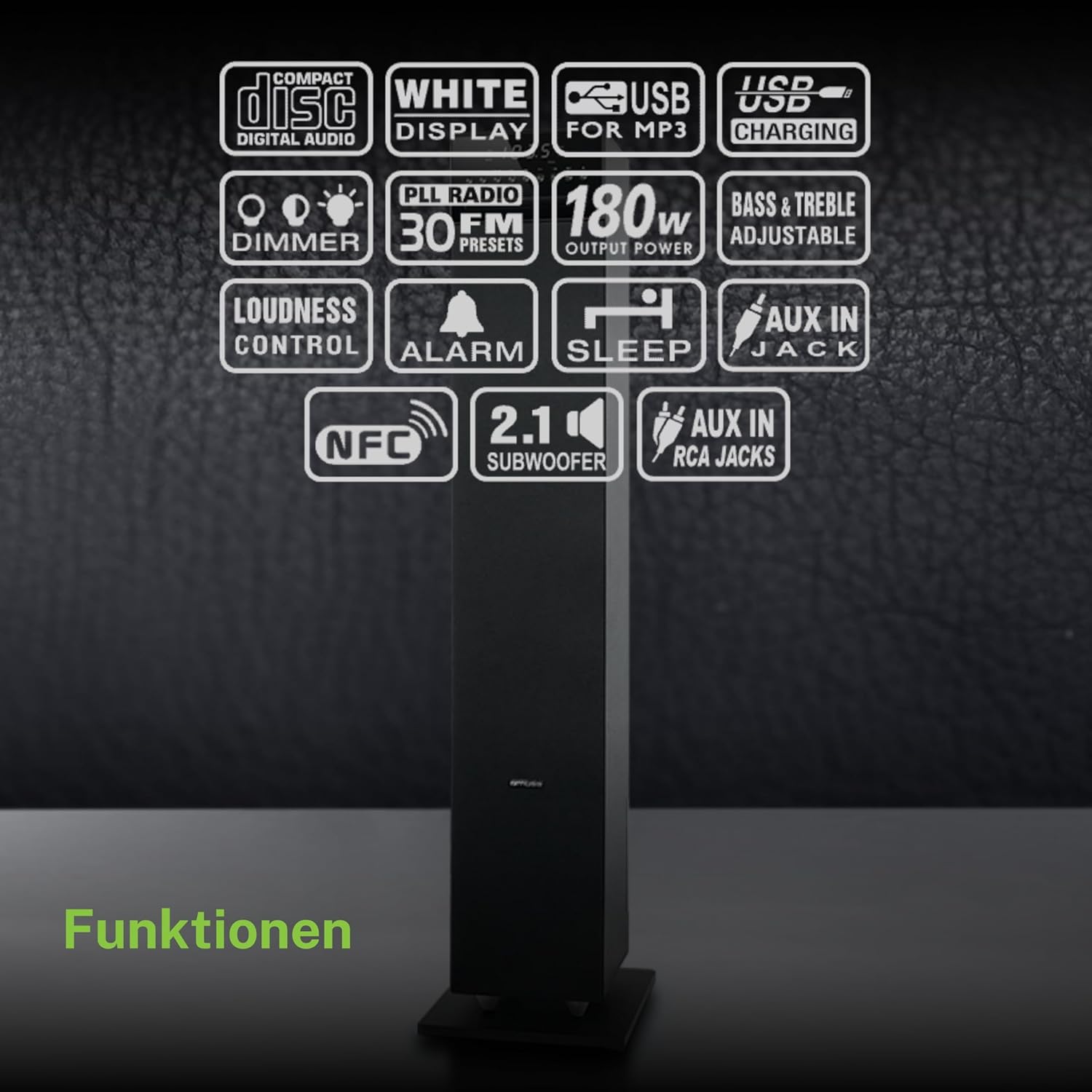
Болееview of the various functions and connectivity options available on the MUSE M-1350 BTC, including CD playback, USB, Bluetooth, FM radio, and audio adjustments.
Настраивать
1. Распаковка
Carefully remove the speaker from its packaging. Check for any signs of damage during transit. Retain the packaging for future transport or storage.
2. Размещение
Place the speaker on a firm, level surface. For optimal sound performance, position it in a location free from obstructions and away from direct heat sources or excessive moisture.

The MUSE M-1350 BTC speaker positioned in a living room environment, demonstrating its sleek design.
3. Подключение питания
Connect the power cord to the AC inlet on the rear of the speaker, then plug the other end into a suitable wall outlet (AC 230V ~ 50Hz).
4. Подключение внешних устройств
- Bluetooth: Ensure Bluetooth is enabled on your device. The speaker will automatically enter pairing mode when Bluetooth is selected.
- Вход AUX: Use a 3.5mm audio cable to connect external audio devices (e.g., MP3 players, smartphones) to the AUX IN jack.
- USB: Вставьте USB-флешку в USB-порт для воспроизведения MP3-файлов.
Инструкция по эксплуатации
1. Включение/выключение питания
Press the POWER button on the top panel or remote control to turn the unit on or off.
2. Выбор режима
Press the MODE button repeatedly to cycle through available modes: CD, Bluetooth, FM Radio, USB, AUX.
3. Сопряжение по Bluetooth
- Select Bluetooth mode on the speaker. The display will show "BT" and flash, indicating pairing mode.
- On your Bluetooth device, search for "MUSE M-1350 BTC" in the Bluetooth settings.
- Select the speaker to pair. Once connected, the display will stop flashing.
4. Воспроизведение компакт-диска
- Выберите режим CD.
- Insert a CD into the CD slot. The unit will automatically begin playback.
- Use the PLAY/PAUSE, SKIP, and STOP buttons for control.
5. Настройка FM-радио
- Выберите режим FM.
- Press and hold the SCAN button to automatically scan and store available stations.
- Use the PRESET buttons to navigate through stored stations.
6. USB-воспроизведение
- Вставьте флэш-накопитель USB с MP3 files в порт USB.
- Select USB mode. Playback will begin automatically.
- Use the PLAY/PAUSE, SKIP, and STOP buttons for control.
7. Вход AUX
Connect your external audio device to the AUX IN jack. Select AUX mode on the speaker. Audio will be played through the speaker.
8. Настройки звука
- Объем: Use the VOLUME knob or +/- buttons on the remote.
- Бас/ВЧ: Adjust bass and treble levels using the dedicated controls on the remote or top panel.
- Loudness: Activate the Loudness function for enhanced bass and treble at low volumes.
Обслуживание
Уборка
Протрите устройство мягкой сухой тканью. Не используйте абразивные чистящие средства, воски или растворители. Для удаления стойких пятен слегка протрите поверхность.amp Можно использовать ткань, а затем сухую ткань.
Хранилище
If the unit is not used for an extended period, unplug it from the power outlet and store it in a cool, dry place, away from direct sunlight and extreme temperatures.
Поиск неисправностей
| Проблема | Возможная причина | Решение |
|---|---|---|
| Нет электричества | Шнур питания не подключен; розетка неисправна. | Убедитесь, что шнур питания надежно вставлен в розетку; попробуйте использовать другую розетку. |
| Нет звука | Volume too low; Incorrect input mode selected; Device not connected properly | Increase volume; Select correct input mode (Bluetooth, CD, AUX, USB); Reconnect device |
| Сбой сопряжения Bluetooth | Speaker not in pairing mode; Device too far; Bluetooth not enabled on source device | Ensure speaker is in Bluetooth mode and flashing; Move device closer; Enable Bluetooth on your device |
| CD не воспроизводится | CD inserted incorrectly; CD is scratched/dirty; Incorrect mode | Вставьте компакт-диск правильно; Очистите или замените компакт-диск; Выберите режим CD. |
| Плохой прием FM | Антенна не выдвинута; Зона слабого сигнала | Fully extend the FM antenna; Reposition the speaker for better reception |
Технические характеристики
| Особенность | Деталь |
|---|---|
| Название модели | М-1350 БТД |
| Бренд | МУЗА |
| Тип динамика | Башня |
| Технология связи | Bluetooth, USB |
| Максимальная выходная мощность динамика | 120 Вт |
| Режим аудиовыхода | Стерео |
| Конфигурация каналов объемного звука | 2.1 |
| Материал | Древесина |
| Цвет | Черный |
| Размеры продукта (ДxШxВ) | 23.1 х 25.7 х 100.6 см |
| Вес товара | 9.25 Килограмма |
| Общее количество портов USB | 1 |
| Совместимые устройства | MP3 players, laptops, tablets, televisions, smartphones |
| Рекомендуемое использование | Для смартфона или планшета |

Technical drawing illustrating the precise dimensions of the MUSE M-1350 BTC speaker in millimeters.
Гарантия и поддержка
This product comes with a manufacturer's warranty of 1 year from the date of purchase. Please retain your proof of purchase for warranty claims.
For technical support or service inquiries, please contact your retailer or the official MUSE customer service. Contact information can typically be found on the manufacturer's webсайта или упаковки продукта.


