1. Введение
This manual provides detailed instructions for the installation, operation, and maintenance of your Zmodo ZM-KW1001-O4-1TB HD Camera System. Please read this manual thoroughly before using the product to ensure proper setup and functionality. Keep this manual for future reference.
2. Продукт закончилсяview
2.1 Основные характеристики
- 720p HD video for clear and sharp images.
- Smartlink wireless configuration for quick setup.
- Motion detection alerts to notify you of activity.
- IP66 rated outdoor cameras for weather resistance.
- Infrared night vision for surveillance in low-light conditions.
- Integrated 1TB hard drive for local video storage.
2.2 Компоненты системы
The Zmodo ZM-KW1001-O4-1TB system typically includes the following components:
- Wireless Network Video Recorder (NVR) with 1TB HDD
- HD Wireless Cameras (quantity may vary, typically 4)
- Адаптеры питания для NVR и камер
- Ethernet-кабель
- Монтажные винты и анкеры
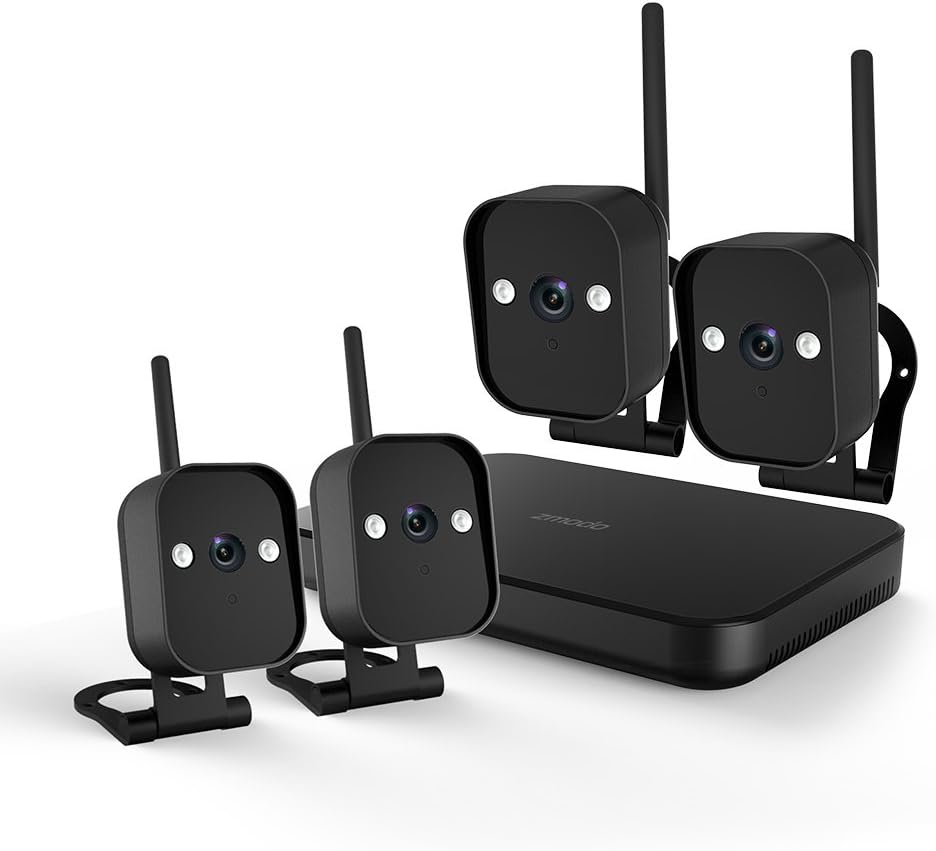
Рисунок 1: Надview of the Zmodo ZM-KW1001-O4-1TB HD Camera System, showing the NVR unit and four wireless cameras.
3. Инструкции по настройке
3.1 Распаковка и первоначальный осмотр
Carefully unpack all components and verify that all items listed in Section 2.2 are present and undamaged. If any items are missing or damaged, contact customer support.
3.2 Подключение сетевого видеорегистратора
- Подключите сетевой видеорегистратор к розетке с помощью прилагаемого адаптера питания.
- For initial setup and optimal performance, connect the NVR to your router using the supplied Ethernet cable.
- Connect the NVR to a monitor via HDMI or VGA cable (not included) if local viewжелательно.

Рисунок 2: The Zmodo Network Video Recorder (NVR) unit, which stores recordings and manages camera connections.
3.3 Установка и сопряжение камеры
The cameras are designed for both indoor and outdoor use with an IP66 weather-resistant rating. Ensure cameras are placed within range of the NVR's wireless signal.
- Включение камер: Подключите каждую камеру к соответствующему адаптеру питания и вставьте ее в розетку.
- Smartlink Pairing: The cameras should automatically attempt to pair with the NVR. Follow the on-screen prompts on the connected monitor or use the Zmodo app for Smartlink setup. If pairing fails, refer to the troubleshooting section.
- Монтаж: Choose suitable locations for your cameras. Use the provided screws and anchors to securely mount the cameras. Ensure a clear line of sight and optimal viewугол наклона.

Рисунок 3: A Zmodo wireless camera shown with its wall-mounting bracket, suitable for outdoor installation.

Рисунок 4: A Zmodo wireless camera shown with its stand mount, ideal for indoor placement on flat surfaces.
3.4 Настройка мобильного приложения
- Download the Zmodo app from the App Store (iOS) or Google Play Store (Android).
- Create a new account or log in to an existing one.
- Follow the in-app instructions to add your Zmodo NVR system. This typically involves scanning a QR code on the NVR or manually entering device details.
- Once added, you should be able to view Прямая трансляция с ваших камер.
4. Инструкция по эксплуатации
4.1 Прямой эфир View
Access the Zmodo app or the NVR's local interface to view live video streams from your cameras. You can typically select individual cameras or view одновременная подача нескольких кормушек.
4.2 Обнаружение движения и оповещения
The system is equipped with motion detection capabilities. When motion is detected, the system can record footage and send alerts to your mobile device.
- Конфигурация: In the Zmodo app or NVR settings, navigate to the motion detection section. You can customize detection zones, sensitivity levels, and alert schedules.
- Оповещения: Ensure push notifications are enabled for the Zmodo app on your mobile device to receive timely alerts.
4.3 Запись и воспроизведение
The NVR includes a 1TB hard drive for continuous or motion-activated recording.
- Настройки записи: Configure recording modes (continuous, scheduled, motion-activated) via the NVR's local interface or the Zmodo app.
- Воспроизведение: Чтобы повторноview записано фуtage, access the playback feature in the Zmodo app or directly on the NVR. Select the desired date and time to view события.
4.4 Ночное видение
The cameras feature infrared night vision, allowing them to capture clear video in low-light or complete darkness. The system automatically switches to night vision mode when ambient light levels are insufficient.
5. Техническое обслуживание
- Очистка камеры: Периодически прочищайте линзы камеры мягкой тряпкой.amp Для обеспечения чёткого изображения используйте ткань. Избегайте использования абразивных чистящих средств.
- Обновления прошивки: Check the Zmodo app or website regularly for firmware updates. Keeping your system updated ensures optimal performance and security.
- Управление жестким диском: Жесткий диск объемом 1 ТБ автоматически перезапишет самые старые файлы.tage when full. If you need to preserve specific recordings, back them up to an external device before they are overwritten.
- Источник питания: Убедитесь, что все адаптеры питания надежно подключены и не имеют повреждений.
6. Поиск Неисправностей
- Нет видеопотока:
- Проверьте, включены ли видеорегистратор и камеры.
- Verify network connectivity for the NVR.
- Убедитесь, что камеры находятся в зоне действия беспроводной связи видеорегистратора.
- Re-pair cameras if they have lost connection.
- Уведомления о движении не получены:
- Убедитесь, что функция обнаружения движения включена в настройках приложения.
- Check motion detection zones and sensitivity.
- Ensure push notifications are enabled for the Zmodo app on your mobile device.
- Плохое качество изображения:
- Очистите объектив камеры.
- Убедитесь, что в поле зрения камеры нет никаких препятствий. view.
- Check for strong interference if using wireless connection.
- Cameras Not Connecting to Wi-Fi:
- Ensure the NVR's Wi-Fi is enabled and functioning.
- Move cameras closer to the NVR to improve signal strength.
- Reset cameras and attempt Smartlink pairing again.
7. Технические характеристики
| Особенность | Спецификация |
|---|---|
| Номер модели | ZM-KW1001-O4-1TB |
| Разрешение видео | 720p HD |
| Технология связи | Беспроводной |
| Количество каналов | 4 |
| Емкость хранилища | 1 ТБ (терабайт) |
| Особые возможности | Wireless, Motion Detection, Night Vision, IP66 Weatherproof |
| Совместимость с операционными системами | Android, iOS |
| Источник питания | Wireless (Power Adapters for components) |
| Цвет | Черный |
| Размеры упаковки | 26.8 х 20 х 16 см |
| Вес товара | 1.5 Килограмма |
8. Гарантия и поддержка
For warranty information and technical support, please refer to the official Zmodo website or contact Zmodo customer service directly. Details regarding warranty periods and service procedures are typically available on the manufacturer's support pages.
Онлайн поддержка: Visit the Zmodo official webсайт с часто задаваемыми вопросами, руководствами по устранению неполадок и контактной информацией.
Связаться со службой поддержки: If you require further assistance, please have your product model number (ZM-KW1001-O4-1TB) and purchase details ready when contacting support.


