1. Введение
This manual provides comprehensive instructions for the setup, operation, maintenance, and troubleshooting of your Avaya 9508 Digital Deskphone. Designed for small and medium-sized businesses, this deskphone offers reliable and high-quality communication solutions.
The Avaya 9508 Digital Deskphone features an intuitive design and functionality, making it an ideal choice for various user types in mixed digital/IP telephony environments.
2. Настройка
Follow these steps to set up your Avaya 9508 Digital Deskphone:
- Подключите трубку: Вставьте один конец витого шнура в трубку, а другой конец — в разъем для трубки на боковой стороне телефонной базы.
- Подключите сетевой кабель: Connect a digital line cable from your wall jack to the port labeled "Digital Line" on the back of the phone.
- Подключите питание (если применимо): If your system requires external power, connect the power adapter to the phone and a power outlet.
- Расположите телефон: Place the phone on a stable surface. The integrated stand allows for an angled viewпозиция.
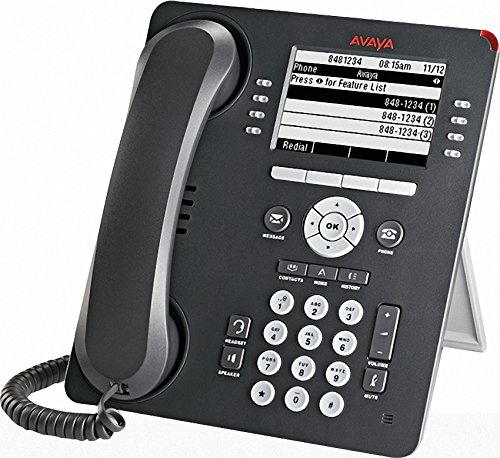
Figure 1: Avaya 9508 Digital Deskphone. This image shows the complete phone unit, including the handset, display screen, and the full keypad with various function buttons.
3. Инструкция по эксплуатации
3.1 Основные функции вызова
- Звонок: Поднимите трубку или нажмите Спикер кнопка. Наберите нужный номер.
- Ответ на звонок: Поднимите трубку или нажмите Спикер нажимайте, когда звонит телефон.
- Завершение вызова: Замените трубку или нажмите кнопку Phone/Exit кнопка.
3.2 Клавиатура и дисплей
The phone features a clear display and a standard 12-button dial pad. Soft keys below the display provide context-sensitive options.
- Навигационный кластер: Используйте OK button and surrounding arrow keys to navigate menus and select options on the display.
- Программируемые клавиши: The buttons adjacent to the display (as seen in Figure 1) change function based on the current menu or call state. The OCR shows "Press for Feature List" as a display option, indicating dynamic soft key functionality.
3.3 функциональные кнопки
- Сообщение: Access your voicemail messages. A red indicator light next to this button signals new messages.
- Контакты: Access your stored contact directory.
- Меню: Access the phone's main menu for settings and features.
- Журнал вызовов: View a list of recent incoming, outgoing, and missed calls. A red indicator light next to this button signals new missed calls.
- Повторный набор: Повторно наберите последний набранный номер.
- Спикер: Toggle speakerphone mode on or off.
- Немой: Отключите микрофон во время разговора.
- Объем: Adjust the volume for the handset, speaker, or ringer.
- Гарнитура: Activate or deactivate the headset port.
- Держать: Поставьте активный вызов на удержание.
- Конференция: Начните конференц-связь.
- Передача: Transfer an active call to another extension or external number.
- Уронить: Disconnect an active call.
4. Техническое обслуживание
To ensure the longevity and proper functioning of your Avaya 9508 Digital Deskphone, follow these simple maintenance guidelines:
- Уборка: Используйте мягкий, damp cloth to clean the phone's surface. Avoid abrasive cleaners or solvents. Do not spray liquids directly onto the phone.
- Среда: Keep the phone away from excessive heat, direct sunlight, and moisture. Ensure proper ventilation.
- Управление шнуром: Avoid tangling or excessive pulling on the handset and network cords to prevent damage.
5. Поиск Неисправностей
If you encounter issues with your Avaya 9508 Digital Deskphone, refer to the following common problems and solutions:
- Нет сигнала готовности:
- Check that the network cable is securely connected to both the phone and the wall jack.
- Ensure the phone has power (if using an external adapter).
- Дисплей пустой или не отвечает:
- Проверьте подключение к электросети.
- Try restarting the phone by disconnecting and reconnecting the power/network cable.
- Не слышно и не слышно:
- Отрегулируйте громкость с помощью Объем кнопки.
- Обеспечить Немой button is not active.
- Проверьте соединения телефона и гарнитуры.
- Кнопки не реагируют:
- Перезагрузите телефон.
- Убедитесь, что никакие посторонние предметы не загораживают кнопки.
For persistent issues, contact your system administrator or Avaya support.
6. Технические характеристики
| Бренд | Авайя |
| Номер модели | 9508 |
| Производитель | Авайя |
| Цвет | Черный |
| Тип автоответчика | Цифровой |
| Идентификация вызывающего абонента | Нет |
| СКП | 712155447561, 033587515940 |
| ASIN | B014FHW9WA |
| Дата первой доступности | 6 февраля 2016 г. |
7. Гарантия и поддержка
For detailed warranty information, please refer to the documentation provided with your purchase or contact your Avaya reseller. Warranty terms and conditions may vary.
For technical support, contact your IT department or the official Avaya support channels. You can typically find support contact information on the Avaya website or through your service provider.