1. Начало работы
1.1 Содержимое упаковки
Verify that all items are present in your Ultimate Ears Boom 2 package:
- Ultimate Ears Boom 2 Bluetooth Speaker
- Кабель для зарядки Micro-USB
- Адаптер питания (может различаться в зависимости от региона)
1.2 Зарядка динамика
Before initial use, fully charge your Ultimate Ears Boom 2 speaker. Connect the micro-USB cable to the charging port on the speaker and the other end to the power adapter, then plug into a wall outlet. The LED indicator will show charging status.

The Ultimate Ears Boom 2 speaker, ready for charging.
1.3 Сопряжение по Bluetooth
Чтобы подключить динамик к устройству с поддержкой Bluetooth:
- Press and hold the Power button on the top of the speaker until you hear a tone and the LED flashes white.
- На мобильном устройстве перейдите в настройки Bluetooth.
- Select 'UE Boom 2' from the list of available devices.
- Once connected, you will hear a confirmation tone from the speaker.

Вершина view of the speaker, highlighting the power and Bluetooth pairing buttons.
1.4 Ultimate Ears App
For enhanced control and additional features, download the Ultimate Ears app from your device's app store (iOS 9.0 or later required for Apple devices, Android compatible). The app allows for remote power control, equalizer adjustments, and PartyUp mode.
2. Speaker Operation
2.1 Включение/выключение питания
Press the Power button located on the top of the speaker to turn it on or off. A distinct sound will indicate the power status.
2.2 Регулятор громкости
Adjust the volume using the large '+' and '-' buttons located on the side of the speaker. You can also control the volume from your connected Bluetooth device.
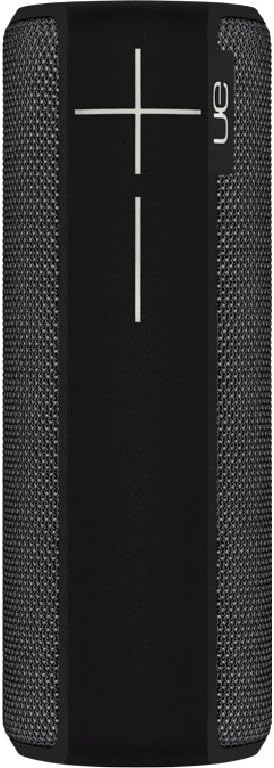
Сторона view of the speaker, featuring the prominent volume control buttons.
2.3 Music Control (Tap Gestures)
The Boom 2 features tap controls for music playback:
- Одно нажатие: Tap the top of the speaker once to play or pause the current track.
- Двойное нажатие: Tap the top of the speaker twice to skip to the next track.
2.4 Состояние батареи
To check the battery level, press both the '+' and '-' volume buttons simultaneously. The speaker will announce the remaining battery percentage.
2.5 Waterproof and Durability Features
The Ultimate Ears Boom 2 is designed to be waterproof (IPX7 rated) and shockproof. It can be immersed in water up to 1 meter for 30 minutes. Ensure the charging port cover is securely closed before exposing the speaker to water.

The speaker's waterproof design allows for use in various environments.

The Ultimate Ears Boom 2 demonstrating its water resistance.
2.6 PartyUp Mode (Connecting Multiple Speakers)
Use the Ultimate Ears app to connect multiple Boom speakers together for a more expansive sound experience. Follow the instructions within the app to activate PartyUp mode.
3. Уход и обслуживание
3.1 Инструкции по очистке
Для чистки динамика используйте мягкую, твердую тряпку.amp cloth. Avoid using harsh chemicals or abrasive cleaners, as these can damage the speaker's finish or waterproof seals. Ensure the charging port is dry before charging.
3.2 Долговечность батареи
To maximize battery life, avoid fully discharging the speaker frequently. Charge the speaker regularly, and if storing for an extended period, ensure it has at least a 50% charge.
3.3 Хранение
Store the speaker in a cool, dry place away from direct sunlight and extreme temperatures. Ensure the charging port cover is closed to prevent dust and debris from entering.
4. Руководство по устранению неполадок
4.1 Нет питания
- Ensure the speaker is charged. Connect it to the power adapter and allow it to charge for at least 15 minutes before attempting to power on.
- Нажмите и удерживайте кнопку питания в течение нескольких секунд.
4.2 Проблемы с подключением Bluetooth
- Ensure the speaker is in pairing mode (flashing white LED).
- Выключите и снова включите Bluetooth на мобильном устройстве.
- Forget 'UE Boom 2' from your device's Bluetooth list and attempt to re-pair.
- Move the speaker closer to your device; the maximum range is approximately 33 meters (100 feet).
4.3 Нет звука или низкая громкость
- Увеличьте громкость как на динамике, так и на подключенном устройстве.
- Убедитесь, что динамик правильно подключен по Bluetooth.
- Check if the audio source on your device is playing correctly.
4.4 Искажение звука
- Уменьшите громкость как на динамике, так и на подключенном устройстве.
- Убедитесь, что звук file or streaming quality is not low.
- Move away from potential sources of interference (e.g., Wi-Fi routers, other Bluetooth devices).
4.5 Проблемы с подключением к приложению
- Ensure your mobile device's operating system meets the app's requirements (iOS 9.0+).
- Перезапустите приложение или переустановите его.
- Ensure the speaker's firmware is up to date via the app.
5. Технические характеристики
| Особенность | Спецификация |
|---|---|
| Название модели | Бум 2 |
| Номер модели | 984-000557 |
| ASIN | B0141208EA |
| Технология связи | Bluetooth, USB |
| Технология беспроводной связи | Bluetooth |
| Совместимые устройства | Компьютеры, смартфоны (Android, iOS) |
| Срок службы батареи | До 15 часов |
| Рейтинг водонепроницаемости | IPX7 (до 1 метра в течение 30 минут) |
| Максимальный диапазон | 33 метра (100 фута) |
| Выходная мощность динамика | 25 Вт |
| Размеры продукта | 6.7D x 6.7W x 18H cm (approx. 15 x 5 x 5 cm; 0.54 grams) |
| Режим аудиовыхода | Объемный |
| Источник питания | Питание от аккумулятора (в комплект входит 1 литий-полимерный аккумулятор) |
6. Гарантия и поддержка клиентов
6.1 Ограниченная гарантия
The Ultimate Ears Boom 2 comes with a Limited Warranty. For specific details regarding warranty coverage, terms, and conditions, please refer to the warranty documentation included with your product or visit the official Ultimate Ears webсайт.
6.2 Поддержка клиентов
If you encounter any issues not covered in this manual or require further assistance, please contact Ultimate Ears customer support through their official website. For return policies or issues related to your purchase, consult the retailer's (e.g., Amazon.it) help pages.


