1. Введение
This manual provides detailed instructions for the safe and effective use of your PerfectPrime IR0002 Infrared Thermal Imager. Please read this manual thoroughly before operating the device and retain it for future reference.
The PerfectPrime IR0002 is an advanced infrared thermal imager and visible light camera designed for various applications, offering an IR resolution of 3600 pixels and a temperature range from -20°C to 300°C (-4°F to 572°F). Its 6 Hz refresh rate ensures responsive thermal imaging.
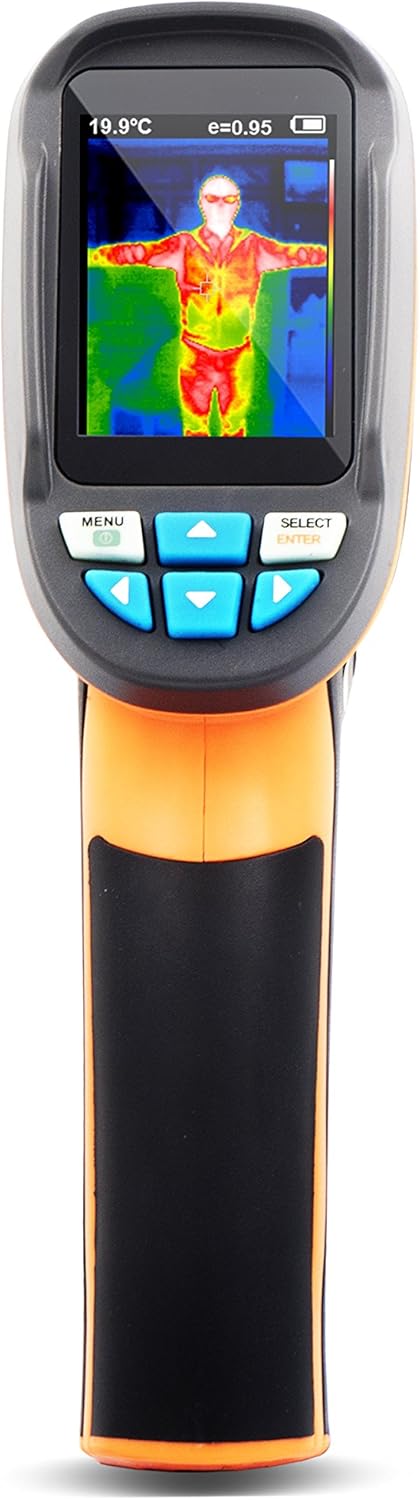
Рисунок 1: Передняя часть view of the PerfectPrime IR0002 Thermal Imager.
2. Меры предосторожности
To ensure safe operation and prolong the life of your device, observe the following precautions:
- Do not point the imager directly at high-intensity light sources (e.g., the sun, lasers) as this may damage the infrared sensor.
- Избегайте воздействия на устройство экстремальных температур, высокой влажности или агрессивных сред.
- Use only the specified battery type: 4 x AA Alkaline 1.5V batteries. Do not use 1.2V rechargeable batteries.
- Держите устройство вдали от сильных электромагнитных полей.
- Не пытайтесь разбирать или модифицировать устройство. По всем вопросам обслуживания обращайтесь к квалифицированному персоналу.
- Протирайте устройство мягкой сухой тканью. Не используйте абразивные чистящие средства или растворители.
3. Product Description and Structure
The PerfectPrime IR0002 integrates an infrared thermal imager and a visible light camera. This combination allows for clear display of temperature distribution and easier identification of target areas.

Figure 2: Structure of the Product and Basic Functions.
Идентификация компонента:
- Цветной TFT-экран высокой четкости
- Start-up/menu key
- Крышка аккумуляторного отсека
- Select/enter key
- Small SD card slot
- Инфракрасный датчик изображения
- Камера видимого света
- Светодиодный свет
- Image capturing key
- Interface for the installation of tripod
4. Настройка
Установка аккумулятора:
Для установки или замены батарей:
- Open the battery cover (3) located on the handle.
- Insert 4 x AA Alkaline 1.5V batteries, ensuring correct polarity. Do not use 1.2V rechargeable batteries.
- Slide the battery cover back to its accurate position until it clicks securely.

Figure 3: Battery cover installation method.
5. Инструкция по эксплуатации
5.1 Basic Functions:
- Press the "start-up" key (2) for 5 seconds to turn on the instrument.
- Press the "menu" key (2) for 1 second to enter the mode of setting of basic functions. There are only five options on the display screen.
- Press "up" or "down" key to scan the menu and select the yellow option box.
- Press "select" key (4) and "menu" option to edit the value.
- Press "up" or "down" to edit the value. After adjustment, confirm the new value and press "menu" key to exit the edit mode.
5.2 Описание меню:
The device menu provides various settings and functions:
- Установка времени: Настройте внутренние часы устройства.
- Save image: Store captured thermal images.
- Background light setting: Отрегулируйте яркость дисплея.
- Установка единиц измерения температуры: Переключение между градусами Цельсия (°C) и Фаренгейта (°F).
- Настройка температуры фона: Calibrate the background temperature for accurate readings.
- Capacity of memory card: View remaining storage on the Micro SD card.
- Color palette setting: Choose different color schemes for thermal images.
- Настройка коэффициента излучения: Adjust the emissivity value for different materials.
5.3 Measurement:
The measured temperature of the center of the pixel is displayed in the upper left corner of the display screen. The setting of the radiation coefficient is also displayed in the upper right corner of the display screen. Move the product until the hot spot or cold spot coincides with the center of the pixel. Direct the product to the object whose temperature is higher or lower than the surrounding temperature to get the optimum measured results.
5.4 Focal Distance:
This product is a fixed-focal thermal imaging camera. The applicable distance is 50cm (20in).
5.5 Elimination of Noise:
Start up the instrument and then put the head of the sensor close to the worktop. Press the "up" key for 5 seconds to eliminate noise.
5.6 LED Light:
Press the "image capturing" key (9) for 5 seconds to turn on the LED light to cooperate with the working of the visible camera.

Figure 4: Advanced Operating Functions.
5.7 Цветовая палитра:
The "Color palette" menu allows changing the fake color of the infrared image displayed on the screen or captured. A series of color palettes is available for usage. Some color palettes are more applicable to specific areas, so they are set as required options. Gray-scale color palette provides balanced linear color, so it can help to fully reveal details. High-contrast color palette can emphasize the displayed color. This color palette is applicable to the hot-cold contrast situation. It is used to improve the color contrast of high-temperature and low-temperature. Iron red and rainbow color palettes provide a mixed high-contrast gray-scale color palette.
5.8 Temperature of Reflective Background:
The background temperature can be set between 0°C and +36°C. Set the temperature compensation for reflective background in the option of background. Over-hot or over-cold objects may influence the object and the surface temperature and measurement accuracy of the measured object. When the radiation coefficient of the surface of the measured object is low, this phenomenon is obvious. Under many situations, adjust the temperature of the reflective background to get the optimum measured result.
5.9 Marking of Spot Temperature:
Turn on or off the marking of spot temperature. If turned on, the marking of spot temperature indicates that the hot spot or cold spot in the screen needs additional appraisal. If turned off, it indicates that the user can focus on the measured pixel per time.
5.10 Unit of Temperature:
The product displays the temperature in unit of °C or °F.
5.11 Image Mixing:
Use the aligned visible image and infrared image. The mixed image makes the understanding of the infrared image easier. The product can capture the visible image of the infrared image to accurately display the temperature distribution of the target area. It helps to share with others. If this mixing function is used, press "left" or "right" key to adjust the mixed image from 0% to 100%.
5.12 Image Capture and Storage:
This product can be stored for up to 25,000 images on the micro SD card. Press the image capturing button (9) and the symbol of "store photos yes no" will display. Press "MENU" key to store the image; press "SELECT" to delete the captured image. If "NO SD" is displayed at the lower left corner of the screen, it indicates the SD card is not installed. If "FULL" is displayed at the lower left corner of the screen, it indicates that the SD card is full.
5.13 Checking Internal Storage:
- Press "menu" to enter into the mode of "menu".
- Select the image storage module using the arrow keys.
- Press the "SELECT" button to choose the picture you want to view.
- Нажимайте клавиши со стрелками, чтобы view другие картинки.
- Press the above key on the screen will display "Delete photo yes no", then press the MENU key to delete the picture. Press "SELECT" to cancel.
- Press the "MENU" button to exit Review.
5.14 Notes on Radiation Coefficient:
All objects have radiated infrared energy. The radiated quantity of infrared energy is based on the actual temperature and radiation coefficient of the surface. Our instrument can sense the infrared energy on the surface of the object and estimate the temperature based on the sensed value of infrared energy. Many objects (e.g., coated metal, wood, water, skin, and texture) can radiate energy, so it is easy to get the accurate measured value. As to the surface which is easy to radiate energy (high radiation coefficient), the radiation coefficient is greater than 90% (0.90). This simple method is not applicable to the glossy surface or coated metal because their radiation coefficient is less than 60% (0.60). These materials are not easy to radiate energy so they are classified as low radiation coefficient materials. To accurately measure the low radiation coefficient materials, calibrate the radiation coefficient. Adjustment of radiation coefficient is to make the product more accurately calculate the estimated value of actual temperature.

Figure 5: Image Mixing and Storage Functions.
5.15 Emissivity:
For the emissivity within the step length of 0.01, it can be adjusted from 0.10 to 1.00. Set the default value to 0.95. The accurate value of emissivity is very important to the accurate measurement of temperature. The surface emissivity has great impact on the measured temperature of our product. To know the emissivity of the measured surface helps to get more accurate results of temperature but this is not always true.
5.16 Emissivity of Normal Materials:
| Материалы | Тепловое излучение | Материалы | Тепловое излучение |
|---|---|---|---|
| Асфальт | 0.90–0.98 | Черная ткань | 0.98 |
| Конкретный | 0.94 | Кожа человека | 0.98 |
| Цемент | 0.96 | Пузырь | 0.75–0.80 |
| Песок | 0.90 | Угольная пыль | 0.96 |
| Земля | 0.92–0.96 | Краска | 0.80–0.95 |
| Вода | 0.92–0.96 | Matt paint | 0.97 |
| Лед | 0.96–0.98 | Черная резина | 0.94 |
| Снег | 0.83 | Пластик | 0.85–0.95 |
| Стекло | 0.90–0.95 | Древесина | 0.90 |
| Керамика | 0.90–0.94 | Бумага | 0.70–0.94 |
| Мрамор | 0.94 | Оксид хрома | 0.81 |
| гипс | 0.80–0.90 | Оксид меди | 0.78 |
| Миномет | 0.89–0.91 | Оксид железа | 0.78–0.82 |
| Кирпич | 0.93–0.96 | Текстура | 0.90 |
Рисунок 6: Значения коэффициента излучения для распространенных материалов.
6. Техническое обслуживание
To maintain your PerfectPrime IR0002 in optimal condition:
- Use a wet cloth or liquid soap to clean the shell of the device.
- Do not use abrasive compounds or isopropyl alcohol to clean the shell or lens.
- Храните устройство в прохладном сухом месте, когда оно не используется.
- Если устройство не будет использоваться в течение длительного времени, извлеките из него батарейки, чтобы предотвратить утечку.
7. Поиск Неисправностей
If you encounter issues with your PerfectPrime IR0002, consider the following common solutions:
- Устройство не включается: Ensure batteries are correctly installed and fully charged. Replace with new alkaline batteries if necessary.
- Неточные показания температуры: Check the emissivity setting for the material being measured. Ensure the background temperature compensation is correctly set. Avoid measuring highly reflective surfaces without proper emissivity adjustment.
- Проблемы с качеством изображения: Ensure the lens is clean and free from dust or smudges. Check the image mixing percentage if the visible and IR images appear distorted.
- Не удаётся сохранить изображения: Verify that a Micro SD card is inserted and that it is not full. If "NO SD" or "FULL" is displayed, address the SD card status.
- Устройство не отвечает: Try removing and reinserting the batteries to perform a hard reset.
If problems persist, contact PerfectPrime customer support for assistance.
8. Технические характеристики
| Особенность | Деталь |
|---|---|
| IR Image Resolution | 60 x 60 пикселей (110 592 пикселя) |
| Разрешение видимого изображения | 0.3 мега пикселей |
| Экран дисплея | 2.4" Full angle HD |
| Диапазон температур | -20°C до 300°C (-4°F до 572°F) |
| Термальная Чувствительность | 0.15°С |
| Точность температуры | +/- 2% or +/- 2°C |
| Частота обновления | 6 Гц |
| Память | Micro SD Card (4GB included for image storage) |
| Источник питания | 4 x AA Alkaline 1.5V batteries (not included) |
| Лучший Viewрасстояние | от 1.6 до 16 футов |
| Вес товара | 8 унции |
| Размеры упаковки | 10.1 x 6.3 x 3.8 дюйма |
| Сертификация | CE, RoHS |
| Особые возможности | Бесконтактный |
9. Гарантия и поддержка
PerfectPrime products are designed for reliability and performance. For warranty information, product registration, or technical support, please visit the official PerfectPrime webсайт или свяжитесь со службой поддержки клиентов напрямую. Сохраните чек о покупке в качестве доказательства покупки для гарантийных претензий.
For further assistance, please refer to the contact information provided with your product packaging or on the PerfectPrime webсайт.


