Введение
The DigiTech TRIO is an innovative electric guitar multi-effect pedal designed to be your personal band. It listens to your guitar playing and automatically generates accompanying bass and drum parts. This manual provides comprehensive instructions for setting up, operating, and maintaining your TRIO pedal, ensuring you get the most out of its unique features.
Основные характеристики
- Seven Music Genres and Twelve Song Styles Per Genre to Choose From
- The TRIO can learn up to three different song parts that can be recalled on-the-fly
- Adjustable Tempo & Alternate Half Time/Double Time Variants Bass & Drum Level Controls
- Hands-Free Control Using a DigiTech FS3X Footswitch (optional)
- Amp & Mixer Outputs Headphone Output w/Level Control Power Supply Included
Руководство по настройке
Follow these steps to set up your DigiTech TRIO pedal:
- Connect the included 9V DC power supply to the ВЛАСТЬ input on the pedal and plug it into a power outlet.
- Подключите свою электрогитару к ГИТАРА В разъем с использованием стандартного инструментального кабеля 1/4 дюйма.
- Подключите AMP ВНЕ Джек к твоей гитаре ampВход усилителя подключается с помощью другого инструментального кабеля 1/4 дюйма.
- For connecting to a mixer or PA system, use the ВЫХОД СМЕСИТЕЛЯ Джек.
- Для индивидуальной практики подключите наушники к ВЫХОД НА НАУШНИКИ Джек.
- Optionally, connect a DigiTech FS3X Footswitch to the КОНТРОЛЬ В jack for extended hands-free control.
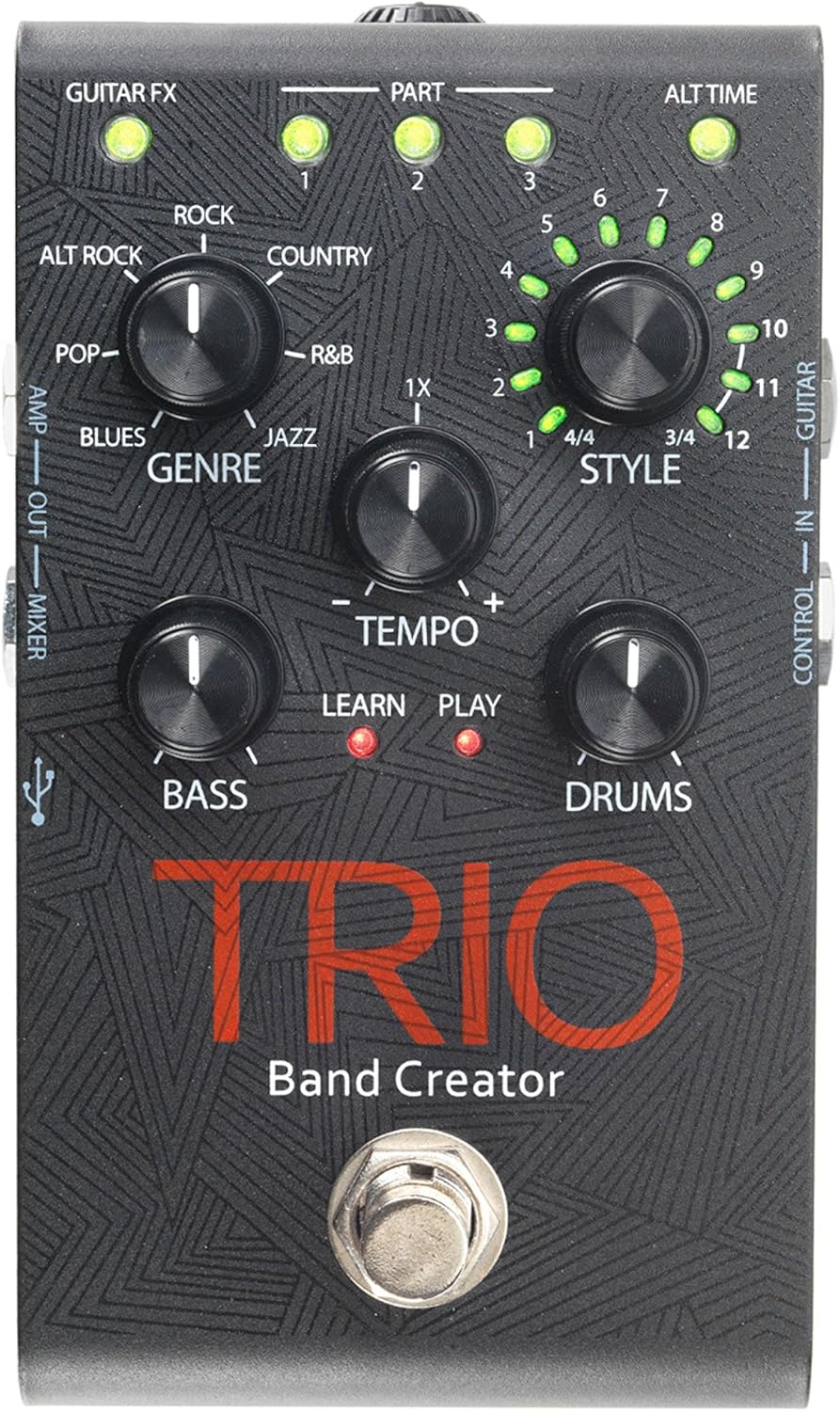
Рисунок 1: Вверху view of the DigiTech TRIO pedal, showing the main controls and footswitch.
Инструкция по эксплуатации
Basic Operation: Teaching the TRIO a Song
- Нажмите ГРУППА footswitch once to enter 'Listen' mode. The УЧИТЬСЯ Светодиод загорится.
- Play your desired chord progression and rhythm clearly. The TRIO will analyze your playing.
- Нажмите ГРУППА footswitch again to stop 'Listen' mode. The ИГРАТЬ LED will illuminate, and the TRIO will immediately begin playing generated bass and drum parts.
- You can now play along with your virtual band.
Genre and Style Selection
- Используйте ЖАНР knob to select from Blues, Pop, Alternative Rock, Rock, Country, R&B, and Jazz. The genre affects the overall feel of the generated bass and drum parts.
- Используйте СТИЛЬ knob to choose from twelve different song styles available for each genre. This allows for further customization of the rhythm and feel.
- The АЛЬТЕРНАТИВНОЕ ВРЕМЯ button allows you to switch between 3/4 and 4/4 time signatures.
Looping and Song Parts
- The TRIO can learn up to 3 different song parts. To record a new part, select an empty ЧАСТЬ slot (1, 2, or 3) using the corresponding buttons.
- Follow the 'Basic Operation' steps to teach the TRIO the new song part.
- During playback, you can switch between learned song parts on-the-fly by pressing the corresponding ЧАСТЬ кнопка.
- The ЛУПЕР footswitch allows you to record and playback your own guitar loops. Press once to start recording, press again to stop recording and start playback, and press and hold to clear the loop.
Adjusting Levels and Tempo
- The ТЕМП knob adjusts the playback speed of the band and loops.
- The BASS knob controls the volume level of the generated bass line.
- The БАРАБАНЫ knob controls the volume level of the generated drum track.
- The ПЕТЛЯ knob controls the volume level of your recorded guitar loop.

Рисунок 2: Наклонный view of the DigiTech TRIO pedal, highlighting the control knobs and input/output jacks.
Элементы управления и соединения
The DigiTech TRIO pedal features a user-friendly layout with clearly labeled controls and versatile connection options:
Элементы управления на передней панели:
- GUITAR FX: Activates built-in guitar effects tailored to the selected genre.
- PART 1, 2, 3: Buttons to select and recall different learned song parts.
- ALT TIME: Toggles between 3/4 and 4/4 time signatures.
- TEMPO Knob: Adjusts the overall playback speed.
- GENRE Knob: Selects the musical genre (Blues, Pop, Alt Rock, Rock, Country, R&B, Jazz).
- STYLE Knob: Selects one of twelve styles within the chosen genre.
- LOOP Knob: Controls the volume of your recorded guitar loop.
- Регулятор баса: Controls the volume of the generated bass line.
- DRUMS Knob: Controls the volume of the generated drum track.
- Педальный переключатель LOOPER: Records/plays/clears guitar loops.
- BAND Footswitch: Enters 'Listen' mode to learn chords/rhythm, or starts/stops band playback.
Side and Rear Panel Connections:
- ГИТАРА ВХОД: 1/4-inch input for your electric guitar.
- AMP ВНЕ: 1/4-inch output to your guitar ampпожизненнее.
- MIXER OUT: 1/4-inch output for connecting to a mixer or PA system.
- ВЫХОД НА НАУШНИКИ: Стереовыход 1/8 дюйма для наушников.
- КОНТРОЛЬ В: 1/4-inch input for optional DigiTech FS3X Footswitch.
- ВЛАСТЬ: 9V DC input for the included power supply.
- USB: Mini-USB port for firmware updates.

Рисунок 3: Сзади view of the DigiTech TRIO pedal, showing the power input and headphone jack.
Технические характеристики
| Особенность | Деталь |
|---|---|
| Вес товара | 10.6 унций (0.3 кг) |
| Размеры продукта | 4.63 x 3.19 x 2.13 дюйма (11.76 x 8.10 x 5.41 см) |
| Номер модели товара | TRIO |
| Аккумуляторы | 1 9V battery required (for internal use, not primary power) |
| аппаратный интерфейс | 1/4-дюймовый аудио |
| Формат сигнала | Аналоговый |
| Источник питания | Corded Electric (9V DC adapter included) |
| Томtage | 9 Вольт |
| Ampярость | 300 миллиamps |
Обслуживание
- Поддерживайте чистоту педали, протирая её мягкой сухой тканью. Избегайте использования абразивных чистящих средств и растворителей.
- Храните педаль в прохладном, сухом месте, вдали от прямых солнечных лучей и экстремальных температур.
- Убедитесь, что все кабели надежно подключены, чтобы предотвратить потерю сигнала или повреждение.
- Не допускайте падения педали и сильных ударов по ней.
Поиск неисправностей
- Нет звука: Проверьте все кабельные соединения (гитара, amp, power). Ensure the pedal is powered on and the volume knobs are not set to zero.
- Плохое качество звука: Убедитесь, что ваш прибор и amplifier are functioning correctly. Check for damaged cables.
- Band Not Generating Correctly: Ensure you are playing clear, distinct chords during the 'Listen' phase. Try different genres and styles to see if a different setting better interprets your playing.
- Ножной переключатель не реагирует: Disconnect and reconnect the power supply. If using an optional FS3X footswitch, ensure it is properly connected.
Гарантия и поддержка
Информацию о гарантии и технической поддержке можно получить на официальном сайте DigiTech. webили обратитесь в службу поддержки клиентов. Сохраните чек о покупке для предъявления гарантийных претензий.


