1. Продукт закончилсяview
The HT Instruments MACROTESTG3 is an advanced multifunction installation tester designed for safety tests on civil and industrial electrical systems, adhering to IEC/EN61557-1 standards. It features a resistive TFT color touch-screen display, an intuitive icon menu, and integrated help-on-line for ease of use. The device supports a wide range of measurements and includes internal memory for data storage, with transfer capabilities via USB or built-in Wi-Fi to iOS and Android devices.
The MACROTESTG3 can perform high-resolution loop/line impedance measurements with prospective short-circuit current calculations using the optional IMP57 accessory. It also checks breakdown current, tripping current, and I2t for MCBs (B, C, D, K curves) and fuses (gG, aM types), along with percentagе томtage drop on main power lines. RCD tests up to 10A are possible with the optional RCDX10 accessory. Leakage current can be measured using the optional HT96U clamp, and earth probe resistance can be checked with the optional T2100 clamp without disconnection.

2. Настройка и первоначальное использование
2.1 Распаковка и осмотр
Carefully unpack the MACROTESTG3 and all accessories. Inspect the device for any signs of damage. Retain the packaging for future transport or storage.
2.2 Питание устройства
The MACROTESTG3 is powered by 6 x 1.2V rechargeable type AA batteries or 6 x 1.5V type AA batteries. Ensure batteries are correctly inserted according to polarity markings. For rechargeable batteries, fully charge them before first use.
2.3 Первоначальные соединения
Connect the test leads to the appropriate input terminals on the device. Ensure secure connections for accurate measurements.

3. Инструкция по эксплуатации
3.1 Пользовательский интерфейс
The device features a resistive TFT color touch-screen display. Navigate through menus using the touch interface or the physical buttons. The icon menu provides quick access to various test functions. Utilize the 'Help-on-line' feature for immediate assistance on specific functions.
3.2 Проведение тестов
The MACROTESTG3 supports a variety of tests:
- Continuity of Protection Conductors: Perform tests with 200mA current.
- Сопротивление изоляции: Test with 50V, 100V, 250V, 500V, and 1000V DC.
- RCD Tests: Type A, AC, and B general, selective, and delayed RCDs up to 1000mA.
- Loop/Line Impedance: High-resolution measurements with prospective short-circuit current calculation (requires optional IMP57).
- MCB and Fuse Tests: Check breakdown current, tripping current, and I2t for MCBs (B, C, D, K curves) and fuses (gG, aM types).
- Томtagе падение: Измерить процентtagе томtage drop on main power lines.
- Ток утечки: Measure using the optional HT96U clamp.
- Earth Probe Resistance: Quickly check resistance without disconnection using the optional T2100 clamp.
3.3 Организуйте управление данными
All measurements can be saved to the internal memory. Saved data can be transferred to a PC via USB or to iOS/Android smartphones/tablets via built-in Wi-Fi. The supplied software allows for printing testing reports.

4. Техническое обслуживание
4.1 Очистка
Очистите внешнюю поверхность инструмента мягкой тряпкой.amp cloth. Do not use abrasive cleaners or solvents. Ensure the device is powered off and disconnected from any electrical circuits before cleaning.
4.2 Уход за аккумулятором
If using rechargeable batteries, follow the manufacturer's guidelines for charging. If the device will not be used for an extended period, remove the batteries to prevent leakage and damage.
4.3 Хранение
Store the MACROTESTG3 in a cool, dry place, away from direct sunlight and extreme temperatures. Use the original packaging or a suitable carrying case to protect the device during storage and transport.
5. Поиск Неисправностей
- Устройство не включается: Check battery installation and charge level. Replace or recharge batteries if necessary.
- Неточные показания: Ensure test leads are securely connected and in good condition. Verify that the correct test function is selected for the measurement.
- Проблемы с передачей данных: Check USB cable connection or Wi-Fi settings. Ensure the companion software/app is correctly installed and updated.
- Сообщения об ошибках: Refer to the 'Help-on-line' feature on the device for specific error code explanations and solutions.
For persistent issues, contact HT Instruments customer support.
6. Технические характеристики
The following images provide detailed electrical and general specifications for the HT Instruments MACROTESTG3.
6.1 Electrical Specifications (Page 1 of 6)
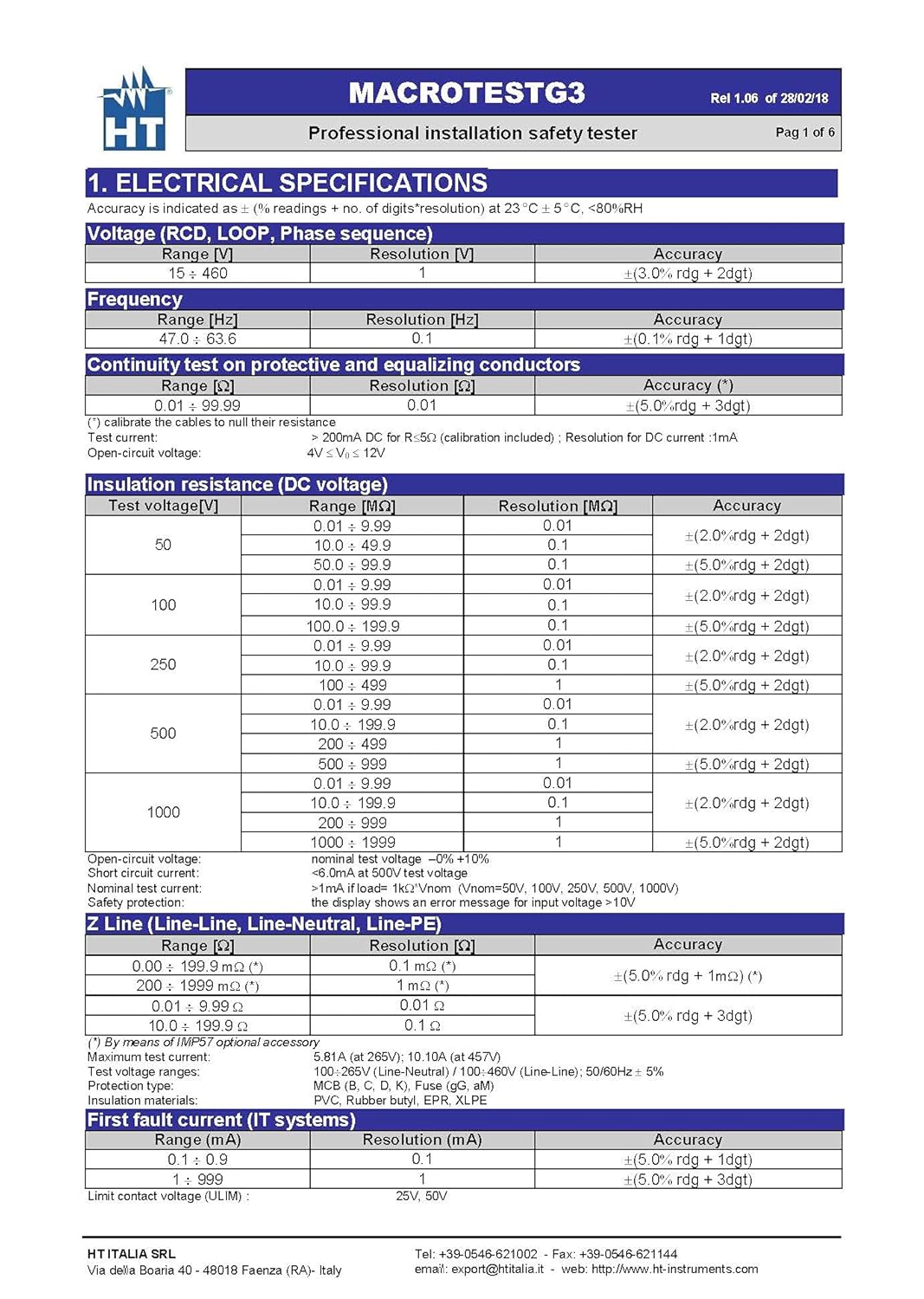
6.2 Electrical Specifications (Page 2 of 6)

6.3 Electrical Specifications (Page 3 of 6)

6.4 Electrical Specifications (Page 4 of 6)

6.5 Electrical Specifications (Page 5 of 6)

6.6 General Specifications (Page 6 of 6)

6.7 Краткое описание основных характеристик
- Continuity of protection conductors with 200mA.
- Insulation resistance with 50, 100, 250, 500, 1000V DC.
- Type A, AC, and B general, selective, and delayed RCDs up to 1000mA.
7. Гарантия и поддержка
7.1 Гарантия производителя
This product comes with a 1-year manufacturer warranty. Please refer to the warranty documentation included with your purchase for specific terms and conditions.
7.2 Поддержка клиентов
For technical assistance, service, or warranty claims, please contact HT Instruments customer support. Refer to the contact information provided in the product packaging or on the official HT Instruments webсайт.