1. Введение
This manual provides comprehensive instructions for the proper setup, operation, and maintenance of your Sony RM-DX300 remote control. This remote is specifically designed for use with Sony CD Changer models CDP-CX300, CDP-CX335, CDP-CX355, and CDP-X300. Please read this manual thoroughly before using the remote control to ensure optimal performance and longevity.
2. Информация по технике безопасности
- Обращение с аккумулятором: Always insert batteries with the correct polarity (+/-). Do not mix old and new batteries, or different types of batteries (e.g., alkaline and rechargeable). Remove batteries if the remote will not be used for an extended period to prevent leakage.
- Утилизация: Утилизируйте использованные батарейки в соответствии с местными правилами. Не сжигайте батарейки.
- Воздействие жидкости: Avoid exposing the remote control to liquids or excessive moisture.
- Температура: Не подвергайте пульт дистанционного управления воздействию экстремальных температур или прямых солнечных лучей.
- Уборка: Для чистки используйте мягкую сухую ткань. Не используйте абразивные чистящие средства или растворители.
3. Содержимое упаковки
Пожалуйста, убедитесь, что ваша посылка содержит следующие предметы:
- Sony RM-DX300 Remote Control
- Руководство по эксплуатации (данный документ)
Примечание: Батарейки, как правило, не входят в комплект и приобретаются отдельно.
4. Настройка
4.1 Установка аккумулятора
To power your RM-DX300 remote control, you will need to install two (2) AA batteries (not included).
- Найдите крышку батарейного отсека на задней стороне пульта дистанционного управления.
- Нажмите на язычок и сдвиньте крышку в направлении, указанном стрелкой.
- Insert two AA batteries, ensuring that the positive (+) and negative (-) terminals align correctly with the markings inside the compartment.
- Задвиньте крышку батарейного отсека на место до щелчка.
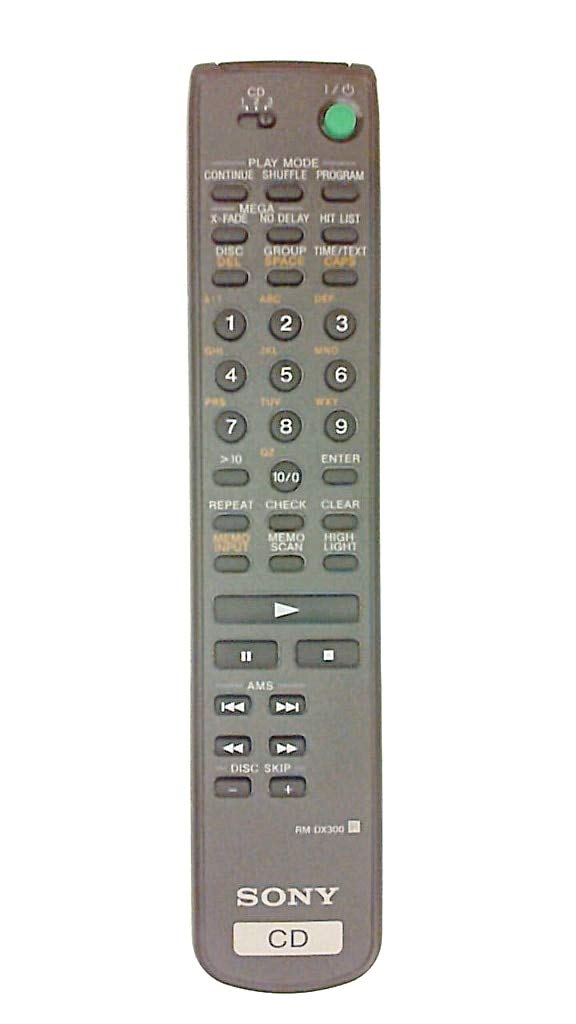
Image 4.1: The Sony RM-DX300 remote control. The battery compartment is located on the back.
5. Инструкция по эксплуатации
The RM-DX300 remote control allows you to operate your compatible Sony CD Changer from a distance. Ensure there is a clear line of sight between the remote's infrared emitter and the CD changer's IR receiver.
5.1 Основные функции
- ВЛАСТЬ: Turns the CD changer on or off.
- ИГРАТЬ (►): Начинает воспроизведение компакт-диска.
- ПАУЗА (−): Приостанавливает воспроизведение компакт-диска. Нажмите еще раз, чтобы возобновить.
- СТОП (■): Останавливает воспроизведение компакт-диска.
- ПРОПУСТИТЬ (►►| / |◄◄): Skips to the next track or returns to the beginning of the current/previous track.
- SEARCH (►► / ◄◄): Fast forwards or fast reverses through a track.
- DISC SELECT (Numeric Keypad): Directly select a disc by entering its number.
- TRACK SELECT (Numeric Keypad): Directly select a track by entering its number.
- ПРОГРАММА: Allows programming of tracks for custom playback sequences. Refer to your CD changer's manual for detailed programming instructions.
- ПОВТОРИТЬ: Повторяет текущий трек, диск или запрограммированную последовательность.
- SHUFFLE/RANDOM: Plays tracks or discs in a random order.
Note: Specific button labels and advanced functions may vary slightly depending on your CD changer model. Consult your CD changer's original instruction manual for detailed information on all features.
6. Техническое обслуживание
6.1 Очистка пульта дистанционного управления
To clean the remote control, gently wipe its surface with a soft, dry cloth. Do not use liquid cleaners, sprays, or abrasive materials, as these can damage the remote's finish or internal components.
6.2. Замена батареи
Replace the batteries when the remote control's range decreases or if it stops responding. Follow the battery installation steps outlined in Section 4.1. Always replace both batteries at the same time with new ones of the same type.
7. Поиск Неисправностей
| Проблема | Возможная причина | Решение |
|---|---|---|
| Remote control does not operate the CD changer. |
|
|
| Remote control operates intermittently. |
|
|
8. Технические характеристики
| Модель: | RM-DX300 |
| Совместимые устройства: | Sony CD Changer models CDP-CX300, CDP-CX335, CDP-CX355, CDP-X300 |
| Технологии подключения: | Инфракрасный (ИК) |
| Источник питания: | 2 батарейки типа АА (не входят в комплект) |
| Размеры продукта: | 8.1 x 1.5 x 1 дюйма |
| Вес товара: | 3.2 унции |
| Производитель: | Сони |
9. Гарантия и поддержка
This remote control is manufactured by Sony. For information regarding warranty coverage, technical support, or service, please refer to the documentation provided with your original Sony CD Changer or visit the official Sony support webСохраните чек о покупке в качестве подтверждения покупки для предъявления гарантийных претензий.
Поддержка Сони Webсайт: https://www.sony.com/electronics/support