1. Заview
The Sony STR-DN1050 is a 7.2 Channel Hi-Res 4K AV Receiver designed to deliver superior audio and video performance for your home entertainment system. It features built-in Wi-Fi, Bluetooth, and AirPlay for seamless music streaming. With 165 watts of power across 7.2 channels, high-resolution audio compatibility, 4K resolution pass-through and upscaling, and 10 HD inputs, this receiver provides a robust foundation for music, Blu-ray movies, and games.
Основные характеристики:
- 7.2 Channel A/V Receiver with 165W x 7 (at 6 ohms, 1 kHz, THD 0.9%)
- Optimized chassis and internal circuitry for enhanced audio performance
- Built-in Wi-Fi with DLNA and AirPlay compatibility for wireless streaming
- Возможность подключения Bluetooth для простого сопряжения с совместимыми устройствами.
- 4K resolution pass-through and upscaling for high-quality video
- High-Resolution Audio support for superior sound reproduction
- Multiple HD inputs and support for 2 separate powered zones
2. Настройка
2.1 Распаковка и размещение
Carefully remove the receiver from its packaging. Place the receiver on a stable, flat surface with adequate ventilation to prevent overheating. Ensure there is sufficient space around the unit for airflow.
2.2 Подключение динамиков
The STR-DN1050 supports a 7.2 channel speaker configuration. Connect your speakers to the corresponding terminals on the rear panel. Ensure correct polarity (+ to + and - to -) for optimal sound. Refer to the impedance guidelines printed on the rear panel for compatible speaker setups (6-16 ohms).

Figure 1: Rear panel connections of the Sony STR-DN1050, highlighting speaker terminals and various inputs.
For speaker connections, use appropriate speaker wire. For a 7.2 channel setup, connect front left/right, center, surround left/right, and surround back left/right speakers. Subwoofers connect via RCA cables to the dedicated SUBWOOFER PRE OUT ports.
2.3 Подключение аудио/видеоустройств
Connect your audio and video sources (e.g., Blu-ray player, game console, cable box) to the HDMI inputs on the rear panel. Connect your TV to the HDMI OUT (TV ARC) port for audio return channel functionality. The receiver also provides optical, coaxial, and analog audio inputs for other devices.
2.4 Первоначальное включение и настройка сети
After connecting all devices and speakers, plug the receiver into a power outlet. Follow the on-screen instructions on your TV for initial setup, including network configuration for Wi-Fi and AirPlay. This process typically involves connecting to your home network and performing any available software updates.
3. Инструкция по эксплуатации
3.1 Включение/выключение питания
Нажмите Ввод/вывод button on the front panel or the POWER button on the remote control to turn the receiver on or off. The receiver supports smart turn-on technology, automatically activating when a connected HDMI device is powered on.
3.2 Выбор входа
Используйте ВЫБОР ВХОДА dial on the front panel or the input buttons on the remote control (e.g., BD/DVD, GAME, SAT/CATV) to switch between connected audio/video sources.
3.3 Регулятор громкости
Отрегулируйте уровень звука с помощью МАСТЕР ОБЪЕМ dial on the front panel or the VOLUME +/- buttons on the remote control.
3.4 Сопряжение по Bluetooth
To pair a Bluetooth device, press the СОПРЯЖЕНИЕ ПО BLUETOOTH button on the remote or navigate to the Bluetooth pairing option via the receiver's menu. Select the receiver from your device's Bluetooth settings to establish a connection.
3.5 Режим чистого прямого управления
Активировать ЧИСТЫЙ ПРЯМОЙ mode by pressing the corresponding button on the front panel or remote. This mode switches off unnecessary processing circuitry to provide the cleanest possible signal path with minimized electronic interference, enhancing audio clarity and detail.
3.6 Speaker Zone Control
The receiver supports multiple speaker zones. Use the КОНТРОЛЬ ЗОНЫ button to manage audio output to different areas. You can select between Speaker A, Speaker B, or both (A+B) depending on your setup and listening preferences.
4. Связи
The Sony STR-DN1050 offers a variety of input and output options to integrate with your home theater system.
4.1 HDMI Inputs/Outputs
- HDMI ВХОД: Connect up to 9 HDMI source devices (e.g., Blu-ray player, game console, streaming device).
- Выход HDMI (TV ARC): Connect to your television for video output and Audio Return Channel (ARC) functionality.
Аудиовходы 4.2
- Оптический: Digital audio input for devices like CD players or older TVs.
- Коаксиальная: Digital audio input for compatible devices.
- Analog Audio IN: Multiple RCA stereo inputs for analog audio sources.
- USB: Front-panel USB port for media playback from USB storage devices.
- МХЛ: Mobile High-Definition Link input for connecting compatible smartphones.
- Фонокорректор: Dedicated input for turntables (requires a built-in phono pre-amp or external pre-amp).
4.3 Speaker Terminals
Screw-type terminals for connecting up to 7 speakers (Front L/R, Center, Surround L/R, Surround Back L/R). Ensure proper impedance matching (6-16 ohms) as indicated on the rear panel.
4.4 Сетевое подключение
- Ethernet: Wired network connection for stable internet access and firmware updates.
- Wi-Fi: Built-in wireless connectivity for network features and streaming.
4.5 Другие порты
- Наушники: Front-panel 6.3mm jack for private listening.
- Pre-out (Subwoofer): RCA outputs for connecting external powered subwoofers.
- Auto Calibration Mic: Port for connecting the supplied calibration microphone for automatic speaker setup.
5. Интеграция с медиа
5.1 Изображения продукта
Below are images of the Sony STR-DN1050 receiver, showcasinг его дизайн и возможности подключения.

Рисунок 2: Передняя часть view of the Sony STR-DN1050 AV Receiver.
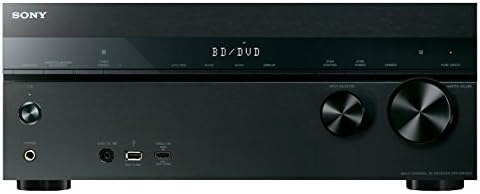
Рисунок 3: Наклонный фасад view of the Sony STR-DN1050.
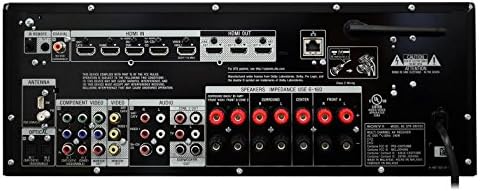
Figure 4: Close-up of the front panel.
5.2 Официальные видеоролики о продукте
Watch these official videos from Sony for more information on the STR-DN1050's features and sound quality.
Video 1: Demonstrating the sound quality of the Sony STR-DN1050.
Видео 2: Оверview of the Sony STR-DN1050 7.2 Channel Hi-Res 4K AV Receiver.
6. Техническое обслуживание
To ensure the longevity and optimal performance of your Sony STR-DN1050 receiver, follow these maintenance guidelines:
- Уборка: Для чистки внешней поверхности используйте мягкую сухую ткань. Избегайте использования абразивных чистящих средств и растворителей.
- Вентиляция: Ensure the receiver has adequate ventilation. Do not block the ventilation holes on the top, sides, or rear of the unit.
- Власть: Отсоедините шнур питания от розетки, если устройство не будет использоваться в течение длительного периода времени.
- Среда: Avoid exposing the receiver to extreme temperatures, humidity, dust, or direct sunlight.
7. Поиск Неисправностей
If you encounter issues with your receiver, try the following basic troubleshooting steps:
- Нет питания: Check if the power cord is securely connected and the power outlet is functional.
- Нет звука: Verify all speaker connections are secure and correctly polarized. Ensure the correct input source is selected and the volume is turned up. Check the TV ARC connection if using your TV as a source.
- Нет картинки: Confirm HDMI cables are securely connected to both the source device and the TV. Ensure the correct HDMI input is selected on the receiver and the TV.
- Проблемы с подключением Bluetooth: Ensure the receiver is in pairing mode and your device's Bluetooth is enabled and discoverable. Try restarting both the receiver and your Bluetooth device.
- Система зависла/не отвечает: Disconnect the receiver from the power outlet for a few minutes, then reconnect and power on. This can resolve temporary software glitches.
For more detailed troubleshooting, refer to the comprehensive online instruction manual or contact Sony customer support.
8. Технические характеристики
| Особенность | Ценить |
|---|---|
| Размеры продукта | 19.61 x 15.67 x 9.53 дюйма |
| Вес товара | 21 фунта |
| Производитель | Сони |
| Номер модели товара | STRDN1050 |
| Дата первой доступности | 14 апреля 2014 г. |
| Технология связи | HDMI, Component Video input, Composite input, Optical, Coaxial, Analogue Audio in, USB, MHL, Ethernet, Composite Monitor Out, Component Monitor Out, Headphone, Pre-out (subwoofer) |
| Тип контроллера | iOS или Android |
| Специальная характеристика | Автокалибровка |
| Совместимые устройства | Смартфон, Динамик |
| Всего портов HDMI | 9 |
| Тип разъема | HDMI, USB, Composite input, Optical, Coaxial, Headphone, Pre-out (subwoofer) |
| Режим аудиовыхода | Стерео |
| Конфигурация каналов объемного звука | 7.2 канала |
| Кодирование видео | H.264 |
9. Гарантия и поддержка
Для получения информации о гарантии и технической поддержке обратитесь к документации, прилагаемой к вашему продукту, или посетите официальный сайт поддержки Sony. website. You can find detailed guides, FAQs, and contact information for customer service.


