1. Введение
This manual provides essential information for the safe and effective use of your Canon EOS Rebel T5 Digital SLR Camera Kit. The Canon EOS Rebel T5 is designed for capturing high-quality still images and Full HD video, featuring an 18.0 Megapixel CMOS sensor and a DIGIC 4 image processor. Its intuitive design makes it suitable for both beginners and experienced photographers.
2. Что в коробке
Your Canon EOS Rebel T5 kit typically includes the following components:
- Canon EOS Rebel T5 Camera Body
- Canon EF-S 18-55mm f/3.5-5.6 IS II Standard Zoom Lens
- Аккумуляторная батарея
- Зарядное устройство для аккумулятора
- Interface Cable (USB)
- Wide Strap
- EOS Digital Solution Disk (Software)
- Инструкции по эксплуатации

Figure 2.1: Typical contents of the Canon EOS Rebel T5 kit.
3. Настройка
3.1 Установка объектива
- Снимите крышку корпуса с камеры и заднюю крышку с объектива.
- Совместите красную метку на объективе с красной меткой на корпусе камеры.
- Поверните объектив по часовой стрелке до щелчка.
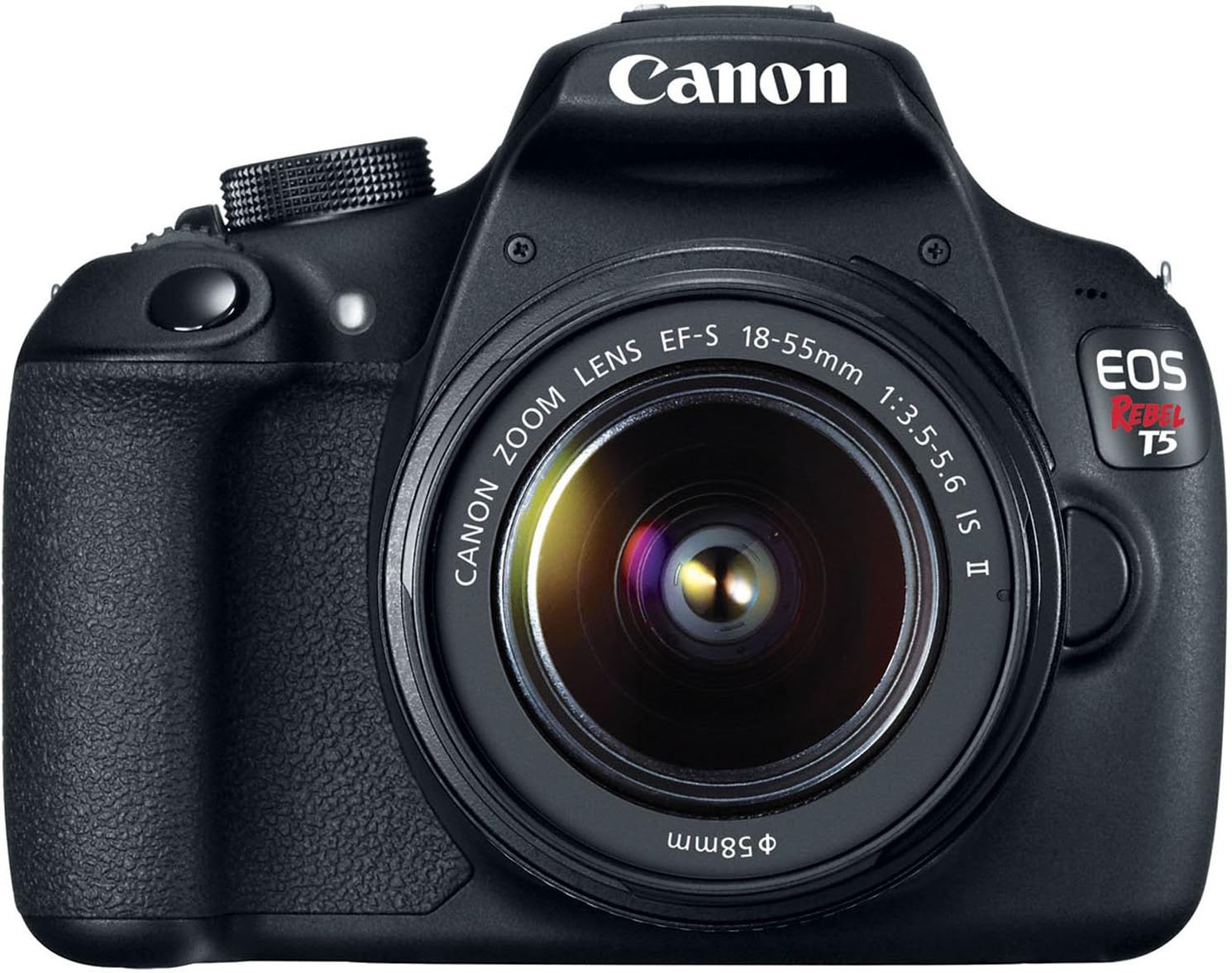
Рисунок 3.1: Передняя часть view of the Canon EOS Rebel T5 with the EF-S 18-55mm lens.
3.2 Установка батареи
- Откройте крышку батарейного отсека в нижней части камеры.
- Insert the charged battery pack with the electrical contacts facing inward, ensuring it clicks into place.
- Закройте крышку батарейного отсека.
3.3 Вставка SD-карты
An SD card is required to store photos and videos. The SD card is not included with the kit and must be purchased separately. Open the SD card slot cover on the side of the camera and insert the SD card until it clicks. Ensure the card is inserted correctly to avoid damage.
Video 3.1: This video provides a visual guide on unboxing and basic setup, including attaching the lens and inserting the battery into the Canon EOS Rebel T5 Digital Camera.
4. Инструкция по эксплуатации
4.1 Включение/выключение питания
To power on the camera, rotate the power switch to the 'ON' position. To power off, rotate it to 'OFF'.
4.2-х режимный диск
Диск выбора режимов на верхней части камеры позволяет выбирать различные режимы съемки:
- Basic Zone Modes: Fully automatic modes for simple point-and-shoot operation (e.g., Scene Intelligent Auto, Flash Off, Creative Auto, Portrait, Landscape, Close-up, Sports, Night Portrait).
- Creative Zone Modes: Provide more control over settings (e.g., Program AE (P), Shutter-priority AE (Tv), Aperture-priority AE (Av), Manual Exposure (M)).
- Movie Shooting Mode: For recording Full HD videos.

Рисунок 4.1: Сзади view of the Canon EOS Rebel T5, highlighting the LCD and control layout.
4.3 Фотосъемка
- Выберите желаемый режим съемки с помощью диска выбора режимов.
- Посмотрите через viewfinder or use the LCD screen for Live View стрельба.
- Press the shutter button halfway to activate the 9-point autofocus system and achieve focus.
- Полностью нажмите кнопку спуска затвора, чтобы сделать снимок.
4.4 Запись видео
Switch the mode dial to the movie shooting mode. Press the Live View shooting/Movie shooting button to start and stop recording. The camera supports Full HD video recording.
4.5 Использование встроенной вспышки
In low-light conditions or when backlighting is present, the built-in flash can be used. In Basic Zone modes, the flash may pop up automatically. In Creative Zone modes, you can manually raise the flash by pressing the flash button.
Video 4.1: This video offers an honest review of the Canon T5, demonstrating various features and operational aspects of the camera.
5. Техническое обслуживание
5.1 Уход за линзами
- Always keep the lens cap on when not in use to protect the front element.
- Use a lens brush or blower to remove dust, then gently wipe with a microfiber lens cloth. Avoid touching the lens surface with your fingers.
- For stubborn smudges, use a small amount of lens cleaning solution on a clean cloth.
5.2 Camera Body Care
- Протрите корпус камеры мягкой сухой тканью.
- Не подвергайте камеру воздействию экстремальных температур, влажности или пыли.
- Не используйте органические растворители или сильнодействующие чистящие средства.
5.3 Уход за аккумулятором
- Charge the battery fully before first use and whenever the battery indicator is low.
- Когда батарейки не используются, храните их в прохладном сухом месте.
- Если камера не будет использоваться в течение длительного времени, извлеките батарею из неё.
6. Поиск Неисправностей
- "No card in camera" message: Ensure an SD card is inserted correctly and is not full or damaged.
- Autofocus is slow: In very low light or with subjects lacking contrast, autofocus may be slower. Try using the built-in flash or switching to manual focus.
- Камера не включается: Проверьте, заряжена ли батарея и правильно ли она вставлена.
- Изображения размыты: Ensure the lens is clean, the camera is stable (use a tripod if necessary), and the correct focus mode is selected.
7. Технические характеристики
| Тип датчика | КМОП |
| Разрешение фотодатчика | 18 МП |
| Разрешение видео | FullHD1080p |
| Линза | EF-S 18-55mm f/3.5-5.6 IS II standard zoom lens |
| Точки автофокусировки | 9-точечная система автофокусировки |
| Скорость непрерывной съемки | 3 кадров в секунду |
| Размер экрана | 3 дюйма |
| Поддерживается File Формат | JPEG, СЫРЬЕ |
| Технология связи | Проводной, беспроводной (Wi-Fi) |
| Вес товара | 1 фунта |
8. Гарантия и поддержка
8.1 Информация о гарантии
This Canon EOS Rebel T5 camera kit comes with a 90-day limited warranty. Please retain your proof of purchase for any warranty claims.
8.2 Поддержка клиентов
For further assistance, technical support, or service inquiries, please refer to the official Canon support website or contact their customer service department. Detailed contact information can typically be found in the included warranty card or on the manufacturer's webсайт.


