1. Введение
Thank you for choosing the Antec HCG-850M 850W Power Supply. This manual provides essential information for the safe and efficient installation, operation, and maintenance of your power supply unit. Please read this manual thoroughly before installation and retain it for future reference.
2. Информация по технике безопасности
Во избежание травм или повреждения вашей системы всегда соблюдайте следующие меры предосторожности:
- Не открыть блок питания casinг. Высокий объемtagЭлектрохимические соединения присутствуют внутри устройства, даже когда оно отключено от сети.
- Не insert any objects into the power supply's ventilation openings.
- Убедитесь, что блок питания установлен в хорошо проветриваемом помещении.
- Use only the modular cables provided with this power supply. Using incompatible cables can cause damage.
- Disconnect the AC power cord from the wall outlet before installing or removing the power supply.
- This product is designed for use in personal computers only.
3. Содержимое упаковки
Проверьте наличие всех предметов в посылке:
- Antec HCG-850M 850W Power Supply
- Modular Cable Set (PCI-E, SATA, Peripheral, CPU)
- Шнур питания переменного тока
- Крепежные винты
- Руководство пользователя (этот документ)
4. Продукт закончилсяview
The Antec HCG-850M is an 850-watt, 80 PLUS Bronze certified, semi-modular power supply designed for high-performance personal computers. It features a quiet 135mm fan for efficient cooling and robust protection circuits to ensure stable power delivery.
4.1 Основные характеристики
- 850 Watts Continuous Power
- 80 PLUS Bronze Certified Efficiency
- Semi-Modular Cable Management
- 135-мм бесшумный вентилятор
- Форм-фактор ATX
- Multiple Protection Circuits (OCP, OVP, UVP, SCP, OPP, OTP)
4.2 Блок питания
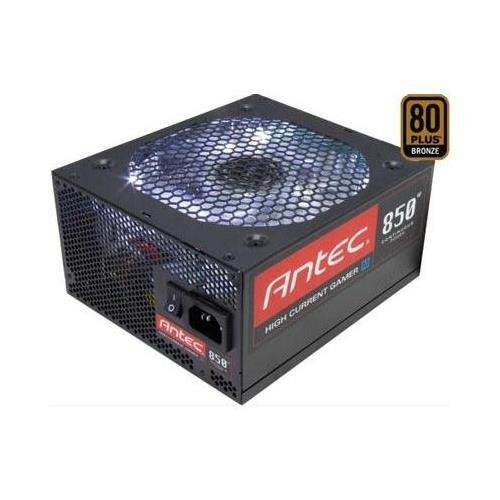
Изображение 1: Спереди view of the Antec HCG-850M 850W Power Supply, showing the fan grille and modular cable connectors. This unit provides stable power to your computer components.
5. Настройка и установка
Follow these steps to install your Antec HCG-850M power supply:
- Подготовьте свою систему: Убедитесь, что компьютер полностью выключен и отсоединен от розетки. Откройте корпус компьютера.
- Удалите старый блок питания (если применимо): Отсоедините все кабели от старого блока питания. Открутите и извлеките старый блок питания из корпуса.
- Установите новый блок питания: Carefully place the Antec HCG-850M into the power supply bay of your computer case. Secure it with the provided mounting screws. Ensure the fan is oriented correctly for optimal airflow (typically facing down if there's a bottom vent, or up if not).
- Подключите необходимые кабели:
- Connect the 24-pin ATX motherboard power cable.
- Connect the 4+4-pin or 8-pin EPS/CPU power cable to your motherboard.
- Подключите модульные кабели: Attach the necessary modular cables for your components (e.g., PCI-E for graphics cards, SATA for hard drives/SSDs, Peripheral for fans/accessories). Connect them securely to both the power supply and the respective components.
- Управление кабелями: Аккуратно прокладывайте кабели, чтобы улучшить циркуляцию воздуха и внешний вид.
- Закройте корпус и включите питание: Close your computer case. Connect the AC power cord to the power supply and then to a wall outlet. Flip the power switch on the PSU to the 'ON' position. Power on your computer.
6. Инструкция по эксплуатации
Once installed, the Antec HCG-850M operates automatically. Here are some general operating guidelines:
- Включение/выключение питания: Use your computer's power button to turn the system on or off. The switch on the power supply itself should generally remain in the 'ON' position during normal operation.
- Стабильность системы: Ensure your system is stable. If you experience unexpected shutdowns or reboots, refer to the troubleshooting section.
- Вентиляция: Maintain good airflow around your computer case to prevent overheating of components, including the power supply.
7. Техническое обслуживание
Правильное техническое обслуживание может продлить срок службы вашего блока питания:
- Очистка от пыли: Periodically clean dust from the power supply's fan grille and the interior of your computer case using compressed air. Перед чисткой всегда отсоединяйте шнур питания переменного тока.
- Проверка кабеля: Occasionally check that all power cables are securely connected to the power supply and components.
- Среда: Operate the power supply in a clean, dry environment with stable temperatures.
8. Поиск Неисправностей
Если у вас возникли проблемы с блоком питания, попробуйте выполнить следующие действия:
8.1 No Power to System
- Убедитесь, что сетевой шнур надежно вставлен как в розетку, так и в блок питания.
- Check that the power supply's ON/OFF switch is in the 'ON' position.
- Verify all internal power cables (24-pin ATX, CPU, PCI-E) are correctly and firmly connected.
- Проверьте розетку с помощью другого устройства, чтобы убедиться в наличии питания.
- По возможности проверьте блок питания в другом заведомо исправном устройстве или с помощью тестера блоков питания.
8.2 System Instability or Random Shutdowns
- Убедитесь, что потребляемая мощность вашей системы не превышает 850 Вт мощности блока питания.
- Check for overheating components. Ensure proper case ventilation and clean any dust buildup.
- Verify all power connections are secure. Loose connections can cause intermittent power delivery.
- If the issue persists, it may indicate a fault with the power supply or another component. Consider professional diagnosis.
9. Технические характеристики
| Особенность | Деталь |
|---|---|
| Номер модели | HCG-850M |
| Выход Втtage | 850 Вт |
| Сертификация эффективности | 80 PLUS бронза |
| Форм-фактор | АТХ |
| Метод охлаждения | Air (135mm Fan) |
| Модульный тип | Полумодульный |
| Совместимые устройства | Персональный компьютер |
| Вес товара | 9 фунта (приблизительно 4.08 кг) |
| ASIN | B00ESAI3M0 |
10. Гарантия и поддержка
Antec products are backed by a manufacturer's warranty. For specific warranty terms and conditions, please refer to the warranty card included with your product or visit the official Antec website. For technical support or customer service, please contact Antec directly through their official support channels.
Официальный представитель Antec Webсайт: www.antec.com


