1. Введение
This manual provides essential information for the safe and effective operation of the Rigol DG5352 Function/Arbitrary Waveform Generator. The DG5352 is a high-performance, 2-channel device capable of generating various waveforms with a maximum frequency of 350 MHz and a sampling rate of 1 GSa/s. Please read this manual thoroughly before using the instrument to ensure proper functionality and to prevent damage.
2. Информация по технике безопасности
Для предотвращения травм и повреждения прибора или любых подключенных к нему устройств соблюдайте следующие меры предосторожности.
- Источник питания: Connect the instrument to a power source that provides the specified voltagе диапазон.
- Заземление: Убедитесь, что прибор надлежащим образом заземлен, чтобы предотвратить поражение электрическим током.
- Вентиляция: Не закрывайте вентиляционные отверстия. Обеспечьте достаточный приток воздуха вокруг инструмента.
- Среда: Эксплуатируйте прибор в сухом, хорошо проветриваемом помещении, вдали от прямых солнечных лучей, высоких температур и чрезмерной пыли.
- Уборка: Отключите питание перед чисткой. Используйте мягкую тряпку.amp тканью; избегайте использования абразивных чистящих средств и растворителей.
- Обслуживание: Все работы по техническому обслуживанию должны выполняться квалифицированным сервисным персоналом. Не пытайтесь ремонтировать прибор самостоятельно.
3. Продукт закончилсяview
The Rigol DG5352 is a versatile function/arbitrary waveform generator designed for a wide range of applications in electronics testing and development. It features two independent output channels, allowing for simultaneous generation of different waveforms or synchronized signals.
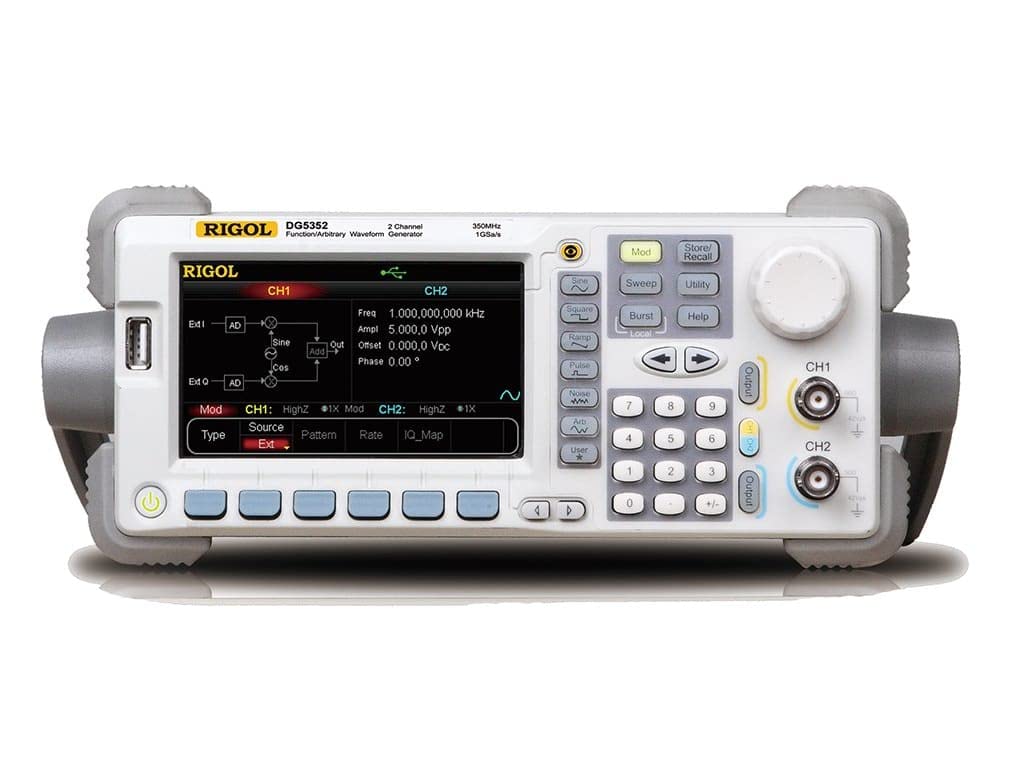
Figure 3.1: Front Panel of the Rigol DG5352. This image displays the front panel of the Rigol DG5352, highlighting its main display, control buttons, rotary knob, and output connectors for Channel 1 (CH1) and Channel 2 (CH2). The display shows current settings for frequency, amplitude, offset, and phase, along with waveform type and modulation options.
Основные характеристики:
- Каналы: 2 independent output channels.
- Диапазон частот: До 350 МГц.
- Sampскорость: 1 GSa/s.
- Типы волновых форм: Синус, Квадрат, Ramp, Pulse, Noise, Arbitrary, and more.
- Modulation Functions: AM, FM, PM, FSK, ASK, PSK, PWM, Sweep, Burst.
- Пользовательский интерфейс: Intuitive front panel with a clear display, dedicated function buttons, and a rotary knob for precise adjustments.
4. Настройка
- Распаковка: Carefully remove the DG5352 from its packaging. Verify that all accessories listed in the packing list are present.
- Подключение питания: Connect the provided power cord to the AC input on the rear panel of the instrument, then plug the other end into a grounded AC power outlet.
- Включение питания: Нажмите кнопку питания, расположенную на передней панели, чтобы включить прибор. Дисплей загорится, и система выполнит самодиагностику.
- Выходные соединения: Connect your test leads or cables to the desired output channels (CH1 or CH2) on the front panel. Ensure proper impedance matching for your application.
- Подключение по USB/LAN (опционально): For remote control or data transfer, connect a USB cable to the USB host/device port or an Ethernet cable to the LAN port on the rear panel.
5. Инструкция по эксплуатации
This section outlines basic operation procedures for generating standard waveforms.
5.1. Generating a Standard Waveform (e.g., Sine Wave)
- Выберите канал: Нажмите CH1 or CH2 button on the front panel to select the desired output channel. The active channel will be highlighted on the display.
- Выберите тип волновой формы: Нажмите Синус button (or other waveform buttons like Квадрат, Ramp, Пульс) located on the left side of the control panel. The display will show the default sine wave parameters.
- Установите частоту: Use the numeric keypad to enter the desired frequency value, then press the corresponding unit button (e.g., МГц, кГц). Alternatively, use the rotary knob to adjust the frequency.
- Набор Ampдолгота: Нажмите Ampl softkey on the display. Use the numeric keypad and unit buttons (e.g., Впп) or the rotary knob to set the peak-to-peak ampдолгота.
- Set Offset: Нажмите Компенсировать softkey. Use the numeric keypad and unit buttons (e.g., В пост. тока) or the rotary knob to set the DC offset voltage.
- Включить вывод: Нажмите Выход button for the selected channel (CH1 or CH2) to enable the waveform output. The button will illuminate when active.
5.2. Modulation Functions
The DG5352 supports various modulation types. To access these, press the Мод button on the front panel. Follow the on-screen prompts and use the softkeys and rotary knob to configure the desired modulation parameters (e.g., AM, FM, PM).
5.3. Storing and Recalling Settings
To save current instrument settings, press the Хранить/отзыв button. Select a memory location using the softkeys and rotary knob, then confirm to save. To recall settings, press Хранить/отзыв again, select the desired memory location, and confirm.
6. Техническое обслуживание
- Уборка: Регулярно протирайте внешнюю поверхность прибора мягкой сухой тканью. Для удаления стойких загрязнений используйте слегка протертую ткань.ampзалит водой. Не используйте агрессивные химикаты или растворители.
- Вентиляция: Ensure that the ventilation openings on the instrument remain clear of dust and obstructions to prevent overheating.
- Хранилище: When not in use for extended periods, store the DG5352 in a clean, dry environment within its specified operating temperature range.
- Калибровка: Periodic calibration by qualified personnel is recommended to maintain measurement accuracy. Refer to Rigol's official support for calibration services.
7. Поиск Неисправностей
| Проблема | Возможная причина | Решение |
|---|---|---|
| Прибор не включается. | Шнур питания не подключен; розетка неисправна; внутренний предохранитель перегорел. | Check power cord connection; test power outlet; contact service for fuse replacement. |
| Нет выходного сигнала. | Output channel not enabled; incorrect waveform parameters; faulty cable. | Нажмите Выход button for the channel; verify frequency/amplitude settings; check/replace cables. |
| На дисплее отображается сообщение об ошибке. | System error; invalid input. | Refer to the on-screen message for specific instructions; restart the instrument; contact support if persistent. |
8. Технические характеристики
The following are key specifications for the Rigol DG5352 Function/Arbitrary Waveform Generator.
- Номер модели: DG5352
- Производитель: Ригол
- Каналы: 2
- Максимальная частота: 350 МГц
- Sampскорость: 1 Гвыб/с
- ASIN: B00EPECMLC
- Первая доступная версия: 3 сентября 2014 г.
9. Гарантия и поддержка
Rigol products typically come with a standard manufacturer's warranty. For detailed warranty terms, technical support, or service inquiries, please refer to the official Rigol website or contact your local Rigol distributor. Keep your purchase receipt as proof of purchase for warranty claims.