Продукт болееview
The Sagemcom Sixty Cordless Telephone and Answer Machine combines modern technology with a classic design. Its unique aesthetic, smooth finish, and touchscreen functionality make it a distinctive addition to any environment. Designed for user comfort, the Sixty offers a range of features including hands-free mode, extended battery life, and an intuitive interface for easy communication.
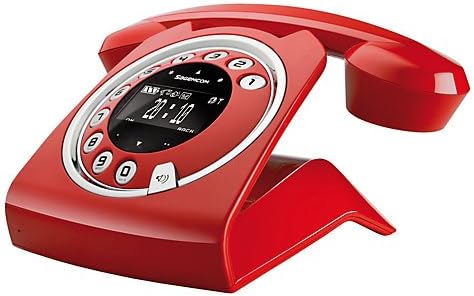
Image: The Sagemcom Sixty Cordless Telephone and Answer Machine in red, showcasing its unique retro-modern design with a circular dial and digital display.

Изображение: сбоку view of the Sagemcom Sixty Cordless Telephone, highlighting its sleek profile and the cradle design.
Руководство по настройке
1. Распаковка
Carefully remove all components from the packaging. Ensure you have the base unit, handset, power adapter, and telephone line cord.
2. Подключение базового блока
- Connect the power adapter to the 'DC IN' port on the back of the base unit and plug the other end into a wall outlet.
- Connect one end of the telephone line cord to the 'LINE' port on the base unit and the other end to your telephone wall jack.
3 Установка и зарядка аккумулятора
- Откройте батарейный отсек на трубке.
- Вставьте прилагаемые аккумуляторные батареи, соблюдая правильную полярность (+ и -).
- Закройте батарейный отсек.
- Place the handset on the base unit. The display will indicate charging. Allow the handset to charge for at least 16 hours before first use to ensure optimal battery performance.
Инструкция по эксплуатации
Совершение и прием звонков
- Сделать звонок: Поднимите трубку или нажмите Вызов button. Dial the number using the touchscreen keypad.
- Чтобы принять вызов: Поднимите трубку или нажмите Вызов нажимайте, когда звонит телефон.
- Чтобы завершить вызов: Установите трубку обратно на базовый блок или нажмите кнопку. Завершить звонок кнопка.
Использование сенсорного экрана
The Sixty features a responsive touchscreen for navigation and input. Tap icons or numbers to select functions or dial. Swipe to scroll through lists or menus.
Режим громкой связи
Во время разговора нажмите кнопку Спикер Нажмите эту кнопку для активации режима громкой связи. Нажмите ее еще раз, чтобы вернуться в режим трубки.
Управление телефонной книгой
- Добавление контакта: Navigate to the Phonebook menu, select 'Add New Contact', enter the name and number using the touchscreen, and save. The phonebook can store up to 150 names.
- Поиск контакта: Access the Phonebook and use the search function or scroll through the list.
- Редактирование/удаление контакта: Select the desired contact from the Phonebook and choose the 'Edit' or 'Delete' option.
Функции автоответчика
The integrated answering machine has a recording capacity of 10 minutes.
- Активация/Деактивация: Access the Answering Machine menu to turn it on or off.
- Воспроизведение сообщений: Select 'Play Messages' from the Answering Machine menu.
- Запись исходящего сообщения: Follow the prompts in the Answering Machine menu to record a personalized outgoing message.
Обслуживание
Чистка телефона
Чтобы почистить телефон, протрите его мягкой тряпкой.amp cloth. Do not use abrasive cleaners or solvents, as these can damage the surface. Ensure the phone is disconnected from power before cleaning.
Уход за аккумулятором
- Всегда используйте прилагаемые перезаряжаемые батареи.
- Если телефон не будет использоваться в течение длительного времени, извлеките батареи, чтобы предотвратить протекание.
- Утилизируйте старые батареи ответственно в соответствии с местными правилами.
Поиск неисправностей
| Проблема | Возможное решение |
|---|---|
| Нет гудка | Проверьте, надежно ли телефонный кабель подключен как к базовому блоку, так и к настенной розетке. Убедитесь, что адаптер питания подключен к сети. |
| Телефон не заряжается | Ensure the handset is correctly placed on the base unit. Clean the charging contacts on both the handset and base unit with a dry cloth. Verify the power adapter is working. |
| Плохое качество звука | Подойдите ближе к базовому блоку. Проверьте наличие помех от других электронных устройств. Убедитесь, что телефонный кабель не поврежден. |
| Дисплей пустой | Check if the handset battery is charged. If not, place it on the base unit to charge. Ensure the power adapter is connected to the base unit. |
| Невозможно совершать и принимать звонки | Verify that the telephone line is active. Check all cable connections. Restart the base unit by unplugging and replugging the power adapter. |
Технические характеристики
| Особенность | Спецификация |
|---|---|
| Бренд | Sagemcom |
| Модель | Шестьдесят |
| Цвет | Красный |
| Тип телефона | Беспроводной |
| Время разговора по телефону | До 10 часов |
| Время в режиме ожидания | До 120 часов |
| Recording Capacity (Answering Machine) | 10 минут |
| Емкость телефонной книги | 150 Имена |
| ASIN | B00DX64LPI |
| Первая доступная дата | 15 апреля 2014 г. |
Гарантия и поддержка
For warranty information and customer support, please refer to the documentation included with your purchase or visit the official Sagemcom webСохраните чек о покупке для предъявления гарантийных претензий.


