Введение
This manual provides essential information for setting up, operating, and maintaining your Microsoft Xbox 360 E 250GB Console. Please read this guide thoroughly before using your console to ensure proper function and longevity.
Содержимое упаковки
Убедитесь, что ваш пакет содержит следующие предметы:
- Xbox 360 E 250GB Console
- Xbox 360 Wireless Controller (Black)
- Блок питания и шнур питания
- HDMI-кабель
- AA Batteries for Wireless Controller
Консоль надview
Familiarize yourself with the various ports and buttons on your Xbox 360 E console.

Image: Microsoft Xbox 360 E 250GB Console. This image displays the front and side view of the Xbox 360 E console, showing its compact design and disc drive slot.
Передняя панель
- Кнопка питания: Включает или выключает консоль.
- Дисковод: Insert game discs or DVDs.
- USB-порты: Connect accessories like USB drives or wired controllers.
- Controller Connect Button: Used to wirelessly sync controllers.
Задняя панель
- Порт питания: Подключите источник питания.
- Порт HDMI: Connect to a TV or monitor for high-definition video and audio.
- AV-порт: For older composite or component cables (not included with all models).
- Порт Ethernet: Подключитесь к проводной сети.
- USB-порты: Additional ports for accessories.
Беспроводной контроллер Overview
The Xbox 360 Wireless Controller allows for intuitive gameplay. Familiarize yourself with its buttons and functions.
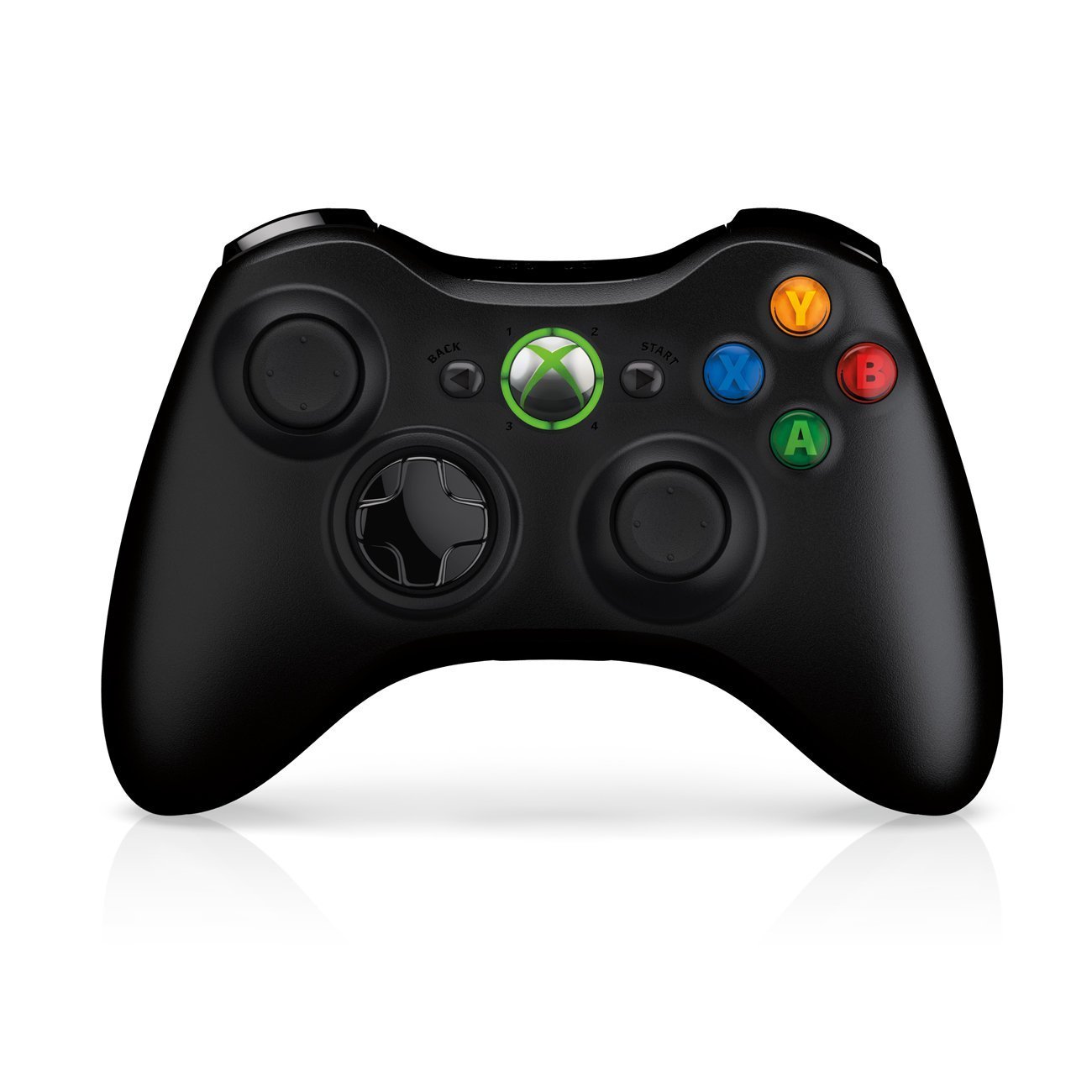
Image: Xbox 360 Wireless Controller. This image displays the front view of the black wireless controller, highlighting the D-pad, analog sticks, face buttons (A, B, X, Y), Guide button, Start button, and Back button.
Кнопки и функции контроллера
- Левый/правый аналоговые джойстики: Для управления движением и камерой.
- D-Pad (кнопка направлений): For menu navigation and specific game controls.
- Кнопки A, B, X, Y: Primary action buttons, color-coded (Green A, Red B, Blue X, Yellow Y).
- Кнопка «Пуск»: Pauses games or opens in-game menus.
- Кнопка «Назад»: Returns to previous screens or opens specific game functions.
- Guide Button (Xbox Logo): Powers on the console, accesses the Xbox Guide, or turns off the controller.
- Left/Right Bumpers (LB, RB): Кнопки на плечах для различных игровых действий.
- Left/Right Triggers (LT, RT): Analog triggers for precise control, often used for acceleration/braking or firing weapons.
Установка аккумулятора
The wireless controller requires two AA batteries. To install:
- Press the tab on the top of the battery pack and pull down to remove it.
- Вставьте две батарейки типа АА, соблюдая правильную полярность (+/-).
- Slide the battery pack back into the controller until it clicks into place.
Руководство по настройке
1. Подключение консоли
- Подключение питания: Connect the power cord to the power supply, then connect the power supply to the console's power port. Plug the power cord into a wall outlet.
- Видео/аудио подключение: Connect one end of the HDMI cable to the HDMI port on the back of your Xbox 360 E console. Connect the other end to an available HDMI input on your TV or monitor.
- Подключение к Интернету (необязательно): For wired internet, connect an Ethernet cable from your router/modem to the Ethernet port on the console. For wireless, the console has built-in Wi-Fi.
2. Подключение беспроводного контроллера
- Ensure batteries are installed in the controller.
- Turn on the console by pressing the Power button on the console or the Guide button on the controller.
- Press and release the Connect button on the console (small button near the USB ports on the front).
- Within 20 seconds, press and release the Connect button on the controller (small button on the top edge, between the bumpers).
- The lights around the Guide button on the controller and the console will flash and then glow steadily, indicating a successful connection.
3. Первое включение и настройка системы.
After connecting, turn on your console. Follow the on-screen prompts to:
- Выберите свой язык и регион.
- Adjust display settings (resolution, aspect ratio).
- Set up your internet connection (wired or wireless).
- Create or sign in to an Xbox Live profile.
Работа с консолью
Игры и медиа.
- Turn on your console and TV.
- Open the disc tray by pressing the eject button on the console.
- Place a game disc or DVD/Blu-ray disc into the tray, label side up.
- Close the disc tray. The console should automatically start the game or media. If not, select it from the dashboard.
- Digital games can be launched directly from the Xbox Dashboard.
Connecting to Xbox Live
Xbox Live allows you to play online, download games and content, and access streaming services. Ensure your console is connected to the internet.
- From the Xbox Dashboard, navigate to the "Social" or "Settings" tab.
- Select "Join Xbox Live" or "Network Settings" to configure your connection and create/manage your profile.
- A 1-month Xbox LIVE Gold trial may be included with your console.
Системные настройки
Access system settings to customize your console experience:
- Дисплей и звук: Adjust resolution, audio output, and screen format.
- Хранилище: Manage your 250GB hard drive, view free space, and delete content.
- Настройки сети: Configure wired or wireless internet connections.
- Family Settings: Set parental controls for content and online access.
Обслуживание
Cleaning Your Console
- Always power off and unplug the console before cleaning.
- Use a soft, dry, lint-free cloth to wipe down the exterior of the console and controller.
- Не используйте жидкие чистящие средства, аэрозоли или абразивные материалы.
- Keep ventilation openings clear of dust and obstructions to ensure proper airflow.
Хранение и размещение
- Place the console on a stable, flat surface.
- Ensure adequate ventilation around the console. Do not place it in an enclosed cabinet or on soft surfaces that can block vents.
- Avoid exposing the console to direct sunlight, excessive heat, or extreme cold.
Поиск неисправностей
If you encounter issues with your Xbox 360 E console, refer to the following common solutions:
Нет питания / Консоль не включается
- Убедитесь, что шнур питания надежно подключен к консоли, блоку питания и розетке.
- Check the power supply unit (PSU) indicator light. If it's off or red, try a different outlet or contact support.
- Попробуйте использовать другую розетку.
No Video or Audio Output
- Verify the HDMI cable is securely connected to both the console and your TV/monitor.
- Убедитесь, что ваш телевизор/монитор настроен на правильный источник входного сигнала HDMI.
- Попробуйте использовать другой кабель HDMI или другой порт HDMI на вашем телевизоре.
- Проверьте настройки громкости и отключения звука на вашем телевизоре.
Ошибки чтения диска
- Убедитесь, что диск чистый, без царапин и пятен. Аккуратно протрите его мягкой тканью, двигаясь от центра к краям.
- Try a different game or movie disc to determine if the issue is with the disc or the console.
- Ensure the console is placed on a stable, flat surface and not being moved during disc operation.
Wireless Controller Not Connecting
- Убедитесь, что в контроллере установлены новые батарейки.
- Resync the controller by pressing the Connect buttons on both the console and controller as described in the "Setup Guide".
- Убедитесь, что поблизости нет сильных помех беспроводной связи.
For further assistance, please refer to the official Microsoft Xbox support webсайт.
Технические характеристики
| Особенность | Деталь |
|---|---|
| Номер модели | M9V-00001 |
| Хранилище | Жесткий диск 250 GB |
| Беспроводное подключение | Встроенный Wi-Fi |
| Контроллер | 1 черный беспроводной контроллер |
| Код региона | НТСК |
| Размеры продукта | 12 x 6 x 24 дюйма |
| Вес товара | 10.32 фунта |
| Требуются батареи | 2 AA batteries for controller |
| Дата выпуска | 1 июня 2013 г. |
Информация о гарантии
For detailed warranty information regarding your Microsoft Xbox 360 E 250GB Console, please refer to the warranty card included with your product or visit the official Microsoft Xbox support webсайт. Условия гарантии могут различаться в зависимости от региона и даты покупки.
Поддерживать
If you require technical assistance, have questions about your console, or need to report an issue, please contact Microsoft Xbox Support:
- Онлайн поддержка: Посетите официальный сайт Поддержка Xbox webсайт для получения ответов на часто задаваемые вопросы, руководств по устранению неполадок и вариантов связи.
- Поддержка по телефону: Refer to your product packaging or the Xbox Support webсайт региональных телефонных номеров.


