1. Введение
1.1. Заview
The Hager WITTY charging station is designed for charging electric vehicles in accordance with Mode 3 (IEC 61851-1) and Mode 2 standards. It supports both Type 3 and standard socket connections, offering flexible charging solutions for various electric vehicles. This device operates on a 3-phase + Neutral, 32A electrical supply, delivering power from 4 kW to 22 kW.
1.2. Инструкции по технике безопасности
- Монтаж должен выполняться квалифицированным электриком в соответствии с местными и национальными электротехническими нормами.
- Do not attempt to open or repair the charging station yourself. Contact qualified service personnel.
- Убедитесь, что зарядная станция правильно заземлена.
- Do not use the charging station if it is damaged or shows signs of malfunction.
- Keep children and unauthorized persons away from the charging station during operation.
- Avoid exposing the charging station to extreme temperatures, direct sunlight for prolonged periods, or corrosive substances.
2. Описание продукта
2.1. Особенности
- Compatible with Mode 3 (Type 3) and Mode 2 charging.
- Free access operation.
- Power output: 4 kW to 22 kW.
- Input: 3-phase + Neutral, 32A.
- Integrated status indicator light.
2.2. Компоненты
The Hager WITTY charging station typically includes:
- Блок зарядной станции
- Монтажное оборудование (винты, дюбели)
- Руководство пользователя (этот документ)

Рисунок 1: Передний view of the Hager WITTY charging station with a green operational light, mounted on a textured wall.
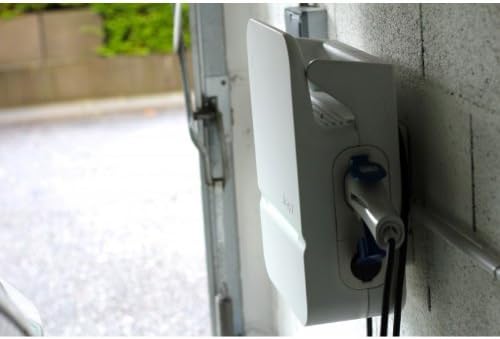
Рисунок 2: Сторона view of the Hager WITTY charging station, illustrating the cable connection point and the unit's profile.
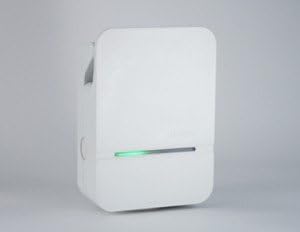
Рисунок 3: Подробный фронт view of the Hager WITTY charging station, emphasizing the integrated green status light.
3. Настройка
3.1. Место установки
Choose a suitable location that is protected from direct impact, excessive moisture, and extreme temperatures. Ensure adequate ventilation and accessibility for maintenance.
3.2 Монтаж
- Отметьте места для сверления на стене, используя прилагаемый шаблон (если применимо) или измерив монтажные отверстия на устройстве.
- Просверлите отверстия и вставьте соответствующие дюбели в стену.
- Secure the charging station to the wall using the provided screws.
3.3. Электрическое подключение
ПРЕДУПРЕЖДЕНИЕ: Электромонтаж должен выполнять квалифицированный электрик.
- Ensure the main power supply is disconnected before beginning any electrical work.
- Connect the 3-phase + Neutral (3Ph+N) 32A power supply to the designated terminals inside the charging station.
- Убедитесь, что установлено правильное заземление.
- Verify all connections are secure and correctly wired according to the wiring diagram provided with the unit (refer to the separate installation guide for detailed diagrams).
- Close the charging station cover securely.
4. Операционная
4.1. Начало зарядки
- Ensure the charging station is powered on and the status indicator light is green (ready).
- Connect the charging cable to your electric vehicle's charging port.
- Connect the other end of the charging cable to the charging station's outlet (Type 3 or Mode 2 socket).
- The charging station will automatically initiate the charging process. The status indicator light may change to blue or flashing green, depending on the charging status.
4.2. Stopping a Charge
- Сначала отсоедините зарядный кабель от электромобиля.
- Disconnect the charging cable from the charging station.
- The charging station will return to a ready state (green indicator light).
4.3. Индикаторы состояния
- Зеленый свет: Готов к зарядке.
- Blue Light (or flashing green): Идет зарядка.
- Red Light (or flashing red): Обнаружена ошибка или неисправность. См. раздел «Устранение неполадок».
- Нет света: Power off or system fault.
5. Техническое обслуживание
5.1. Уборка
Очистите внешнюю поверхность зарядной станции мягкой тряпкой.amp Используйте ткань. Не используйте абразивные чистящие средства, растворители или агрессивные химикаты. Перед чисткой убедитесь, что устройство выключено.
5.2.Осмотр
Periodically inspect the charging station for any signs of damage, wear, or loose connections. Check the charging cable for fraying or damage. If any damage is found, discontinue use and contact a qualified technician.
6. Поиск Неисправностей
| Проблема | Возможная причина | Решение |
|---|---|---|
| No power/No light | Power supply disconnected; Circuit breaker tripped. | Check power supply; Reset circuit breaker. If problem persists, contact a qualified electrician. |
| Красный индикатор | Internal fault; Overcurrent; Ground fault. | Disconnect and reconnect the vehicle. If the error persists, power cycle the unit. If still red, contact service. |
| Зарядка не начинается | Cable not properly connected; Vehicle not ready to charge; Charging station fault. | Ensure cable is securely connected to both vehicle and station. Check vehicle's charging status. Power cycle the charging station. |
7. Технические характеристики
| Особенность | Деталь |
|---|---|
| Модель | XEV103 |
| Режим зарядки | Mode 3 (IEC 61851-1), Mode 2 |
| Тип разъема | Type 3 / Standard Socket |
| Vol входtage | 3-phase + Neutral |
| Максимальный ток | 32А |
| Выходная мощность | 4 кВт – 22 кВт |
| Доступ | Свободный доступ |
| ASIN | B00CSJUVKA |
8. Гарантия и поддержка
For warranty information and technical support, please refer to the official Hager website or contact your local Hager distributor. Keep your purchase receipt for warranty claims.
Spare parts availability: Information not available.