1. Введение
This manual provides essential information for the safe and effective installation, operation, and maintenance of your Vimar 14015 Serie Plana 2-Pole White Switch. This product is a 2-pole switch designed for electrical circuits, rated at 16 Amperes and 250 Volts. It features an illuminable and replaceable push button, making it suitable for various residential and commercial applications.
2. Информация по технике безопасности
Перед установкой и использованием внимательно ознакомьтесь со всеми инструкциями по технике безопасности. Несоблюдение этих инструкций может привести к поражению электрическим током, пожару или серьёзной травме.
- Отключить питание: Always ensure the main power supply to the circuit is turned off at the circuit breaker or fuse box before attempting any installation, wiring, or maintenance.
- Квалифицированный электрик: Installation should only be performed by a qualified electrician or competent person in accordance with all local and national electrical codes and regulations.
- Томtagе и ток: Не превышайте указанный объемtage (250V) and current (16A) ratings of the switch.
- Рейтинг IP40: This switch has an International Protection Rating of IP40, meaning it is protected against solid objects larger than 1mm but offers no protection against liquids. Do not install in areas where it may be exposed to water or high humidity.
- Материал: The switch is constructed from metal. Ensure proper grounding if required by local codes.
3. Содержимое упаковки
- 1 x Vimar 14015 Serie Plana 2-Pole White Switch
4. Установка
Follow these steps for proper installation of the Vimar 14015 switch.
4.1 Предварительная установка
- Выключите питание: Locate the circuit breaker or fuse controlling the area where the switch will be installed and turn off the power. Verify power is off using a voltagе тестер.
- Подготовьте проводку: Ensure the existing wiring is suitable for a 2-pole, 16A, 250V switch.
4.2 Подключение
The Vimar 14015 switch is designed for 2-way circuits and features quick connect terminals. Refer to the diagram below for terminal identification.
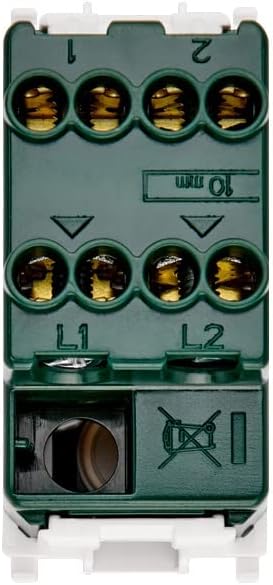
Рисунок 1: Назад view of the Vimar 14015 switch with wiring terminals. Terminals L1 and L2 are for incoming power lines, and terminals 1 and 2 are for outgoing load connections in a 2-way circuit.
- Connect the incoming live wires to terminals labeled L1 и L2.
- Connect the outgoing load wires to terminals labeled 1 и 2.
- Ensure all connections are secure and wires are fully inserted into the quick connect terminals.
4.3 Монтаж
This switch is designed for surface mount installation.

Рисунок 2: Сторона view of the Vimar 14015 switch, indicating its compact design and model identification.
- Carefully place the switch into the appropriate mounting box or frame.
- Secure the switch using the provided screws or clips, ensuring it is flush and stable.
4.4 После установки
- Восстановить мощность: После завершения установки и проверки надежности всех соединений восстановите подачу питания на автоматический выключатель.
- Тестовая функциональность: Press the switch button to verify proper ON-OFF operation and check if the illumination functions correctly.
5. Инструкция по эксплуатации
The Vimar 14015 switch operates with a simple push-button mechanism.

Рисунок 3: Передняя часть view of the Vimar 14015 switch, showing the push-button actuator.
- Функция включения/выключения: Press the upper part of the button to turn the connected device or light ON. Press the lower part of the button to turn it OFF.
- Освещение: If the switch is configured for illumination, a light indicator will be visible on the button when the switch is in a specific state (e.g., ON or OFF, depending on wiring).
- Replaceable Button: The button is designed to be replaceable. If replacement is needed, ensure power is disconnected before attempting to remove or install a new button.
6. Техническое обслуживание
The Vimar 14015 switch requires minimal maintenance.
- Уборка: To clean the switch, wipe it with a soft, dry cloth. Do not use abrasive cleaners, solvents, or excessive moisture, as this can damage the finish or internal components.
- Нет деталей, обслуживаемых пользователем: There are no user-serviceable parts inside the switch other than the replaceable button. Do not attempt to disassemble the switch.
7. Поиск Неисправностей
If you encounter issues with your Vimar 14015 switch, refer to the following common problems and solutions.
- Switch Not Working:
- Ensure the main power supply to the circuit is ON.
- Verify that all wiring connections (L1, L2, 1, 2) are secure and correctly installed.
- Check the connected load (e.g., light bulb) to ensure it is functional.
- Подсветка не работает:
- Confirm that the switch is correctly wired for illumination.
- If the illumination is provided by a separate component (e.g., an LED module), ensure it is correctly installed and functional.
If problems persist after attempting these troubleshooting steps, contact a qualified electrician or Vimar customer support.
8. Технические характеристики
| Спецификация | Ценить |
|---|---|
| Бренд | Вимар |
| Номер модели | SERIE PLANA (14015) |
| Режим работы | ВКЛ ВЫКЛ |
| Текущий рейтинг | 16 Amps |
| Рабочий объемtage | 250 Вольт |
| Тип контакта | Нормально открытый |
| Тип разъема | Быстрое подключение |
| Тип цепи | 2-х полосный |
| Тип привода | Кнопка нажатия |
| Международный рейтинг защиты | IP40 |
| Количество позиций | 2 |
| Метод контроля | Трогать |
| Цвет | Белый |
| Ватtage | 200 Вт |
| Материал | Металл |
| Тип крепления | Поверхностный монтаж |
| Размеры продукта (Д x Ш x В) | 0.88 x 1.51 x 1.92 дюйма |
| Вес товара | 1.06 унции |
9. Гарантия и поддержка
Vimar products are manufactured to high-quality standards. For specific warranty information, please refer to the documentation provided with your purchase or visit the official Vimar website. For technical support or assistance, please contact Vimar customer service through their official channels.