Введение
Thank you for choosing the Brondi Sydney DECT Phone. This manual provides comprehensive instructions for the proper setup, operation, and maintenance of your new cordless telephone. Please read this manual carefully before using the device to ensure optimal performance and longevity.
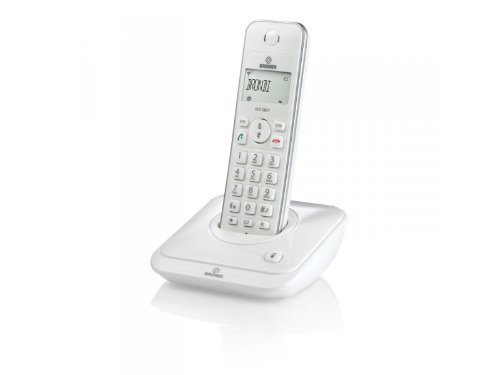
Figure 1: Brondi Sydney DECT Phone. This image shows the cordless handset resting on its charging base station.
1. Настройка
1.1 Распаковка и комплектация
Аккуратно извлеките все предметы из упаковки. Убедитесь в наличии всех компонентов:
- Brondi Sydney Handset
- Brondi Sydney Base Station
- Адаптер питания для базовой станции
- Телефонный шнур
- Rechargeable Batteries (AAA, quantity 2) (Может продаваться отдельно)
- Руководство пользователя (этот документ)
1.2 Установка аккумулятора
Install the rechargeable batteries into the handset:
- Найдите крышку батарейного отсека на задней панели телефона.
- Чтобы открыть крышку, сдвиньте ее вниз или нажмите на защелку.
- Вставьте две перезаряжаемые батарейки типа AAA, соблюдая правильную полярность (+ и -), указанную внутри отсека.
- Установите на место крышку батарейного отсека и убедитесь, что она надежно защелкнулась.
Figure 2: Battery installation. This image illustrates the correct way to insert batteries into the handset's battery compartment.
1.3 Подключение базовой станции
Connect the base station to power and the telephone line:
- Plug one end of the telephone line cord into the TEL LINE port on the base station.
- Вставьте другой конец телефонного кабеля в телефонную розетку на стене.
- Connect the power adapter to the DC IN port on the base station.
- Подключите адаптер питания к стандартной электрической розетке.
- Place the handset on the base station to charge. The charging indicator on the handset or base station should illuminate. Allow at least 12-15 hours for the initial charge.
Figure 3: Base station connections. This image shows the power adapter and telephone line cord connected to the base station ports.
1.4 Handset Registration (If Needed)
Your handset is usually pre-registered to the base station. If the handset displays "Unregistered" or similar, follow these steps:
- На базовой станции нажмите и удерживайте PAGE/LOCATE button for approximately 5 seconds until the registration indicator light flashes.
- На телефоне перейдите к МЕНЮ, затем выберите РЕГИСТРАЦИЯ or REGISTER HANDSET.
- Enter the PIN (default is usually 0000 or 1234) и нажмите OK.
- The handset will display "Registering..." and then "Registered" upon successful completion.
2. Инструкция по эксплуатации
2.1 Совершение и прием звонков
Сделать звонок:
- Нажмите РАЗГОВАРИВАТЬ or ЗЕЛЕНЫЙ кнопка.
- Наберите нужный номер телефона.
- Нажимать РАЗГОВАРИВАТЬ again or wait for the call to connect.
Чтобы принять вызов:
- Когда телефон зазвонит, нажмите кнопку РАЗГОВАРИВАТЬ or ЗЕЛЕНЫЙ кнопка.
Чтобы завершить вызов:
- Нажмите КОНЕЦ or КРАСНЫЙ button, or place the handset back on the base station.
2.2 АОН
If you subscribe to Caller ID service, the caller's number and name (if available) will be displayed on the handset screen before you answer the call. You can review прошлые вызовы в журнале идентификатора вызывающего абонента.
- To access the Caller ID log, press the ЖУРНАЛ ВЫЗОВОВ or CID кнопка.
- Используйте ВВЕРХ/ВНИЗ arrow keys to scroll through entries.
- To call back an entry, press the РАЗГОВАРИВАТЬ button while the entry is displayed.
2.3 Телефонная книга (20 записей)
Your Brondi Sydney phone can store up to 20 phonebook entries.
Чтобы добавить запись:
- Нажмите МЕНЮ кнопка.
- Выбирать ТЕЛЕФОННАЯ КНИГА, затем ADD NEW ENTRY.
- Enter the name using the alphanumeric keypad.
- Нажимать OK.
- Введите номер телефона.
- Нажимать СОХРАНЯТЬ or OK.
Чтобы набрать номер из телефонной книги:
- Нажмите ТЕЛЕФОННАЯ КНИГА button or navigate via МЕНЮ.
- Используйте ВВЕРХ/ВНИЗ arrow keys to find the desired entry.
- Нажмите РАЗГОВАРИВАТЬ кнопка для набора номера.
2.4 Регулировка громкости
Во время разговора нажмите кнопку ВВЕРХ/ВНИЗ arrow keys on the handset to adjust the earpiece volume. To adjust the ringer volume, navigate to MENU > SETTINGS > RINGER VOLUME when the phone is idle.
3. Техническое обслуживание
3.1 Инструкции по очистке
To keep your Brondi Sydney phone in good condition:
- Протрите трубку и базовую станцию мягкой тряпкой.amp ткань.
- Do not use harsh cleaning agents, abrasive cloths, or chemical solvents, as these can damage the surfaces.
- Ensure no liquid enters the openings of the device.
3.2 Уход за аккумулятором
- Always use the supplied rechargeable batteries. Using non-rechargeable batteries can damage the handset.
- For optimal battery life, place the handset on the base station when not in use.
- Если телефон не будет использоваться в течение длительного времени, извлеките батареи, чтобы предотвратить протекание.
- Утилизируйте старые батареи ответственно в соответствии с местными правилами.
3.3 Хранение
Store the phone in a cool, dry place away from direct sunlight and extreme temperatures when not in use for long periods.
4. Поиск Неисправностей
If you encounter issues with your Brondi Sydney phone, refer to the table below for common problems and solutions.
| Проблема | Возможная причина | Решение |
|---|---|---|
| Нет гудка | Телефонный шнур отсоединен. | Ensure the telephone line cord is securely plugged into the base station and the wall jack. |
| Нет гудка | Base station power is off. | Check that the power adapter is securely connected to the base station and a working electrical outlet. |
| На экране телефона отображается сообщение «Незарегистрировано». | Handset lost connection or was not registered. | Follow the handset registration steps in Section 1.4. |
| Плохое качество звука / Помехи | Handset is too far from the base station. | Move closer to the base station. |
| Плохое качество звука / Помехи | Помехи от других электронных устройств. | Move the base station away from other electronic devices (e.g., Wi-Fi routers, microwaves). |
| Телефон не заряжается | Handset not properly seated on the base. | Ensure the handset is correctly placed on the base station and the charging contacts are clean. |
| Телефон не заряжается | Batteries are depleted or faulty. | Allow sufficient charging time (12-15 hours for initial charge). If issues persist, replace with new rechargeable AAA batteries. |
5. Технические характеристики
| Особенность | Деталь |
|---|---|
| Бренд | Бронди |
| Модель | SIDNEY_BIANCO |
| Тип | Беспроводной телефон DECT |
| Идентификатор вызывающего абонента | Да |
| Записи телефонной книги | 20 |
| Модельный год | 2012 |
| Размеры (упаковка) | 18.2 х 14 х 7.2 см |
| Вес (упаковка) | 479.99 г |
| Требуются батареи | 2 x AAA Rechargeable (Not included in package, but required for operation) |
| ASIN | B009WRN180 |
6. Гарантия и поддержка
6.1 Информация о гарантии
Brondi products are covered by a limited warranty. Please refer to the warranty card included in your product packaging or visit the official Brondi webПодробные условия гарантии можно найти на сайте. Сохраните чек о покупке для предъявления претензий по гарантии.
6.2 Поддержка клиентов
For technical assistance, troubleshooting beyond this manual, or service inquiries, please contact Brondi customer support. Contact details can typically be found on the Brondi official webсайте или на упаковке продукта.
- Онлайн поддержка: Visit the official Brondi webсайт.
- Телефонная поддержка: Refer to your product packaging or Brondi's webсайт региональных контактных телефонов.


