Введение
The Intermatic TN111RM40 is a mechanical 24-hour timer designed for controlling lamps and small appliances. This timer allows for up to two ON and two OFF events per day, making it suitable for automating various electrical devices, including landscape lighting systems. It features a 2-prong polarized outlet and a manual override function. The timer is housed in a 3R enclosure, indicating its suitability for outdoor use.
This manual provides instructions for the safe and effective operation of your Intermatic TN111RM40 timer.
Информация по безопасности
- Перед использованием прочтите все инструкции.
- Не погружать в воду.
- Ensure the timer is unplugged before making any adjustments or cleaning.
- Не превышайте номинальные электрические параметры таймера.
- This timer is designed for use with 2-prong polarized plugs only.
Продукт болееview
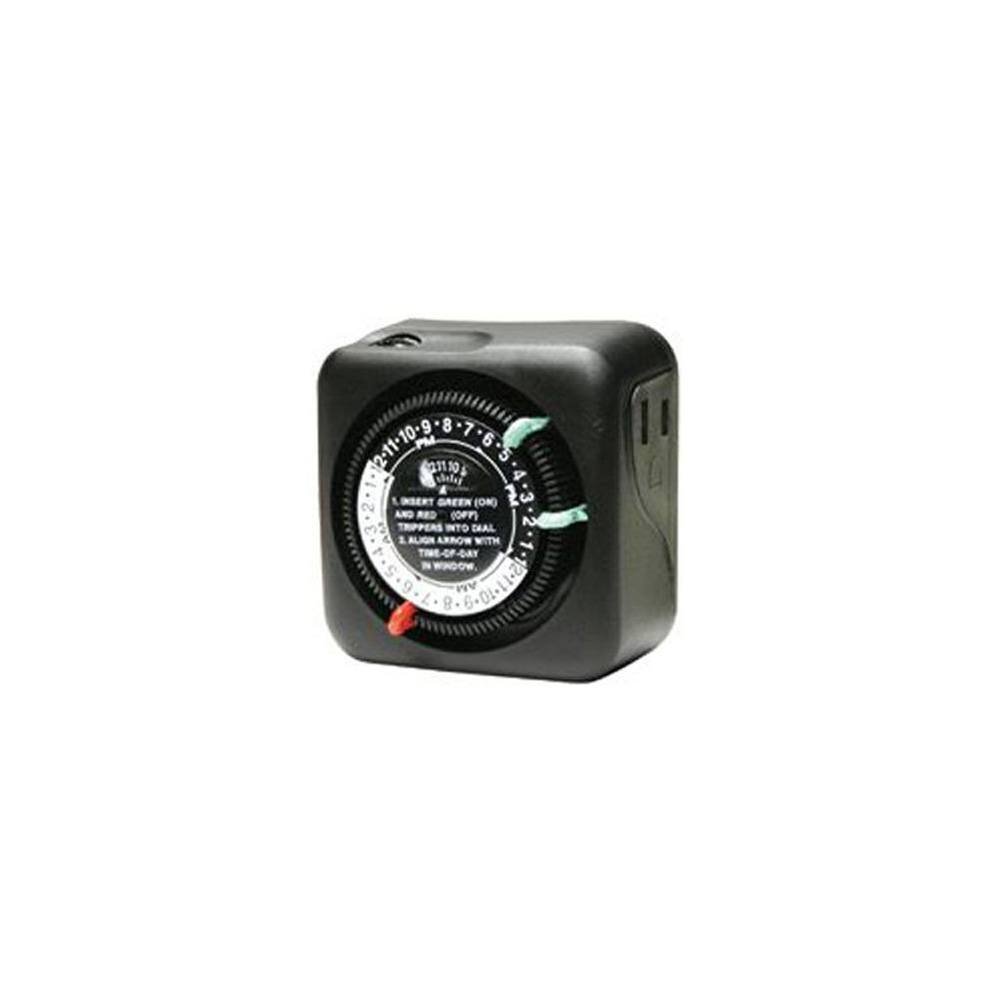
Рисунок 1: Передняя часть view of the Intermatic TN111RM40 timer, highlighting the 24-hour dial, green (ON) and red (OFF) trippers, and the time-of-day window. The image also shows the product dimensions: 3 inches deep, 4 inches wide, and 3 inches high.
The Intermatic TN111RM40 timer features a rotating 24-hour dial with markings for AM and PM. It includes removable trippers (pins) for setting ON and OFF times, a manual override switch, and a single 2-prong polarized outlet.
Настраивать
- Распакуйте таймер: Аккуратно извлеките таймер из упаковки. Осмотрите его на наличие повреждений.
- Определите компоненты: Locate the green (ON) trippers and red (OFF) trippers. These are small pins that insert into the dial.
- Установить текущее время:
- Rotate the entire dial clockwise until the current time aligns with the "TIME-OF-DAY" arrow in the window. Ensure to distinguish between AM and PM hours.
- Insert ON/OFF Trippers:
- Insert the green (ON) trippers into the dial at the desired times you want the connected appliance to turn ON.
- Insert the red (OFF) trippers into the dial at the desired times you want the connected appliance to turn OFF.
- The timer supports up to two ON and two OFF settings per 24-hour period.
- Подключите таймер: Plug the timer into a standard 2-prong wall outlet.
- Подключить устройство: Подключите lamp or small appliance into the 2-prong polarized outlet on the side of the timer. Ensure the appliance is switched to the ON position if it has its own power switch.
Инструкция по эксплуатации
Once set up, the timer will automatically turn your connected appliance ON and OFF according to the programmed times. The dial will continuously rotate clockwise, indicating the passage of time.
Ручное управление
The Intermatic TN111RM40 includes a manual override feature. This allows you to temporarily turn the connected appliance ON or OFF without disturbing the programmed schedule.
- To manually turn the appliance ON or OFF, locate the manual override switch (often a small lever or button) on the timer.
- Toggle the switch to the desired position. The timer will resume its programmed schedule at the next ON or OFF event.
Обслуживание
- Уборка: Перед чисткой отключите таймер от сети. Протрите внешнюю поверхность мягкой тряпкой.amp Ткань. Не используйте абразивные чистящие средства или растворители.
- Хранилище: При длительном хранении таймера убедитесь, что он чистый и сухой. Храните его в прохладном, сухом месте, вдали от прямых солнечных лучей.
- Инспекция: Periodically inspect the timer and its cord for any signs of wear or damage. If damage is found, discontinue use and replace the unit.
Поиск неисправностей
| Проблема | Возможная причина | Решение |
|---|---|---|
| Прибор не включается/выключается в запрограммированное время. |
|
|
| Диск таймера не вращается. |
|
|
Технические характеристики
- Модель: TN111RM40
- Бренд: Интерматик
- Тип: 24-часовой механический таймер
- Настройки: Up to 2 ON/OFF events per day
- Тип розетки: 2-Prong Polarized
- Приложение: 3R (Suitable for outdoor use)
- Цвет: Черный
- Материал: Пластик
- Размеры продукта: 3 дюймов (глубина) x 4 дюймов (ширина) x 3 дюйма (высота)
- Вес товара: 5.3 унции
- СКП: 702811361973
Гарантия и поддержка
For warranty information or technical support, please refer to the official Intermatic webили обратитесь в службу поддержки клиентов. Сохраните чек о покупке для предъявления гарантийных претензий.
Intermatic Customer Support: www.intermatic.com/support


