Введение
The ALFAJR CT-01 Azan Clock is designed to provide accurate prayer times and Azan sounds for users worldwide. This manual provides comprehensive instructions for setting up, operating, and maintaining your clock to ensure optimal performance.
Key features of your ALFAJR CT-11 clock include:
- High-quality digital Azan sound for all prayers, including complete Fajr Azan, with adjustable volume control.
- Accurate prayer time calculation for cities globally, supporting various Taqweem systems (Islamic World Organization, Taqweem Um Al-Qura, Altaqweem Almasri, Islamic Scientific University, Islamic Society of North America, Fixed Time).
- Функция ежедневного будильника.
- Qibla direction indicator.
- Hijri and Gregorian Calendar display.
- Отображение температуры.
- Gentle prayer reminders (when Azan sound is off).
- Опция перехода на летнее время (DST).
- Five high-quality Azan sounds (Makkah, Madinah, Quds, Egypt, Riyadh).
- Широкий viewЖК-дисплей с углом поворота.
- DC 6 Volts external input option.

Рисунок 1: Передняя часть view of the ALFAJR CT-11 Azan Clock, displaying time, date, and prayer information.
Руководство по настройке
1. Питание часов
The ALFAJR CT-11 clock operates on 2 AA batteries (not included) or can be powered via a DC 6 Volts external input (power adapter cable not included).
Установка аккумулятора:
- Найдите батарейный отсек в нижней части часов.
- Откройте крышку батарейного отсека.
- Вставьте 2 батарейки типа АА, соблюдая правильную полярность (+/-).
- Плотно закройте крышку батарейного отсека.

Рисунок 2: Внизу view of the clock, illustrating the battery compartment (labeled 13 in some diagrams).
2. Начальные настройки
Upon first power-on or after a reset, the clock will prompt you to set the basic parameters.
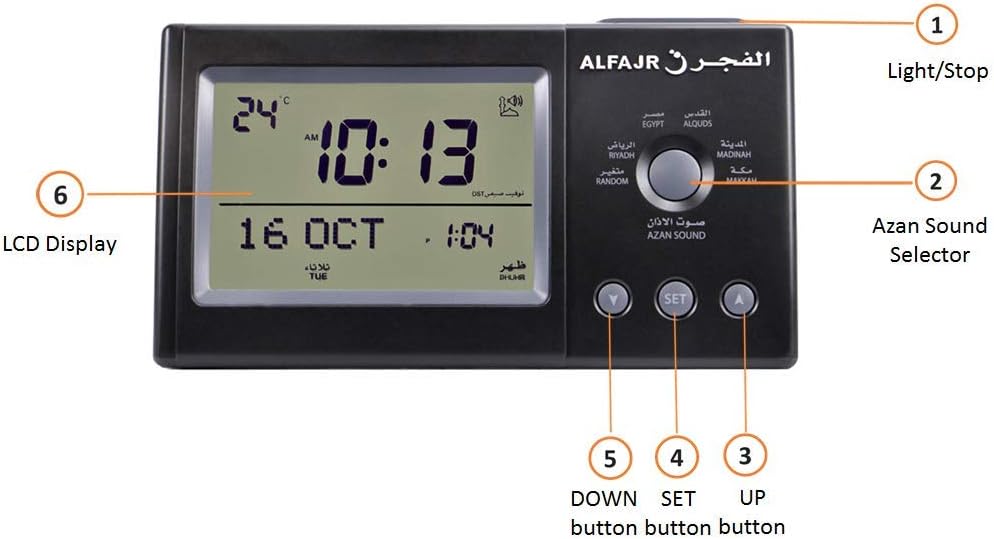
Figure 3: Front controls of the ALFAJR CT-11 Azan Clock. Key controls include Light/Stop (1), Azan Sound Selector (2), UP button (3), SET button (4), DOWN button (5), and LCD Display (6).
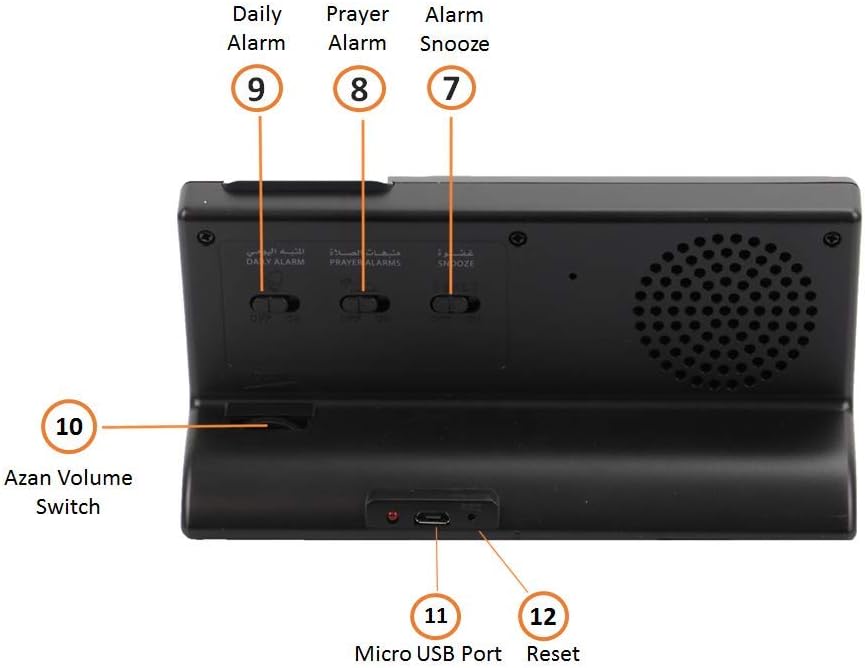
Figure 4: Back controls of the ALFAJR CT-11 Azan Clock. Key controls include Alarm Snooze (7), Prayer Alarm (8), Daily Alarm (9), Azan Volume Switch (10), Micro USB Port (11), and Reset (12).
Setting Current Time and Date:
- Нажмите НАБОР button (4) to enter the setting mode.
- Используйте UP (3) и ВНИЗ (5) buttons to adjust the hour, then press НАБОР to confirm and move to minutes. Repeat for minutes, year, month, and day.
- Продолжайте нажимать НАБОР to cycle through settings until the time and date are correctly configured.
Setting City and Taqweem System:
The clock calculates prayer times based on your selected city and Taqweem system.
- In setting mode, navigate to the city selection.
- Используйте UP и ВНИЗ buttons to select your city. The clock has a pre-programmed list of major cities.
- After selecting the city, you will be prompted to choose a Taqweem system. Select the system most widely used in your region (e.g., Islamic World Organization, Um Al-Qura, ISNA).
- Нажимать НАБОР для подтверждения.
Настройка летнего времени (DST):
Если в вашем регионе действует летнее время, включите эту функцию.
- In setting mode, navigate to the DST option.
- Используйте UP or ВНИЗ кнопка для включения или выключения летнего времени.
- Нажимать НАБОР для подтверждения.
Инструкция по эксплуатации
Azan and Prayer Times
The clock automatically displays prayer times and plays the Azan at the calculated times for your selected city.
- Azan Volume Control: Use the Azan Volume Switch (10) located at the back of the clock to adjust the loudness of the Azan.
- Azan Sound Selection: Rotate the Azan Sound Selector (2) on the front of the clock to choose from five different Azan voices (Makkah, Madinah, Quds, Egypt, Riyadh, or Random).
- Prayer Reminders: If the Azan sound is turned off, the clock can provide gentle prayer reminders.

Figure 5: Display features of the ALFAJR CT-11 Azan Clock, including temperature, DST indicator, low battery indicator, Qibla direction, moon age, Micro USB power socket, Azan sound options, prayer reminders, language options, and calendar types.
Функции будильника
The clock features multiple alarm types:
- Daily Alarm (9): A regular alarm that can be set for any time. Use the switch on the back to enable/disable.
- Prayer Alarm (8): An alarm specifically for prayer times. Use the switch on the back to enable/disable.
- Alarm Snooze (7): When an alarm sounds, press the Light/Stop button (1) on the front to snooze the alarm for a short period. Use the switch on the back to enable/disable the snooze function.
Другие функции
- Направление Киблы: The clock displays the Qibla direction relative to North, assisting in prayer orientation.
- Отображение температуры: The LCD shows the ambient temperature in Celsius or Fahrenheit.
- Выбор языка: The clock supports both Arabic and English languages for display.
- Light/Stop Button (1): Press this button to illuminate the display or to stop an active Azan or alarm.
Обслуживание
- Уборка: Протрите часы мягкой сухой тканью. Не используйте абразивные чистящие средства или растворители.
- Замена батареи: Replace batteries when the low battery indicator appears on the display or when the clock's functions become erratic. Always use new AA batteries and dispose of old batteries responsibly.
- Хранилище: При длительном хранении часов извлеките батарейки, чтобы предотвратить их протечку.
Поиск неисправностей
| Проблема | Возможная причина | Решение |
|---|---|---|
| Дисплей часов пустой или тусклый. | Low or dead batteries; incorrect battery installation; no external power. | Replace batteries with new ones, ensuring correct polarity. Connect to a DC 6V power source if available. |
| Azan sound is too low or not playing. | Azan volume switch is set too low; Azan sound is turned off; clock not set to correct prayer time. | Adjust the Azan Volume Switch (10) on the back of the clock. Ensure Azan sound is enabled in settings. Verify city and Taqweem settings are correct. |
| Incorrect prayer times displayed. | Incorrect city or Taqweem system selected; DST setting is wrong. | Re-enter setting mode and verify your city and Taqweem system. Check and adjust the DST setting if applicable. |
| Часы отстают или ускоряются. | Low batteries; environmental factors. | Replace batteries. If the issue persists, perform a reset (12) and reconfigure. |
| Кнопки не реагируют. | Временный сбой программного обеспечения; низкий заряд батареи. | Remove and reinsert batteries. If issue persists, use the Reset button (12) on the back of the clock. |
Технические характеристики
| Бренд | АЛЬФАЖР |
| Номер модели | CT-11 (also referred to as CT-01) |
| Цвет | Темно-серый |
| Тип дисплея | Цифровой |
| Специальная характеристика | Летнее время |
| Размеры продукта | 6.25 дюйма в ширину x 3.25 дюймов в высоту (приблизительно 15.88 см в ширину x 8.26 см в высоту) |
| Источник питания | Corded Electric (DC 6 Volts external input) or 2 AA Batteries |
| Материал | Пластик |
| Вес товара | 0.66 Pounds (approx. 10.6 ounces / 300 grams) |
| Требуются батареи | 2 батарейки типа АА (не входят в комплект) |
| Будильник | Yes (Daily Alarm, Prayer Alarm) |
| Режим работы | Автоматический |
| Тип крепления | Настольный |
Информация о гарантии
The manufacturer provides a 2-year warranty from the date of purchase. For North American customers, warranty coverage is handled by an authorized North American distributor.
The warranty covers defects in material and workmanship only. If the clock can be repaired, it will be repaired and returned after testing. If a repair is not possible, a replacement will be issued. Warranty fees may apply.
Гарантия делает НЕТ крышка:
- Справедливый износ.
- Willful damage, abnormal storage or working conditions, accident, or negligence.
- Failure to operate or use the products in accordance with the user instructions.
- Любые изменения или ремонт, выполненные вами или третьей стороной.
- Theft or loss of the product.
To proceed with a warranty claim, a valid proof of purchase is required.
Поддерживать
For further assistance, technical support, or warranty claims, please contact the authorized ALFAJR distributor in your region or refer to the contact information provided with your purchase documentation.
Always refer to the official ALFAJR website or your local distributor for the most up-to-date information and support resources.


