1. Введение
Thank you for choosing the TFA 30.5027.02 Digital Thermometer/Hygrometer. This device is designed to accurately measure and display indoor temperature and humidity, providing a clear indication of the comfort level in your environment. Its ultra-flat design and high-gloss surface make it a discreet and functional addition to any room. Please read this manual carefully to ensure proper setup and operation.
2. Информация по технике безопасности
- Сохраните данную инструкцию для дальнейшего использования.
- Данное устройство предназначено только для использования внутри помещений.
- Do not expose the device to extreme temperatures, direct sunlight, moisture, or strong vibrations.
- Не погружайте устройство в воду или другие жидкости.
- Не пытайтесь вскрывать или модифицировать устройство. Это аннулирует гарантию.
- Храните батареи в недоступном для детей месте. При проглатывании немедленно обратитесь за медицинской помощью.
- Утилизируйте использованные батареи в соответствии с местным законодательством.
- Очистите устройство мягкой тряпкой.amp Ткань. Не используйте абразивные чистящие средства или растворители.
3. Содержимое упаковки
Пожалуйста, проверьте наличие и целостность всех компонентов:
- 1x TFA 30.5027.02 Digital Thermometer/Hygrometer
- 1x CR2 Lithium Battery (pre-installed or separate)
- 1x Руководство по эксплуатации (этот документ)
4. Продукт закончилсяview
The TFA 30.5027.02 features a clear digital display showing current temperature and humidity. It also includes a comfort level indicator and a maximum/minimum value memory function.

Рисунок 1: Передний view of the TFA 30.5027.02 Digital Thermometer/Hygrometer. The display shows temperature in Celsius and relative humidity percentage, along with a comfort level icon.
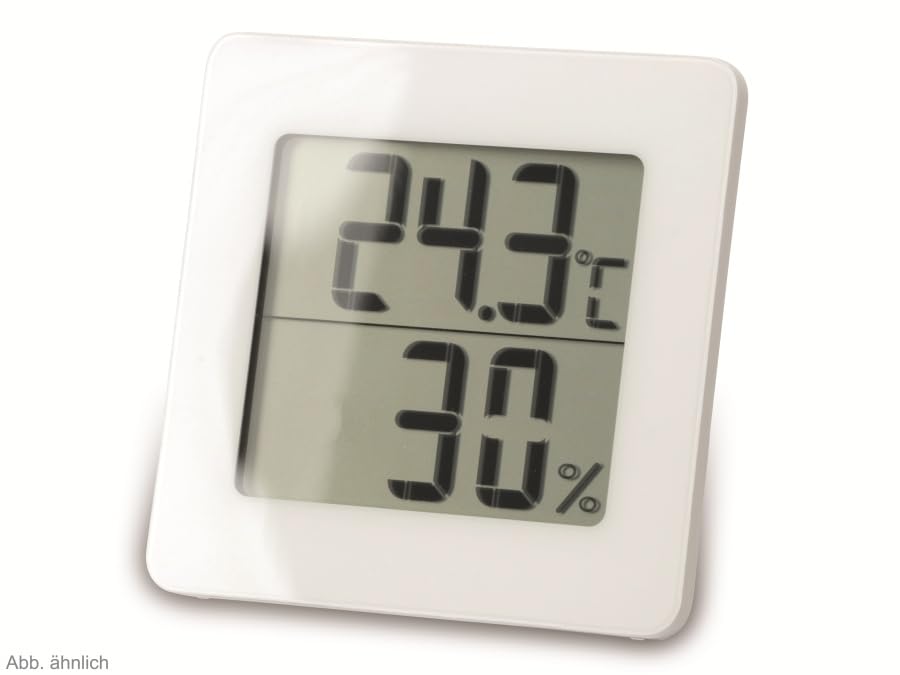
Рисунок 2: Альтернативный view of the TFA 30.5027.02 showing different temperature and humidity readings, demonstrating the device's clear digital display.
Основные характеристики:
- Digital display for temperature (°C) and humidity (% RH)
- Ultra-flat design with high-gloss finish
- Comfort level indicator (smiley icon)
- Maximum and minimum value memory function
- Возможность крепления на стену
5. Настройка
5.1 Установка аккумулятора
- Найдите крышку батарейного отсека на задней панели устройства.
- Снимите крышку, сдвинув или осторожно поддев ее.
- Insert one CR2 Lithium battery, ensuring the correct polarity (+/-) as indicated inside the compartment.
- Надежно закройте крышку батарейного отсека.
- The device display should activate, showing current temperature and humidity readings.
5.2 Первоначальное размещение
For accurate readings, place the thermometer/hygrometer in a location free from direct sunlight, drafts, or heat sources. The device can be placed on a flat surface or mounted on a wall using the integrated mounting hole on the back.
- Настенный монтаж: Use a small screw (not included) suitable for your wall type. Hang the device securely.
- Размещение на столе: Ensure the device is stable on a flat, level surface.
6. Инструкция по эксплуатации
6.1 Отображение поверхview
The large digital display shows two main values:
- Верхний дисплей: Current temperature in degrees Celsius (°C).
- Нижний дисплей: Current relative humidity in percentagе (% относительной влажности).
- Индикатор уровня комфорта: A small icon (e.g., a smiley face) indicates the current indoor climate comfort level based on temperature and humidity.
6.2 Макс./мин. функция
The device records the maximum and minimum temperature and humidity values measured since the last reset. To access these values:
- Нажмите МАКС/МИН button (if present, typically on the back or side). The display will show the maximum recorded temperature and humidity.
- Нажмите МАКС/МИН кнопку еще раз, чтобы view Минимальная зарегистрированная температура и влажность.
- Нажмите МАКС/МИН button a third time to return to current readings.
To reset the MAX/MIN values, press and hold the МАКС/МИН button for a few seconds while viewing the MAX or MIN values. The memory will clear, and new maximum and minimum values will begin recording from that point.
6.3 Индикатор уровня комфорта
The comfort level indicator provides a quick visual reference for indoor climate conditions:
- Happy Face: Indicates optimal comfort (e.g., 20-25°C and 40-70% RH).
- Нейтральное лицо: Indicates acceptable but not optimal conditions.
- Грустное лицо: Indicates uncomfortable conditions (e.g., too dry, too humid, too hot, or too cold).
Note: Specific ranges for comfort levels may vary slightly by model. Refer to the device's display for the exact icon representation.
7. Техническое обслуживание
7.1 Очистка
Очищайте устройство мягкой, слегка damp cloth. Do not use abrasive cleaning agents, solvents, or alcohol, as these can damage the surface and display.
7.2. Замена батареи
When the battery power is low, a low battery indicator (if available) will appear on the display. Replace the battery as follows:
- Откройте крышку батарейного отсека на задней панели устройства.
- Remove the old CR2 Lithium battery.
- Insert a new CR2 Lithium battery, observing the correct polarity (+/-).
- Закройте крышку батарейного отсека.
Note: After battery replacement, the device may reset, and MAX/MIN values will be cleared.
8. Поиск Неисправностей
| Проблема | Возможная причина | Решение |
|---|---|---|
| Нет изображения или оно слабое | Батарея разряжена или неправильно вставлена. | Replace the battery with a new CR2 Lithium battery, ensuring correct polarity. |
| Неточные показания | Device is placed in an unsuitable location (e.g., near a window, heat source, or vent). | Relocate the device to a stable indoor environment away from direct influences. Allow 15-30 minutes for readings to stabilize. |
| Comfort indicator always shows the same face | Environmental conditions are consistently outside or within a specific comfort range. | This indicates the device is functioning correctly. Adjust your indoor environment if desired. |
9. Технические характеристики
- Номер модели: 30.5027.02
- Бренд: TFA
- Цвет: Белый
- Размеры продукта (Д x Ш x В): 10 x 1.2 x 8.2 см (3.94 x 0.47 x 3.23 дюймов)
- Вес товара: 70 грамм (2.47 унции)
- Аккумулятор: 1 x CR2 Lithium (included)
- Тип крепления: Настенное крепление
- Operational Humidity Range: Относительная влажность 20–95 %
- Upper Rated Temperature: 50°С (122°F)
- Точность температуры: ±1°С
- Точность считывания температуры: ±1°С
10. Гарантия и поддержка
For warranty information and customer support, please refer to the terms and conditions provided by your retailer or contact the manufacturer directly. Keep your proof of purchase for any warranty claims.
Производитель: ТФА Достманн ГмбХ и Ко. КГ
For further assistance, please visit the official TFA webсайте или обратитесь в их отдел обслуживания клиентов.


