Введение
This manual provides comprehensive instructions for the setup, operation, maintenance, and troubleshooting of your Avaya 9508 Digital Phone. The Avaya 9508 is designed to deliver reliable, high-quality communication for business environments, offering functionality similar to the Avaya 9600 Series IP Deskphones in a digital telephony setting.
Продукт болееview
The Avaya 9508 Digital Phone is a robust communication device featuring a sleek design suitable for various business users. It integrates essential telephony functions with an intuitive interface.

Рисунок 1: Передняя часть view of the Avaya 9508 Digital Phone, showing the handset, display, and keypad.

Рисунок 2: Сторона view of the Avaya 9508 Digital Phone, illustrating its ergonomic design with the desk stand.
Инструкции по установке
1. Распаковка устройства
Осторожно извлеките все компоненты из упаковки. Убедитесь, что в наличии следующие предметы:
- Avaya 9508 Digital Phone unit
- Трубка
- Провод телефонной трубки
- Сетевой шнур
- Настольная подставка
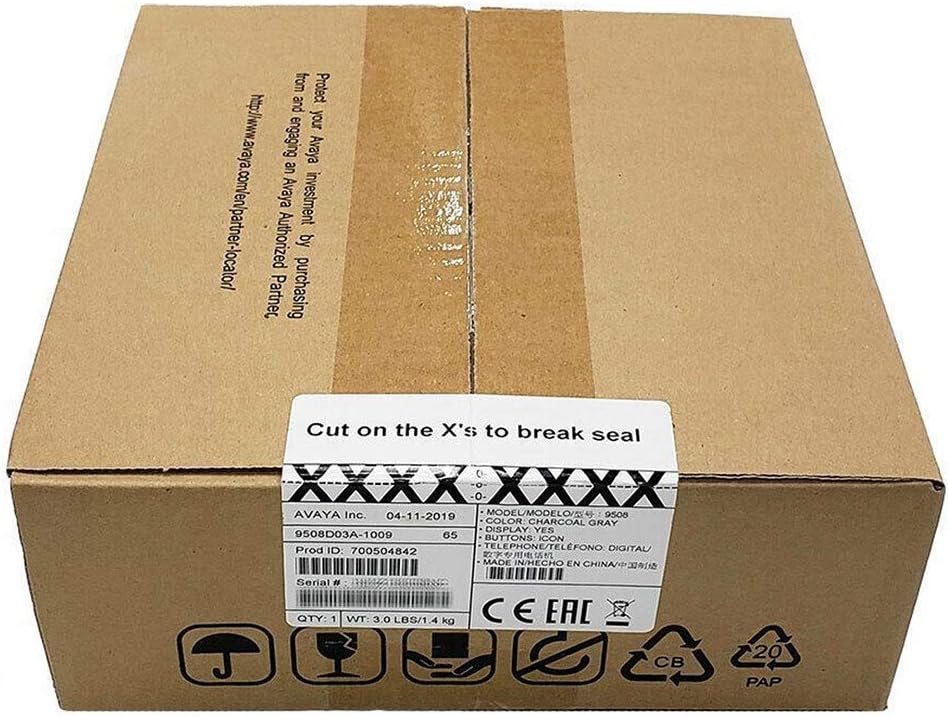
Figure 3: The Avaya 9508 Digital Phone packaging box, indicating product details and sealing instructions.
2. Attaching the Desk Stand
- Locate the slots on the back of the phone unit.
- Align the tabs on the desk stand with these slots.
- Вставьте подставку на место до щелчка.
3. Подключение телефона
- Plug one end of the coiled handset cord into the handset.
- Plug the other end into the designated handset port on the phone unit (usually marked with a handset icon).
4. Connecting to the Phone System
The Avaya 9508 is a digital phone and requires connection to a compatible Avaya phone system. It cannot be directly connected to a standard analog phone line or a modem/router for VoIP services without the appropriate system infrastructure.
- Connect one end of the line cord to the port labeled "LINE" or "DIGITAL" on the back of the phone.
- Connect the other end of the line cord to the digital station port on your Avaya communication system.
- Ensure the phone receives power from the system or an external power adapter (if required and not included).
Инструкция по эксплуатации
Основные функции вызова
- Звонок: Поднимите трубку или нажмите кнопку громкой связи, затем наберите номер.
- Ответ на звонок: Lift the handset or press the Speaker button when the phone rings.
- Завершение вызова: Положите трубку на место или нажмите кнопку громкой связи еще раз.
- Повторный набор номера: Нажмите кнопку повторного набора, чтобы позвонить на последний набранный номер.
Расширенные функции
- Держать: During a call, press the Hold button.
- Перемещение: During a call, press the Transfer button, dial the new extension or number, and then press Transfer again.
- Конференция: During a call, press the Conference button, dial the next participant, and then press Conference again to join all parties.
- Голосовая почта: Press the Voicemail button (often represented by an envelope icon) to access your messages. Follow the audio prompts for setup and retrieval.
- Регулировка громкости: Use the volume up/down buttons on the side of the phone to adjust handset, speaker, or ringer volume.
Обслуживание
Уборка
Чтобы сохранить внешний вид и функциональность вашего телефона:
- Используйте мягкий, damp cloth to wipe the phone's surface.
- Avoid using abrasive cleaners, solvents, or strong chemicals, as these can damage the plastic and electronic components.
- Ensure the phone is disconnected from the power source before cleaning.
Хранилище
При длительном хранении телефона отсоедините все кабели и храните его в прохладном, сухом месте, вдали от прямых солнечных лучей и экстремальных температур.
Поиск неисправностей
| Проблема | Возможная причина | Решение |
|---|---|---|
| Нет гудка | Phone not properly connected to the system. | Check all cable connections, especially the line cord to the phone system. Ensure the phone system is operational. |
| Не слышу звонящего / Звонящий меня не слышит | Handset or speaker volume too low; faulty cord. | Adjust volume. Check handset cord connection. Test with another handset if available. |
| Дисплей пустой | No power; phone system issue. | Verify power connection. Contact your system administrator if other phones are also affected. |
| Кнопки не отвечают | Временный сбой программного обеспечения. | Disconnect and reconnect the phone from the system (power cycle). |
If issues persist after attempting these solutions, please contact your system administrator or Avaya support.
Технические характеристики
- Модель: Avaya 9508 Digital Phone
- Номер детали: 700504842
- Размеры (Д x Ш x В): 1.97 x 1.97 x 1.97 inches (approximate, based on product data)
- Вес товара: 7.1 унции (200 граммов)
- Цвет: Черный
- Материал: Пластик
- Тип телефона: Digital Landline
- Источник питания: Corded Electric (typically powered by the Avaya communication system)
- Совместимые устройства: Requires connection to a compatible Avaya digital communication system.
- Первая доступная версия: 3 мая 2013 г.
Гарантия и поддержка
For warranty information, please refer to the documentation provided at the time of purchase or contact your Avaya reseller. Technical support is typically provided by your organization's IT department or the Avaya certified partner who installed your communication system.
For general information about Avaya products, visit the official Avaya webсайт: www.avaya.com


