Введение
This manual provides comprehensive instructions for the setup, operation, and maintenance of your Sonic Alert SBJ525SS Digital Alarm Clock. Please read this manual thoroughly before using the device to ensure proper function and longevity. This alarm clock is designed to provide reliable timekeeping and alarm functions, including a powerful vibrating bed shaker, loud audible alarm, and visual alert features.
Информация по безопасности
- Ensure the power adapter is connected to a standard electrical outlet.
- Не подвергайте устройство воздействию воды или чрезмерной влажности.
- Не размещайте устройство вблизи источников тепла или под прямыми солнечными лучами.
- Хранить в недоступном для детей месте.
- Use only the provided power adapter and bed shaker.
Содержимое упаковки
Проверьте наличие всех предметов в посылке:
- Sonic Alert SBJ525SS Digital Alarm Clock Unit
- 12-Volt Vibrating Bed Shaker
- Адаптер питания
- Руководство по эксплуатации
Продукт болееview
Ознакомьтесь с различными частями и элементами управления вашего будильника.
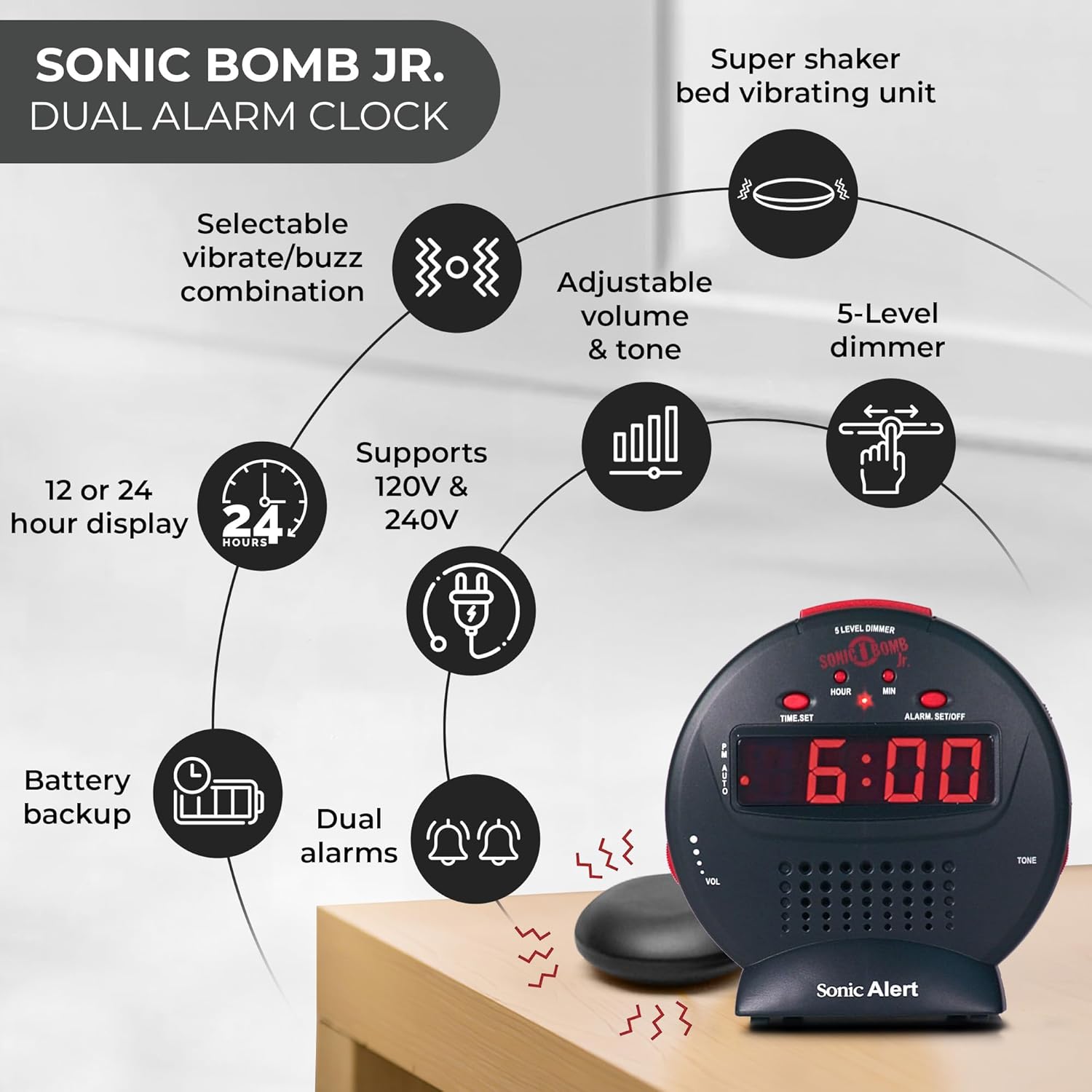
Описание изображения: A diagram illustrating the Sonic Alert SBJ525SS Digital Alarm Clock. Key features highlighted include the 12 or 24-hour display, battery backup, dual alarms, selectable vibrate/buzz combination, adjustable volume and tone, 5-level dimmer, and the super shaker bed vibrating unit. The clock supports 120V & 240V power.
The clock features a large digital display, control buttons for time and alarm settings, and adjustment knobs for volume and tone. A dedicated port is available for the bed shaker connection.
Настраивать
1. Подключение питания
- Connect the power adapter to the DC IN jack on the back of the alarm clock.
- Plug the power adapter into a standard electrical wall outlet. The display will illuminate.
2. Установка резервной батареи
The alarm clock requires 2 AA batteries (not included) for battery backup functionality. This ensures your time and alarm settings are retained during a power outage.
- Найдите батарейный отсек в нижней части устройства.
- Откройте крышку батарейного отсека.
- Вставьте 2 батарейки типа АА, соблюдая правильную полярность (+/-).
- Установите на место крышку батарейного отсека.

Описание изображения: A graphic illustrating the battery backup feature of the alarm clock. It shows the clock on a nightstand with a small circular battery icon (CR2032, 3V) next to it, indicating the type of battery used for backup. The text emphasizes that batteries are not included and are for retaining settings during power outagес.
3. Установка времени
- Нажмите и удерживайте УСТАНОВИТЬ ВРЕМЯ Кнопка. Цифры, обозначающие часы, начнут мигать.
- Нажмите ЧАС Нажмите кнопку несколько раз, чтобы настроить часы. Следите за индикатором PM для правильной настройки времени AM/PM.
- Нажмите МИН кнопку несколько раз, чтобы настроить минуты.
- Нажимать УСТАНОВИТЬ ВРЕМЯ еще раз, чтобы подтвердить время.
- Чтобы переключиться между 12-часовым и 24-часовым форматом, нажмите кнопку 12/24ч button (if available, otherwise it might be part of time set cycle).
4. Bed Shaker Connection
The vibrating bed shaker is an integral part of the Sonic Alert system, designed for heavy sleepers or individuals with hearing impairments.
- Locate the jack labeled ШЕЙКЕР на обратной стороне будильника.
- Insert the plug of the bed shaker into this jack.
- Place the bed shaker under your pillow, between your mattress and box spring, or under a fitted sheet for optimal vibration.

Описание изображения: A composite image showing three different methods for placing the super bed shaker: under a pillow, under a fitted sheet, and under a mattress. The image also highlights the 6ft long cable of the shaker.
Инструкция по эксплуатации
1. Установка будильников (двойной будильник)
The SBJ525SS features dual alarms, allowing you to set two independent wake-up times.
- Нажмите и удерживайте ALARM SET/OFF button once for Alarm 1. The hour digits for Alarm 1 will flash.
- Используйте ЧАС и МИН кнопки для установки желаемого времени срабатывания будильника.
- Нажимать ALARM SET/OFF again to confirm Alarm 1 and proceed to Alarm 2. The hour digits for Alarm 2 will flash.
- Используйте ЧАС и МИН buttons to set the desired time for Alarm 2.
- Нажимать ALARM SET/OFF a third time to confirm Alarm 2 and exit alarm setting mode.
- Для включения или выключения будильника нажмите кнопку. ALARM SET/OFF button briefly (not held). Each press cycles through Alarm 1 ON, Alarm 2 ON, Both Alarms ON, Both Alarms OFF. An indicator light on the display will show which alarm(s) are active.

Описание изображения: A bedroom scene with a couple sleeping, and the Sonic Alert alarm clock prominently displayed on a nightstand. The text overlay emphasizes the "Dual Alarm Clock" feature, allowing two different alarms to be set for reliable wake-up times.
2. Alarm Modes (Vibrate, Sound, Both)
The alarm clock offers various alert modes:
- Vibrate Only: The bed shaker will activate without an audible alarm.
- Только звук: The audible alarm will sound without bed shaker activation.
- Оба: Both the bed shaker and audible alarm will activate simultaneously.
To select the alarm mode, use the РЕЖИМ БУДИЛЬНИКА switch located on the side or back of the unit. Cycle through the options until your desired mode is selected.

Описание изображения: A woman sleeping in bed with the Sonic Alert alarm clock and its bed shaker visible on the adjacent nightstand. The image highlights the clock's features: a powerful 6-volt bed shaker, 102dB loud alarm with adjustable tone and volume, alarm and bed shaker test mode, and built-in red flashing lights.
3. Функция повтора сигнала
Когда зазвонит будильник, нажмите большую кнопку SNOOZE button on top of the unit to temporarily silence the alarm. The alarm will sound again after the set snooze duration.
- The snooze duration is adjustable from 1 to 30 minutes. Refer to the full instruction manual for specific steps on adjusting the snooze time.
Описание изображения: A man sleeping in bed with the Sonic Alert alarm clock on his bedside table. An overlay graphic shows a slider indicating the adjustable snooze duration from 1 to 30 minutes.
4. Brightness Dimmer
Adjust the display brightness to your preference using the 5-level dimmer function.
- Найдите ДИММЕР control (often a slider or button) on the unit.
- Adjust the control to cycle through the 5 brightness levels, from brightest (5) to dimmest (1).

Описание изображения: A woman sleeping in a bedroom with the Sonic Alert alarm clock on her nightstand. Below, a series of five clock images illustrate the different brightness levels of the display, from level 5 (brightest) to level 1 (dimmest), demonstrating the five-level dimmer feature.
5. Регулировка громкости и тона
Customize the audible alarm sound to your preference.
- Используйте ОБЪЕМ (Volume) knob/slider to increase or decrease the alarm's loudness.
- Используйте ТОН knob/slider to adjust the pitch of the alarm sound.
Описание изображения: крупный план view of the Sonic Alert alarm clock, specifically highlighting the volume control slider on its side. The accompanying text explains how to adjust the sound with ease using the knobs for volume and tone.

Описание изображения: The Sonic Alert alarm clock on a white surface, with a graphic overlay demonstrating the adjustable tone feature. Sound waves emanate from the clock, and a slider indicates the range of tone adjustments available.
6. USB Charging Port Usage
The alarm clock includes a built-in USB port for charging compatible handheld devices.
- Locate the USB charging port on the side or back of the unit.
- Подключите USB-кабель для зарядки вашего устройства к соответствующему порту.
- Ensure your device begins charging. Note that charging speed may vary depending on the device and cable.

Описание изображения: A woman reaching for her smartphone, which is connected and charging via the built-in USB port on the Sonic Alert alarm clock, placed on a nightstand next to her bed.
Обслуживание
- Уборка: Протирайте устройство мягкой сухой тканью. Не используйте жидкие чистящие средства или абразивные материалы.
- Замена батареи: Replace backup batteries annually or when the battery low indicator appears to ensure continuous backup functionality.
- Хранилище: При длительном хранении устройства извлеките резервные батареи, чтобы предотвратить утечку.
Поиск неисправностей
| Проблема | Возможная причина | Решение |
|---|---|---|
| Дисплей часов выключен или мерцает. | Адаптер питания не подключен или неисправен; выходное напряжение отсутствует.tage. | Ensure power adapter is securely plugged in. Check wall outlet. If power outage, battery backup should maintain time (display will be off). |
| Сигнализация не срабатывает/не вибрирует. | Alarm not activated; incorrect alarm mode selected; volume too low; bed shaker not connected. | Verify alarm is ON (indicator light). Check alarm mode switch. Increase volume. Ensure bed shaker is securely plugged in. |
| Настройки времени/будильника сбрасываются после отключения питания.tage. | Резервные батареи разряжены или не установлены. | Install fresh AA batteries in the battery compartment. |
| Зарядка через USB происходит медленно или не работает. | Device incompatibility; faulty USB cable; device requires higher power output. | Try a different USB cable. Ensure your device is compatible with standard USB charging. The clock's USB port provides standard charging output. |
Технические характеристики
| Бренд | Звуковая тревога |
| Номер модели | SBJ525SS |
| Тип дисплея | Цифровой |
| Особые возможности | Alarm, Auto Dimmable, Snooze, Vibrating Bed Shaker, USB Charging Port, Red Flashing Alert Lights |
| Источник питания | Corded Electric with Battery Backup (2 AA batteries required, not included) |
| Размеры продукта | 5 дюймов (Ш) x 5 дюйма (В) |
| Материал | Пластик |
| Громкость сигнала тревоги | Up to 102dB (with bed shaker) |
Гарантия и поддержка
The Sonic Alert SBJ525SS Digital Alarm Clock comes with a Limited Warranty. For specific warranty terms and conditions, please refer to the warranty card included with your product or visit the official Sonic Alert webсайт.
For technical support, troubleshooting assistance, or to inquire about replacement parts, please contact Sonic Alert customer service:
- Webсайт: www.sonicalert.com
- Контактная информация: Обратитесь к официальному webсайт или упаковку продукта для получения актуальной контактной информации.
Описание изображения: An open instruction manual for the Sonic Bomb Jr. alarm clock, showing detailed operational instructions and diagrams. This image signifies that a manual is included with the product for user guidance.


