Введение
This manual provides comprehensive instructions for the setup, operation, and maintenance of your DIRECTV H24 HD Satellite Receiver. The H24 receiver is designed to deliver high-definition (MPEG-2, MPEG-4) and standard-definition (MPEG-2) programming, offering a wide range of features for an enhanced viewing experience. Please read this manual thoroughly before operating your device.
Что в коробке?
Upon unpacking your DIRECTV H24 HD Satellite Receiver, please ensure all the following components are present:
- DIRECTV H24 HD Satellite Receiver
- Силовой кабель
- Карта доступа
- 6-Foot HDMI Cable
- RC66RX IR / RF Compatible Remote Control
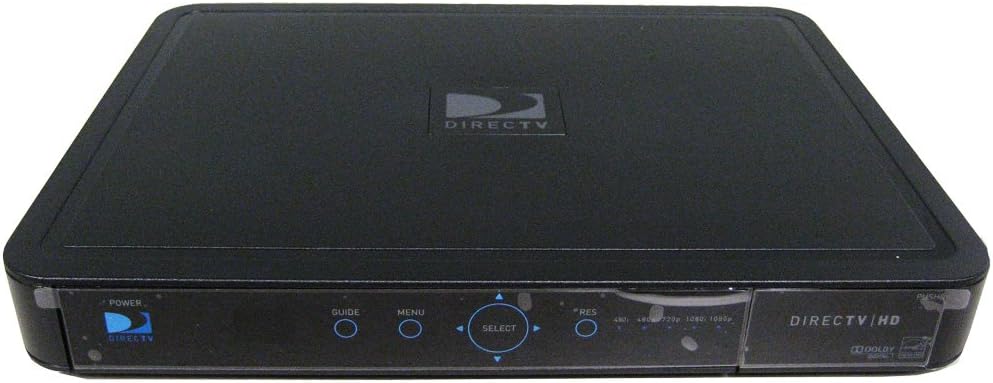
Изображение: Спереди view of the DIRECTV H24 HD Satellite Receiver. The receiver is black with a glossy front panel. Visible controls include Power, Guide, Menu, and a circular Select button with directional arrows. Resolution indicators (480i, 480p, 720p, 1080i, 1080p) are also present on the right side of the front panel. The DIRECTV logo is prominently displayed on the top surface.
Настраивать
1. Подключение к телевизору
The DIRECTV H24 receiver offers multiple connection options for your television. Choose the best available option for your TV.
- Подключение HDMI (рекомендуется для HD): Connect one end of the provided HDMI cable to the HDMI output port on the back of the H24 receiver and the other end to an HDMI input port on your television.
- Component Video (YPbPr) Connection: Connect the red, green, and blue component video cables from the H24 receiver's Component output to the corresponding input ports on your television. Also, connect the red and white RCA audio cables for sound.
- Composite Video (RCA) Connection: Connect the yellow composite video cable from the H24 receiver's Composite output to the yellow video input on your television. Also, connect the red and white RCA audio cables for sound.
- S-видео соединение: Connect an S-Video cable from the H24 receiver's S-Video output to the S-Video input on your television. Also, connect the red and white RCA audio cables for sound.
2. Connecting to Audio System (Optional)
For enhanced audio, you can connect your receiver to an external audio system.
- Оптический аудиовыход: Connect an optical audio cable from the Digital Optical output on the H24 receiver to your audio receiver or soundbar.
- Coaxial Audio: Connect a digital coaxial audio cable from the Digital (coaxial) output on the H24 receiver to your audio receiver or soundbar.
- Stereo RCA Audio: Connect red and white RCA audio cables from the Stereo (L/R, RCA) outputs on the H24 receiver to your audio receiver or television.
3. Подключение к спутниковой антенне
Connect the coaxial cable from your DIRECTV satellite dish to the Satellite In port on the back of the H24 receiver.
4. Подключение питания
Once all other connections are made, connect the power cable to the H24 receiver and then plug it into a standard electrical outlet.
Инструкция по эксплуатации
Основная операция
- Включение/выключение питания: Нажмите ВЛАСТЬ button on the remote control or the front panel of the receiver.
- Навигация по каналу: Используйте КАНАЛ ВВЕРХ / ВНИЗ buttons or enter the channel number directly using the remote's keypad.
- Гид: Нажмите ГИД button to access the seven-day Advanced Program Guide. You can search for shows up to 7 days in advance.
- Меню: Нажмите МЕНЮ button to access system settings, preferences, and other features.
- Выбирать: Use the directional arrows and the ВЫБИРАТЬ button to navigate and confirm selections within the guide and menus.
Расширенные функции
- Формат экрана: Adjust the screen format to full screen, stretched, letterbox, pillar box, or crop mode via the menu settings.
- Sports Scores (Red Button): Press the red button on your remote to view scores of major games without changing the channel.
- Идентификатор вызывающего абонента: View and log Caller ID information provided by your local phone company (requires phone line connection to receiver, if available).
- Родительский контроль: Set up parental controls and locks to restrict objectionable programming. Access this feature through the main menu.
Обслуживание
Proper maintenance ensures the longevity and optimal performance of your DIRECTV H24 receiver.
- Уборка: Для очистки внешней поверхности приемника используйте мягкую сухую ткань. Не используйте жидкие чистящие средства или абразивные материалы.
- Вентиляция: Ensure the receiver has adequate ventilation. Do not block the ventilation openings on the top, sides, or back of the unit. Avoid placing the receiver in enclosed spaces or on soft surfaces that may impede airflow.
- Цикл питания: If the receiver becomes unresponsive, try unplugging it from the power outlet for 15 seconds and then plugging it back in.
Поиск неисправностей
This section addresses common issues you might encounter with your DIRECTV H24 receiver.
| Проблема | Возможная причина/решение |
|---|---|
| Нет изображения/нет сигнала |
|
| Нет звука |
|
| Пульт дистанционного управления не работает |
|
| Receiver Unresponsive |
|
| Проблемы с активацией | As of January 1, 2019, DIRECTV no longer allows customers to self-activate receivers purchased online. You will need a DIRECTV authorized dealer to create an activation order for you. Contact DIRECTV customer support or an authorized dealer for assistance with activation. |
Технические характеристики
| Особенность | Деталь |
|---|---|
| Номер модели | Н24-100 |
| Размеры (Д x Ш x В) | 9.4 x 15 x 2.6 дюйма |
| Вес товара | 6 фунта |
| Видеовыход | 480i, 480p, 720p, 1080i picture output |
| Технология связи | Ethernet, HDMI |
| Режим аудиовыхода | Объемный |
| Порты подключения | 1 Digital Optical, 1 Digital (coaxial), 2 Stereo (L/R, RCA), 1 HDMI, 1 Component (YPbPr), 1 S-Video, 2 Composite (RCA) |
| Энергоэффективность | 2010 ENERGY STAR Excellence In Energy Efficient Product Design Award by the EPA |
Гарантия и поддержка
For warranty information and technical support, please refer to the documentation provided by DIRECTV at the time of service activation or visit the official DIRECTV support website. Please note that DIRECTV policy changes may affect receiver activation and service. For activation of receivers purchased online, an authorized DIRECTV dealer is required to create an activation order.
Правовая оговорка: Since January 1, 2019, DIRECTV does not allow customers to self-activate receivers purchased online. You will need a DIRECTV authorized dealer to create an activation order for you.


