1. Введение
The Antec TruePower TPQ-1200 is a high-performance 1200-watt power supply designed for demanding computer systems. It features an 80 PLUS Silver certification, indicating high energy efficiency, and provides stable power delivery through its six +12V rails. This manual provides essential information for the safe installation, operation, and maintenance of your TPQ-1200 power supply.
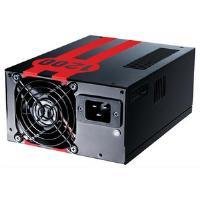
Image 1.1: The Antec TruePower TPQ-1200 Power Supply unit, showcasing its design and modular connectors.
2. Информация по технике безопасности
Перед установкой или эксплуатацией блока питания, пожалуйста, внимательно ознакомьтесь со всеми инструкциями по технике безопасности. Несоблюдение этих инструкций может привести к травмам или повреждению оборудования.
- Перед установкой, снятием или чисткой блока питания всегда отсоединяйте шнур питания от розетки.
- Этот блок питания предназначен только для использования в персональных компьютерах. Не используйте его для других целей.
- Не открывайте блок питания casinг. Высокий объемtagВнутри находятся детали, которые пользователь может обслуживать самостоятельно. Открытие корпусаasing аннулирует гарантию.
- Обеспечьте надлежащее заземление вашей компьютерной системы.
- Avoid operating the power supply in high humidity or extreme temperature environments.
- Keep the power supply away from liquids and sources of heat.
3. Содержимое упаковки
Убедитесь, что ваш пакет содержит следующие предметы:
- Antec TruePower TPQ-1200 Power Supply Unit
- Modular Cable Set (PCIe, SATA, Molex, Floppy)
- Шнур питания переменного тока
- Крепежные винты
- Руководство пользователя (этот документ)
If any items are missing or damaged, please contact your retailer or Antec customer support.
4. Особенности
The Antec TruePower TPQ-1200 power supply offers advanced features for reliable and efficient performance:
- 1200 Вт непрерывной мощности: Обеспечивает ample power for high-end gaming and workstation systems.
- 80 PLUS Silver Certified: Achieves up to 88% efficiency, reducing heat generation and operating costs.
- Six +12V Rails: Delivers stable and clean power to critical components.
- Расширенные возможности организации кабельной инфраструктуры: Semi-modular design allows for cleaner builds and improved airflow.
- PowerCache High Performance Capacitors: Enhances stability and transient response.
- Ultra-Quiet Pulse Width Modulation (PWM) Fan: Provides efficient cooling with minimal noise.
- Industrial Grade Protection Circuitry: Includes Over Current Protection (OCP), Over Voltage Защита (OVP), Under Voltage Protection (UVP), Short Circuit Protection (SCP), Over Power Protection (OPP), and Over Temperature Protection (OTP).
5. Настройка и установка
Follow these steps carefully to install your Antec TruePower TPQ-1200 power supply.
5.1 Контрольный список перед установкой
- Ensure your computer case supports an ATX power supply.
- Подготовьте необходимые инструменты: крестовую отвертку.
- Unplug your computer from the wall outlet and discharge any residual power by pressing the power button.
5.2 Монтаж источника питания
- Carefully place the power supply into the designated PSU bay in your computer case. Ensure the fan is oriented correctly (typically facing down for bottom-mounted PSUs, or according to case design for top-mounted).
- Совместите отверстия для винтов на блоке питания с отверстиями на корпусе.
- Secure the power supply using the provided mounting screws. Do not overtighten.
5.3 Подключение кабелей питания
Connect the necessary cables to your motherboard and components. The TPQ-1200 features both fixed and modular cables.
- 24-Pin ATX Motherboard Power: Connect the main 24-pin connector to the corresponding port on your motherboard. Ensure it clicks into place.
- 8-Pin EPS12V (CPU) Power: Connect the 8-pin (or 4+4 pin) EPS12V connector to the CPU power port on your motherboard.
- PCIe (Graphics Card) Power: For graphics cards requiring additional power, connect the appropriate 6-pin or 6+2 pin PCIe modular cables from the power supply to your graphics card(s).
- Питание SATA: Connect SATA modular cables to your SATA hard drives, SSDs, and optical drives.
- Molex (Peripheral) Power: Use Molex modular cables for older peripherals or case fans that require this connector type.
- Управление кабелями: Route cables neatly behind the motherboard tray or in other designated areas of your case to improve airflow and aesthetics.
5.4 Первоначальное включение питания
- Убедитесь, что все соединения надежны.
- Подключите сетевой шнур переменного тока к источнику питания, а затем к заземленной розетке.
- Переведите выключатель питания на задней панели блока питания в положение «ВКЛ» (I).
- Включите компьютер.
6. Инструкция по эксплуатации
The Antec TruePower TPQ-1200 is designed for continuous operation within its specified limits. Ensure adequate ventilation around your computer case to prevent overheating. The intelligent PWM fan will adjust its speed based on the power supply's temperature to maintain optimal cooling and noise levels.
Always shut down your computer properly through the operating system before turning off the power supply switch or unplugging the AC cord.
7. Техническое обслуживание
Регулярное техническое обслуживание помогает обеспечить долговечность и оптимальную работу вашего блока питания.
- Очистка от пыли: Periodically (e.g., every 6-12 months), disconnect the power supply from the wall outlet and use compressed air to gently clean dust from the fan grille and ventilation openings. Do not open the power supply casing.
- Проверка кабеля: Периодически проверяйте все соединения силовых кабелей, чтобы убедиться в их надежности и отсутствии повреждений.
8. Поиск Неисправностей
If you encounter issues with your power supply, refer to the following troubleshooting guide:
| Проблема | Возможная причина | Решение |
|---|---|---|
| Компьютер не включается. | AC power cord not connected or loose. Power supply switch is OFF. Faulty power supply. | Ensure AC cord is firmly connected. Flip PSU switch to 'ON' (I). Test with another power supply if possible. |
| Система включается, но тут же выключается. | Overload, short circuit, or overheating. | Check for short circuits (e.g., loose screws). Ensure adequate ventilation. Disconnect non-essential components to check for overload. |
| Нестабильность системы или случайные перезагрузки. | Insufficient power, faulty component, or power supply issue. | Verify all power connectors are secure. Ensure total system wattage does not exceed PSU capacity. Test components individually if possible. |
| Сильный шум вентилятора блока питания. | Dust accumulation, fan malfunction, or high load. | Clean dust from the fan grille. If noise persists and is excessive, contact support. |
If troubleshooting steps do not resolve the issue, contact Antec customer support for further assistance.
9. Технические характеристики
Detailed technical specifications for the Antec TruePower TPQ-1200 power supply:
- Название модели: TruePower TPQ-1200
- Выход Втtage: 1200 Вт
- Форм-фактор: ATX12V
- Тип разъема: АТХ
- Эффективность: 80 PLUS Silver Certified
- Метод охлаждения: Air (PWM Fan)
- Количество фанатов: 1
- Совместимые устройства: Персональный компьютер
- Вес товара: 4.96 фунта (2.25 кг)
- Размеры упаковки: 12.91 x 9.84 x 5.59 дюйма (32.8 x 25 x 14.2 см)
- Дата первой доступности: 17 апреля 2012 г.
10. Гарантия и поддержка
Информацию о гарантии и технической поддержке можно получить на официальном сайте Antec. webПосетите сайт или свяжитесь напрямую со службой поддержки клиентов. Условия гарантии могут различаться в зависимости от региона и даты покупки.
Официальный представитель Antec Webсайт: www.antec.com


