1. Введение
This instruction manual provides essential information for the safe and efficient use of your THOMSON CE-26 Cassette/SD/USB Audio System. Please read this manual thoroughly before operating the device and retain it for future reference. The CE-26 allows you to play audio from cassettes, USB drives, and SD/MMC cards, as well as record audio directly from cassettes or external sources to MP3 format on USB or SD/MMC media.
2. Продукт закончилсяview
Familiarize yourself with the components and controls of your CE-26 audio system.

Рисунок 2.1: Передняя панель View. This image displays the front of the THOMSON CE-26 unit, showing the cassette deck, control buttons, display screen, USB port, SD/MMC card slot, and volume knob.
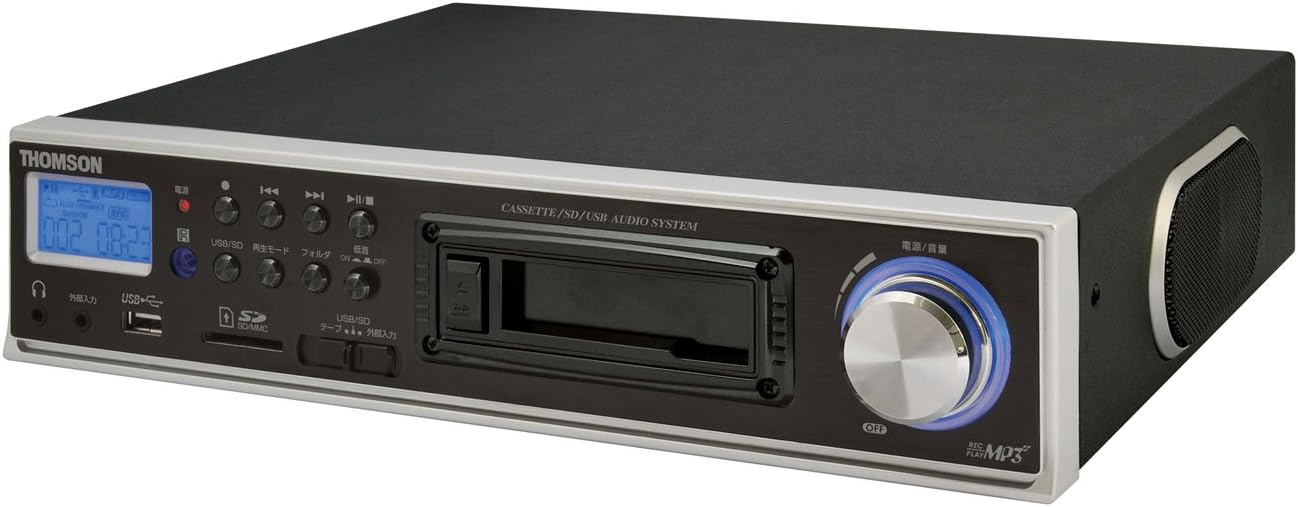
Рисунок 2.2: Наклонный View. This image shows the THOMSON CE-26 from an angled perspective, highlighting the integrated side speaker and the overall compact design.

Рисунок 2.3: Блок дистанционного управления. This image displays the included remote control for the THOMSON CE-26, featuring buttons for search, display, record, playback mode, program, folder navigation, and USB/SD selection.

Рисунок 2.4: Обзор функцииview Диаграмма. This diagram illustrates the key functionalities of the THOMSON CE-26, including direct recording from cassette to USB/SD, MP3/WMA playback, USB/SD memory copying, AUX input, built-in speaker, and remote control.
Элементы управления на передней панели:
- Кнопка питания: Включает и выключает устройство.
- Экран дисплея: Shows track information, mode, and time.
- Кассетная дека: For inserting and playing audio cassettes.
- USB-порт: Connect USB flash drives for playback or recording.
- Слот для карты SD/MMC: Insert SD or MMC cards for playback or recording.
- Управление воспроизведением: Воспроизведение, Пауза, Стоп, Перемотка вперед, Перемотка назад, Пропуск трека.
- Кнопка записи: Начинает запись.
- Кнопка режима: Switches between Cassette, USB, SD, and AUX input modes.
- Ручка регулировки громкости: Регулирует уровень вывода звука.
- Порт для наушников: Для частного прослушивания.
- Вход AUX: Подключите внешние аудиоустройства.
3. Настройка
- Подключение питания: Connect the AC power cord to the unit's power input and then to a standard wall outlet.
- Первоначальное включение: Press the Power button to turn on the unit. The display will illuminate.
- Вставка носителя:
- кассета: Open the cassette door and insert an audio cassette with the open edge facing upwards. Close the door securely.
- USB-накопитель: Insert a USB flash drive into the USB port. Ensure it is formatted to FAT32.
- Карта SD/MMC: Insert an SD or MMC card into the card slot until it clicks into place. Ensure it is formatted to FAT32.
- External Audio Device (Optional): To use the AUX input, connect an external audio source (e.g., smartphone, CD player) to the AUX IN jack using a 3.5mm audio cable.
4. Инструкция по эксплуатации
4.1. Воспроизведение кассеты
- Вставьте кассету.
- Press the "Mode" button until "Cassette" mode is selected (or the cassette deck automatically starts playing).
- Нажмите кнопку воспроизведения (►) на устройстве или пульте дистанционного управления.
- Отрегулируйте громкость с помощью ручки громкости.
- Use Fast Forward (►►) or Rewind (◄◄) кнопки для навигации по ленте.
- Press Stop (■) to end playback.
4.2 Воспроизведение с USB/SD
- Insert a USB drive or SD/MMC card containing MP3 or WMA audio files.
- Press the "Mode" button to select "USB" or "SD" mode. The unit will automatically scan and begin playing the first track.
- Используйте кнопку «Воспроизведение/Пауза» (►/∥), Останавливаться (■), Next Track (►►|), and Previous Track (|◄◄) кнопки для управления воспроизведением.
- The "Folder" buttons on the remote can be used to navigate between folders on the USB/SD media.
4.3. Recording Audio to MP3 (Cassette to USB/SD)
This feature allows you to convert your cassette tapes into digital MP3 files.
- Insert a blank or desired USB drive/SD card into the respective slot.
- Insert the cassette tape you wish to record.
- Press the "Mode" button to select "Cassette" mode.
- Start playing the cassette tape.
- Press the "Record" button on the unit or remote. The recording indicator will light up, and the unit will begin converting the cassette audio to MP3 format on the selected USB/SD media.
- To stop recording, press the "Stop" button. The recorded MP3 file will be saved on your USB drive or SD card.
- Примечание: There might be a slight delay between pressing record and the actual start of recording. It is recommended to start recording slightly before the desired audio begins to avoid cutting off the start of a track.
4.4. Recording Audio to MP3 (AUX Input to USB/SD)
Record audio from an external device connected via the AUX input.
- Connect your external audio device to the AUX IN jack.
- Insert a blank or desired USB drive/SD card.
- Press the "Mode" button to select "AUX" mode.
- Начните воспроизведение на внешнем аудиоустройстве.
- Press the "Record" button on the unit or remote. The recording indicator will light up, and the unit will begin converting the AUX audio to MP3 format on the selected USB/SD media.
- To stop recording, press the "Stop" button.
4.5. Копирование Files Between USB and SD/MMC
The CE-26 allows direct copying of MP3/WMA files between a USB drive and an SD/MMC card.
- Ensure both a USB drive and an SD/MMC card are inserted into their respective slots.
- Select either "USB" or "SD" mode using the "Mode" button, depending on which source you want to copy от.
- Перейдите к file or folder you wish to copy.
- Press and hold the "Copy" button (often labeled "USB/SD Copy" or similar) on the unit or remote. Follow any on-screen prompts to confirm the copy operation.
- The display will indicate when the copying process is complete.
5. Техническое обслуживание
- Уборка: Для чистки внешней поверхности устройства используйте мягкую сухую ткань. Не используйте жидкие чистящие средства или абразивные материалы.
- Уход за кассетной декой: Periodically clean the cassette head and pinch rollers with a specialized cassette head cleaner to ensure optimal audio quality and prevent tape damage.
- Хранилище: When not in use for extended periods, disconnect the power cord and store the unit in a cool, dry place away from direct sunlight and extreme temperatures.
6. Поиск Неисправностей
| Проблема | Возможная причина | Решение |
|---|---|---|
| Нет электричества | Шнур питания не подключен; Розетка питания неактивна. | Убедитесь, что шнур питания надежно подключен. Проверьте, работает ли розетка. |
| Нет звука во время воспроизведения | Слишком низкий уровень громкости; выбран неправильный режим; подключены наушники. | Increase volume. Select the correct input mode (Cassette, USB, SD, AUX). Disconnect headphones if using speakers. |
| Cassette tape not playing or recording correctly | Tape tangled or damaged; Cassette heads dirty; Incorrect tape direction. | Check tape condition. Clean cassette heads and pinch rollers. Ensure tape is inserted correctly. |
| Recording stops prematurely or has gaps | USB drive/SD card full; Media format issue; Intermittent power. | Ensure sufficient storage space. Use FAT32 formatted media. Check power connection stability. |
| Poor audio quality from USB/SD | Поврежденный files; Low bitrate MP3/WMA files. | Try different audio fileс. Гарантировать files не повреждены. |
| Пульт дистанционного управления не работает | Batteries depleted; Obstruction between remote and unit; Incorrect angle. | Replace remote control batteries. Ensure clear line of sight to the unit's IR receiver. |
7. Технические характеристики
| Особенность | Деталь |
|---|---|
| Бренд | ТОМСОН |
| Номер модели | CE-26 |
| Поддерживаемые носители | Cassette Tape, USB Memory, SD/MMC Card |
| Поддерживаемые аудиоформаты | MP3, WMA (playback); MP3 (recording) |
| Функция записи | Direct digital recording from Cassette to MP3, AUX to MP3 |
| Связность | USB Port, SD/MMC Card Slot, AUX Input (3.5mm), Headphone Output (3.5mm) |
| Встроенный динамик | Да |
| Дистанционное управление | Включено |
| Размеры (приблизительные) | 35.4 х 33.2 х 12 см |
| Вес (приблизительный) | 3.02 кг |
8. Гарантия и поддержка
For warranty information and technical support, please refer to the warranty card included with your product or contact THOMSON customer service directly. Keep your purchase receipt as proof of purchase.
For further assistance, please visit the official THOMSON webсайт или обратитесь в их авторизованные сервисные центры.


