1. Введение
Thank you for choosing the Taylor #1523 Indoor/Outdoor Thermometer & Humidity Guide. This device is designed to provide accurate indoor and outdoor temperature readings, along with indoor humidity levels. Please read this manual carefully to ensure proper setup, operation, and maintenance of your thermometer.
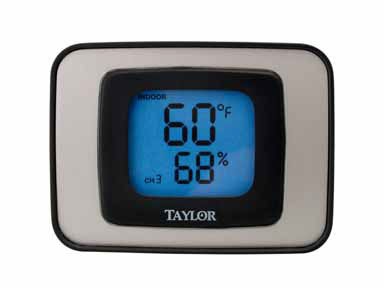
Image 1: Taylor #1523 Indoor/Outdoor Thermometer and Humidity Guide. This image shows the front view of the thermometer unit, displaying temperature and humidity readings.
2. Особенности продукта
- Simultaneous display of indoor and outdoor temperature.
- Displays indoor humidity levels.
- Switchable temperature units (Celsius or Fahrenheit).
- Records and displays minimum and maximum temperature/humidity readings.
- Подсветка для удобного чтения в условиях недостаточного освещения.
- Versatile placement: desktop stand or wall-mountable.
3. Содержимое упаковки
- Taylor #1523 Thermometer Unit
- Outdoor Temperature Sensor (wired)
- Руководство пользователя
Note: One AAA battery is required for operation and is not typically included.
4. Настройка
4.1 Установка аккумулятора
- Найдите батарейный отсек на задней панели устройства.
- Снимите крышку батарейного отсека.
- Insert one (1) AAA battery, ensuring correct polarity (+ and -).
- Установите на место крышку батарейного отсека.
4.2 Размещение датчика
- Внутренний блок: Place the main thermometer unit indoors in a location away from direct sunlight, heat sources, or drafts that could affect temperature and humidity readings. It can be placed on a desktop using its integrated stand or mounted on a wall using the keyhole slot on the back.
- Наружный датчик: Route the wired outdoor temperature sensor outside. For accurate readings, place the sensor in a shaded area, protected from direct sunlight and precipitation. Ensure the cable is not pinched or damaged.
5. Операция
The control buttons are located on the back of the unit, except for the backlight button which is on the top.
5.1 Показания дисплея
- The display will show the current indoor temperature, outdoor temperature, and indoor humidity.
5.2 Changing Temperature Units (C/F)
- Нажмите C / F button on the back of the unit to toggle between Celsius and Fahrenheit temperature displays.
5.3 Viewing Minimum/Maximum Readings (MIN/MAX)
- Нажмите МИН МАКС button on the back of the unit to cycle through current, minimum, and maximum recorded values for temperature and humidity.
5.4 Clearing Minimum/Maximum Readings (CLEAR)
- Пока viewing the MIN/MAX readings, press the ПРОЗРАЧНЫЙ button on the back of the unit to reset the recorded minimum and maximum values.
5.5 Подсветка
- Press the button located on the top of the unit to activate the backlight for a few seconds, improving visibility in dark environments.
6. Техническое обслуживание
- Уборка: To clean the unit, wipe it with a soft, damp Ткань. Не используйте абразивные чистящие средства или растворители, так как они могут повредить пластик.asinг или дисплей.
- Замена батареи: Replace the AAA battery when the display becomes dim or stops functioning. Ensure proper polarity during installation.
- Хранилище: If storing the unit for an extended period, remove the battery to prevent leakage.
7. Поиск Неисправностей
| Проблема | Возможная причина | Решение |
|---|---|---|
| Нет дисплея или тусклый дисплей | Низкий заряд или полная разрядка батареи; неправильная установка батареи. | Вставьте батарейку типа AAA, соблюдая полярность. |
| Неточные показания температуры/влажности | Unit or sensor placed in direct sunlight, near heat/cold sources, or in drafts. | Relocate the unit and/or outdoor sensor to a more appropriate, stable environment. Ensure the outdoor sensor is in shade. |
| Температура наружного воздуха не отображается. | Outdoor sensor cable is disconnected or damaged. | Check the connection of the outdoor sensor cable to the main unit. Inspect the cable for any visible damage. |
8. Технические характеристики
- Модель: #1523
- Размеры: 6.5 x 5.9 x 1.8 дюйма (упаковка)
- Масса: 4 унций (вес упаковки)
- Материал: Пластик
- Источник питания: 1 батарейка типа ААА (не входит в комплект)
- СКП: 077784015230
- Инструкции по уходу: Очистить
9. Гарантия и поддержка
Taylor provides a limited warranty for its products. For specific warranty details, technical support, or service inquiries, please refer to the warranty card included with your product or visit the official Taylor website. You may also contact Taylor customer service directly for assistance.
Taylor Customer Service: www.taylorusa.com/support


