Введение
This manual provides detailed instructions for the safe and effective use of your Canon EOS 7D Digital SLR camera body. Please read this manual thoroughly before using the camera and keep it for future reference.

Передний view of the Canon EOS 7D Digital SLR camera body, showing the lens mount and grip.
Настраивать
1. Установка аккумулятора
The EOS 7D uses one Battery Pack LP-E6. A CR1616 lithium-ion battery is also used for date/time retention.
- Откройте крышку батарейного отсека, расположенную в нижней части камеры.
- Вставьте батарейный блок LP-E6 электрическими контактами внутрь, убедившись, что он защелкнулся.
- Плотно закройте крышку батарейного отсека.
- For the date/time battery, refer to the dedicated section in the full user manual for replacement instructions.
2. CF Card Installation
The camera records images directly to a CompactFlash (CF) card.
- Open the CF card slot cover on the side of the camera.
- Insert the CF card with the correct orientation until it is fully seated.
- Close the CF card slot cover securely.
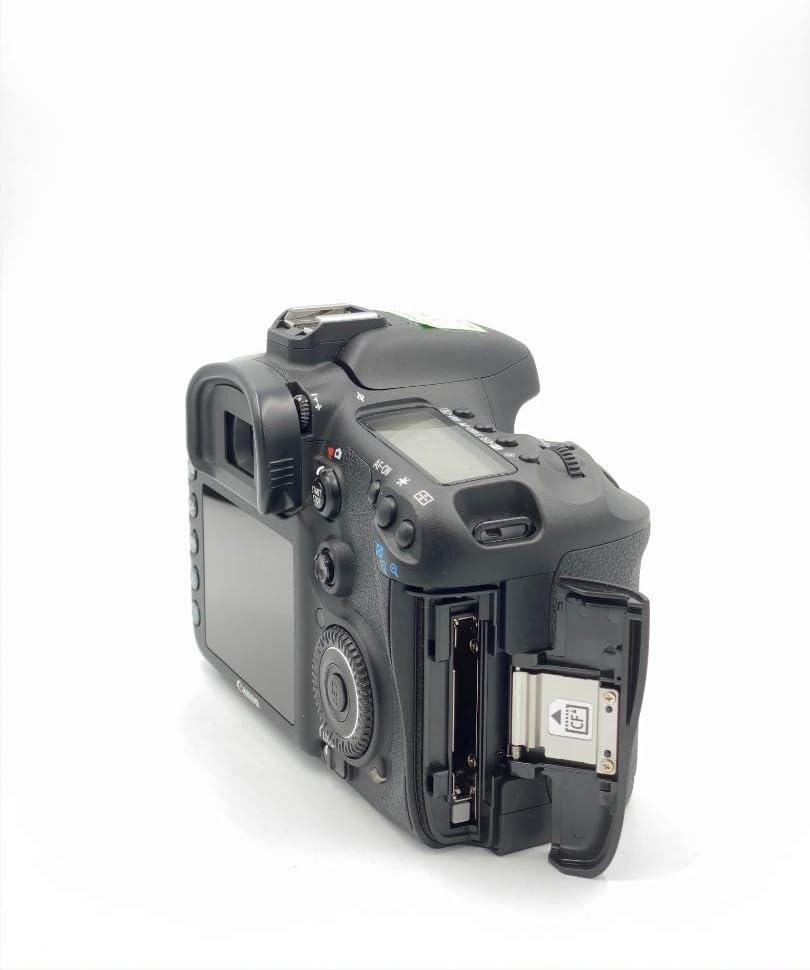
Сторона view of the Canon EOS 7D, showing the open CF card slot for media insertion.
3. Установка объектива
The EOS 7D is compatible with Canon EF and EF-S lenses.
- Снимите крышку корпуса камеры и заднюю крышку объектива.
- Align the red or white index mark on the lens with the corresponding mark on the camera body.
- Поверните линзу по часовой стрелке, пока она не зафиксируется на месте.
4. Начальные настройки
Upon first power-on or after battery replacement, you may need to set the language and time zone.
- Включите камеру с помощью выключателя питания.
- Следуйте инструкциям на экране, чтобы выбрать предпочитаемый язык.
- Установите дату, время и часовой пояс.
Инструкция по эксплуатации
1. Основные операции
To power on the camera, slide the power switch to the "ON" position. To take a photo, press the shutter button halfway to focus, then press fully to capture the image.
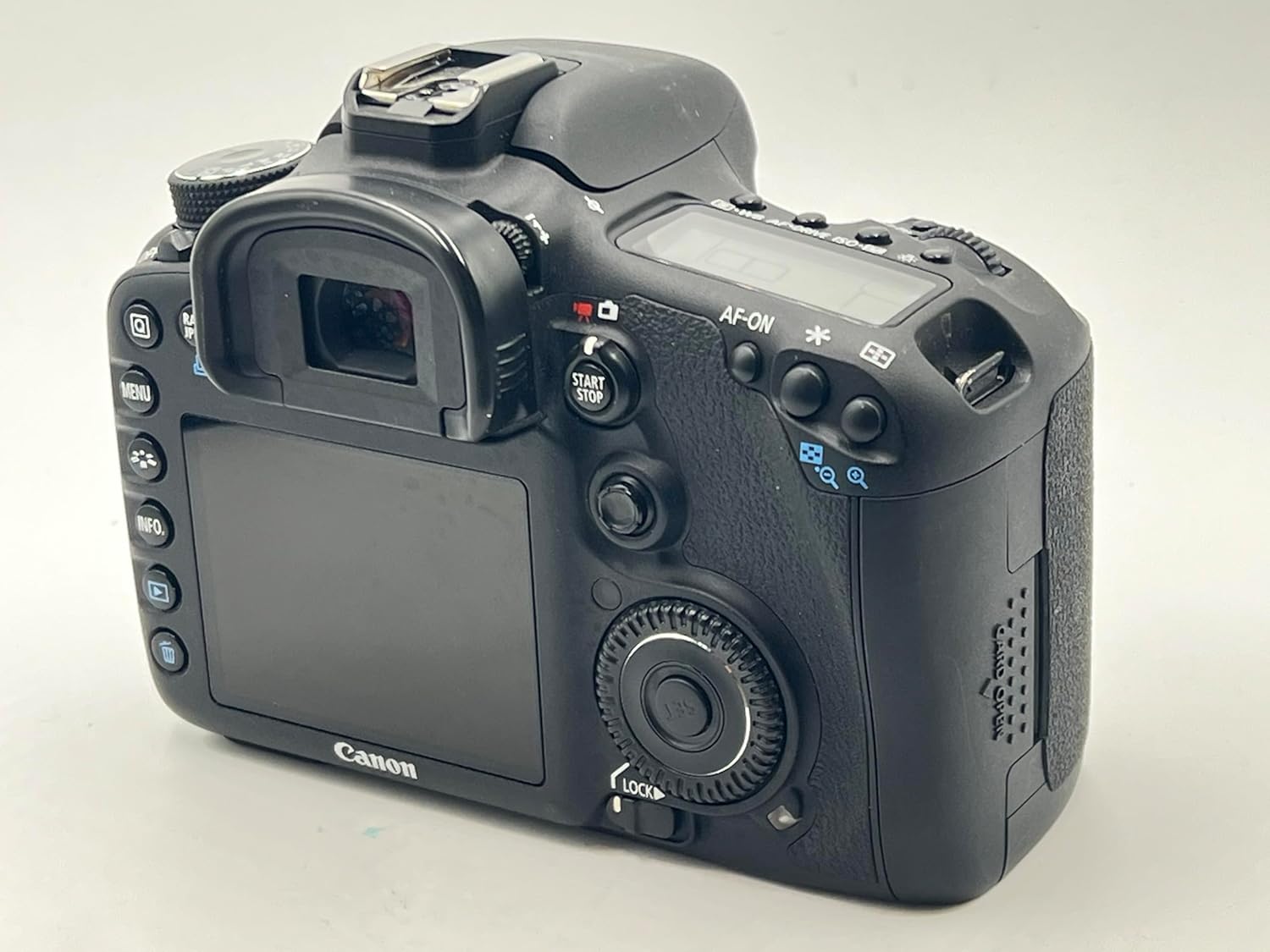
Задний view of the Canon EOS 7D, showing the LCD monitor and control buttons.
2. Image Capture Settings
- Датчик изображения: 18.0 Megapixel APS-C size CMOS sensor.
- Image Processors: Dual DIGIC 4 for high speed and quality.
- Скорость ISO: Range from 100 to 6400, expandable to 12800.
- Непрерывная съемка: До 8.0 кадров в секунду (fps).
- Форматы записи: JPEG, RAW (14-bit), M-RAW, S-RAW. Video in MOV (H.264).
- Стиль изображения: Select from Standard, Portrait, Landscape, Neutral, Faithful, Monochrome, or User Defined settings.
- Баланс белого: Auto, Daylight, Shade, Cloudy, Tungsten Light, White Fluorescent Light, Flash, Custom, Color Temperature setting.
3. Система автофокусировки
The EOS 7D features a sophisticated 19-point all cross-type AF system for precise focusing.
- AF Points: 19-point all cross-type, with dual diagonal cross-type sensors at the center (f/2.8 and f/5.6).
- Режимы фокусировки: One-Shot AF (for still subjects), AI Servo AF (for moving subjects), AI Focus AF (automatic switching), and Manual Focus (MF).
- AF Point Selection: Manual selection (Single point, Spot AF, AF point expansion, Zone AF) or Automatic selection (19 point AF).
- AF Assist Beam: Emitted from an external Speedlite when necessary.
4. Контроль воздействия
Accurate exposure is achieved through various metering modes and controls.
- Режимы замера: Evaluative (63 zones, linked to active AF point), Partial (approx. 9.4% of viewfinder), Spot (approx. 2.3% of viewfinder), and Center-weighted average.
- Exposure Control Systems: Program AE, Shutter-priority AE, Aperture-priority AE, Creative Auto, Full auto, Manual exposure, and E-TTL II autoflash.
- Компенсация экспозиции: Adjustable up to ±5 stops in 1/3- or 1/2-stop increments.
- Блокировка АЭ: Available automatically in One-Shot AF with evaluative metering, or manually via the AE lock button.
5. Shutter and Flash
- Скорость затвора: From 30 seconds to 1/8000th second, plus Bulb mode. X-sync at 1/250th second.
- Встроенная вспышка: Retractable, auto pop-up flash with a Guide Number of 12/39 (meters/feet at ISO 100).
- Внешняя вспышка: Compatible with E-TTL II Speedlites, offering flash exposure compensation and FE Lock.
6. Жить View and Video Recording
The camera supports Live View for both still photos and video, with advanced video capabilities.
- Жить View: Offers Quick mode, Live mode, Face detection Live mode, and Manual focusing with magnification.
- Видеозапись: Full HD (1920 x 1080) at 30p, 24p, 25p; HD (1280 x 720) at 60p, 50p; SD (640 x 480) at 60p, 50p.
- Аудио: Linear PCM (monaural). Manual audio level adjustment is available with Firmware Version 2.0.X.
- Непрерывная запись: Approximately 12 minutes for Full HD/HD, 24 minutes for SD (with a 4GB card).
7. Playback and Customization
- Воспроизведение: View single images, histograms, magnified views, and perform in-camera RAW processing, JPEG resizing, and image rating.
- Пользовательские функции: 27 customizable functions to tailor camera operation to your preferences.
- Пользовательские элементы управления: Assign desired functions to various buttons and dials for personalized control.
- Пользовательские настройки: Register up to three sets of camera settings (C1, C2, C3) on the Mode Dial for quick recall.
Обслуживание
1. Dust Deletion Feature
The EOS 7D includes features to manage dust on the image sensor:
- Automatic Sensor Cleaning: The low-pass filter is automatically cleaned when the power is turned on or off.
- Dust Delete Data: The camera can detect dust adhering to the low-pass filter and append its coordinates to captured images. This data can be used by provided software to automatically erase dust spots.
- Ручная очистка: For persistent dust, manual cleaning of the sensor is possible. Refer to the full user manual for detailed instructions or consult a Canon service center.
2. Генеральная уборка
- Корпус камеры: Протрите корпус камеры мягкой сухой тканью. Для удаления стойких загрязнений слегка потрите.ampСмочите ткань водой. Избегайте использования органических растворителей.
- Объектив: Use a lens blower brush to remove dust. For smudges, use a lens cleaning solution and a clean lens cloth.
- ЖК монитор: Gently wipe with a soft cloth. Avoid pressing hard on the screen.
3. Уход за аккумулятором
- Always use the provided Canon Battery Charger LC-E6 to charge the LP-E6 battery pack.
- Когда батарейки не используются, храните их в прохладном сухом месте.
- Чтобы продлить срок службы аккумулятора, избегайте его частой полной разрядки.
Поиск неисправностей
This section addresses common issues you might encounter with your EOS 7D.
1. Камера не включается
- Ensure the battery pack LP-E6 is fully charged and correctly inserted.
- Проверьте, надежно ли закрыта крышка батарейного отсека.
- If using an AC Adapter Kit ACK-E6, ensure it is properly connected to a power source.
2. Unable to Take Photos
- Check if a CF card is inserted and has sufficient free space.
- Ensure the lens is properly attached and the focus mode switch on the lens is set to AF (Autofocus) or MF (Manual Focus) as desired.
- If the shutter button is pressed halfway and the camera does not focus, check the AF mode and lighting conditions.
- If the built-in flash is used, ensure it has recycled (flash-ready icon is lit).
3. Изображения размыты.
- Убедитесь, что линзы чистые и на них нет пятен.
- Ensure the camera is properly focused on the subject. In AF mode, confirm the AF point is on the desired area.
- Check the shutter speed. If it is too slow for the shooting conditions, use a faster shutter speed or a tripod to prevent camera shake.
- Consider using a higher ISO setting in low light to allow for faster shutter speeds.
4. Exposure Problems (Too Dark/Too Bright)
- Check the metering mode. Evaluative metering is generally suitable for most situations.
- Review the exposure compensation setting. Reset it to ±0 if unintended compensation was applied.
- In manual mode, adjust aperture, shutter speed, and ISO to achieve the desired exposure.
- If using flash, check flash exposure compensation settings.
5. Обновление прошивки
Canon periodically releases firmware updates to enhance camera performance and add features. Refer to the official Canon website for the latest firmware and detailed update instructions. Firmware Version 2.0.X, for example, introduced features like manual audio level adjustment and improved burst rates.
Технические характеристики
| Особенность | Деталь |
|---|---|
| Датчик изображения | 18.0-мегапиксельная APS-C CMOS-матрица |
| Процессор изображений | Dual DIGIC 4 |
| Чувствительность ISO | 100–6400 (с возможностью расширения до 12800) |
| Скорость затвора | 30 seconds to 1/8000th second, Bulb |
| Непрерывная съемка | Max. 8.0 shots/sec. |
| Система автофокусировки | 19-point all cross-type AF |
| Система учета | 63-zone dual-layer iFCL metering |
| Видеозапись | Full HD 1080p (30p/24p/25p) |
| ЖК-монитор | 3.0-inch TFT color, approx. 920,000 dots |
| Viewискатель | Eye-level pentaprism, approx. 100% coverage, 1.0x magnification |
| Носители информации | Карта CompactFlash (CF) |
| Связность | USB 2.0 Hi-Speed, mini-HDMI OUT, Video OUT (NTSC/PAL) |
| Источник питания | Аккумулятор LP-E6 |
| Размеры (Ш x В x Г) | Approx. 5.8 x 4.4 x 2.9 in. (148.2 x 110.7 x 73.5mm) |
| Вес (только тело) | прибл. 28.9 унции. (820 г) |
| Операционная среда | Temperature: 32-104°F (0-40°C), Humidity: 85% or less |
Гарантия и планы обслуживания
Standard warranty information is typically provided with the product at the time of purchase. Please refer to the documentation included in your product packaging for specific warranty terms and conditions.
Optional CarePAK PLUS Protection Plans
Canon offers optional CarePAK PLUS protection plans for extended coverage beyond the standard warranty. These plans provide protection from accidental damage (drops, spills, power surges) and normal wear and tear. Benefits may include Image Recovery, priority repair service, free return shipping, and genuine Canon factory service.
- CarePAK PLUS (2YR): 2-year protection plan.
- CarePAK PLUS (3YR): 3-year protection plan.
Подробности о покупкеasing and registering for CarePAK PLUS, please visit the official Canon webсайте или обратитесь в службу поддержки клиентов Canon.
Поддержка и ресурсы
For additional support, resources, and accessories, please refer to the following:
- Официальный канон Webсайт: Посетите Canon website for product information, driver downloads, firmware updates, and FAQs.
- Canon Developer Community: If you are a developer interested in controlling select Canon cameras within your application, the Canon EDSDK is available at developercommunity.usa.canon.com.
- Аксессуары: A wide range of accessories, including batteries, chargers, cables, cases, and remote controllers, are available through authorized Canon retailers and the Canon Store.


