1. Введение
Продукт болееview
The Visual Land VL-G4 is a compact and versatile portable media player designed for on-the-go entertainment. It features a 1.8-inch screen, 4GB of internal storage, and supports various media formats. This device allows you to enjoy your favorite music, videos, and images, along with additional functionalities such as an FM radio and a voice recorder.
Ключевые особенности включают в себя:
- 4 GB storage capacity, sufficient for approximately 4,000 songs.
- До 6 часов воспроизведения аудио на одном заряде.
- 1.8-inch color LCD display for media viewинж.
- Supports MP3, WMA, and WAV audio formats; AMV video format; JPG image format.
- Встроенный FM-радиоприемник.
- Встроенный диктофон.
- Functions as a USB flash memory drive for data storage.
- Built-in speaker for shared listening.
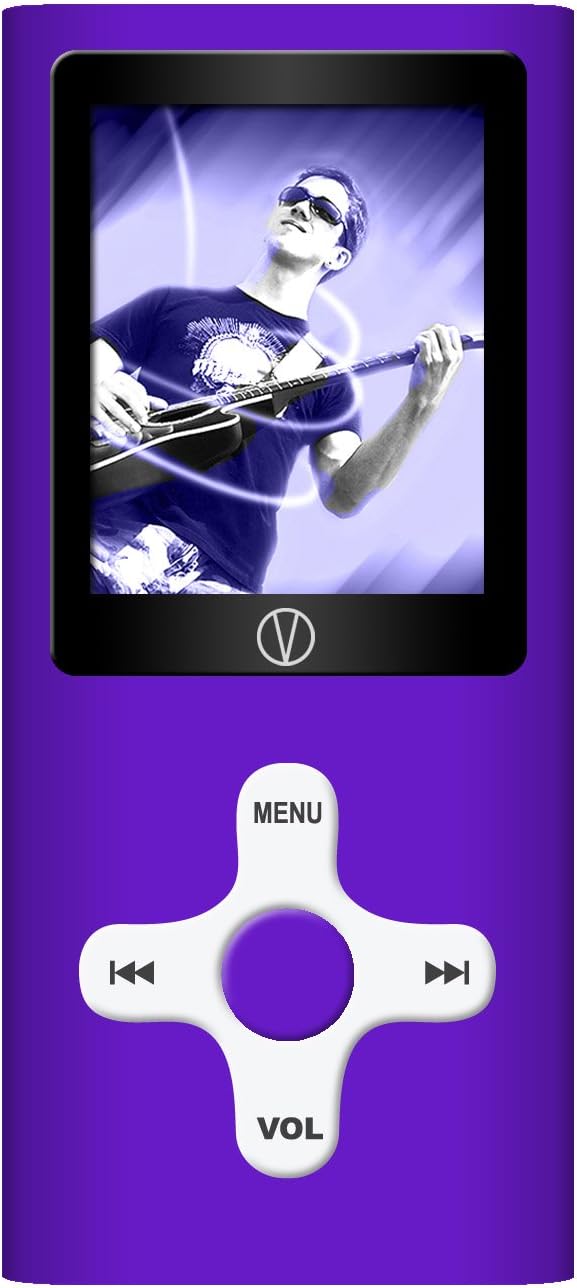
This manual provides detailed instructions for setting up, operating, and maintaining your VL-G4 device to ensure optimal performance and user experience.
2. Настройка
2.1 Содержимое упаковки
Прежде чем начать, пожалуйста, проверьте наличие всех предметов в упаковке:
- Visual Land VL-G4 Media Player
- Наушники
- Адаптер переменного тока
- USB-кабель
- Руководство пользователя (этот документ)
2.2 Зарядка устройства
The VL-G4 is equipped with an internal lithium-ion battery. Before initial use, fully charge the device.
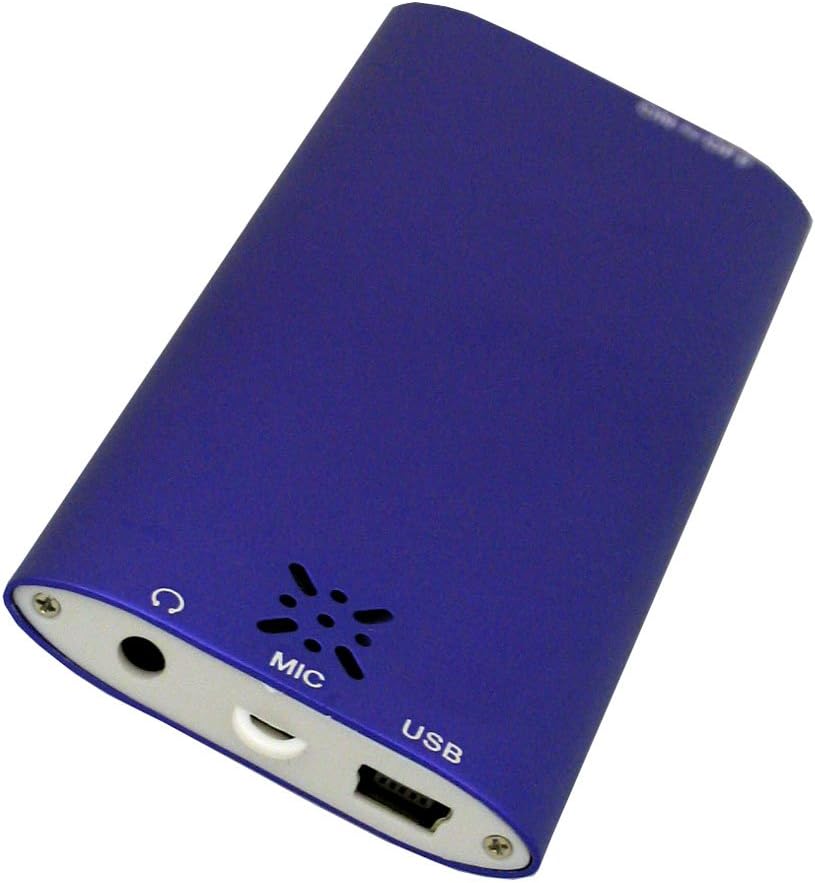
- Connect the small end of the USB cable to the USB port on the bottom of the VL-G4.
- Подключите толстый конец USB-кабеля к адаптеру переменного тока.
- Подключите адаптер переменного тока к стандартной розетке.
- Устройство будет отображать состояние зарядки на своем экране. Полная зарядка обычно занимает около 2-3 часов.
- Alternatively, you can connect the USB cable directly to a powered USB port on your computer for charging.
2.3 Загрузка медиа Files
To transfer music, videos, or images to your VL-G4:
- Убедитесь, что устройство включено.
- Connect the VL-G4 to your computer using the provided USB cable.
- Your computer should recognize the VL-G4 as a removable disk drive.
- Open the VL-G4 drive on your computer. You can create folders (e.g., 'Music', 'Videos', 'Photos') to organize your files.
- Drag and drop your desired MP3, WMA, WAV, AMV, or JPG files into the appropriate folders on the VL-G4 drive.
- Один раз file transfer is complete, safely eject the VL-G4 drive from your computer before disconnecting the USB cable.
Note: For video playback, AMV format is supported. You may need to convert other video formats using the included software (if applicable) or third-party conversion tools.
3. Инструкция по эксплуатации
3.1 Компоновка устройства и элементы управления
Familiarize yourself with the buttons and ports on your VL-G4:
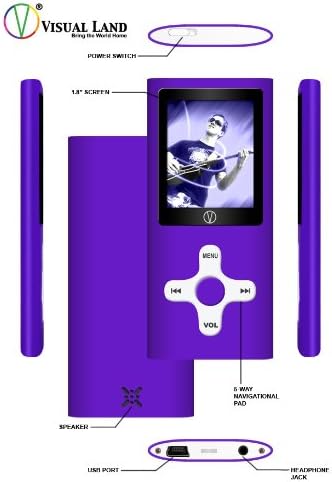
- Выключатель: Located on the top edge, slides to turn the device On or Off.
- 1.8-дюймовый экран: Displays menus, media content, and device status.
- 5-Way Navigational Pad: Central control for menu navigation and media playback.
- MENU button (Top): Открывает главное меню или возвращает на предыдущий экран.
- Кнопки влево/вправо: Navigate through menus, skip tracks, fast forward/rewind.
- Play/Pause/Confirm button (Center): Starts/pauses playback, confirms selections.
- VOL button (Bottom): Enters volume adjustment mode. Use Left/Right to change volume.
- Спикер: Built-in speaker for audio output without earphones.
- USB-порт: Для зарядки и подключения к компьютеру.
- Порт для наушников: 3.5mm port for connecting earphones.
- МИКРОФОНД: Встроенный микрофон для записи голоса.
3.2 Включение/выключение питания
To power on the device, slide the Power Switch to the 'On' position. To power off, slide it to the 'Off' position.
3.3 Базовая навигация
From the main menu, use the Left/Right buttons on the navigational pad to scroll through options. Press the central Play/Pause/Confirm button to select an option. Press the MENU button to go back to the previous screen or the main menu.
3.4 Audio Playback (MP3/WMA/WAV)
- From the main menu, select 'Music' or 'Audio'.
- Просмотрите свои папки и files using the Left/Right buttons.
- Press the central Play/Pause/Confirm button to start playback of a selected track.
- Во время воспроизведения:
- Press Play/Pause/Confirm to pause/resume.
- Press Left/Right briefly to skip to the previous/next track.
- Press and hold Left/Right to fast forward/rewind within a track.
- Press the VOL button, then use Left/Right to adjust the volume. Press VOL again to exit volume mode.
- The device offers EQ presets (Natural, Rock, Pop, Classical, Soft, Jazz, DBB) which can typically be accessed through the music playback options menu.
3.5 Video Playback (AMV)
- В главном меню выберите «Видео».
- Navigate to your desired AMV video file.
- Press the central Play/Pause/Confirm button to begin playback.
- Playback controls are similar to audio playback.
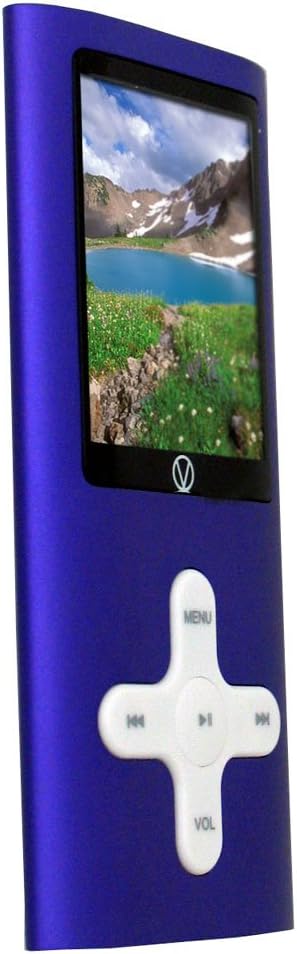
3.6 Изображение Viewing (JPG)
- From the main menu, select 'Photos' or 'Images'.
- Navigate to your JPG image files.
- Press the central Play/Pause/Confirm button to view картинка.
- Use Left/Right buttons to cycle through images.
- Some models may offer a slideshow function, typically accessible via the options menu during image viewинж.
3.7 FM-радио
- Connect earphones to the headphone jack; they act as the antenna for the FM radio.
- В главном меню выберите «FM-радио».
- Use the Left/Right buttons to manually tune frequencies.
- Look for an 'Autoscan' or 'Search' option within the FM radio menu to automatically find and save available stations.
3.8 Диктофон
- From the main menu, select 'Recorder' or 'Voice'.
- Select 'Start Recording' or a similar option. The built-in microphone (MIC) will capture audio.
- Press Play/Pause/Confirm to stop recording.
- Recordings are typically saved in a dedicated folder and can be played back from the 'Audio' or 'Recorder' menu.
3.9 Using as a USB Drive
When connected to a computer, the VL-G4 functions as a standard USB mass storage device. You can drag and drop any file type onto it, making it useful for carrying documents or other data in addition to media files.
4. Техническое обслуживание
4.1 Очистка
To clean your VL-G4, use a soft, dry, lint-free cloth. Do not use liquid cleaners, aerosols, or solvents, as these can damage the device's finish or internal components.
4.2 Уход за аккумулятором
- Избегайте частой полной разрядки аккумулятора.
- Регулярно заряжайте устройство, даже если оно не используется, чтобы поддерживать работоспособность аккумулятора.
- Не подвергайте устройство воздействию экстремальных температур, так как это может ухудшить работу и сократить срок службы батареи.
4.3 Хранение
When storing the device for extended periods, ensure it is partially charged (around 50%) and kept in a cool, dry place away from direct sunlight and extreme temperatures.
5. Поиск Неисправностей
If you encounter issues with your VL-G4, refer to the following common problems and solutions:
| Проблема | Возможное решение |
|---|---|
| Устройство не включается. | Ensure the battery is charged. Connect to the AC adapter and try again. Check the power switch position. |
| Нет звука в наушниках/динамиках. | Check volume level. Ensure earphones are properly plugged in. Test with different earphones. Verify media file не поврежден. |
| Компьютер не распознает устройство. | Ensure the device is powered on. Try a different USB port or cable. Restart your computer. |
| Files are not playing. | Проверьте file format is supported (MP3/WMA/WAV for audio, AMV for video, JPG for images). Ensure files не повреждены. |
| Короткое время работы батареи. | Ensure the device is fully charged. Reduce screen brightness. Close unused applications. Battery performance may degrade over time with usage. |
6. Технические характеристики
| Особенность | Деталь |
|---|---|
| Номер модели | VL-G4 |
| Емкость памяти | 4 ГБ |
| Размер экрана | 1.8 Inches (Note: Product description states 1.8-inch, specifications list 2.4 inches. Using 1.8-inch as per detailed description.) |
| Поддерживаемые аудиоформаты | MP3, WMA, WAV |
| Поддерживаемые форматы видео | АМВ |
| Поддерживаемые форматы изображений | JPG |
| Особые возможности | FM Radio, Video Playback, Voice Recorder, Built-in Speaker |
| Технология связи | USB |
| Battery Life (Audio) | До 6 часов |
| Размеры продукта | 1.6 x 0.34 x 3.6 дюйма |
| Вес товара | 1.28 унции |
7. Информация о гарантии
The Visual Land VL-G4 Portable Media Player comes with a one-year limited warranty from the date of purchase. This warranty covers manufacturing defects under normal use. It does not cover damage caused by misuse, accidents, unauthorized modifications, or normal wear and tear. Please retain your proof of purchase for warranty claims.
8. Поддержка клиентов
For further assistance, technical support, or warranty inquiries, please refer to the contact information provided on the Visual Land official website or the original product packaging. When contacting support, please have your product model number (VL-G4) and proof of purchase readily available.


