1. Введение
This manual provides detailed instructions for the setup, operation, and maintenance of your Acctim Smartlite Grande Alarm Clock, Model 13422X. Please read this manual thoroughly before using the product to ensure correct operation and to maximize its lifespan.
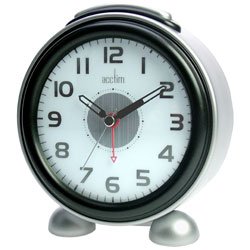
Рисунок 1: Передняя часть view of the Acctim Smartlite Grande Alarm Clock, displaying its analog dial, time hands, and brand logo.
2. Информация по технике безопасности
- Безопасность аккумулятора: Use only the specified battery type (not included). Do not mix old and new batteries, or different types of batteries. Insert batteries with correct polarity (+/-). Remove exhausted batteries promptly. Do not dispose of batteries in fire.
- Размещение: Place the clock on a stable, flat surface. Avoid placing it in direct sunlight, near heat sources, or in areas with high humidity or extreme temperatures.
- Уборка: Clean the clock with a soft, dry cloth. Do not use liquid cleaners or abrasive materials.
- Разборка: Не пытайтесь разбирать или ремонтировать часы самостоятельно. Все работы по обслуживанию должны выполняться квалифицированным персоналом.
3. Содержимое упаковки
Пожалуйста, проверьте наличие всех предметов:
- Acctim Smartlite Grande Alarm Clock (1 unit)
- Руководство по эксплуатации (данный документ)
Примечание: Батарейки в комплект не входят и приобретаются отдельно.
4. Особенности продукта
- Smartlite Technology: An innovative feature that automatically illuminates the clock dial for easy viewing in low-light conditions. A built-in light sensor detects ambient light levels, turning the illumination off during daytime to conserve battery life.
- Функция будильника: Integrated alarm with an on/off switch.
- Non-Ticking Sweep Movement: The second hand moves in a continuous, smooth motion, designed to reduce audible ticking sounds.
- Аналоговый дисплей: Clear and easy-to-read analog dial.
- Питание от батареи: Operates on batteries for portability and convenience.
5. Настройка
5.1. Установка аккумулятора
- Найдите крышку батарейного отсека на задней панели часов.
- Снимите крышку, сдвинув или подняв ее в соответствии с отметками.
- Insert the required batteries (check the compartment for battery type) ensuring correct polarity (+ and -) as indicated inside the compartment.
- Надежно закройте крышку батарейного отсека.
5.2. Начальная установка времени
- Найдите ручку установки времени на задней панели часов.
- Rotate the knob in either direction to set the current time. Ensure the hour and minute hands are accurately positioned.
6. Инструкция по эксплуатации
6.1. Настройка будильника
- Найдите ручку настройки будильника на задней панели часов.
- Поверните ручку установки времени будильника, чтобы переместить стрелку будильника на желаемое время.
- Locate the alarm ON/OFF switch (usually a small slider or button) on the back or side of the clock.
- Чтобы включить будильник, переведите переключатель в положение «ВКЛ».
6.2. Отключение сигнализации
When the alarm sounds, you can silence it by:
- Pressing the snooze/light button (if available, typically on top). This will temporarily silence the alarm, and it will sound again after a few minutes.
- Sliding the alarm ON/OFF switch to the "OFF" position. This will deactivate the alarm until it is manually turned "ON" again.
6.3. Smartlite Function
The Smartlite feature operates automatically. The built-in light sensor will detect low ambient light conditions and illuminate the clock dial. During brighter conditions, the illumination will turn off to conserve battery power. No manual adjustment is required for this feature.
7. Техническое обслуживание
7.1. Уборка
Wipe the clock's exterior with a soft, dry, lint-free cloth. Do not use abrasive cleaners, solvents, or chemical sprays, as these can damage the finish and internal components.
7.2. Замена батареи
When the clock's display dims, the alarm weakens, or the clock stops functioning, it is time to replace the batteries. Follow the battery installation steps in Section 5.1.
8. Поиск Неисправностей
- Clock not working / Display dim:
- Проверьте правильность установки батареек и соблюдение полярности.
- Замените батареи новыми.
- Сигнализация не срабатывает:
- Убедитесь, что переключатель включения/выключения сигнализации находится в положении «ВКЛ».
- Убедитесь, что время срабатывания будильника установлено правильно.
- Замените батареи, если они разряжены.
- Smartlite not illuminating:
- Ensure the clock is in a sufficiently dark environment for the sensor to activate.
- Замените батареи, если они разряжены.
- Unusual noise from the clock:
- While the clock features a non-ticking sweep movement, some subtle mechanical sounds may be audible in very quiet environments. This is generally normal for analog movements.
- Ensure the clock is on a stable, flat surface to prevent vibrations.
9. Технические характеристики
| Бренд | Жертва |
| Номер модели | 13422X |
| Тип дисплея | Аналоговый |
| Стиль | Современный |
| Специальная характеристика | Alarm, Smartlite (Automatic Dial Illumination) |
| Источник питания | Питание от батареи |
| Форма | Круглый |
| Материал рамы | Акрилонитрил-бутадиен-стирол |
| Батарейки в комплекте | Нет |
| Режим работы | Электрические |
| Производитель | Жертва |
| ASIN | B000TLIGD8 |
| Дата первой доступности | 1 марта 2014 г. |
10. Гарантия и поддержка
For warranty information and customer support, please refer to the documentation provided at the point of purchase or visit the official Acctim webСохраните чек о покупке для предъявления гарантийных претензий.
For further assistance, please contact your retailer or the manufacturer's customer service department.


