1. Введение
Welcome to the user manual for your new Singing Machine SMVG-620 CD+G Karaoke System. This system is designed to provide hours of entertainment with its CD+G playback capabilities, built-in camera, 5.5-inch monitor, and AM/FM radio. Please read this manual thoroughly before operating your unit to ensure proper use and to maximize your enjoyment.
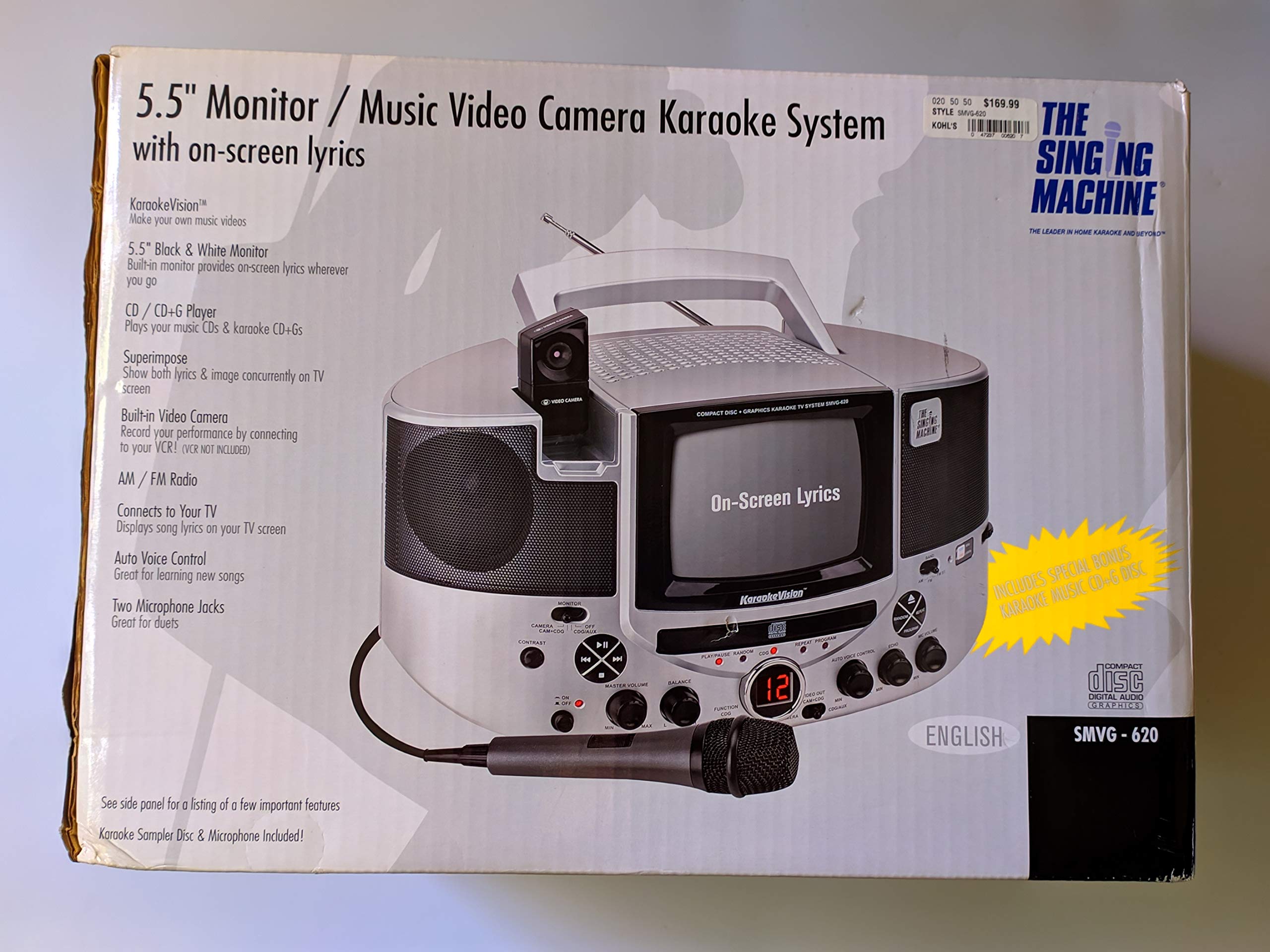
Рисунок 1.1: The Singing Machine SMVG-620 CD+G Karaoke System.
For optimal performance and safety, always follow the instructions and warnings provided.
2 Важная информация по безопасности
- Прочитать инструкцию: Все инструкции по технике безопасности и эксплуатации должны быть прочитаны до начала эксплуатации прибора.
- Сохраните инструкции: Инструкции по технике безопасности и эксплуатации следует сохранить для дальнейшего использования.
- Обратите внимание на предупреждения: Необходимо соблюдать все предупреждения, указанные на приборе и в инструкции по эксплуатации.
- Следуйте инструкциям: Необходимо соблюдать все инструкции по эксплуатации и использованию.
- Вода и влага: Не используйте данное устройство вблизи воды.
- Уборка: Чистить только сухой тканью.
- Вентиляция: Не закрывайте вентиляционные отверстия. Устанавливайте в соответствии с инструкциями производителя.
- Нагревать: Не устанавливайте вблизи источников тепла, таких как радиаторы, обогреватели, печи или другие приборы (включая amp(жирообразующие вещества), которые вырабатывают тепло.
- Защита шнура питания: Не допускайте, чтобы на шнур питания наступали или защемляли его, особенно в местах расположения вилок, розеток и в местах выхода из устройства.
- Насадки/аксессуары: Используйте только те насадки/аксессуары, которые указаны производителем.
- Молния: Отключайте устройство от сети во время грозы или если оно не используется в течение длительного времени.
- Обслуживание: Поручите все обслуживание квалифицированному обслуживающему персоналу. Обслуживание требуется, если устройство было повреждено каким-либо образом.
3. Содержимое упаковки
Carefully unpack your Singing Machine SMVG-620 system and ensure all items listed below are present and in good condition.
- SMVG-620 CD+G Karaoke System
- One (1) Microphone
- Sampler CD+G Disc
- Аудио/видео RCA кабели
- Адаптер переменного тока
- Руководство по эксплуатации

Рисунок 3.1: Contents of the box, including the microphone, RCA cables, and the instruction manual.
4. Продукт закончилсяview
Familiarize yourself with the various parts and controls of your SMVG-620 Karaoke System.

Рисунок 4.1: Задний view of the product packaging highlighting key features and components of the SMVG-620 system.
Основные характеристики:
- 5.5" Black & White Monitor: For on-screen lyrics from CD+G discs.
- Built-in Color Camera: Allows you to see yourself on the monitor or connected TV.
- Dual Microphone Jacks: Connect two microphones for duets (one microphone included).
- AM/FM-радио: Настройтесь на ваши любимые радиостанции.
- CD+G-плеер: Plays standard audio CDs and CD+Graphics discs.
- Автоматическое голосовое управление (AVC): Helps maintain vocal balance by automatically reducing the main vocal track when you sing.
- Эхо-контроль: Adds depth and resonance to your voice.
- Professional Style Microphone: For clear vocal pickup.
- Аудио/видео выход: Connects to your TV for larger screen display and enhanced audio.
5. Настройка
5.1 Подключение питания
- Убедитесь, что устройство установлено на устойчивой, ровной поверхности.
- Connect the AC power adapter to the DC IN jack on the back of the SMVG-620 unit.
- Plug the other end of the AC power adapter into a standard wall outlet (AC 120V ~ 60Hz).
5.2 Подключение к телевизору
К view lyrics on a larger screen and enhance audio, connect the SMVG-620 to your television using the supplied Audio/Video RCA cables.
- Locate the AUDIO OUT (white and red) and VIDEO OUT (yellow) jacks on the back of the SMVG-620.
- Connect the white plug of the RCA cable to the white AUDIO OUT jack on the karaoke system and to the white AUDIO IN jack on your TV.
- Connect the red plug of the RCA cable to the red AUDIO OUT jack on the karaoke system and to the red AUDIO IN jack on your TV.
- Connect the yellow plug of the RCA cable to the yellow VIDEO OUT jack on the karaoke system and to the yellow VIDEO IN jack on your TV.
- Turn on your TV and select the correct A/V input source (e.g., AV1, Video 1) that corresponds to the jacks you used.
5.3 Подключение микрофона
Plug the microphone into either the MIC 1 or MIC 2 jack on the front of the SMVG-620 unit.
6. Операция
6.1 Включение/выключение питания
Нажмите ВЛАСТЬ button located on the front panel to turn the unit ON or OFF.
6.2 CD+G Playback
- Open the CD compartment door and carefully place a CD+G disc (or standard audio CD) onto the spindle with the label side facing up. Close the door.
- Выбирать CD + G mode using the FUNCTION selector.
- Нажмите ВОСПРОИЗВЕДЕНИЕ/ПАУЗА кнопку, чтобы начать воспроизведение.
- Отрегулируйте МАСТЕР ОБЪЕМ поверните ручку на желаемый уровень прослушивания.
- Используйте ПРОПУСКАТЬ кнопки (<< or >>) для навигации между треками.
- Чтобы сделать паузу, нажмите ВОСПРОИЗВЕДЕНИЕ/ПАУЗА Снова. Нажмите еще раз, чтобы продолжить.
- Чтобы остановить воспроизведение, нажмите кнопку ОСТАНАВЛИВАТЬСЯ кнопка.
6.3 Использование микрофона
- Ensure the microphone is connected to a MIC jack.
- Отрегулируйте ГРОМКОСТЬ МИКРОФОНА регулятор для управления уровнем выходного сигнала микрофона.
- Поверните ЭХО регулятор для добавления эффекта эха к вашему голосу.
- The AUTO VOICE CONTROL (AVC) switch can be toggled ON/OFF. When ON, the original vocal track on a CD+G disc will be reduced when you sing into the microphone.
6.4 AM/FM-радио
- Выбирать AM or FM mode using the FUNCTION selector.
- Для лучшего приема выдвиньте FM-антенну.
- Поверните ТЮНИНГ Поворотный регулятор для выбора нужной радиостанции.
- Отрегулируйте МАСТЕР ОБЪЕМ ручка.
6.5 Функции камеры
The built-in camera allows you to display your image on the 5.5-inch monitor or a connected TV.
- Ensure the unit is powered on and connected to a TV if you wish to use an external display.
- The camera feed will automatically display when the unit is in CD+G or Video mode, or when no other video source is active.
7. Техническое обслуживание
7.1 Чистка устройства
- Перед очисткой всегда отключайте устройство от электрической розетки.
- Для очистки внешних поверхностей используйте мягкую сухую ткань.
- Не используйте абразивные чистящие средства, воски или растворители, так как они могут повредить отделку.
- Для чистки линз CD используйте специальный диск для чистки линз CD.
7.2 Уход за компакт-дисками
- Держите компакт-диски за края, чтобы не оставлять отпечатков пальцев на проигрывающей поверхности.
- Храните диски в футлярах, когда они не используются, чтобы предотвратить появление царапин.
- Протирайте диски мягкой безворсовой тканью, двигаясь от центра к краям.
8. Поиск Неисправностей
If you encounter any issues with your SMVG-620, please refer to the following common problems and solutions.
| Проблема | Возможная причина | Решение |
|---|---|---|
| Нет электричества | Шнур питания подключен неправильно. | Убедитесь, что адаптер переменного тока надежно подключен к устройству и к исправной розетке. |
| Нет звука от динамиков | Master Volume is too low. Выбран неверный функциональный режим. | Увеличьте общий уровень громкости. Select the correct FUNCTION (CD+G, AM, FM). |
| Нет звука с микрофона | Микрофон не подключен. MIC VOLUME is too low. Переключатель микрофона выключен. | Plug microphone into MIC 1 or MIC 2 jack. Increase the MIC VOLUME. Ensure microphone switch is ON. |
| No video on TV / No lyrics | RCA-кабели подключены неправильно. Выбран неверный телевизионный вход. Not a CD+G disc. | Check all RCA cable connections (yellow for video). Select the correct A/V input on your TV. Ensure you are playing a CD+G disc for lyrics. |
| пропуск компакт-дисков | Диск грязный или поцарапан. Устройство находится на неустойчивой поверхности. | Очистите диск или попробуйте другой. Place the unit on a stable, vibration-free surface. |
9. Технические характеристики
| Номер модели | SMVG-620 (SIN SMVG620) |
| Источник питания | AC 120V ~ 60Hz (via AC Adapter) |
| Монитор | 5.5-inch Black & White |
| Количество говорящих | 2 |
| Совместимые устройства | Телевидение |
| Тип носителя | CD, CD+G |
| Размеры продукта (ДxШxВ) | 35.8 x 20.8 x 19.3 см (14.1 x 8.2 x 7.6 дюймов) |
| Вес товара | 3.9 кг (8.6 фунта) |
10. Гарантия и поддержка
For warranty information and customer support, please refer to the warranty card included with your product or contact The Singing Machine directly. You may also consult your retailer for details regarding their return and warranty policies.
Производитель: ПОЮЩАЯ МАШИНА


