1. Введение
Спасибо за покупкуasing the Pentax Optio W10 Digital Camera. This manual provides essential information for the safe and effective use of your camera. The Optio W10 is a compact 6.0-megapixel digital camera featuring a 3x optical zoom lens, designed for capturing high-quality still images and video. Its robust design makes it suitable for various environments.
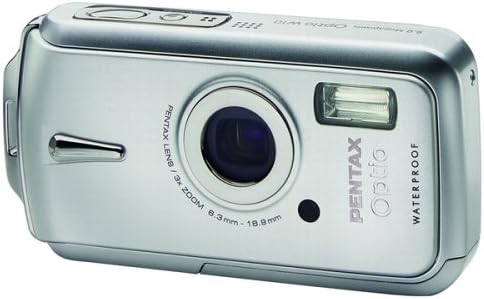
Рисунок 1.1: Передняя часть view of the Pentax Optio W10 Digital Camera, showcasinобъектив, вспышка и фирменная символика.
2. Информация по технике безопасности
Пожалуйста, ознакомьтесь со всеми мерами предосторожности и усвойте их перед использованием камеры. Несоблюдение этих мер может привести к травмам или повреждению изделия.
- Не пытайтесь разбирать или модифицировать камеру.
- Держите камеру подальше от экстремальных температур, прямых солнечных лучей и высокой влажности.
- Ensure all compartment covers (battery, memory card) are securely closed and locked before exposing the camera to water or dust.
- Use only the specified battery type (Lithium-ion DL-I8) and charger.
- Хранить в недоступном для детей месте.
3. Содержимое упаковки
Убедитесь, что все предметы в комплекте с вашей камерой присутствуют:
- Pentax Optio W10 Digital Camera
- Lithium-ion Battery DL-I8
- Зарядное устройство для аккумулятора
- Шнур питания переменного тока
- USB Cable (for computer connection)
- Ремень
- CD-ROM с программным обеспечением
- Руководство по эксплуатации (данный документ)
4. Настройка
4.1. Установка аккумулятора
- Locate the battery/memory card compartment cover on the bottom of the camera.
- Slide the lock switch to the 'OPEN' position and open the cover.
- Insert the Lithium-ion battery DL-I8 into the compartment, ensuring the correct orientation as indicated inside the compartment.
- Close the cover and slide the lock switch to the 'LOCK' position until it clicks securely.

Рисунок 4.1: Внизу view of the camera, illustrating the battery and SD card compartment with the lock switch.
4.2. Установка карты памяти
The Pentax Optio W10 uses SD memory cards.
- Open the battery/memory card compartment cover as described in Section 4.1.
- Insert the SD memory card into the designated slot with the label facing the correct direction, pushing gently until it clicks into place.
- Close the cover and slide the lock switch to the 'LOCK' position.
4.3. Первоначальное включение и настройка даты/времени
- Нажмите ВКЛ/ВЫКЛ Кнопка расположена в верхней части камеры.
- Upon first power-on, the camera will prompt you to set the date and time. Use the directional buttons on the back of the camera to navigate and the OK кнопку для подтверждения.
- Следуйте инструкциям на экране, чтобы завершить первоначальную настройку.

Рисунок 4.2: Вверху view of the camera, highlighting the ON/OFF button and 6.0 Megapixels branding.
5. Эксплуатация камеры
5.1. Базовая фотография
To take a still picture:
- Включите камеру, нажав кнопку ВКЛ/ВЫКЛ кнопка.
- Скомпонуйте кадр с помощью 2.5-дюймового ЖК-монитора.
- Нажмите кнопку спуска затвора наполовину, чтобы сфокусироваться. Рамка фокусировки станет зелёной, когда объект будет сфокусирован.
- Нажмите кнопку спуска затвора до упора, чтобы сделать снимок.

Рисунок 5.1: Сзади view На экране камеры отображается ЖК-дисплей и различные кнопки управления для навигации и настроек.
5.2. Режимы съемки.
The Optio W10 offers various shooting modes accessible via the РЕЖИМ button. Refer to the on-screen menu for specific options such as Program Auto, Scene Modes, and Movie Mode.
5.3. Запись видео
Чтобы записать видео:
- Switch to Movie Mode using the РЕЖИМ кнопка.
- Press the shutter button to start recording. The camera can capture QuickTime motion JPEG videos at 640 x 480 resolution at 30 frames per second.
- Нажмите кнопку спуска затвора еще раз, чтобы остановить запись.
5.4. Воспроизведение
К view сделанные фото и видео:
- Нажмите Воспроизведение кнопка (обычно обозначается значком треугольника).
- Use the directional buttons to scroll through your photos and videos.
- Нажмите OK кнопка для view a video or zoom into a photo.
5.5. Подключение к компьютеру
To transfer images and videos to a computer:
- Убедитесь, что камера выключена.
- Подключите камеру к компьютеру с помощью прилагаемого USB-кабеля.
- Turn on the camera. It should be recognized as a removable disk or a PTP device.
- Следуйте инструкциям операционной системы вашего компьютера для доступа и передачи данных. files.
6. Техническое обслуживание
6.1. Уборка
- Корпус камеры: Протрите мягкой сухой тканью. Для стойких загрязнений используйте слегка грубую ткань.amp тканью, а затем тщательно высушите.
- Объектив: Use a lens brush or a soft, clean lens cloth. Avoid touching the lens surface with your fingers.
- ЖК монитор: Аккуратно протрите мягкой сухой тканью. Избегайте сильного нажатия на экран.
- Водонепроницаемые уплотнения: Regularly inspect the rubber seals around the battery/memory card compartment for dirt, sand, or damage. Clean gently with a soft cloth. Do not use sharp objects.
6.2. Хранение
When not in use for extended periods, store the camera in a cool, dry, and well-ventilated place. Remove the battery to prevent leakage. Avoid storing in areas with high humidity or extreme temperature fluctuations.
7. Поиск Неисправностей
If you encounter issues with your Pentax Optio W10, refer to the following common solutions:
| Проблема | Возможная причина/решение |
|---|---|
| Камера не включается | Battery is depleted or incorrectly inserted. Recharge the battery or reinsert it correctly. |
| Не могу фотографировать | Memory card is full, locked, or not inserted. Delete unnecessary files, разблокируйте карту или вставьте ее правильно. |
| Изображения размыты. | Lens is dirty, camera shake, or incorrect focus. Clean the lens, hold the camera steady, or ensure proper focus. |
| Water inside compartment | Compartment cover not securely closed or seal is damaged. Ensure cover is locked. If seal is damaged, contact service. |
For further assistance, please refer to the official Pentax support webсайт или свяжитесь со службой поддержки клиентов.
8. Технические характеристики
Key technical specifications for the Pentax Optio W10 Digital Camera:
- Эффективное разрешение неподвижного изображения: 6.0 мегапикселей
- Технология фотодатчика: ПЗС-матрица (1/2.5 дюйма)
- Оптический зум: 3x
- Цифровой зум: 4x
- Максимальное фокусное расстояние: 114 мм
- Минимальное фокусное расстояние: 38 мм
- Размер ЖК-экрана: 2.5 дюйма
- Стабилизация изображения: Цифровой, Оптический
- Разрешение видео: 640 x 480, 30/15 fps (QuickTime Motion JPEG)
- Поддерживается File Формат: JPEG (Still Images), MJPEG (Video)
- Носители информации: SD/MMC card, Internal Memory
- Тип батареи: Lithium-ion (DL-I8)
- Особая особенность: Waterproof (Note: Ensure all seals are properly closed before water exposure)
- Минимальная выдержка: 4 секунд
- Максимальная скорость затвора: 1/2000 секунды
- Диапазон ISO: Авто, 64, 100, 200, 400, 800
- Вес товара: 5.6 унции
- Номер модели: 19033
9. Гарантия и поддержка
For information regarding warranty coverage, service, or technical support for your Pentax Optio W10 camera, please refer to the warranty card included with your product or visit the official Pentax webСохраните чек о покупке для предъявления гарантийных претензий.
Онлайн поддержка: Ricoh Imaging Global Support (Pentax is a brand of Ricoh Imaging)


