1. Введение
Thank you for choosing the Nortek Soundream 2.1 Attive Minispeaker system. This manual provides essential information for the proper setup, operation, and maintenance of your new audio system. Please read this manual thoroughly before using the product to ensure optimal performance and safety.
2. Информация по технике безопасности
Во избежание возгорания, поражения электрическим током или повреждения изделия, пожалуйста, соблюдайте следующие меры предосторожности:
- Не подвергайте прибор воздействию дождя или влаги.
- Не ставьте на прибор предметы, наполненные жидкостью, например, вазы.
- Обеспечьте надлежащую вентиляцию. Не закрывайте вентиляционные отверстия.
- Не устанавливайте вблизи источников тепла, таких как радиаторы, обогреватели, печи или другие приборы (включая amp(жирообразующие вещества), которые вырабатывают тепло.
- Не наступайте на шнур питания и не защемляйте его, особенно у вилок, розеток и в местах выхода из прибора.
- Используйте только те насадки/аксессуары, которые указаны производителем.
- Отключайте это устройство от сети во время грозы или если оно не используется в течение длительного времени.
3. Содержимое упаковки
Пожалуйста, проверьте наличие всех предметов в упаковке:
- 1 x Nortek Soundream 2.1 Subwoofer
- 2 сателлитных динамика
- 1 x Power Cable (Corded Electric)
- 1 x Audio Input Cable (e.g., 3.5mm stereo jack)
- 1 x Руководство пользователя (этот документ)
4. Продукт закончилсяview
The Nortek Soundream 2.1 system consists of a subwoofer and two satellite speakers designed to deliver enhanced audio for various devices.
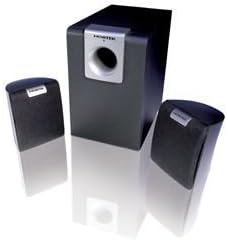
Image: The Nortek Soundream 2.1 Attive Minispeaker system, featuring a central subwoofer unit and two compact satellite speakers.
Компоненты:
- Сабвуфер: The main unit containing the amplifier, bass driver, and primary controls.
- Сателлитные динамики: Two compact speakers for mid-range and high-frequency audio.
- Управление: Typically located on the subwoofer, these include power on/off, master volume, and potentially bass level adjustment.
5. Настройка
Follow these steps to set up your Nortek Soundream 2.1 system:
- Размещение:
- Place the subwoofer on the floor, preferably near a wall or in a corner for optimal bass response.
- Position the two satellite speakers on either side of your listening area, facing towards you. Ensure they are equidistant from your listening position for balanced stereo sound.
- Подключите сателлитные колонки:
- Connect the cables from the satellite speakers to the corresponding output jacks on the back of the subwoofer. Ensure correct polarity if applicable (e.g., red to red, black to black).
- Подключите источник звука:
- Connect one end of the audio input cable (e.g., 3.5mm stereo jack) to the 'Audio In' port on the subwoofer.
- Connect the other end of the audio input cable to the audio output jack of your device (e.g., computer, smartphone, MP3 player, TV).
- Подключите питание:
- Plug the power cable into the power input on the subwoofer.
- Другой конец кабеля питания подключите к стандартной электрической розетке.
6. Инструкция по эксплуатации
Once the system is set up, follow these steps to operate your speakers:
- Включение питания: Locate the power button or switch on the subwoofer and turn it to the 'ON' position. An indicator light may illuminate.
- Регулятор громкости: Turn the master volume knob on the subwoofer to a low setting before playing audio. Gradually increase the volume to your desired listening level.
- Bass Adjustment (if available): If your subwoofer has a separate bass control knob, adjust it to achieve your preferred bass level.
- Воспроизвести аудио: Start playing audio from your connected device.
- Выключение: When finished, turn the power switch on the subwoofer to the 'OFF' position. For extended periods of non-use, it is recommended to unplug the system from the power outlet.
7. Техническое обслуживание
Proper maintenance ensures the longevity and performance of your speaker system:
- Уборка: Disconnect the power before cleaning. Use a soft, dry cloth to wipe the surfaces of the speakers and subwoofer. Do not use liquid cleaners or abrasive materials.
- Вентиляция: Ensure that the ventilation openings on the subwoofer are not blocked by dust or other objects.
- Хранилище: If storing the system for an extended period, unplug it and store it in a cool, dry place away from direct sunlight and extreme temperatures.
- Уход за кабелем: Avoid bending or crimping the audio and power cables excessively.
8. Поиск Неисправностей
If you encounter issues with your Nortek Soundream 2.1 system, refer to the following common problems and solutions:
- Нет звука:
- Ensure the power cable is securely plugged into both the subwoofer and the wall outlet.
- Verify the power switch on the subwoofer is in the 'ON' position.
- Check that the audio input cable is securely connected to both the subwoofer and your audio source.
- Increase the master volume on the subwoofer and the volume on your audio source device.
- Test with a different audio source or cable to rule out a faulty source or cable.
- Искаженный звук:
- Reduce the volume on both the subwoofer and your audio source.
- Ensure the audio input cable is fully inserted and not damaged.
- Проверьте, нет ли помех от других электронных устройств.
- Only One Satellite Speaker Working:
- Проверьте соединение неисправного сателлитного динамика с сабвуфером.
- Ensure the audio source is outputting stereo sound.
9. Технические характеристики
- Модель: Nortek Soundream 2.1
- Конфигурация: 2.1 Channel (Subwoofer + 2 Satellite Speakers)
- Выходная мощность (Вт)tagд): 2 Вт
- Источник питания: Проводной электрический
- Вес товара: Примерно 1.5 кг (3.31 фунта)
- ASIN: B000CFYA2C
- Производитель: Нортек
10. Гарантия и поддержка
For warranty information and technical support, please refer to the warranty card included with your product or visit the official Nortek webСохраните чек о покупке в качестве подтверждения покупки на случай предъявления гарантийных претензий.


