Введение
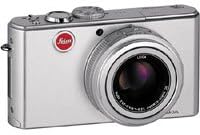
The Leica D-LUX 2 is an 8.4 megapixel digital camera designed for versatile photography. It features Leica DC VARIO-ELMARIT 6.3-25.2 mm f/2.8-4.9 ASPH. optics with 4x optical zoom, providing a focal length range equivalent to 28-112 mm on a 35 mm camera. The camera incorporates optical image stabilization and offers various scene programs to adapt to different shooting conditions. Its compact and stylish aluminum body is built for portability and ease of use.
Настраивать
1. Установка аккумулятора
The Leica D-LUX 2 uses a Lithium-Ion battery (3.7 V, 1150 mAH). Ensure the battery is fully charged before first use.
- Откройте крышку батарейного отсека, расположенную в нижней части камеры.
- Insert the charged battery into the compartment, ensuring correct orientation as indicated inside the compartment.
- Плотно закройте крышку батарейного отсека до щелчка.
Изображение: Нижний view of the Leica D-LUX 2 camera, highlighting the battery and memory card compartment. This compartment is crucial for power and storage.
2. Установка карты памяти
The camera supports SD & MMC Cards. A 64 MB SD Card is supplied with the camera.
- Открыв батарейный отсек, найдите слот для карты памяти.
- Insert the SD or MMC card into the slot with the label facing the correct direction (usually towards the front of the camera) until it clicks.
- Закройте крышку батарейного отсека.
3. Установка крышки объектива
Always attach the lens cap when the camera is not in use to protect the lens from dust and scratches.

Изображение: Передний view of the Leica D-LUX 2 camera with its lens cap in place, demonstrating proper lens protection.
Эксплуатация камеры
1. Включение и выключение
Press the power button to turn the camera on or off. The lens will extend upon powering on.
2. Основные режимы съемки
The D-LUX 2 offers various exposure control modes:
- Full Automatic Mode: The camera automatically sets all parameters. Shutter speed range: 1/4 - 1/2000 sec.
- Program Mode (P): The camera sets aperture and shutter speed, but you can adjust other settings. Shutter speed range: 1 - 1/2000 sec.
- Aperture Priority (Av or A): Вы устанавливаете диафрагму, а камера выбирает подходящую выдержку.
- Shutter Priority (Tv or S): You set the shutter speed, and the camera selects the appropriate aperture. Shutter speed range: 8 - 1/2000 sec.
- Ручной режим (М): You control both aperture and shutter speed. Shutter speed range: 60 - 1/2000 sec.
- Scene Programs: Select from various pre-set scene modes like Portrait, Sport, Night-time Landscape, Night-time Portrait, Fireworks, Party, Snow, Self-portrait, Food, Baby, Soft-focus for skin, Candlelight, and Starry Sky.

Изображение: Задний view of the Leica D-LUX 2, displaying the LCD screen and various control buttons for mode selection and navigation.
3. Чувствительность ISO
Adjust the ISO sensitivity manually or set it to automatic. Available ISO settings are 80, 100, 200, and 400.
4. Optical Image Stabilizer
The camera features an Optical Image Stabilizer with two operating modes: one for exposure only and another for both exposure and monitor display. This helps reduce blur caused by camera shake.
5. File Форматы
Still images can be saved in RAW, TIFF, or JPEG (Fine / Standard) formats. RAW and TIFF formats offer maximum image data for post-processing, while JPEG provides smaller file размеры.
6. Запись видео
The camera can record video in QuickTime Motion JPEG format. Video resolutions include up to 3840 x 2160, 16:9 VGA 848 x 480, and 4:3 VGA 640 x 480 at 10 or 30 frames per second.
7. Автоспуск
Utilize the self-timer function for delayed shots, with options for a 2-second or 10-second delay.
Обслуживание
1. Чистка камеры
- Для очистки корпуса камеры используйте мягкую безворсовую ткань.
- For the lens, use a specialized lens cleaning cloth and solution. Avoid touching the lens surface directly.
- Keep the lens cap on when not in use to prevent dust accumulation.
2. Уход за аккумулятором
- Store the Lithium-Ion battery in a cool, dry place when not in use.
- Чтобы продлить срок службы аккумулятора, избегайте его частой полной разрядки.
- Используйте только указанное зарядное устройство для аккумулятора.
3. Работа с картами памяти
- Перед первым использованием всегда форматируйте новые карты памяти в камере.
- Avoid removing the memory card while the camera is writing data to prevent corruption.
- Regularly back up your photos and videos to an external storage device.
Поиск неисправностей
| Проблема | Возможная причина | Решение |
|---|---|---|
| Камера не включается. | Батарея разряжена или неправильно вставлена. | Полностью зарядите аккумулятор и убедитесь, что он правильно вставлен. |
| Изображения размыты. | Camera shake or incorrect focus. | Ensure Optical Image Stabilizer is active. Use a faster shutter speed or tripod. Check focus settings. |
| Ошибка карты памяти. | Карта заполнена, повреждена или несовместима. | Удалить ненужное files, reformat the card (will erase all data), or try a different compatible SD/MMC card. |
| Вспышка не срабатывает. | Flash mode is set to OFF or conditions are too bright. | Check flash mode settings (Auto, On, Off, Slow Synch). Ensure subject is within flash range. |
Технические характеристики
| Особенность | Деталь |
|---|---|
| Название модели | Leica D-LUX 2 |
| Эффективное разрешение неподвижного изображения | 8.4 МП |
| Тип датчика изображения | 1/1.6 inches CCD |
| Тип объектива | Leica DC VARIO-ELMARIT 6.3-25.2 mm f/2.8-4.9 ASPH. with 4x optical zoom |
| Фокусное расстояние (в эквиваленте 35 мм) | 28-112 мм |
| Оптический зум | 4x |
| Цифровой зум | 5x |
| Стабилизация изображения | Оптический |
| Поддерживается File Форматы | JPEG, RAW, TIFF |
| Видеовыход | QuickTime-движение JPEG |
| Разрешение видео | До 480p |
| Размер экрана | 2.5-дюймовый ЖК-дисплей |
| Чувствительность ISO | Авто, 80, 100, 200, 400 |
| Диапазон выдержки | 60 - 1/2000 sec (Manual), 1/4 - 1/2000 sec (Auto) |
| Таймер | 2 или 10 секунд |
| Источник питания | Lithium-Ion battery, 3.7 V, 1150 mAH |
| Размеры (Ш x В x Г) | 105.7 x 58.3 x 25.6 mm (4 5/32 x 2 9/32 x 1 inch) |
| Масса | 185 grams (6.5 ounces) without battery, 220 grams (7.75 ounces) with battery |
Гарантия и поддержка
For warranty information, please refer to the documentation included with your purchase or visit the official Leica website. For technical support, service, or additional inquiries, please contact Leica customer service through their official channels.
- Онлайн поддержка: Посетите Камера Leica webсайт for FAQs, software downloads, and service information.
- Контакт: Refer to your product packaging or the Leica webСайт с контактными данными региональной службы поддержки клиентов.


