Введение
This manual provides instructions for the StarTech.com 16 ft USB 2.0 Active Extension Cable (model USB2FAAEXT15). This active USB extension cable is designed to extend the reach of your USB 2.0 devices by an additional 16.4 feet (5 meters), ensuring reliable data transfer and power delivery over longer distances. It features a male USB Type-A connector on one end and a female USB Type-A connector on the other, facilitating easy connection between your host computer and USB peripherals.
Характеристики продукта
- Reliably extends the distance of a USB 2.0 device by an additional 15ft (4.5m).
- Connects printers, scanners, or other USB devices that are beyond the reach of standard USB cables.
- Powered directly from the USB port, eliminating the need for an external power adapter.
- Supports cascading up to 5 active repeater cables to extend the connection distance up to 75ft (22.5m) without loss in transfer speed.
- Maintains signal integrity along the entire cable length, ensuring data transfer rates of up to 480 Mbits/sec.
- Plug-and-play compatible for easy setup.
- Backwards compatible with USB 1.1 devices.
- Works with both PCs and Macs.
Содержимое упаковки
- 1 x StarTech.com 16 ft USB 2.0 Active Extension Cable (USB2FAAEXT15)
Настройка и установка
- Определите соединители: Locate the male USB Type-A connector and the female USB Type-A connector on the extension cable.
- Подключение к хосту: Plug the male USB Type-A connector of the active extension cable into an available USB port on your computer or host device.
- Подключить устройство: Plug the USB Type-A connector of your peripheral device (e.g., printer, scanner, webcam) into the female USB Type-A port of the active extension cable.
- Проверить соединение: Your operating system should automatically detect the connected device. No additional drivers are typically required for standard USB devices.
- Cascading (Optional): For extended distances beyond 16.4 feet, you can connect up to five (5) StarTech.com active extension cables in a series. Connect the male end of one cable to the female end of another, and so on, ensuring the final female end connects to your USB device.

Figure 1: StarTech.com 16 ft USB 2.0 Active Extension Cable, coiled, showing both male and female connectors.

Figure 2: Close-up of the male USB Type-A connector of the extension cable, which connects to the host device.
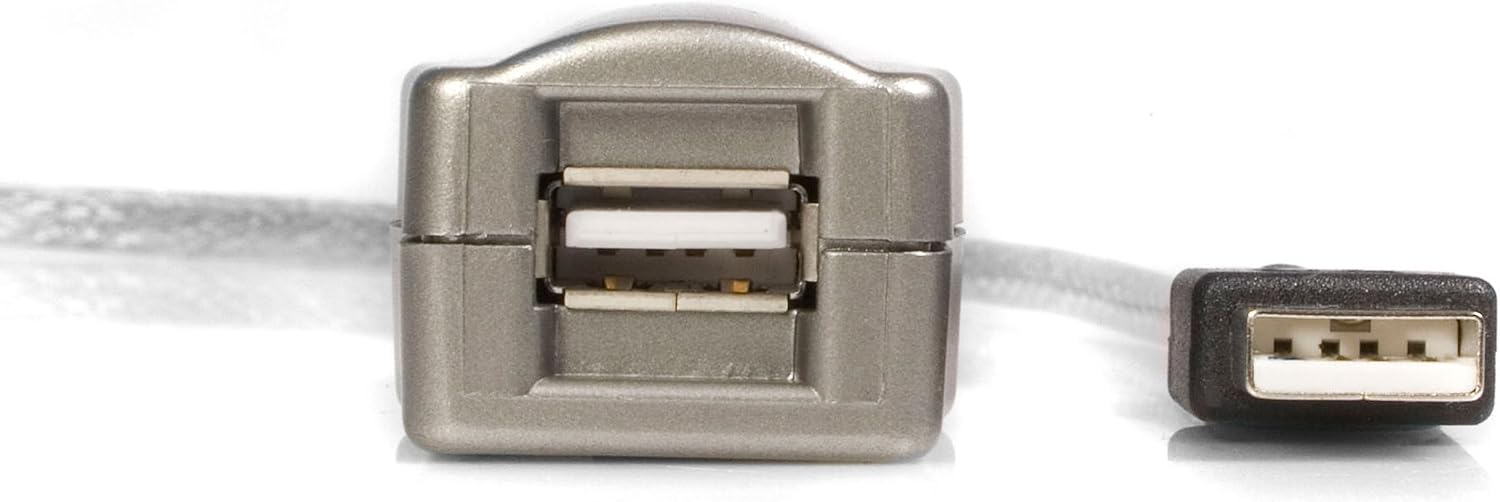
Figure 3: Close-up of the female USB Type-A connector of the extension cable, where the peripheral device connects.
Инструкция по эксплуатации
Once the cable is properly connected, the active extension cable functions transparently. Your connected USB 2.0 device will operate as if it were directly connected to your computer's USB port. Data transfer and power delivery will be managed by the active circuitry within the cable to maintain signal integrity over the extended distance.
- Ensure all connections are secure to prevent intermittent disconnections.
- The cable is bus-powered, drawing power directly from the host USB port. No external power source is typically required for most USB 2.0 devices.
- The maximum data transfer rate supported is 480 Mbps (USB 2.0 Hi-Speed).
Обслуживание
To ensure the longevity and optimal performance of your StarTech.com USB 2.0 Active Extension Cable, follow these simple maintenance guidelines:
- Хранилище: When not in use, coil the cable loosely to prevent kinks or damage. Avoid sharp bends.
- Уборка: Для очистки кабеля и разъёмов используйте мягкую сухую ткань. Не используйте жидкие чистящие средства или растворители.
- Умение обращаться: Always grasp the connector ends when plugging or unplugging the cable. Avoid pulling on the cable itself, as this can damage internal wiring.
- Среда: Store and use the cable in a dry environment, away from extreme temperatures and direct sunlight. The cable is rated for both indoor and outdoor usage, but prolonged exposure to harsh outdoor elements should be avoided.
Поиск неисправностей
If you encounter issues with your USB 2.0 Active Extension Cable, consider the following troubleshooting steps:
- Устройство не распознано:
- Убедитесь, что оба конца удлинительного кабеля надежно подключены.
- Try connecting the USB device directly to the computer's USB port to confirm the device itself is functional.
- Test the extension cable with a different USB device.
- If using multiple cascaded cables, try reducing the number of cables to isolate the issue.
- Connect the male end of the extension cable to a different USB port on your computer.
- Медленная передача данных:
- Verify that both the host port and the connected device support USB 2.0 speeds.
- Ensure no other high-bandwidth USB devices are connected to the same USB hub or controller.
- If cascading cables, ensure you are within the recommended limit of 5 cables. Exceeding this limit may degrade performance.
- Прерывистое соединение:
- Проверьте наличие физических повреждений кабеля или разъемов.
- Убедитесь, что кабель не перегнут и не натянут чрезмерно.
- Avoid electromagnetic interference (EMI) by keeping the cable away from power cords, fluorescent lights, and other sources of electrical noise.
Технические характеристики
| Атрибут | Ценить |
|---|---|
| Бренд | StarTech.com |
| Название модели | 15 ft USB 2.0 Active Extension Cable - M/F (USB2FAAEXT15) |
| Тип разъема | USB Type A (Male) to USB Type A (Female) |
| Тип кабеля | Активный удлинительный кабель USB 2.0 |
| Длина кабеля | 16.4 футов (5 метров) |
| Скорость передачи данных | Up to 480 Megabits Per Second (USB 2.0 Hi-Speed) |
| Источник питания | Bus Powered (no external power adapter required) |
| Cascading Limit | Up to 5 active cables for a total of 75ft (22.5m) |
| Совместимые устройства | Camera, Printer, Scanner, Storage Device, and other USB 2.0 peripherals |
| Совместимость | Backwards compatible with USB 1.1 devices; Works with PCs and Macs |
| Цвет | Космический серый |
| Внешний материал | Поливинилхлорид |
| Размеры продукта | 180 x 1.2 x 0.9 дюйма |
| Вес товара | 5.4 унции |
| Использование внутри и снаружи помещений | В помещении, на открытом воздухе |
| СКП | 065030810500 |
Гарантия и поддержка
На продукцию StarTech.com распространяется гарантия. пожизненная гарантия. For technical support, product information, or warranty claims, please visit the official StarTech.com webили обратитесь в службу поддержки напрямую. Сохраните чек о покупке для подтверждения гарантии.
For additional resources and product details, you may visit the Страница товара на Amazon.