Введение
Спасибо за покупкуasing the Nyko AirFlo EX Controller for PlayStation 2. This controller is designed to enhance your gaming experience with its unique airflow feature, providing comfort during extended gameplay sessions. Please read this manual thoroughly before use to ensure proper setup and operation.
Содержимое упаковки
- Nyko AirFlo EX Controller for PlayStation 2
- Руководство пользователя (этот документ)
Особенности контроллера
The Nyko AirFlo EX Controller integrates several features for an optimized gaming experience:
- AirFlo Cooling System: An integrated fan provides airflow to help keep hands dry and comfortable during intense gaming.
- Эргономичный дизайн: Shaped for comfortable grip and extended play.
- Standard PlayStation 2 Controls: Includes directional pad, action buttons (Triangle, Circle, Cross, Square), L1/R1/L2/R2 shoulder buttons, START, SELECT, and analog sticks (L3/R3 functionality).
- Вибрационная обратная связь: Supports in-game vibration effects for enhanced immersion.
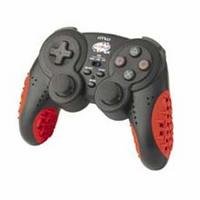
Image: Nyko AirFlo EX Controller for PlayStation 2. This image displays the front view of the controller, highlighting its button layout and ergonomic shape.
Настраивать
- Connect to PlayStation 2: Locate an available controller port on your PlayStation 2 console.
- Вставьте соединитель: Firmly insert the controller's connector cable into the chosen port. Ensure it is fully seated.
- Включение консоли: Turn on your PlayStation 2 console. The controller should be automatically recognized.
- Тестовая функциональность: Navigate the PlayStation 2 menu or start a game to confirm all buttons and analog sticks are responsive.
Инструкция по эксплуатации
The Nyko AirFlo EX Controller operates similarly to standard PlayStation 2 controllers, with the added AirFlo feature.
- Основные элементы управления: Use the directional pad or left analog stick for movement, and the action buttons (Triangle, Circle, Cross, Square) for in-game actions.
- Analog Stick Functionality: Pressing the analog sticks down activates L3 and R3 functions, if supported by the game.
- AirFlo Fan Activation: The AirFlo fan is typically activated by a switch or button on the controller itself. Refer to the controller's physical layout for the exact location of the fan control. Toggle this control to turn the fan on or off.
- Вибрационная обратная связь: Vibration effects will automatically engage during gameplay when supported by the software.
Обслуживание
- Уборка: Для очистки поверхности контроллера используйте мягкую сухую ткань. Для удаления стойких загрязнений слегка протрите поверхность.amp cloth can be used, ensuring no moisture enters openings. Do not use harsh chemicals or abrasive cleaners.
- Хранилище: Храните контроллер в прохладном, сухом месте, вдали от прямых солнечных лучей и экстремальных температур. Избегайте тугого наматывания кабеля на контроллер, чтобы предотвратить его повреждение.
- Избегайте капель: Оберегайте контроллер от падений и ударов, которые могут повредить внутренние компоненты.
Поиск неисправностей
| Проблема | Возможное решение |
|---|---|
| Контроллер не отвечает. |
|
| AirFlo fan not working. |
|
| Buttons or analog sticks are unresponsive or stiff. |
|
Технические характеристики
- Модель: AirFlo EX
- Совместимость: Плейстейшен 2
- Вес товара: 9.6 унции (приблизительно 272 грамм)
- Размеры упаковки: 6 x 4.8 x 2.7 дюйма (приблизительно 15.2 x 12.2 x 6.9 см)
- Связь: Проводной
- Особые характеристики: Integrated AirFlo cooling fan
Гарантия и поддержка
For warranty information, technical support, or service inquiries regarding your Nyko AirFlo EX Controller, please contact Nyko customer support directly. Details can typically be found on the official Nyko webсайта или упаковки продукта.
Nyko Official Webсайт: www.nyko.com (Примечание: это заполнитель. URL. Please refer to your product packaging or official Nyko documentation for the most current support information.)


