Введение
The Melnor 3060 Digital Water Timer Plus is designed to automate your watering schedule, providing convenience and efficient water management for your lawn or garden. This timer allows you to set precise watering times and durations, ensuring your plants receive the right amount of water without constant manual intervention. It features an easy-to-read LCD menu for programming and supports multiple independent watering cycles.
This manual provides detailed instructions for setting up, operating, and maintaining your Melnor 3060 Digital Water Timer Plus. Please read it thoroughly before use to ensure optimal performance and longevity of your device.
Основные характеристики
- Автоматический полив: Set and forget, program to automatically start and shut off.
- Простое программирование: Features an intuitive LCD menu for straightforward setup.
- Универсальная совместимость: Works effectively with low-pressure drip systems and soaker hoses.
- Гибкий график: Program up to 6 independently programmable cycles, allowing watering while away or at night.
- Ручное управление: Includes an on/off function to use like a standard faucet.
- Additional Outlet: Equipped with a second manual outlet for convenient watering.
Информация по безопасности
ПРЕДУПРЕЖДЕНИЕ: Этот продукт может подвергнуть вас воздействию химических веществ, включая стирол, который, как известно в штате Калифорния, вызывает рак. Для получения дополнительной информации перейдите на www.P65Warnings.ca.gov.
For outdoor use only. Do not use this timer indoors or for purposes other than watering.
Настраивать
1. Установите батареи.
The Melnor 3060 Digital Water Timer Plus requires two (2) AA batteries (not included) for operation. Ensure batteries are inserted with correct polarity.
- Найдите отсек для батареек на задней панели таймера.
- Откройте крышку батарейного отсека.
- Insert two fresh AA alkaline batteries, matching the (+) and (-) terminals correctly.
- Securely close the battery compartment cover to prevent water intrusion.
2. Attach to Faucet
Connect the timer to a standard outdoor hose faucet.
- Убедитесь, что кран закрыт.
- Thread the timer's inlet connector onto the faucet. Hand-tighten only to prevent damage.
- Attach your garden hose or watering system to the timer's outlet.
- Slowly turn on the faucet completely. The timer is designed to operate with full water pressure.
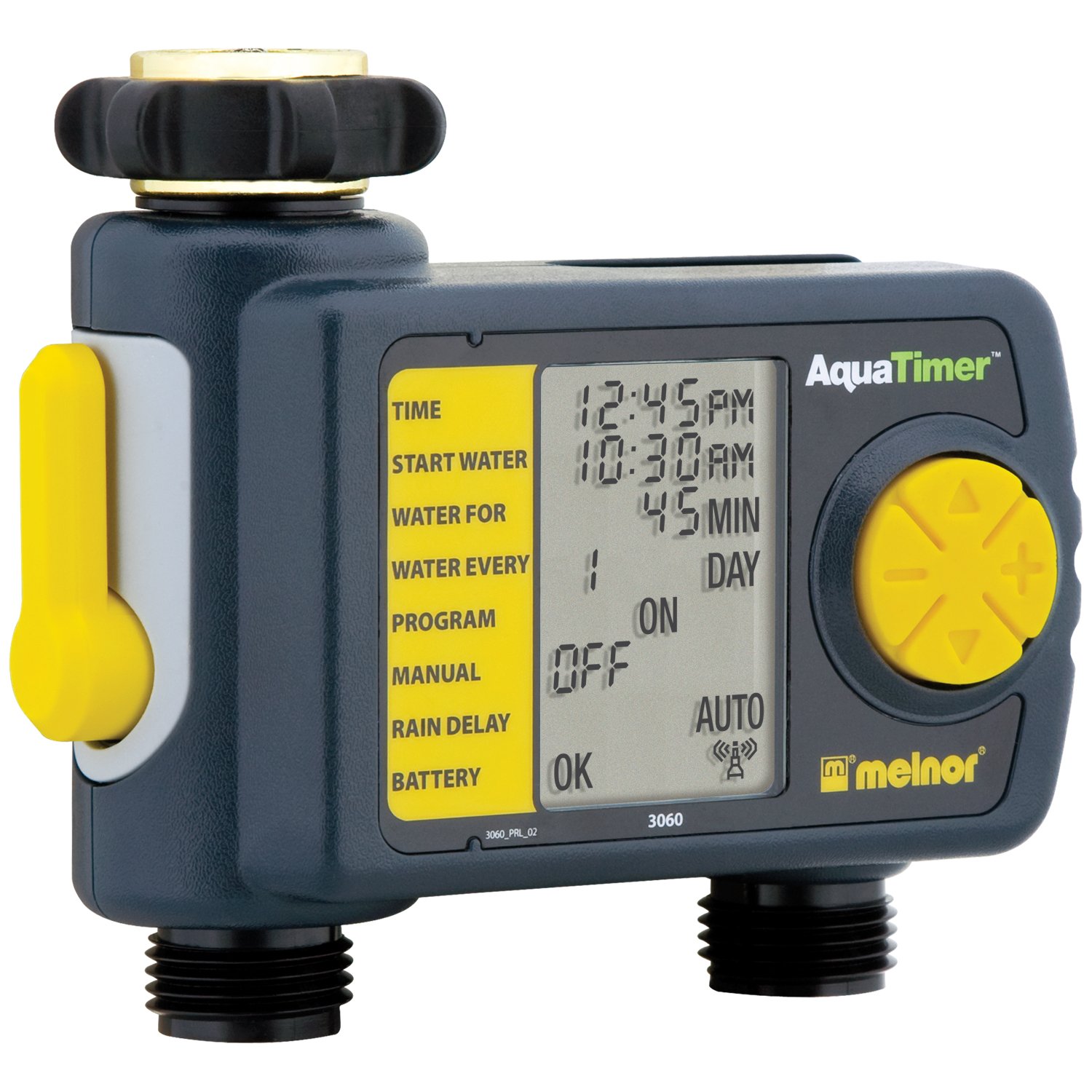
Image: The Melnor 3060 Digital Water Timer Plus, showing its connection points for a faucet and a garden hose.
Инструкция по эксплуатации
The Melnor 3060 features an LCD display and several buttons for programming. Refer to the on-screen prompts for guidance.
1. Set Current Time
- Нажмите УСТАНОВИТЬ ЧАСЫ кнопка.
- Используйте + и - кнопки для настройки часов и минут.
- Нажимать OK or УСТАНОВИТЬ ЧАСЫ еще раз для подтверждения.
2. Program Watering Schedule
The timer allows for up to six independent watering cycles per day. You can also choose from five preset programs.
- Нажмите ПРОГРАММА Кнопка входа в режим программирования.
- Используйте + и - buttons to select a program number (1-6) or a preset option.
- Нажимать OK для подтверждения вашего выбора.
- Follow the on-screen prompts to set the:
- Время начала: When watering begins.
- Продолжительность: How long watering will last.
- Частота: How often watering occurs (e.g., every day, every other day, specific days of the week).
- Repeat for additional watering cycles as needed.
- Once all programs are set, ensure the timer is in АВТО режим автоматической работы.
3. Ручной полив
Для полива вручную без изменения запрограммированного расписания:
- Нажмите ВКЛ/ВЫКЛ кнопка.
- The water will begin to flow.
- Чтобы остановить ручной полив, нажмите кнопку. ВКЛ/ВЫКЛ button again. The timer will return to its programmed schedule.
4. Using the Second Manual Outlet
The timer includes a second, un-timed manual outlet. This outlet functions like a standard faucet and is not controlled by the timer's programming. Simply attach a hose and open the valve on the timer to use it.
Обслуживание
- Замена батареи: Replace batteries annually or when the low battery indicator appears on the LCD. Always use fresh AA alkaline batteries.
- Подготовка к зиме: To prevent damage from freezing, remove the timer from the faucet before the first frost. Store it indoors in a dry, protected area.
- Уборка: Periodically check the inlet screen for debris and clean if necessary to maintain proper water flow.
Поиск неисправностей
| Проблема | Возможная причина | Решение |
|---|---|---|
| Таймер не поливает. |
|
|
| Утечка воды из соединений. |
|
|
| Дисплей пустой или тусклый. |
|
|
Технические характеристики
- Номер модели: 3060 (also referred to as 3100 in some documentation)
- Источник питания: 2 щелочные батарейки типа АА (не входят в комплект)
- Размеры продукта: 4.5 x 5.2 x 4.5 дюйма
- Вес товара: 12.8 унции
- Производитель: Мелнор
- Циклы полива: Up to 6 independently programmable cycles
- Предустановленные программы: 5
Информация о гарантии
The Melnor 3060 Digital Water Timer Plus comes with a Двухлетняя ограниченная гарантия. This warranty covers defects in materials and workmanship under normal use. For specific terms and conditions, or to make a warranty claim, please refer to the warranty card included with your product or contact Melnor customer service.
Поддержка клиентов
If you have any questions, require assistance with setup or programming, or encounter any issues not covered in this manual, please contact Melnor Customer Service. Contact information can typically be found on the product packaging or on the official Melnor webсайт.


