
Введение
Спасибо за покупкуasing the Leadjoy Xeno Plus Game Controller. This controller is designed to provide a versatile and high-performance gaming experience across multiple platforms. This manual will guide you through the setup, operation, and maintenance of your new controller to ensure optimal performance and longevity.
Продукт болееview и компоненты
The Leadjoy Xeno Plus controller offers advanced features such as multi-mode connectivity, TMR joysticks, microswitch buttons, and customizable triggers. Familiarize yourself with the controller's components and included accessories.
Содержимое упаковки:
- Leadjoy Xeno Plus Game Controller Unit
- Умная зарядная док-станция
- Replaceable Magnetic Cover (Clear Blue)
- Replaceable Cross D-pad
- Наклейки для украшения
- Зарядный кабель USB-C
- Руководство по эксплуатации
Компоновка контроллера:

Изображение: Оверview of the Leadjoy Xeno Plus Game Controller highlighting its various features and components, including TMR sticks, microswitch buttons, dual triggers, and back buttons.

Image: The complete package contents of the Leadjoy Xeno Plus Game Controller, including the controller, charging dock, USB-C cable, and interchangeable parts.
Настраивать
1. Первоначальная зарядка
- Connect the USB-C charging cable to the smart charging dock and a power source.
- Place the Leadjoy Xeno Plus controller onto the smart charging dock. The controller will automatically power off and begin charging.
- Allow the controller to fully charge before first use. The LED indicators on the controller will show charging status.
2. Подключение к устройствам
The Leadjoy Xeno Plus supports three connection modes: Wired, 2.4GHz Wireless, and Bluetooth.

Image: The Leadjoy Xeno Plus controller connected to various devices, illustrating its wired, 2.4G wireless, and Bluetooth connectivity options for PC, Switch, Android, and iOS.
Проводное подключение:
- Connect the USB-C cable directly from the controller to your PC or compatible device.
- The controller will be automatically recognized.
2.4GHz Wireless Connection (via Dock):
- Plug the 2.4GHz wireless receiver (located in the smart charging dock) into a USB port on your PC or compatible device (e.g., Xbox Series S/X with R20 receiver, sold separately).
- The controller will automatically connect to the receiver.
Подключение Bluetooth:
- Press and hold the Bluetooth pairing button on the controller until the LED indicator flashes rapidly.
- On your device (Nintendo Switch, PC, Mac, iOS, Android), go to Bluetooth settings and select "Leadjoy Xeno Plus" from the list of available devices.
- Once paired, the LED indicator will become solid.
- For Nintendo Switch, the controller supports one-click wake-up from sleep mode.
Инструкция по эксплуатации
Включение/выключение питания:
- To power on, press the Home button.
- To power off, press and hold the Home button for a few seconds, or place it on the smart charging dock.
TMR Joysticks and Microswitch Buttons:
The controller features advanced TMR joysticks for high precision and durability, minimizing drift over time. The ABXY buttons utilize microswitches for a tactile and responsive click.

Изображение: Подробная схема, показывающаяasing the internal components and features of the TMR joysticks, emphasizing high-level sampling, resolution, linear feel, ultra-low latency, durability, and full customization.
Dual Trigger Modes:
The Xeno Plus controller features dual-mode triggers, allowing you to switch between Hair Trigger and Full Trigger modes based on your game type.
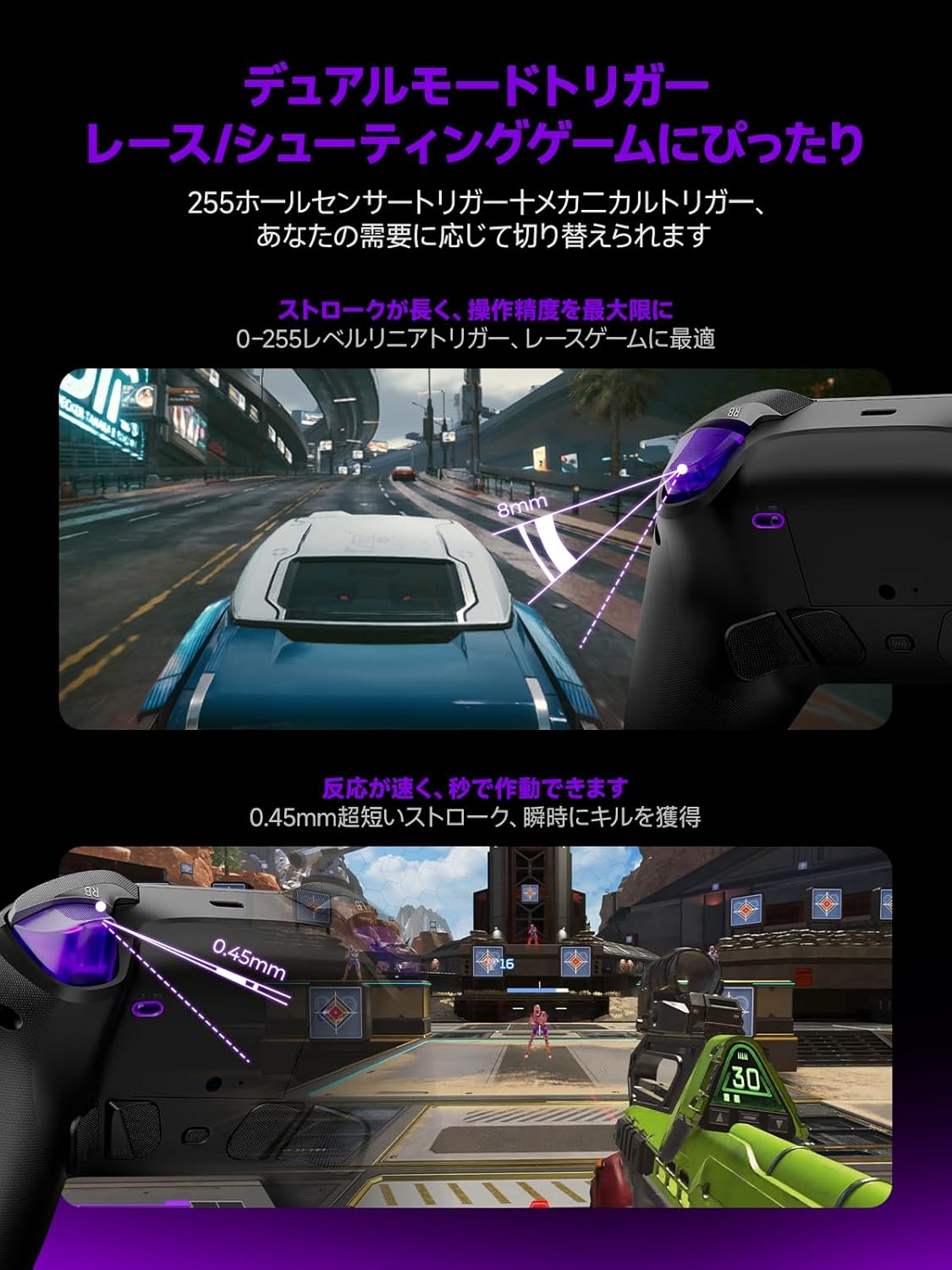
Image: Illustrations demonstrating the dual trigger modes. The top image shows a full trigger pull (8mm) ideal for precise throttle control in racing games. The bottom image shows a hair trigger pull (0.45mm) for rapid firing in shooting games.
- Full Trigger Mode: Ideal for racing games, providing analog input for precise throttle and brake control.
- Режим кратковременного срабатывания: Optimized for FPS games, offering a short travel distance for instant firing and quicker reactions.
- To switch modes, use the dedicated switch located on the back of the controller.
Настраиваемые кнопки «Назад»:
The controller includes four customizable back buttons (R5, R4, L4, L5) that can be mapped to various functions or macros for enhanced gameplay.

Изображение: А view of the back of the Leadjoy Xeno Plus controller, highlighting the four customizable back buttons (R5, R4, L4, L5) and their mechanical microswitch design.
- Refer to the dedicated application for detailed instructions on mapping and creating macros for these buttons.
Motion Aim:
The controller supports motion aim, compatible with all games, offering precise control through gyroscope technology.
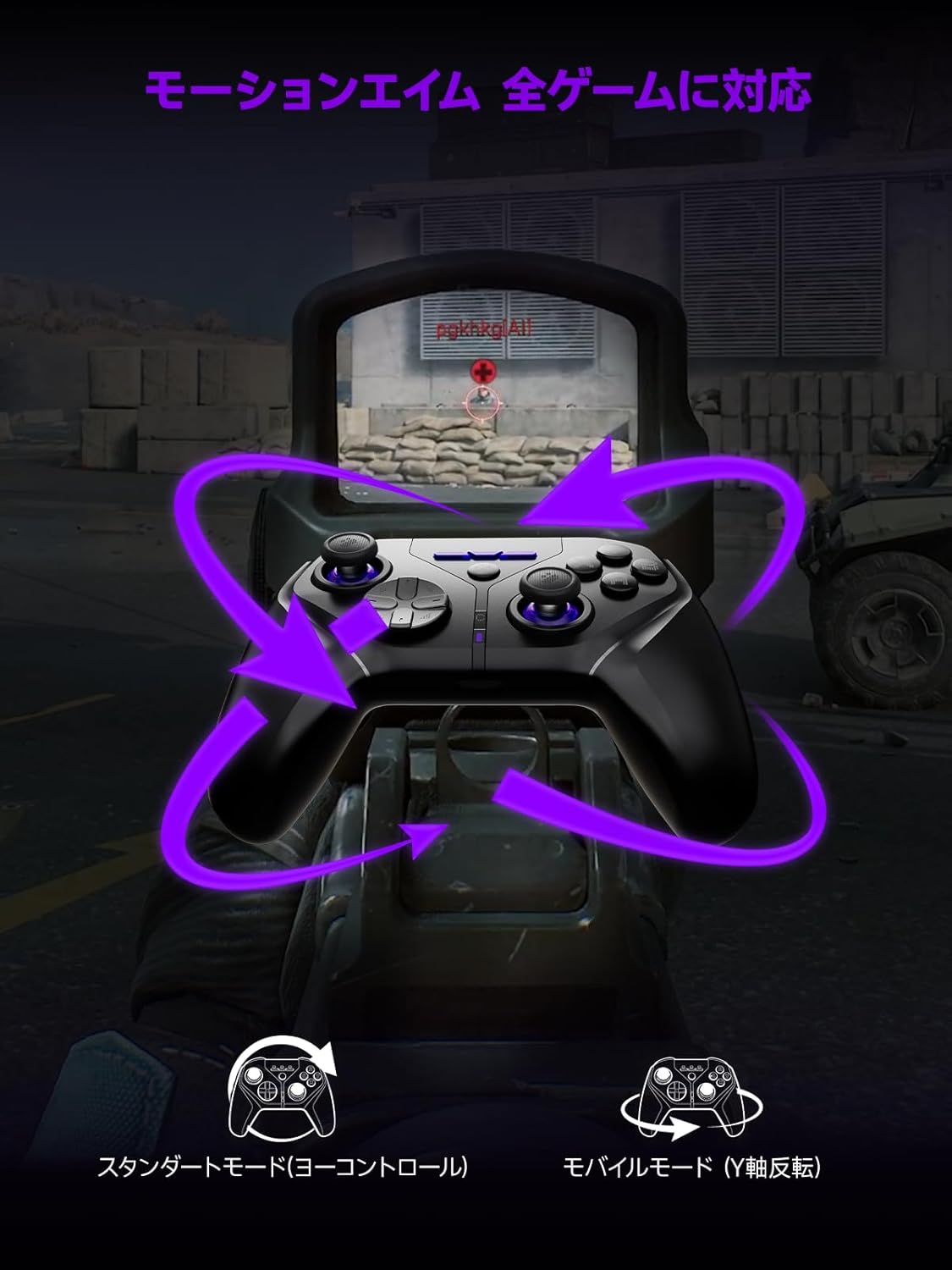
Image: A visual representation of the motion aim feature, showing how tilting the controller translates to in-game aiming, with options for standard (yaw control) and mobile (Y-axis inversion) modes.
- The controller features 1000Hz 6-axis gyroscope control for precise motion aiming.
- Settings for motion aim can be adjusted via the dedicated application.
Функция NFC:
The controller is fully compatible with NFC functions, including amiibo for Nintendo Switch.
- To use NFC, place your amiibo figure or card on the designated NFC touchpoint on the controller.
- Ensure your game supports amiibo functionality.
Обслуживание
Уборка:
- Протрите контроллер мягкой сухой тканью.
- Не используйте абразивные чистящие средства или растворители.
Уход батареи:
- Не подвергайте контроллер воздействию экстремальных температур.
- Для длительного хранения зарядите аккумулятор примерно до 50% и храните его в прохладном, сухом месте.
- The smart charging dock includes overcharge protection to preserve battery life.
Поиск неисправностей
| Проблема | Возможная причина | Решение |
|---|---|---|
| Контроллер не включается. | Низкий заряд батареи. | Charge the controller using the smart charging dock or USB-C cable. |
| Невозможно подключиться через Bluetooth. | Не находится в режиме сопряжения; Bluetooth устройства выключен; помехи. | Ensure controller is in pairing mode (flashing LED). Check device Bluetooth settings. Move closer to the device. |
| 2.4GHz wireless connection issues. | Receiver not properly connected; interference. | Ensure the 2.4GHz receiver is securely plugged into a USB port. Reduce distance between controller and receiver. |
| Кнопки или джойстики не реагируют. | Software glitch; low battery; physical damage. | Restart the controller. Ensure battery is charged. If issues persist, contact support. |
| Контроллер не распознан ПК. | Driver issues; incorrect mode. | Ensure controller is in the correct mode (Xinput/Dinput if applicable). Try a different USB port. Update PC drivers. |
Технические характеристики
- Модель: Xeno Plus
- Связь: Проводное подключение (USB-C), беспроводное подключение 2.4 ГГц, Bluetooth
- Скорость опроса: 1000 Гц
- Джойстики: TMR (Magnetic Hall Effect)
- Кнопки: Microswitch ABXY buttons, 4 customizable back buttons
- Триггеры: Dual-mode (Hair Trigger / Full Trigger)
- Аккумулятор: 1000mAh (up to 30+ hours playtime)
- Зарядка: Smart Charging Dock (USB-C)
- Вибрация: HD Vibration (ALPS linear motors)
- Освещение: Настраиваемый RGB
- Особые характеристики: NFC (amiibo support), One-click Switch wake-up
- Совместимость: Nintendo Switch (1/2/Lite/OLED), PC (Xinput/Dinput), iOS 13.4+, Android 10+, Steam Deck
- Размеры продукта: 17.5 х 17.5 х 10 см
- Вес продукта: 230 г
- Источник: Китай
Гарантия и поддержка
Гарантия:
The Leadjoy Xeno Plus Game Controller comes with a 12-month warranty covering initial defects and operational malfunctions. Please retain your proof of purchase for warranty claims.
Служба поддержки клиентов:
For any questions, technical assistance, or warranty claims, please contact Leadjoy customer support through the retailer where you purchased the product or visit the official Leadjoy webсайт ресурсов поддержки.